


Accounting software demo checklist for attendees




Try Before you Buy Download Free Sample Product
 Impress Your
 Audience
 100%
100% Editable
 Save Hours
 of Time


Our Accounting Software Demo Checklist For Attendees are topically designed to provide an attractive backdrop to any subject. Use them to look like a presentation pro.
People who downloaded this PowerPoint presentation also viewed the following :
Content of this Powerpoint Presentation
Description:
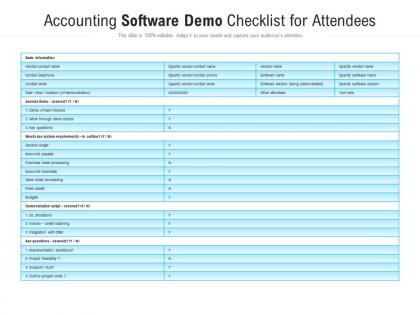
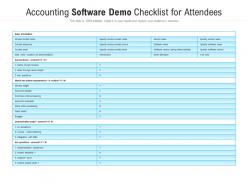
The image displayed is a slide titled "Accounting Software Demo Checklist for Attendees." The image you've uploaded is of a PowerPoint slide titled "Accounting Software Demo Checklist for Attendees." This slide appears to be a template for attendees of an accounting software demonstration to track various aspects of the demo. Here's a detailed breakdown of the elements in the image:
1. Header:
The title suggests that the slide is meant to be used during a demonstration of accounting software, providing a checklist for attendees to ensure they cover all necessary points.
2. Editability Notice:
At the top of the slide, there's a statement noting that "This slide is 100% editable. Adapt it to your needs and capture your audience's attention." This means that the template can be customized as needed.
3. Basic Information Section:
This part of the slide prompts the user to fill out basic information about the vendor and the software being demonstrated, including contact names, phone numbers, email addresses, and details about the demo itself (such as date, time, location, and what will be covered).
4. Agenda Items Section:
Lists items that might be on the agenda for a software demo, such as a demonstration of each module, work through demo scripts, and key questions. It uses a simple 'Y' (Yes) or 'N' (No) format to indicate whether each item is covered.
5. System Requirements Section:
This checklist assesses whether the software meets key system requirements, with a list of accounting functions like general ledger, accounts payable/receivable, and more. Attendees can mark 'Y' or 'N' to track which features are demonstrated.
6. Demonstration Script Section:
It checks whether the demonstration script covers general allocations, invoice-order matching, and integration with CRM (Customer Relationship Management) systems.
7. Key Questions Section:
This part has a list of important considerations for the attendees to ensure are addressed during the demo, such as implementation assistance, project feasibility, support/SLA (Service Level Agreement), and project costs.
8. Design:
The slide has a clean and professional design, with a blue and white color scheme that's typical for business presentations. The checklist format is straightforward, making it easy for attendees to use during the demo.
The purpose of such a slide is to ensure that during the demonstration of the accounting software, all critical features and questions are reviewed and that attendees have all the information they need to make an informed decision or to report back to their teams.
Use Cases:
This checklist can be valuable in multiple industries where software demonstrations are a key part of the decision-making process or where assessment of software capabilities is necessary. Here are seven industries where such slides can be utilized:
1. Accounting:
Use: Evaluate potential accounting software.
Presenter: Software vendor or consultant.
Audience: Finance professionals and accountants.
2. Software Sales:
Use: Track the efficiency and comprehensiveness of sales demos.
Presenter: Sales representatives.
Audience: Potential software buyers.
3. Information Technology:
Use: Assess and select software solutions.
Presenter: IT managers or software vendors.
Audience: IT department staff and decision-makers.
4. Manufacturing:
Use: Determine software suitability for production and inventory management.
Presenter: Software vendor or consultant.
Audience: Manufacturing managers and operations staff.
5. Retail:
Use: Review software for point-of-sale systems and financial management.
Presenter: Software vendor or consultant.
Audience: Retail business owners and managers.
7. Healthcare:
Use: Choosing software for billing, patient records, and other financial operations.
Presenter: Software vendor or healthcare IT specialist.
Audience: Healthcare administrators and finance officers.
8. Education:
Use: To select software for managing institutional finances.
Presenter: Software vendor or consultant.
Audience: School and university financial administrators.
Accounting software demo checklist for attendees with all 2 slides:
Use our Accounting Software Demo Checklist For Attendees to effectively help you save your valuable time. They are readymade to fit into any presentation structure.
FAQs for Accounting software demo
**INPUT**: What key features should I prioritize when evaluating accounting software? **OUTPUT**: Prioritize automated invoicing, real-time financial reporting, tax compliance management, integration capabilities, and robust security features when evaluating accounting software. These functionalities streamline operations by reducing manual data entry, enhancing financial transparency, and ensuring regulatory compliance, with many businesses finding that comprehensive integration ultimately delivers improved cash flow management and competitive operational efficiency. [Word count: 56 words]
Assess user-friendliness by evaluating navigation intuitiveness, menu clarity, task completion speed, and help documentation accessibility during the demonstration. Focus on how easily your team can perform common accounting functions like invoice creation, expense tracking, and report generation, while observing if the interface minimizes clicks and provides clear visual cues for efficient daily operations.
Look for APIs that connect with banking platforms, payroll systems, CRM software, inventory management tools, and tax preparation applications. These integrations streamline data flow by eliminating manual entry, reducing errors, and ensuring real-time synchronization across systems, with many organizations finding that seamless connectivity ultimately delivers improved accuracy and operational efficiency.
Essential reporting features include financial statements, cash flow analysis, budget variance reports, accounts receivable aging, and customizable dashboards with real-time data visualization. These capabilities enable businesses to track performance metrics, identify trends, and make data-driven decisions, with many organizations finding that automated reporting significantly reduces manual workload while enhancing financial transparency and strategic planning.
Accounting software addresses data security through multi-factor authentication, end-to-end encryption, regular security audits, automated backups, and role-based access controls. These features work together to protect sensitive financial data while ensuring compliance with regulations like GDPR and SOX, with many organizations finding that robust security measures ultimately enhance client trust and operational confidence.
Most modern accounting software offers extensive dashboard and report customization options, allowing you to modify layouts, add custom fields, create personalized widgets, and generate tailored financial reports. These customization features enable businesses to track specific KPIs, streamline workflows, and present data in formats that align with their operational needs, ultimately delivering enhanced visibility and more efficient decision-making processes.
Accounting software vendors typically provide multi-tiered support including phone assistance, email tickets, live chat, comprehensive knowledge bases, and user community forums. Many providers offer structured onboarding programs, video tutorials, webinar training sessions, and dedicated account managers for enterprise clients, with organizations finding that robust support resources significantly reduce implementation time and enhance user adoption across finance teams.
Accounting software ensures compliance through built-in regulatory frameworks, automated tax calculations, standardized reporting templates, and real-time updates for changing regulations. These systems streamline adherence by generating compliant financial statements, tracking audit trails, and maintaining documentation standards, with many financial institutions and businesses finding that automated compliance reduces errors while enhancing operational efficiency.
Multi-currency accounting software capabilities include real-time exchange rate updates, automatic currency conversion, multi-currency invoicing and payments, consolidated reporting across currencies, and foreign exchange gain/loss tracking. These features streamline international operations by reducing manual calculations, ensuring compliance with global accounting standards, and providing accurate financial visibility, with many multinational businesses finding that automated currency management significantly enhances operational efficiency while minimizing foreign exchange risks.
Modern accounting software can automate invoicing, payroll processing, recurring billing, expense tracking, and financial reporting through integrated workflows. These automation capabilities streamline operations by reducing manual data entry, minimizing errors, and accelerating payment cycles, with many businesses finding that automated systems deliver significant time savings and improved accuracy across their financial operations.
Mobile accounting app functionality typically includes expense tracking, invoice creation and management, receipt scanning with OCR technology, real-time financial reporting, and client communication tools. These features enable business owners and accountants to manage cash flow, approve transactions, and access critical financial data remotely, with many finding that mobile accessibility significantly enhances operational efficiency and client responsiveness.
Accounting software facilitates collaboration through real-time data sharing, multi-user access controls, role-based permissions, automated workflow notifications, and integrated communication tools. These features enable accounting teams and external professionals to work simultaneously on financial data, track changes seamlessly, and maintain audit trails, ultimately streamlining coordination while ensuring data accuracy and regulatory compliance.
Pricing models typically include subscription tiers based on user count, feature access, and business size, with many demos showcasing basic, professional, and enterprise packages. During demonstrations, you'll see feature comparisons, integration capabilities, support levels, and implementation timelines for each tier, while vendors often provide trial periods and customized quotes, ultimately enabling informed decisions about cost-versus-value for your accounting needs.
Software providers typically update their accounting platforms monthly or quarterly, with major feature releases occurring annually or bi-annually depending on market demands and technological advancements. These updates enhance security protocols, streamline user interfaces, and introduce automation capabilities, with many organizations finding that regular updates ultimately deliver improved operational efficiency, enhanced compliance features, and competitive advantage in an increasingly digital financial landscape.
Existing users frequently highlight improved efficiency, streamlined workflows, reduced manual errors, and enhanced financial reporting capabilities in their feedback. Many accounting professionals and small business owners find that comprehensive software solutions deliver significant time savings, better compliance management, and more accurate financial insights, ultimately enabling faster decision-making and improved operational control.
No Reviews