

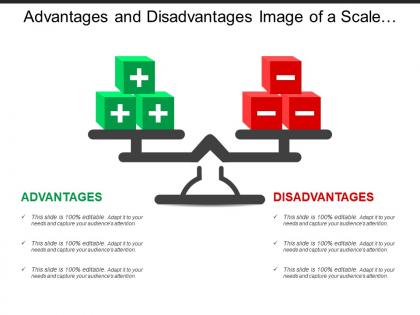
Advantages and disadvantages image of a scale with positive and negative cubes




Try Before you Buy Download Free Sample Product
 Impress Your
 Audience
 100%
100% Editable
 Save Hours
 of Time


Make an appropriate gesture with our Advantages And Disadvantages Image Of A Scale With Positive And Negative Cubes. The audience will applaud your choice.
People who downloaded this PowerPoint presentation also viewed the following :
Advantages and disadvantages image of a scale with positive and negative cubes with all 5 slides:
Commence the countdown with our Advantages And Disadvantages Image Of A Scale With Positive And Negative Cubes. Your ideas will achieve lift-off.
FAQs for Advantages and disadvantages image of a scale with positive
Honestly, templates are a lifesaver - you're not scrambling to build slides from nothing every time. The structure keeps things flowing nicely, and your audience won't get lost trying to follow along. Plus you'll look way more professional than someone who just threw random slides together (I've been that person before, not fun). They actually help you think through your pitch better too since there's already spots for your main problem, solution, all that stuff. Oh and the design stays consistent which is huge. Just don't make it too obvious you used a template - tweak the content so it feels like yours.
Honestly, templates are a game-changer for prep time. You'll look way more put-together than those profs with random fonts everywhere (we all know one). Students follow along better when your slides aren't chaos - predictable layouts actually help them learn. But here's the thing: don't get lazy and shove content where it doesn't belong just because the template has a box there. I'd grab maybe 2-3 good ones that fit how you teach, then tweak them slightly so you're not doing the same thing every class. Way better than starting from zero each time.
Think of templates as your brand's insurance policy. They lock in your fonts, colors, and logo spots so everything looks consistent. Otherwise you'll get presentations with Comic Sans and logos crammed in random corners - trust me, I've witnessed that disaster. Sure, they can feel limiting when someone wants to go wild with creativity. But the trade-off is usually worth it for that polished, professional look. My advice? Make like 3-4 different template options that cover most situations. You get the consistency without forcing everyone into cookie-cutter slides.
Yeah totally - templates can make your stuff look super generic. Like, I swear I've seen the same blue gradient slide deck a million times lol. The structure thing is annoying too. Sometimes you need something weird that just doesn't exist in their little template world. And don't get me started on trying to match your actual brand colors - never works out right. Your content ends up feeling shoved into boxes. Honestly though? Templates aren't evil. Just use them as jumping off points, then mess with them until they actually feel like YOU made it.
Honestly, go with a template first. Way cheaper - like $50-500 vs thousands for custom work. Plus you'll launch way faster, which matters when you're testing an idea. Yeah, it won't be totally unique and you might run into limits later if you need something super specific. But here's the thing - most good templates look pretty damn professional once you customize them properly. I've seen template sites that look better than expensive custom ones tbh. You can always upgrade to custom later if you actually need it. Start cheap, see what happens.
Honestly, start with your audience - boardroom folks want clean and boring, but creative types can handle flashier stuff. Data presentations need templates with decent chart space (learned that the hard way). Make sure people in the back can actually read your text without squinting. Industry matters too - tech startup vibes don't work at stuffy law firms. Oh, and definitely test it on the actual screen you're using beforehand. Trust me, pick something that won't compete with your message.
Templates are seriously a lifesaver for presentations. You get the structure, colors, and layouts already done - no more staring at blank slides wondering where to even begin. Half the work's basically finished before you start. I used to waste so much time just picking fonts and making everything look decent. Most templates also suggest how to organize your content, which honestly helps more than you'd think. My coworker swears by this approach too. Next time you're prepping something, just grab a template first. You'll fly through it way faster than building from scratch.
Honestly, your template design can totally make or break engagement. Clean layouts with good white space keep people reading - cluttered mess makes them bounce immediately. I learned this the hard way when I used this awful template once and my open rates tanked. Consistent colors matter too, but don't sacrifice functionality just to look pretty. Comic Sans is obviously a no-go. Test different styles with real users though, since what works for one audience might flop with another. The goal is guiding their eye naturally through your content without screaming "amateur hour."
Ugh, the worst part about those creative templates? Everyone downloads the same ones, so you end up looking like a clone. Plus your content gets shoved into these weird preset boxes that don't actually fit what you're trying to say. Half of them are so busy and distracting anyway - like, we get it, you can animate text. Then you waste forever trying to customize colors without making it look terrible (speaking from experience here). Honestly, just grab something clean and simple. Spend your time on making your content actually good instead of wrestling with fancy layouts.
Honestly, it depends totally on what you're doing. Marketing templates? Super flexible - bright social media posts, email campaigns, presentations where you want creativity and brand stuff to match. But scientific research is completely different (and way more strict). Lab reports, research papers, data sheets - they're all about accuracy over looking cool. Marketing ones help you pump out creative work fast, while science templates keep everything methodical for peer reviews and all that. My advice? Pick whatever fits your field's actual needs, not just what catches your eye first.
Ugh yeah, templates are such a trap! You just end up with the same boring slides as everyone else. Your content starts getting forced into these weird boxes that don't actually fit what you're trying to say. Honestly, I'm so sick of seeing that exact same "our process" layout everywhere - you know the one. The real problem? You stop actually thinking about the best way to show your ideas. You're just filling blanks like it's a form. Try ditching the template sometimes. Start blank and build around what you actually need to communicate. Way more work but your stuff will actually stand out.
Make your fonts way bigger than you think you need - seriously, what looks fine in person turns into squinting territory on laptop screens. Boost the contrast too since video calls love to wash out colors. Here's the thing though - people's attention spans are basically nonexistent on Zoom. Break up those text-heavy slides into smaller chunks. Throw in more visuals or quick polls to keep everyone awake (because let's face it, half of them are scrolling Instagram anyway). Oh, and definitely do a test run first. What looks perfect on your monitor might be completely different once it goes through video compression.
Honestly, there's tons of cool stuff that'll make your templates way better. Canva and Adobe Creative Suite are game-changers for custom designs - way prettier than basic PowerPoint. Animation tools like Lottie add movement, though don't go crazy or people get dizzy lol. For collaboration, Google Slides and Microsoft 365 let everyone edit in real-time. Grammarly catches your typos. Oh, and Tableau can drop interactive charts right into slides which looks super professional. I'd pick whichever tool fixes your biggest headache first, then add more later.
Dude, presentation design gets SO weird when you factor in different cultures. Like, red means good luck in China but screams "danger" to Americans. Japanese audiences actually want tons of detail on slides, while we're over here obsessed with those minimal bullet point lists. Then there's the whole reading thing - some cultures go right-to-left which totally messes with your layout flow. Even your fonts and slide transitions matter depending on where you're presenting. I went down this rabbit hole once and it's actually pretty cool how much geography shapes what people expect design-wise. Definitely worth checking out your audience's preferences first.
Honestly, I'd focus on the basics first. Are people actually engaged? Count how many questions you get or if they're checking their phones constantly. Quick polls work great for testing if anyone absorbed what you said. The time-saving thing is clutch too - templates should cut your prep time in half at least. I'm always surprised how much consistency improves across teams when everyone uses the same format. Maybe throw in a follow-up survey if you're feeling fancy. Don't overthink it though - pick like 2-3 things that actually matter for your situation and just track those consistently.
-
Use of icon with content is very relateable, informative and appealing.
-
Best Representation of topics, really appreciable.