

Architecture diagram with constrained and standard devices




Try Before you Buy Download Free Sample Product
 Impress Your
 Audience
 100%
100% Editable
 Save Hours
 of Time


Our Architecture Diagram With Constrained And Standard Devices are explicit and effective. They combine clarity and concise expression.
People who downloaded this PowerPoint presentation also viewed the following :
Content of this Powerpoint Presentation
Description:
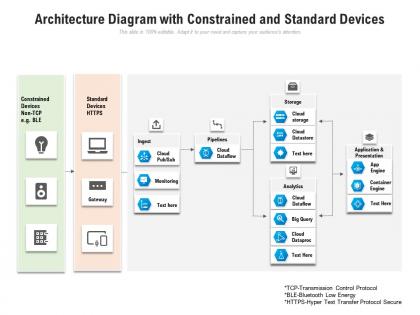
The image is a technical slide showing an Architecture Diagram with Constrained and Standard Devices, which is part of a data processing or IoT (Internet of Things) ecosystem. The diagram illustrates the pathways from different device types through a gateway and into a cloud-based data processing system. Devices categorized under 'Constrained Devices Non-TCP' (e.g., Bluetooth Low Energy or BLE devices) and 'Standard Devices HTTPS' (devices that can communicate over the secure HTTPS protocol) interface with the gateway. This gateway then sends the data to a variety of cloud services that align into three main pathways: Ingest, Processing (Pipelines), and Application & Presentation.
The Ingest pathway includes Cloud Pub/Sub for messaging and data integration, followed by a placeholder for Monitoring tools. The Processing pathway uses Cloud Dataflow for transforming and enriching the data, Cloud Storage and Cloud Datastore for storing data, and Cloud Dataproc alongside BigQuery and Cloud Dataflow for analytics processing. The Application & Presentation layer involves an App Engine for hosting applications and a Container Engine for running containerized applications.
Use Cases:
At the bottom, there are footnotes defining the acronyms TCP, BLE, and HTTPS, ensuring clarity on the technologies referenced.
1. Technical Consulting:
Use: Developing IoT Solutions
Presenter: Technical Consultant
Audience: Technical Managers
2. Smart Home Manufacturers:
Use: Designing Home Automation Systems
Presenter: System Architect
Audience: Product Development Team
3. Healthcare Technology:
Use: Managing Connected Medical Devices
Presenter: Healthcare IT Specialist
Audience: Hospital Administrators
4. Retail and E-commerce:
Use: Supply Chain and Inventory Management
Presenter: Operations Analyst
Audience: Supply Chain Executives
5. Automotive Industry:
Use: Vehicle Telematics & Infotainment Systems
Presenter: Automotive Engineer
Audience: Automotive Industry Stakeholders
6. Energy Sector:
Use: Monitoring & Managing Energy Grids
Presenter: Energy Systems Analyst
Audience: Energy Company Executives
7. Telecommunications:
Use: Infrastructure for IoT Services
Presenter: Network Architect
Audience: Telecom Project Managers
Architecture diagram with constrained and standard devices with all 2 slides:
Give your audience a fulfilling experience. They will find our Architecture Diagram With Constrained And Standard Devices elevating.

FAQs for Architecture diagram with constrained
An effective architecture diagram encompasses components like system boundaries, data flow, key applications, technology stacks, and infrastructure layers. These elements visually represent how different parts interact and contribute to overall functionality, allowing stakeholders to understand system complexity, dependencies, and potential bottlenecks. With many organizations finding that clear diagrams facilitate better communication and informed decision-making, these visuals streamline collaboration and ensure everyone is aligned on the system's design and purpose.
Architecture diagrams facilitate better communication among stakeholders by providing a visual representation of the system's components, their relationships, and data flows. These diagrams, whether conceptual or technical, enable teams to quickly understand the big picture, identify potential bottlenecks, and align on shared understanding, ultimately streamlining development processes and minimizing costly misunderstandings.
Architecture diagrams, crucial for visualizing complex systems, can be effectively created using tools like Lucidchart, draw.io, and Microsoft Visio. These platforms offer intuitive interfaces, pre-built templates, and extensive libraries of symbols, enabling users to construct clear and comprehensive diagrams. With many organizations finding these tools streamline communication and facilitate collaborative planning, they ultimately deliver improved project clarity and efficiency.
Different architecture diagrams, such as logical, physical, and deployment diagrams, each serve distinct purposes in visualizing a system. Logical diagrams focus on the system's components and their relationships, abstracting away from physical implementation. Physical diagrams illustrate the actual hardware and network infrastructure, showing how components are physically connected. Deployment diagrams, on the other hand, depict the system's distribution across different environments, highlighting how components are deployed in production, testing, and development. These diagrams, when used together, provide a comprehensive understanding of a system's structure, functionality, and operational context, enabling stakeholders to make informed decisions about design, implementation, and maintenance.
Color coding plays a vital role in enhancing the readability of architecture diagrams by visually distinguishing various components, relationships, and functionalities. It allows viewers to quickly grasp the overall structure, identify key elements, and understand data flow within complex systems. For example, in software architecture diagrams, different colors can represent different layers, modules, or data types, making it easier to trace interactions and dependencies across the system. Ultimately, color coding simplifies complex information, improves comprehension, and accelerates the understanding of intricate architectural designs.
Ensuring scalability and adaptability in an architecture diagram involves using modular design principles and clearly defining interfaces between components. By breaking down the system into independent, reusable modules, organizations can easily add, remove, or modify functionalities as needs evolve. Financial institutions, for example, can leverage this approach to seamlessly integrate new payment gateways or regulatory compliance tools without disrupting the core architecture. This modularity fosters a flexible system that can readily accommodate future changes and technological advancements, ultimately delivering operational efficiency and competitive advantage.
Architecture diagrams, while essential for visualizing systems, can fall prey to common pitfalls that hinder clarity and effectiveness. Mistakes include overcomplicating the diagram with excessive detail, neglecting to clearly define key components and their relationships, and failing to tailor the diagram to the specific audience and purpose. These oversights can lead to confusion, misinterpretations, and ultimately, impede effective communication and decision-making.
Architecture diagrams support agile methodologies and iterative development by providing a visual representation of the system's structure, components, and interactions. These diagrams evolve alongside the project, facilitating continuous feedback and adjustments, with teams readily identifying dependencies and potential roadblocks during sprints, ultimately enabling more efficient and collaborative development cycles.
Architecture diagrams, which visually represent system components and their relationships, become significantly more informative with annotations and legends. These elements clarify the meaning of symbols, abbreviations, and technical terms, ensuring everyone, from developers to stakeholders, understands the diagram's purpose and structure. By providing clear explanations and context, annotations enhance communication, facilitate collaboration, and ultimately enable more effective decision-making throughout the software development lifecycle, especially in complex projects involving multiple teams and technologies.
Architecture diagrams serve as visual blueprints for system integration projects, clearly outlining the relationships between different components and systems. They depict data flows, communication protocols, and dependencies, enabling project teams to identify potential integration points and conflicts early on. Through these visual representations, organizations like financial institutions and healthcare providers can streamline the integration process, minimizing downtime and ensuring seamless data exchange, ultimately leading to improved operational efficiency and enhanced customer experiences.
Maintaining consistency across multiple architecture diagrams is crucial for clear communication and effective collaboration. Best practices include using a standardized template that defines elements, symbols, and notations; establishing a central repository for diagrams and documentation; and enforcing a consistent naming convention for components and relationships. These strategies ensure that all diagrams present a unified view of the system architecture, enabling stakeholders to quickly grasp the overall structure and understand how different components interact, ultimately streamlining development and reducing potential errors.
Architecture diagrams can be tailored for diverse audiences by adjusting the level of technical detail and visual complexity. For technical stakeholders, diagrams can delve into intricate system components, data flows, and protocols, using standardized symbols and notations. Conversely, for non-technical audiences, diagrams should focus on high-level system functions, key interactions, and overall business value, employing simplified visuals and concise annotations. This approach ensures clear communication and comprehension across varying levels of technical expertise, ultimately facilitating informed decision-making and stakeholder alignment.
Architecture diagrams benefit a wide range of industries by providing a clear visual representation of complex systems. These include banking and finance, where diagrams illustrate intricate transaction flows, healthcare, where they map patient data pathways, and retail, where they optimize supply chain networks. These visual representations enable organizations to identify bottlenecks, streamline processes, and ultimately enhance operational efficiency and customer experiences.
Collaboration tools significantly enhance the creation and sharing of architecture diagrams by enabling real-time co-editing, version control, and centralized document storage. With platforms like Miro or Lucidchart, teams can simultaneously contribute to diagrams, track changes, and ensure everyone is working with the latest iteration, streamlining the design process and minimizing communication silos. This fosters greater transparency and accelerates project timelines, ultimately leading to more efficient and effective architectural planning across diverse teams and organizations.
Architecture diagrams effectively communicate system structure, but evaluating their effectiveness requires metrics beyond mere visual appeal. Key metrics include clarity of information conveyed, alignment with business goals, completeness in representing all components and relationships, and ease of understanding for various stakeholders. With well-defined metrics, organizations can assess if the diagram truly serves its purpose of guiding development, facilitating communication, and enabling informed decision-making.
No Reviews