


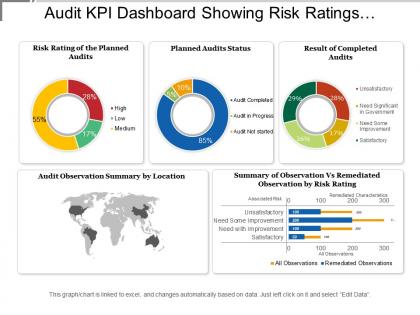
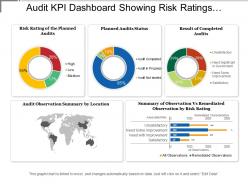
Audit kpi dashboard showing risk ratings planned audit status





Try Before you Buy Download Free Sample Product
 Impress Your
 Audience
 100%
100% Editable
 Save Hours
 of Time


Expose the inherent bias in a decision with our Audit Kpi Dashboard Showing Risk Ratings Planned Audit Status. Elaborate on the cause of injustice.
People who downloaded this PowerPoint presentation also viewed the following :
Audit kpi dashboard showing risk ratings planned audit status with all 6 slides:
Breakthrough the clutter with our Audit Kpi Dashboard Showing Risk Ratings Planned Audit Status. Clear the channels with your thoughts.
FAQs for Audit kpi dashboard showing risk ratings
Track your audit completion rates first - that's the foundation. Then look at findings by risk level and how long it takes to actually fix stuff. Overdue items are huge red flags. Repeat findings drive me crazy but they tell you everything about what's really broken. Management response rates matter too because audits that just sit there are basically useless. Cost per audit if budget's tight, compliance percentages for your key areas, and maybe some trend lines showing whether you're actually getting better over time. Oh and customize based on what your stakeholders bug you about most - saves everyone headaches later.
Dude, get an Audit KPI Dashboard - it's a total game changer. You'll see your audit performance in real-time instead of waiting forever for those boring reports. Track stuff like completion rates and how severe your findings are. What's cool is you can catch problems early and actually fix them before they blow up. Plus leadership loves the visual stuff when you're presenting. Oh, and don't go crazy with metrics - pick like 3-5 KPIs that actually matter to your goals. Makes resource allocation way smarter too since you're working with real data instead of just guessing.
Honestly, Power BI or Tableau are your safest bets here - they're built for this stuff and won't fight you on audit data. Google Data Studio's actually pretty good if budget's tight (and it's free, so that's nice). Excel works for basic dashboards but gets messy real quick with bigger datasets. I'd probably start by figuring out which KPIs you actually need first - saves you from building something nobody uses. Oh, and whatever you pick, make sure it plays well with your current systems or you'll hate yourself later.
Honestly, I'd go with monthly updates as your baseline - that's usually enough to keep things relevant. Weekly is better if you've got the bandwidth though. Real-time stuff makes sense for the critical metrics like overdue findings or budget issues. The main thing is not letting it slide to quarterly updates because then nobody cares anymore - I've watched so many dashboards just collect digital dust that way. Start monthly and see how much your team actually uses it. You can always ramp up frequency later if people are hungry for fresher data. Don't burn yourself out doing daily updates on everything right off the bat.
Honestly, you really need good visuals for your audit dashboard. Raw spreadsheets are a nightmare to parse through quickly. Heat maps work great for showing risk levels at a glance. Trend lines help track completion rates over time. The goal is making those complex metrics actually readable - like, something you can understand in 30 seconds instead of digging through rows of data. Real-time dashboards are clutch too. I'd start with your top 3-5 KPIs first, don't try to visualize everything at once. Way less overwhelming that way.
Start by figuring out which regulations actually apply to your industry - SOX if you're in finance, HIPAA for healthcare, that sort of thing. Map those to KPIs that your auditors genuinely care about (not just pretty numbers that don't mean anything). Most dashboard platforms let you build custom fields and set your own thresholds anyway. Honestly, I'd skip the generic metrics entirely - they're usually useless. Talk to your compliance folks first about what's driving them crazy during audits. That's where you'll find the stuff worth tracking. Build your dashboard around those real pain points instead of what looks impressive on paper.
Honestly, the biggest pain points are messy data and getting people to actually care about your dashboard after you build it. Your audit info is probably spread across like 5 different systems, half manually tracked, and most of it needs major cleanup first. Plus everyone's gonna have strong opinions about which metrics matter most - that's always fun. Real-time updates? Forget it, audits move at snail pace. Start super simple though. Pick 3-4 metrics everyone can agree on, nail those first, then slowly add more. Way easier than trying to boil the ocean from day one.
So here's what I'd do - pull your historical audit data and compare stuff like how often you're finding issues, how long fixes take, that kind of thing. Quarter over quarter works well. Honestly, once you chart it out, some patterns will smack you in the face that you totally missed before. Set up alerts for when numbers go way off from your usual averages so you're not caught off guard. The trend lines are gold for figuring out if you're actually getting better or just spinning your wheels. Oh, and use those historical averages to set targets that aren't completely unrealistic.
Track your audit completion rate first - shoot for 95%+ on time. Finding closure rates matter too, plus how often management actually accepts your recommendations. Honestly, cycle time from start to final report is probably the biggest pain point since dragging audits annoy everyone. Keep an eye on repeat findings because that usually means remediation isn't working. Risk coverage percentage tells you if you're auditing the right areas or just busy work. Pull these weekly at first - you'll spot your problem areas pretty quick.
Add some dedicated sections to track risk scores and heat maps alongside your regular audit stuff. Start with maybe 3-4 basic risk indicators - don't overcomplicate it right away (learned that the hard way). Track things like "percentage of high-risk findings fixed on time" and average remediation time. Break it down by department too. Set up alerts when risk thresholds get breached so you're actually catching issues instead of just staring at dashboards. Honestly, the trend analysis over time is where you'll see the real value - watching those high/medium/low risk patterns shift tells you way more than static numbers ever will.
Look, start by actually asking your users what they care about most - that's key. Your dashboard needs to be dead simple to navigate and let people drill down from big picture stuff into the details. Real-time data is a must, plus filters so they can sort by department or timeframe or whatever. Make sure it works on phones too because execs are always pulling up dashboards during random meetings (trust me on this one). Set up alerts for critical issues and don't forget export options for reports. Honestly, if someone needs a data science degree to understand it, you've already lost them.
Honestly, real-time data is a game changer for audit dashboards. You'll catch issues as they happen instead of finding out about problems weeks later when it's too late to fix anything. Failed controls, weird transactions, missed deadlines - you see it all immediately. This is especially clutch for high-risk stuff where timing actually matters. Your team can jump on problems before they spiral out of control rather than just writing reports about disasters that already happened. Pro tip: set up alerts for the critical stuff so you're not glued to your screen all day.
Benchmarking basically gives your audit KPIs actual meaning - otherwise you're just staring at random numbers. Like, a 85% completion rate sounds decent, but what if everyone else hits 95%? Then you're actually doing pretty badly. I always tell people to start simple though. Compare this year to last year first, then worry about industry standards later when you find good data sources. It's super helpful for setting realistic goals and showing your boss why you need more resources. Without benchmarks, you can't really tell if you're winning or losing - which is honestly kind of terrifying when you think about it.
Honestly, these dashboards are game-changers for compliance stuff. You get real-time visibility into audit findings, remediation timelines, all that good stuff in one spot. No more midnight spreadsheet hunting sessions (been there!). The best part? You can actually spot patterns and recurring issues before they blow up. Set up alerts for critical metrics so nothing gets missed. When regulators show up, you've already got clean data ready to go instead of scrambling around. My friend Sarah swears by automated reporting features - saves her team hours during audit season.
Here's what's worked for me: ditch the jargon first - nobody wants to decode audit-speak in meetings. Visual stuff is huge - clean charts, color coding, the works. I always do a one-slide summary upfront because honestly, people's attention spans are terrible. Focus on why things matter, not just what the numbers say. Interactive dashboards are clutch since execs love clicking around themselves. The key is connecting your findings to actual business risks they can fix. Oh, and make it conversational! Don't just dump data on them - tell the story behind what you found.
-
Understandable and informative presentation.
-
Great experience, I would definitely use your services further.