


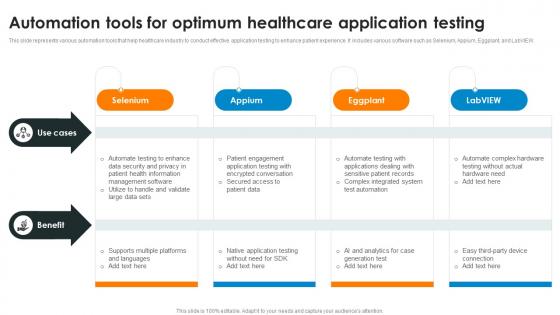
Automation Tools For Optimum Healthcare Application Testing




Try Before you Buy Download Free Sample Product
 Impress Your
 Audience
 100%
100% Editable
 Save Hours
 of Time


This slide represents various automation tools that help healthcare industry to conduct effective application testing to enhance patient experience. It includes various software such as Selenium, Appium, Eggplant, and LabVIEW.
People who downloaded this PowerPoint presentation also viewed the following :
Automation Tools For Optimum Healthcare Application Testing with all 9 slides:
Use our Automation Tools For Optimum Healthcare Application Testing to effectively help you save your valuable time. They are readymade to fit into any presentation structure.








FAQs for Automation Tools For Optimum
Honestly, the time savings alone are worth it - no more babysitting those tedious status updates and deadline reminders. Your team gets consistent info without you having to chase everyone down constantly. The reports basically write themselves too, which is pretty nice. Way better project visibility since everything's tracked automatically. Oh, and you can actually work on stuff that matters instead of administrative busy work all day. I'd probably start with automating status reports first (saves me like 3-4 hours weekly). Once people see how much smoother things run, they'll be sold on expanding it.
Honestly, automation tools are game-changers for team communication. They keep everyone updated without all the back-and-forth nonsense. Your project boards update themselves, notifications fire when they should, and data syncs between apps automatically. No more hunting people down for status updates! The whole team can see what's happening and who's doing what. Way fewer pointless meetings too - though some managers still love those for some reason. Information just flows to whoever needs it. I'd start with automating whatever updates you're doing most often. Trust me, you'll wonder how you lived without it.
Zapier's probably your best bet for connecting different apps together. For customer stuff, HubSpot's solid, and Mailchimp handles email automation really well. Calendly is honestly a game-changer - no more endless "how's Tuesday at 2?" email chains. QuickBooks automates a ton of accounting headaches too. If you're posting on social media, Buffer or Hootsuite will save you from logging into everything separately. Most have free versions you can try first. I'd pick whatever's eating up most of your time right now and tackle that one. Oh, and don't feel like you need to automate everything at once - that gets overwhelming fast.
Honestly, automation tools are a game-changer for data accuracy. No more copy-paste disasters or typing the wrong thing when you're half-asleep. They grab data straight from the source and catch weird stuff automatically. The best part? They don't get distracted like we do - same process every time. I'd start with whatever boring, repetitive task is eating up most of your time. That's usually where the biggest mess-ups happen anyway. Plus you'll actually see results fast, which feels pretty good when you're drowning in spreadsheets.
Dude, automation tools are literally a game changer for marketing. I started with email sequences and it freed up so much time I didn't know what to do with myself lol. You can automate social posts, lead nurturing, customer segmentation - all that repetitive stuff that kills your soul. The personalization you can pull off is insane too, way beyond what you'd ever manage doing it manually. Honestly can't imagine running campaigns without them now. Just pick one thing to start with though - don't go crazy trying to automate everything at once.
Honestly, you gotta track both the obvious savings and the productivity stuff to really know if it's working. Direct costs are easy - less manual work, fewer screwups, no more crazy overtime hours. The softer metrics like processing speed and whether your team actually likes using it matter way more than people think though. Most companies hit positive ROI somewhere between 6-18 months if they're actually measuring right. My advice? Pick maybe 2-3 metrics that really matter for your specific situation and track those from the start. Compare everything against what you spent to implement it. Don't overcomplicate it - just be consistent with the tracking.
First thing - don't put passwords or API keys straight in your scripts. Use environment variables or a secure vault instead. For permissions, just give your tools what they actually need, nothing more. Network stuff is where teams really mess up though. Always use encrypted connections and keep everything updated. Monitor for weird activity too. Oh, and document who can access what - sounds boring but you'll thank me later when something goes wrong. Regular security audits are worth doing even if they're a pain.
So most of these tools connect through APIs or webhooks - they just speak the same tech language your current software uses. Zapier's honestly amazing for this if you're not super technical, they've got tons of pre-built connectors. Custom stuff might need your dev team though. Oh and definitely check what integrations are available before you pick anything! I made that mistake once and had to rebuild half our workflow. Map out which systems need to talk to each other first, then see if your tool supports them natively. Trust me, it's way easier than trying to force incompatible systems to play nice later.
Honestly, the worst part is dealing with people who hate change - and that's like 90% of your team lol. Upfront costs hit hard too. Integration is a nightmare when your new stuff won't talk to the old systems. Training takes forever and productivity tanks while everyone's figuring things out. Oh, and don't get me started on security freakouts, especially with sensitive data. Here's what worked for me though - pick one small process first. Get a quick win so people actually see it's not terrible. Then you can expand once they stop being paranoid about it.
Manufacturing's probably the biggest one right now - robots are basically taking over production lines and quality checks. Healthcare's huge too, they're automating patient scheduling, diagnostic stuff, all that. Banks are going crazy with it for fraud detection and trading. Retail and warehouses are next, automating inventory management. Honestly feels like nothing's safe anymore lol. If you're wondering about your field, start looking at the boring repetitive tasks first. Those usually get automated fastest since they're easier wins.
Oh dude, start with chatbots for basic FAQ stuff - saves so much time. Ticket routing is honestly where you'll see the biggest difference though. Like, imagine not having to manually sort through a million "forgot my password" tickets anymore. Set up auto-routing by keywords and let follow-up emails send themselves. Status updates can be automated too so customers aren't left wondering what's happening. I'd probably start with just auto-responses first, then add more once you see how much time it frees up. Your team can actually focus on the tricky problems that need real people.
Map out where you're actually wasting time first - don't just automate random stuff. Make sure whatever tools you pick play nice with what you already have, because juggling five platforms that hate each other is a nightmare. Also think about whether your team can actually use it. I'd try it on just one workflow first before committing. Sometimes the basic option beats the fancy expensive one anyway. Oh and definitely get input from whoever's gonna be stuck using it every day - they'll tell you real quick if it sucks.
Honestly, automation tools are a lifesaver for compliance stuff. They handle all the boring data collection and audit trails automatically. When regulators show up, you'll have timestamped records ready to go instead of scrambling around. Manual reporting is where mistakes happen - we've all been there. The best part? Reports that used to take days now take minutes. I'd probably start with whatever regulatory reports you file most often since those are the biggest pain. Setting up the documentation to run itself is pretty clutch too.
Honestly, AI automation is getting scary good - these tools can actually think through decisions now instead of just running basic scripts. The whole hyperautomation thing is blowing up too, where you connect different tools to handle complete workflows. Low-code platforms are everywhere suddenly, which means your marketing team can build automations without bugging IT constantly (finally!). Oh, and they're way better at reading messy stuff like random emails and documents now. My advice? Pick one annoying process first and nail that before going crazy with everything else.
Dude, user feedback is seriously everything for automation stuff. People will straight up tell you when something's broken or confusing - way better than just guessing what's wrong. I've watched teams completely ignore this and then act shocked when nobody uses their tools. Makes no sense. Short check-ins work great. Listen to the complaints because that's where you'll find the best fixes. Plus you'll actually know which automations to keep building vs. which ones are basically useless. The data shows you what to prioritize instead of just winging it.
-
I want to thank SlideTeam for the work that they do, especially their customer service.
-
Their professional templates are very impressive, even my manager was curious about the source. I am very grateful.