

Bcg matrix powerpoint slide




Try Before you Buy Download Free Sample Product
 Impress Your
 Audience
 100%
100% Editable
 Save Hours
 of Time


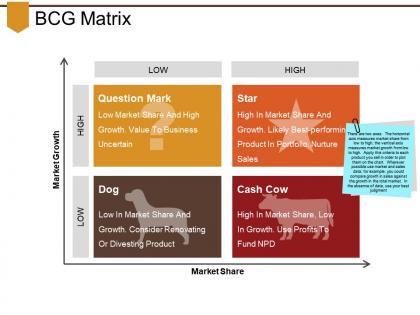
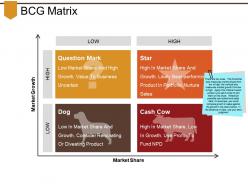
Use this BCG Matrix PowerPoint Slide presentation for reviewing your product portfolio. Take advantage of this growth chart to depict the market share and growth rate of various products of your company. Utilize this share image template to halt the manufacturing of products that are causing a strain on your financial resources. Reveal the level of investment that should be done according to the nature of the product with this BCG slideshow. You can even use this BCG slide for formulating a digital marketing strategy. Exemplify the concept by providing case studies of various brands or retailers with the help of this product PPT. Further, you can assess the investment of your brand in various marketing channels with this product line visual. Have a laser focus on the offerings that have the potential of generating huge cash with this matrix diagram. Download this BCG infographic to create a strong foundation for your business and achieve exponential growth through high revenue.
People who downloaded this PowerPoint presentation also viewed the following :
Bcg matrix powerpoint slide with all 5 slides:
Get the display you desire with our Bcg Matrix Powerpoint Slide. They can be easily customized.
FAQs for Bcg
The BCG Matrix comprises four quadrants: Stars (high growth, high market share), Cash Cows (low growth, high market share), Question Marks (high growth, low market share), and Dogs (low growth, low market share). These components can be visually represented through compelling PowerPoint slides using quadrant grids, bubble charts, and strategic icons, with many organizations finding that clear visual differentiation and color coding enhances stakeholder understanding and strategic decision-making processes.
Color coding enhances BCG Matrix effectiveness by creating immediate visual distinction between quadrants, enabling faster decision-making, and improving audience comprehension during presentations. Through strategic color schemes, organizations streamline portfolio analysis, highlight priority investments, and facilitate clearer strategic discussions, with many management teams finding that well-designed color differentiation accelerates consensus-building and enhances stakeholder engagement.
Creative design elements for BCG Matrix slides include dynamic color coding with gradient transitions, interactive hover effects for each quadrant, custom iconography representing product categories, animated data point movements, and strategic use of whitespace for visual clarity. These design approaches enhance audience engagement by creating memorable visual storytelling, streamlining complex portfolio analysis, and enabling presenters to guide discussions more effectively, ultimately delivering clearer strategic insights and improved stakeholder comprehension.
**INPUT**: How does the positioning of products or services on the BCG Matrix affect strategic decision-making? **OUTPUT**: BCG Matrix positioning directly influences resource allocation, investment priorities, and portfolio management strategies by categorizing offerings into Stars, Cash Cows, Question Marks, and Dogs. This strategic framework enables organizations to streamline decision-making processes, optimize capital deployment across business units, and balance short-term profitability with long-term growth opportunities, ultimately delivering enhanced portfolio performance and competitive advantage. [Word count: 58 words]
Common mistakes include overcrowding slides with excessive data, using unclear axis labels, misplacing products in wrong quadrants, and applying outdated market information. These errors undermine strategic clarity, with many organizations finding that simplified presentations with accurate positioning and current data deliver more compelling business cases, ultimately enhancing decision-making processes and stakeholder buy-in across management teams.
Effective BCG Matrix communication requires clear visual design with distinct quadrants, color-coding for each category, and data-driven positioning of business units with supporting metrics. Your presentation should include strategic recommendations for each quadrant, resource allocation implications, and actionable next steps, with many executives finding that combining portfolio visualization with financial projections ultimately delivers clearer investment priorities and stakeholder alignment.
**INPUT**: What templates or layouts work best for presenting a BCG Matrix in a corporate environment? **OUTPUT**: Effective BCG Matrix templates feature clean quadrant layouts with distinct color coding, interactive elements, data integration capabilities, and executive summary sections. These professional designs enhance strategic discussions by streamlining portfolio analysis, enabling dynamic product positioning, and delivering clear visual insights, with many organizations finding that comprehensive templates facilitate faster decision-making and improved stakeholder alignment. *[Word count: 54 words]*
Animation and transitions can enhance BCG Matrix presentations by revealing quadrants sequentially, highlighting product movements between categories, and emphasizing key insights through strategic visual timing. These dynamic elements help audiences follow complex portfolio analyses more easily, with many presenters finding that animated data points and smooth quadrant transitions maintain viewer attention while reinforcing strategic recommendations about Stars, Cash Cows, Question Marks, and Dogs.
Market growth rate and market share serve as the two fundamental axes that determine strategic positioning within the BCG Matrix, with market growth rate indicating industry attractiveness and future potential, while market share reflects competitive strength and current market position. These metrics enable organizations to categorize their business units or products into Stars, Cash Cows, Question Marks, and Dogs, ultimately delivering strategic insights for resource allocation and portfolio optimization decisions.
You can customize a BCG Matrix PowerPoint template by modifying color schemes to match your brand palette, replacing placeholder logos with your company branding, adjusting fonts to align with corporate standards, and updating axis labels with industry-specific terminology. These customizations enhance professional presentation quality while maintaining analytical clarity, with many organizations finding that branded templates improve stakeholder engagement and reinforce corporate identity during strategic planning sessions.
**INPUT**: What additional data or metrics can complement a BCG Matrix slide for more comprehensive business analysis? **OUTPUT**: Additional metrics include market share trends, profit margins, customer acquisition costs, competitive positioning data, and revenue growth trajectories. These supplementary analytics enhance BCG analysis by providing deeper insights into product performance drivers, enabling organizations to make more strategic resource allocation decisions while identifying emerging opportunities and potential market shifts.
Real-world examples effectively illustrate BCG Matrix concepts by categorizing actual companies or products into each quadrant, such as positioning Apple's iPhone as a Star, Coca-Cola as a Cash Cow, emerging electric vehicles as Question Marks, and declining newspaper companies as Dogs. These concrete examples help audiences visualize strategic positioning and resource allocation decisions, ultimately making abstract portfolio management concepts tangible and actionable for business planning.
BCG Matrix quadrants should be clearly labeled as Stars, Cash Cows, Question Marks, and Dogs, with concise explanations highlighting market share and growth characteristics for each category. These labels work best when accompanied by brief strategic descriptions like "high growth, high share" for Stars, enabling audiences to quickly grasp portfolio positioning while facilitating strategic discussions about resource allocation and investment priorities.
Feedback from BCG Matrix presentations enables organizations to refine their portfolio strategies by identifying overlooked market opportunities, reassessing resource allocation priorities, and validating or challenging assumptions about product performance. This input streamlines future strategic planning by incorporating stakeholder insights, market intelligence, and operational realities, ultimately delivering more robust portfolio decisions and enhanced competitive positioning across business units.
Heat maps, trend charts, financial performance graphs, market share visualizations, and competitive positioning diagrams can effectively complement BCG Matrix slides. These supplementary visuals reinforce strategic insights by providing deeper context around growth rates, revenue contributions, and market dynamics, with many consulting teams finding that layered visual storytelling ultimately delivers more compelling presentations and clearer strategic recommendations.
-
Design layout is very impressive.
-
Editable templates with innovative design and color combination.