


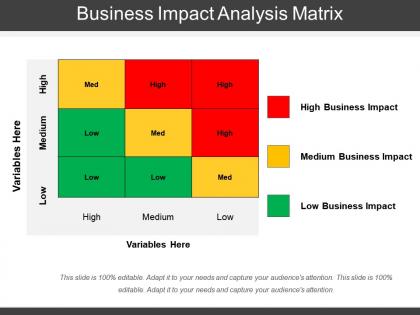
Business impact analysis matrix




Try Before you Buy Download Free Sample Product
 Impress Your
 Audience
 100%
100% Editable
 Save Hours
 of Time


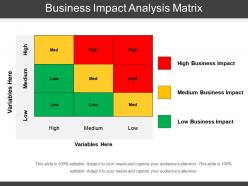
Showcase the numerous consequences of your business situation with this Business Impact Analysis Matrix PPT template. You can make this business continuity planning template inclusive of variables that have high, medium and low effect on your business operations. Take the help of this resilience analysis infographic and emphasize the component which is critical for your organization. Employ this organization analysis layout and chart out the five elements of impact analysis such as executive sponsorship, impact analysis findings, etc. Portray your deliverables clearly with this business consequence assessment background image. Moreover, this PowerPoint presentation is fully adaptable, so you can replace the text in the placeholders with your own relevant topic-related content. Take the assistance of this organization impact study and showcase the various techniques to undertake impact analysis processes such as project initiation, risk assessment, disaster mitigation, etc. Thus, download this business effects study visual and succeed in the prevention of potential threats to your company and ensure that proactive measures are undertaken to counter these threats.
People who downloaded this PowerPoint presentation also viewed the following :
Business impact analysis matrix with all 5 slides:
Delve on the importance of everyone's contribution with our Business Impact Analysis Matrix. It will encourage your associates.


FAQs for Business
You'll want to hit four main things: figure out what could actually mess up your operations, write out step-by-step recovery plans, nail down who talks to who during chaos, and test everything regularly. Testing is where people get lazy honestly - they write this beautiful plan then let it collect dust. Oh, and keep your contact info somewhere you can grab it when systems are down (learned that one the hard way). Map out backup locations, assign clear roles to people. I'd tackle your most critical stuff first since doing everything at once is overwhelming. Short sentences help when you're panicking too.
Okay so risk assessment is like the whole foundation of business continuity planning. You literally can't protect yourself from stuff you haven't even thought about yet, you know? Start with your most critical processes and then figure out what could mess them up - cyberattacks, natural disasters, losing key people, supply chain issues, whatever. I always tell people to make a big list first because honestly it's pretty overwhelming otherwise. Then rank everything by how likely it is and how badly it'd hurt your business. That way you're not wasting time planning for random scenarios that'll never happen while ignoring the obvious threats.
Honestly, cyber stuff is your biggest headache right now - ransomware can literally shut you down for weeks. Natural disasters and power outages hit hard too. Plus when key people quit without warning? That's brutal, especially if they never documented anything. Supply chain issues are still messy post-COVID. I'd figure out where you're most vulnerable first. Like, what would totally screw you if it went down tomorrow? Build backups around those weak spots. Oh, and don't assume your IT security is bulletproof - most small businesses think they're too small to target but hackers don't care.
Make it connect to what people actually do every day - show them how a disruption would mess up *their* specific job. Don't just hand out some manual nobody will read. Get them involved in building the plans instead. Those tabletop exercises? Super helpful for practice. I've seen too many places skip this part and regret it later. Keep people in the loop with updates and real stories about companies that nailed their response. Communication can't be a one-time thing. Link it to performance reviews so there's actual consequences. Otherwise people just won't take it seriously.
So you'll want cloud systems first - keeps your data accessible from anywhere. Automated backups are clutch too, saves you from that panic when files disappear. Monitoring tools catch problems early before they blow up into actual disasters. Video calls and collaboration stuff keeps everyone connected remotely (COVID taught us that lesson pretty brutally). Having backup systems is huge. Oh, and test everything regularly - can't stress that enough. Start by figuring out what tech you'd absolutely need if your office suddenly wasn't available tomorrow. That's your priority list right there.
Tabletop exercises are your best friend here - just walk through scenarios without actually breaking anything. During maintenance windows, try partial tests or run backup systems alongside your main ones. Honestly? Testing individual pieces separately beats trying to coordinate some massive company-wide disaster drill that'll probably go sideways anyway. Off-peak hours work great for this stuff. Always have your rollback ready before you start (learned that one the hard way). Start with just one department first, then expand from there once you've worked out the kinks.
Honestly, the biggest thing is having your messaging templates ready beforehand - like who says what and through which channels. Keep your contact lists current (easier said than done, right?) and have backup ways to reach people when your main systems inevitably crash. Designate specific spokespeople and make sure everyone knows who approves messages. I can't stress this enough - test the whole thing regularly because scrambling during an actual crisis is a nightmare. You don't want to be hunting down phone numbers while everything's on fire.
Look, those regulatory requirements will basically force you to build way better continuity plans than you would on your own. Finance, healthcare, utilities - they all have super strict rules about recovery times and data protection. Your BCP has to hit those exact standards, not just some vague "we'll figure it out" approach. Honestly though? It's kind of helpful because regulations catch stuff you'd totally overlook otherwise. I learned this the hard way at my last job. Map out your industry's specific rules early on so you're not scrambling to add compliance later - that's always a nightmare.
Look at RTO first - that's how fast you can get back online. Then RPO, which is basically how much data you're okay losing. Track your MTTR too since that shows real recovery speed. But honestly? The testing stuff matters way more than most people think. Run drills regularly and see how many people actually show up. Count the problems you find during tests - that's gold. Oh, and don't ignore costs. Both keeping the plan running and what you'll spend when things go sideways. I'd check these numbers every quarter so you can catch patterns before they bite you.
Honestly, most people way overcomplicate this stuff. First thing - figure out what you absolutely can't lose and make simple backup plans. Cloud storage is dirt cheap these days, so use it for your data. Train a few people on key tasks so you're not toast if someone calls in sick. Also set up backup ways to communicate with customers - could be as simple as having everyone's personal cell numbers. Document it all in a shared folder somewhere. Oh, and actually test this stuff every few months or it'll be useless when you need it. The whole point isn't being perfect, just having something that works when everything hits the fan.
Grab decision-makers from IT, operations, HR, facilities, and leadership - not just random reps who can't actually approve anything when chaos hits. Communications person is clutch too, honestly people forget how much messaging matters during a crisis. Keep your core team tiny, like 5-7 max, but definitely have backups lined up for each spot. Oh and give everyone specific roles beforehand! Running drills regularly is key so they're not scrambling to figure out who does what during the real deal. Trust me, you don't want people learning their jobs mid-emergency.
Honestly, most people say once a year but that feels lazy to me. Every 6 months makes way more sense, especially if your business is changing fast. Big stuff like moving offices, losing key employees, or switching suppliers? Review it right away. I always forget about this kind of thing when I'm swamped, so literally put it in your calendar now. The plan's totally useless if it's based on how your company looked two years ago instead of today.
Honestly, after all the crazy stuff that's happened lately, business continuity plans need to be way more flexible. Remote work isn't just nice to have anymore - it's literally make or break. Your supply chain? Don't put all your eggs in one basket because that'll bite you. I can't stress this enough: keep 6+ months cash on hand. Companies that did this survived while others didn't. Also, communication is huge - if you don't keep people in the loop, they panic and everything falls apart. Test your plan constantly and expect weird stuff to happen, because it always does.
Honestly, cloud stuff is a game-changer for disaster recovery. When your office goes down, everyone can still work from home since everything's backed up across different locations automatically. The best part? You don't have to deal with maintaining servers anymore - that's their problem now. Need more computing power during an emergency? Takes literally minutes to get it. I'd probably start with whatever apps you absolutely can't live without, then move the rest later. My old company dragged their feet on this and regretted it big time.
Dude, you absolutely need to drill your team regularly - I learned this the hard way when our server crashed and half the staff just stood around confused. People forget procedures crazy fast, plus panic brain is real. Training shows everyone their specific role and who to call when things go sideways. Those practice runs will expose holes in your plan that looked perfect on paper but fall apart in reality. Honestly, I'd start with simple tabletop scenarios every quarter. Once your team gets comfortable with those, you can ramp up to full simulations. Trust me, it's way better to find problems during a drill than during an actual emergency.
-
Awesomely designed templates, Easy to understand.
-
Understandable and informative presentation.