


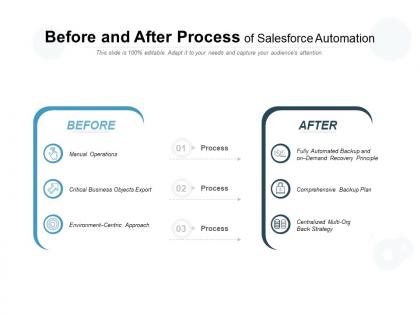
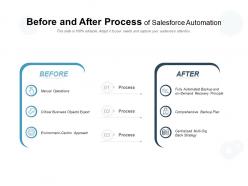
Before and after process of salesforce automation





Try Before you Buy Download Free Sample Product
 Impress Your
 Audience
 100%
100% Editable
 Save Hours
 of Time


Enjoy the cosy comfort of our Before And After Process Of Salesforce Automation. They will be excellent companions.
People who downloaded this PowerPoint presentation also viewed the following :
Before and after process of salesforce automation with all 5 slides:
Your brand will gain a lot from our Before And After Process Of Salesforce Automation. They ensure extensive coverage.

FAQs for Before and after process
Honestly, start with cleaning up your data first - messy data will screw everything up later. Build workflows that actually mirror how your sales team works, not some generic setup everyone else uses. Lead scoring is huge but make it based on what converts for YOU specifically. Get your sales people involved from day one though - I've seen so many companies skip this step and then wonder why nobody's using the system. Also hook it up to whatever tools you're already using, and definitely set up dashboards so people can actually see if it's working. The whole thing falls apart if your team isn't bought in.
First thing - ask your sales team what drives them crazy. They'll definitely have opinions about the stuff that wastes their time. Data entry is usually the big one, plus lead routing and those follow-up emails that are basically copy-paste jobs. Map out what you're doing now, then go for the easy wins first. Automatic lead assignment is a no-brainer. Don't mess with anything that needs actual human judgment though - that'll just create more headaches. Stick to the repetitive, rule-based stuff that happens the exact same way every time.
So Process Builder is this visual automation tool in Salesforce that's actually pretty cool. You drag and drop to create "if this happens, then do that" workflows without coding. Like updating fields, sending emails, creating records - whatever you need when certain conditions are met. Way better than those old workflow rules (seriously, those were annoying). Everything shows up visually so you can actually see your logic mapped out, which makes debugging so much easier later. Oh and definitely start simple when you're learning it - don't try to build something crazy complex right away.
Honestly, automation will save your sanity with lead management. Set up workflows that auto-assign leads by territory or whatever - no more stuff sitting around because nobody knows whose job it is. Email sequences are clutch too, they'll nurture prospects without you having to track every little interaction. Lead scoring happens automatically as people engage with your content, which is pretty sweet. I'd probably start with the assignment rules first since that's the biggest pain point, then worry about building out those drip campaigns. Trust me, once you get this running you'll wonder how you ever did it manually.
Honestly, the worst mistake is trying to automate everything at once - you'll just create chaos. Start small instead. I learned this the hard way when I built workflows that kept triggering each other in endless loops... nightmare to fix. Map out your actual processes first, then automate one thing at a time. Your team needs to get it too, otherwise they'll just ignore the automation or accidentally break it. Oh, and definitely test in sandbox mode before going live. Document what you build so future you doesn't hate current you. Once you nail one process, then you can expand.
So basically Salesforce hooks up with other apps through APIs, connectors, or tools like MuleSoft and Zapier. Real-time syncing works great - your CRM talks to marketing tools, accounting stuff, help desk systems, whatever. Just gotta map your data fields right and get the authentication sorted. Honestly, there's way too many integration options now, which is both awesome and overwhelming. Start with the apps your team actually uses every day instead of trying to connect everything at once. That's what I did and it saved me a ton of headaches.
Honestly, start with the basics - lead response time and conversion rates at each funnel stage. Those will tell you everything. Sales cycle length is clutch too. Then look at your reps' daily activities and how much time they're actually selling vs doing paperwork (spoiler: it's probably depressing). Revenue per lead and customer acquisition costs show if this whole automation thing is worth the investment. Oh, and track adoption rates because I've seen teams spend thousands on tools nobody uses. Pick like 3-4 metrics max to start - don't overwhelm yourself with a crazy dashboard right away.
Dude, automated reporting is a game changer for sales teams. Instead of waiting around for those dreaded month-end spreadsheets, your reps get real-time data they can actually use. You'll catch trends way faster and see exactly which deals are stuck. Honestly, I used to waste so many Friday afternoons pulling numbers from like 5 different systems - never again! Set up dashboards that refresh automatically so you can pivot quickly on pipeline stuff or figure out who needs coaching. Oh, and definitely create alerts when deals move between stages. Keeps everyone in the loop without constant check-ins.
Yeah so Flow is the way to go now - Salesforce basically stopped updating Process Builder. Flow can handle way more complex stuff, like multi-step processes and user interactions. Process Builder is simpler to learn though, I'll give it that. But honestly? Don't waste your time on it since it's being phased out. Start with basic flows first - they're not as scary as they look. Then you can build up to the crazy complex automations once you get the hang of it. Trust me, you'll be glad you went straight to Flow instead of learning outdated tools.
Honestly, start by mapping out what you're doing manually right now - that's the boring but necessary first step. Process Builder or Flow can handle the heavy lifting once you know your process. I'd begin with something simple like automated welcome emails when deals close, then add task creation and team assignments. The checklist generation and milestone tracking stuff is pretty slick too, though I got a bit carried away with custom objects when I first tried this. Build one piece at a time instead of going crazy with everything at once. Once you get the first automation working, you'll probably get addicted to finding more things to automate.
Honestly, automated emails are a game changer for engagement. You basically set up triggers that fire based on what people do - new subscriber gets a welcome series, someone abandons their cart gets a reminder, that kind of thing. The key is hitting people with the right message at the right time (sounds obvious but you'd be surprised how many brands mess this up). Segment your list based on behavior and purchase history so you're not sending random stuff. I'd start simple - pick 2-3 main touchpoints and build flows around those first. You'll see your open rates jump pretty fast once people realize your emails actually matter to them.
Honestly, start with the basics - get everyone comfortable with navigation and data entry before jumping into the fancy stuff. Trailhead's your best friend here (and it's free, which is nice). Focus on Process Builder and Flow Builder since that's where the magic happens. Pick someone on your team to be the go-to automation person - trust me, you'll need someone who can fix things when they break. Practice sessions are key too. Oh, and don't forget the people side of things. Best automation in the world won't help if your team hates using it.
Dude, automation totally changed the game for our Salesforce data mess. We started with validation rules to block garbage from getting in, then added workflows to fix phone number formats automatically. Process Builder handles address standardization now. Flow's great for finding duplicates and filling blank fields - though honestly took me forever to figure out how to set it up right. Our team saves like 3-4 hours weekly just from automated lead scoring. My advice? Don't try to fix everything at once. Pick whatever data issue annoys you most and tackle that first.
Honestly, just go with Flow or Process Builder for this - workflow rules are basically ancient at this point. Set up your triggers like "7 days since last contact" or whatever timeline makes sense for your team. Time-based actions are clutch here. They'll automatically create tasks or send emails when conditions are met. Just test everything in sandbox first because the timing stuff can be weird sometimes. Don't overdo it though. Too many notifications and your reps will tune them out completely. Oh, and always put the actual record details in reminder emails - saves everyone from having to dig around for context.
So compliance and security totally control what you can automate in Salesforce. Your automated stuff has to follow GDPR and other data privacy rules, plus you need solid audit trails. Field-level security matters too. Here's the annoying part - automation can actually skip around normal user permissions if you mess up the config. Workflows and flows need to respect sharing rules or you'll accidentally expose sensitive data to people who shouldn't see it. Oh, and definitely put everything through security review before you deploy. Document it all because auditors love their paperwork.
No Reviews