

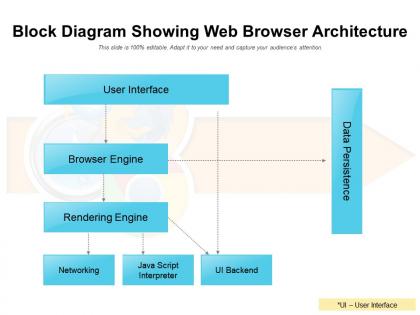
Block diagram showing web browser architecture




Try Before you Buy Download Free Sample Product
 Impress Your
 Audience
 100%
100% Editable
 Save Hours
 of Time


Derive a competitive advantage with our Block Diagram Showing Web Browser Architecture. Your competence gets an extra boost.
People who downloaded this PowerPoint presentation also viewed the following :
Block diagram showing web browser architecture with all 2 slides:
Give your competence an extra boost with our Block Diagram Showing Web Browser Architecture. You will derive a competitive advantage.

FAQs for Block diagram showing
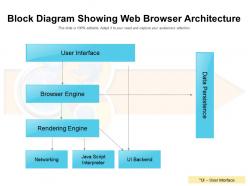
Web browser architecture includes the user interface, browser engine, rendering engine, networking component, JavaScript interpreter, UI backend, and data persistence layer. These components work together by processing user requests through the browser engine, which coordinates the rendering engine to display content, while the networking layer handles data retrieval and JavaScript interpreter executes scripts, ultimately delivering seamless web experiences with optimized performance and reliable functionality across different platforms.
The rendering engine processes HTML and CSS by parsing markup into a Document Object Model, applying styles through CSS parsing, calculating layout positioning, and painting visual elements onto the screen. Through this systematic approach, browsers like Chrome and Firefox transform code into interactive web pages, enabling seamless user experiences while optimizing performance and ensuring cross-platform compatibility.
Browser engines serve as the core interpreters that parse HTML structure, apply CSS styling rules, and execute JavaScript code to render web pages. These engines streamline web development by handling cross-platform compatibility, optimizing performance through efficient rendering pipelines, and enabling dynamic user interactions, with major browsers like Chrome, Firefox, and Safari leveraging different engines to deliver faster, more responsive web experiences.
The DOM serves as a crucial interface layer in web browser architecture, connecting the rendering engine to JavaScript execution environments and enabling dynamic content manipulation. Through this structured representation, browsers can efficiently parse HTML, manage memory allocation, and facilitate real-time interactions, with modern applications like e-commerce platforms and web-based dashboards leveraging DOM optimization for enhanced user experiences and faster page performance.
The user interface layer serves as the critical bridge between users and browser functionality, encompassing navigation controls, address bars, bookmarks, tabs, and visual elements that enable seamless web interaction. This layer streamlines user experience by providing intuitive access to complex underlying processes, with modern browsers increasingly focusing on minimalist designs, customizable interfaces, and accessibility features that ultimately deliver faster navigation, reduced cognitive load, and enhanced productivity across diverse user needs.
Web browsers manage memory through process isolation, sandboxing individual tabs, extensions, and plugins to prevent crashes from affecting the entire browser. They optimize performance by implementing garbage collection, caching frequently accessed resources, and dynamically allocating memory based on usage patterns, with modern browsers like Chrome and Firefox ultimately delivering faster page loads and improved stability across enterprise environments.
Browser security measures include sandboxing, HTTPS encryption, Content Security Policy (CSP), Same-Origin Policy, and certificate validation systems. These technologies enhance user protection by isolating malicious code, securing data transmission, and preventing unauthorized access, with financial institutions and healthcare organizations finding that modern browser architectures deliver significantly improved data protection and regulatory compliance.
Web browsers handle extensions and plugins through sandboxed environments, API frameworks, and isolated processes that manage memory allocation, system access, and data flow. While extensions enhance functionality and user experience, they can significantly impact performance by consuming additional RAM, CPU resources, and network bandwidth, with many organizations finding that strategic extension management balances productivity gains against system efficiency.
Monolithic architecture runs all browser components in a single process, while multi-process architecture separates tabs, plugins, and rendering engines into isolated processes. Multi-process design enhances stability and security by preventing crashes from affecting the entire browser, with modern browsers like Chrome and Firefox leveraging this approach to deliver faster performance and better user experiences.
Web browsers implement caching through memory storage, disk storage, HTTP headers, and DNS caching to store frequently accessed resources locally. These mechanisms streamline page loading by eliminating redundant downloads, reducing bandwidth consumption, and accelerating content delivery, with many organizations finding that strategic caching ultimately delivers faster user experiences and improved website performance.
The networking layer manages all communication between the browser and web servers, handling HTTP/HTTPS requests, DNS resolution, connection management, and data transmission protocols. It enables seamless web browsing by establishing secure connections, managing bandwidth efficiently, and coordinating multiple simultaneous requests, ultimately delivering faster page loads and enhanced user experiences across various web applications.
Web browsers utilize V8 or SpiderMonkey engines by compiling JavaScript into optimized machine code, managing memory allocation, and executing scripts through just-in-time compilation processes. These engines streamline performance by parsing JavaScript syntax, optimizing frequently-used code paths, and handling garbage collection, with many organizations finding that modern JavaScript engines ultimately deliver faster web applications and enhanced user experiences across enterprise platforms.
Web browsers implement CORS through preflight requests, origin headers, access control headers, and credential handling mechanisms. These security features work by validating cross-domain requests against server policies, blocking unauthorized access, and enabling controlled resource sharing, with many web applications finding that proper CORS configuration streamlines API integrations while maintaining robust security boundaries.
Progressive Web Apps have transformed browser architecture by integrating service workers for offline functionality, application shells for faster loading, and enhanced caching mechanisms that blur the line between web and native applications. Modern browsers now support push notifications, background sync, and local storage capabilities that enable PWAs to deliver app-like experiences across retail, banking, and media platforms, ultimately providing faster performance and seamless user engagement.
Web browsers face significant challenges in implementing newer web standards, including maintaining backward compatibility with legacy websites, managing resource-intensive features that impact performance, and coordinating implementation timelines across different browser engines. These challenges require strategic balancing between innovation and stability, with many organizations finding that gradual adoption approaches enable enhanced user experiences while minimizing disruption to existing web applications.
No Reviews