

 0 Comment
 Customer Reviews

Have you watched a movie or TV show that started with a gripping opening sequence, leaving you on the edge of your seat? One such example is the hit Netflix series "Stranger Things." The show's opening credits feature a neon-red title and eerie synth music that sets the tone for the entire series. But what does this have to do with business? Well, just like how a great opening sequence sets the tone for a show, a well-designed project cover page sets the tone for your business project.
Working hard on a project cover page might appear to be a waste of effort, but not making this a priority can cost businesses financially. Due to inefficient project management directly attributed to lack of clarity, businesses lose close to $40 billion each year. The biggest source to get this clarity is, of course, a project cover page. It helps to streamline communication and ensure everyone involved is on the same page by clearly outlining the project's purpose, goals, and timeline.
Now that you know the importance of a project cover page, it's time to take action. That's why we've created a collection of Project Cover Page PPT Templates that are designed to make your project stand out.
The 100% customizable nature of the templates provides you with the desired flexibility to edit your presentations. The content-ready slides give you the much-needed structure.
Don't let inefficient project management cost you time and money. Download our templates today and start your project off on the right foot.
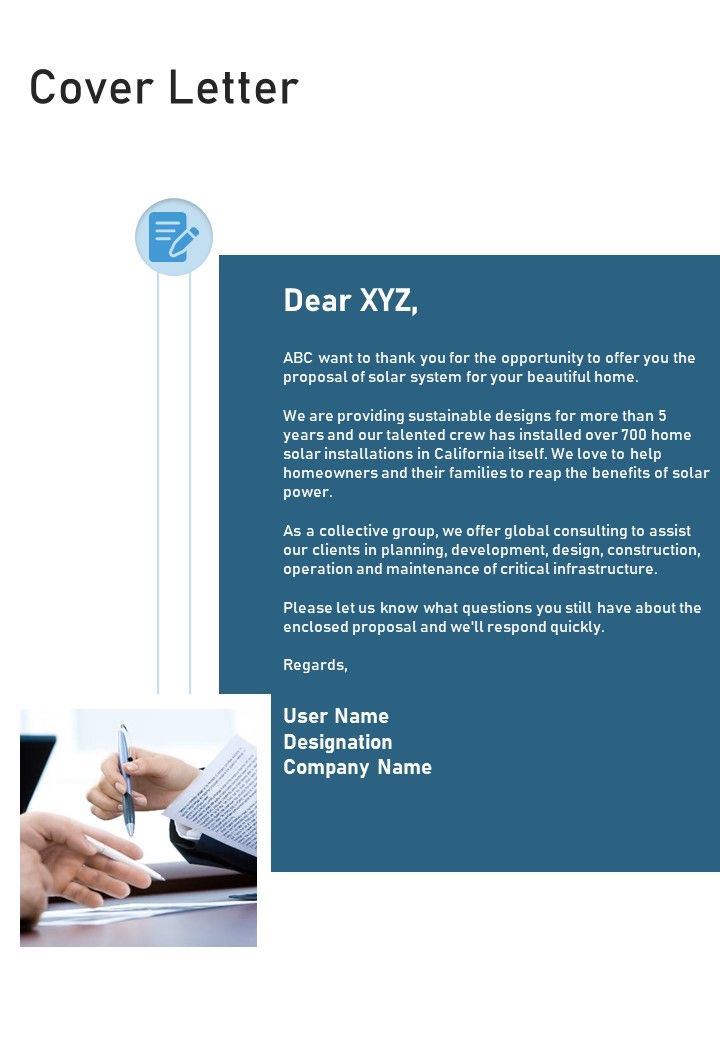
Template 1: Cover Letter Solar Power Project Proposal One-Pager Sample
Looking for a versatile and effective PowerPoint Template to showcase your solar power project proposal? Look no further than this innovative and dynamic option. With a range of insightful and visually engaging features, this template is sure to make your proposal stand out from the crowd. Designed with your needs in mind, this template includes a range of customizable slides that allow you to tailor your presentation to your unique goals and objectives. Whether you're looking to highlight the financial benefits of your solar project, showcase the technical details of your system, or simply provide a clear and concise overview of your proposal, this template has you covered. Get it now.
Template 2: Project Dependency Single-Slide Cover Page
Efficient project management requires a clear understanding of dependencies and potential roadblocks. Our expertly-designed PPT Template offers valuable insights into project dependencies and their impact on its overall success. This PowerPoint Presentation with modern and organized slides is perfect for visually communicating project dependencies, identifying potential risks, and building more effective plans. Use it to highlight dependencies, plan resource allocation, and prioritize tasks. Get your hands on this template today and take your project management skills to the next level.

Final Word
Remember when you were a kid, and your teacher always told you to put your name and date on your assignments? The reason for that wasn't just to ensure you got credit for your work but also to ensure that the assignment was organized and easy to understand. In the same way, a Project Cover Page serves as a simple and effective way to organize and clarify your project. Before diving headfirst into your next project, take a step back and consider the importance of clear communication and organization. And when you're ready to get started, remember to download our Project Cover Page PPT Templates to make your project shine.
FAQs on Project Cover Page Templates
What is a cover page for a project?
A cover page is the first page of a project report or presentation that provides information about it, such as title, author name, date, and sometimes other critical information. It is an essential element and serves to introduce the project to readers or viewers. A cover page provides the project with a professional and organized appearance and sets the tone for the rest of the document.
How do I make a project cover page?
To create a project cover page, first, decide on the necessary information that should be included. Typically, this would be the project title, author name, and date. Other relevant information, such as the company logo, project description, or course abstract, can also be added. Next, select a design that reflects the project's style and tone, including appropriate colors and fonts. You can create a custom design from scratch or use a pre-designed template. Once you have finalized the layout and design, double-check for accuracy and consistency, and ensure all the information is legible and presented clearly. Finally, add the cover page to the front of the project report or presentation.
How do I make my project cover page attractive?
Here are some tips to make your project cover page attractive:
- Choose a visually appealing background: Select an appropriate background image or color scheme that complements the theme and purpose of your project. Make sure the background does not overpower the content on the page.
- Use high-quality images: Use high-resolution images that are relevant to your project. If possible, use original photographs or graphics that you have created.
- Keep it simple and organized: Avoid cluttering the cover page with too much text or design elements. Use a clear and legible font.
- Add a catchy title: Use a concise and catchy title that accurately reflects the topic or subject of your project. The title should be prominent and easy to read.
- Include relevant information: Include relevant information such as the name of the author or team, the date of submission, and the name of the institution or organization.
- Add a creative touch: Consider adding a unique design element, such as a logo, graphic, or illustration that relates to the topic of your project.s