





 0 Comment
 Customer Reviews

The sticky note's been on the board for three days. Nobody's touched it.
Not because the work isn't happening. It is. Somewhere. But the task itself—the one that says "update API endpoint"—hasn't moved columns. And now the standup's starting and someone's going to ask why it's still in "To Do."
This is the quiet chaos of sprint task management. The board looks clean from a distance. Up close, it's a different story. Tasks that are actually done but not marked. Work that's in progress but split across two people with no clear owner. User stories that got picked up without anyone breaking them into actual tasks first.
The planning meeting went fine. The velocity looked right. And then Monday happened.
There's a gap between how Scrum is supposed to work—organized, iterative, transparent—and how it actually runs when twelve people are working across four stories with unclear task definitions. Most teams know the gap is there. Fewer know how to close it in a presentation without it sounding like a process lecture.
That's why scrum task templates exist. Because someone has to show the sprint board to stakeholders, explain task priority to a new team member, or walk through task completion data in a retrospective—and starting from a blank slide is not an option at that point.
SlideTeam's pre-designed scrum task templates handle exactly this: the visual structure you need when the meeting's already scheduled and the board still needs to make sense to everyone in the room. Whether it's a task board, a sprint roadmap, or a task management dashboard, the frameworks are ready.
Here's what's available.
Template 1: Scrum Development Task Board Architecture
Visualize your sprint backlog at a glance with this structured task board layout. The slide maps every work item across five clear columns: Backlog, To Do, In Progress, Review, and Done. Each column drives instant clarity on where tasks stand. Concrete examples like Translate Landing Page and Identify Business Users anchor the board in real-world context. Fully editable PowerPoint shapes let you swap in your own sprint items effortlessly. Use this to run tighter Scrum task board reviews and daily standups. Transform your sprint visibility presentations today. Download this dynamic template now and make every task's status undeniable.
[product_image id=920056]
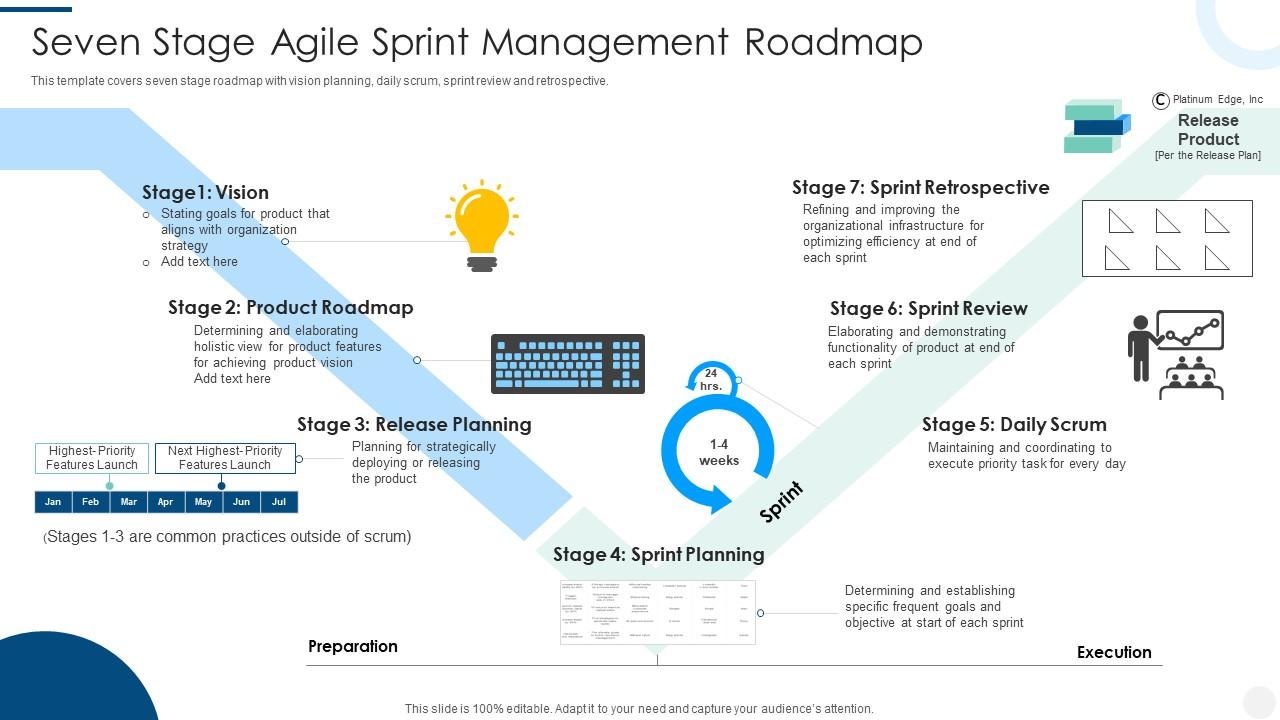
Template 2: Seven-Stage Agile Sprint Management Roadmap
Map your entire agile delivery cycle across seven clearly defined stages. The roadmap covers Vision, Product Roadmap, Release Planning, Sprint Planning, Daily Scrum, Sprint Review, and Retrospective. Each stage delivers a logical checkpoint your team can navigate with confidence. The innovatively designed layout makes sprint task planning discussions structured and easy to follow. Editable shapes let you adapt every element to your team's workflow. Use this to present agile sprint management from kickoff to retrospective. Elevate your sprint planning presentations today. Download this template now and give your team a clear path forward.
Download this PowerPoint Template
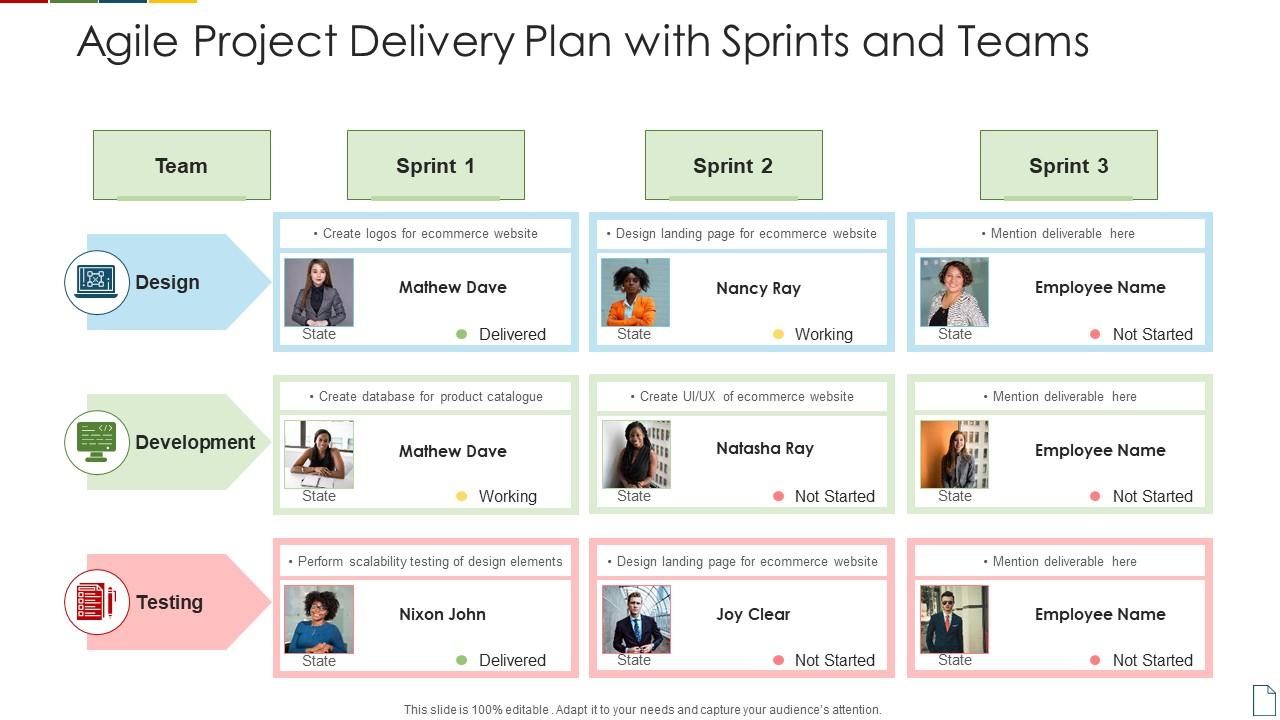
Template 3: Agile Project Delivery Plan with Sprints and Teams
Deliver a clear agile project plan across Development, Design, and Team workstreams. The slide structures your delivery plan for team coaching sessions with three distinct, parallel tracks. Each track surfaces responsibilities and timelines without ambiguity. The clean layout ensures stakeholders see how sprints and teams interconnect at once. Editable design elements let you tailor every section to your specific project context. Use this to communicate agile project delivery plans and sprint team assignments. Transform your delivery planning presentations today. Download this template now and align your teams around a shared execution framework.
Download this PowerPoint Template
Template 4: Scrum Marketing Team Task Status
Track your marketing team's scrum task status across five active workstreams. The slide covers Web Application, On Boarding Experience, Startup Model, Emails Design, and more—all in one view. Each stage makes scrum task priority and progress visible without digging through multiple documents. The five-stage structure keeps cross-functional marketing sprints organized and accountable. Fully editable layouts let you update task names, owners, and statuses in minutes. Use this to run scrum task assignment reviews with your marketing team. Transform your team status presentations today. Download this template now and bring transparency to every marketing sprint.

Download this PowerPoint Template
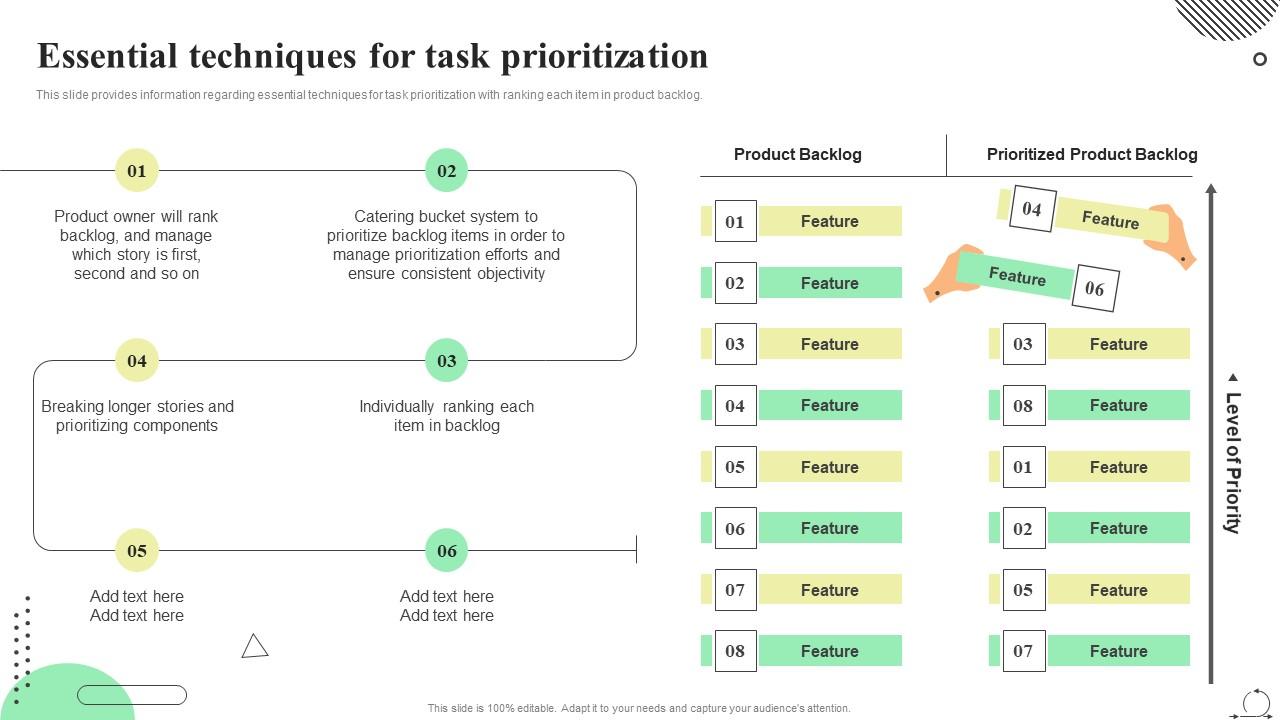
Template 5: Scrum Agile Playbook Essential Techniques for Task Prioritization
Prioritize your product backlog with six proven techniques, all mapped in one clear slide. The layout covers individual ranking, component prioritization, and structured product backlog ordering methods. Each technique translates directly into an actionable decision your team can execute immediately. Visual callouts make the logic behind each prioritization method easy to communicate. Editable stages let you weight and sequence techniques to match your team's maturity. Use this to run task estimation scrum sessions and backlog grooming meetings. Elevate your task prioritization presentations today. Download this template now and make backlog decisions faster.
Download this PowerPoint Template
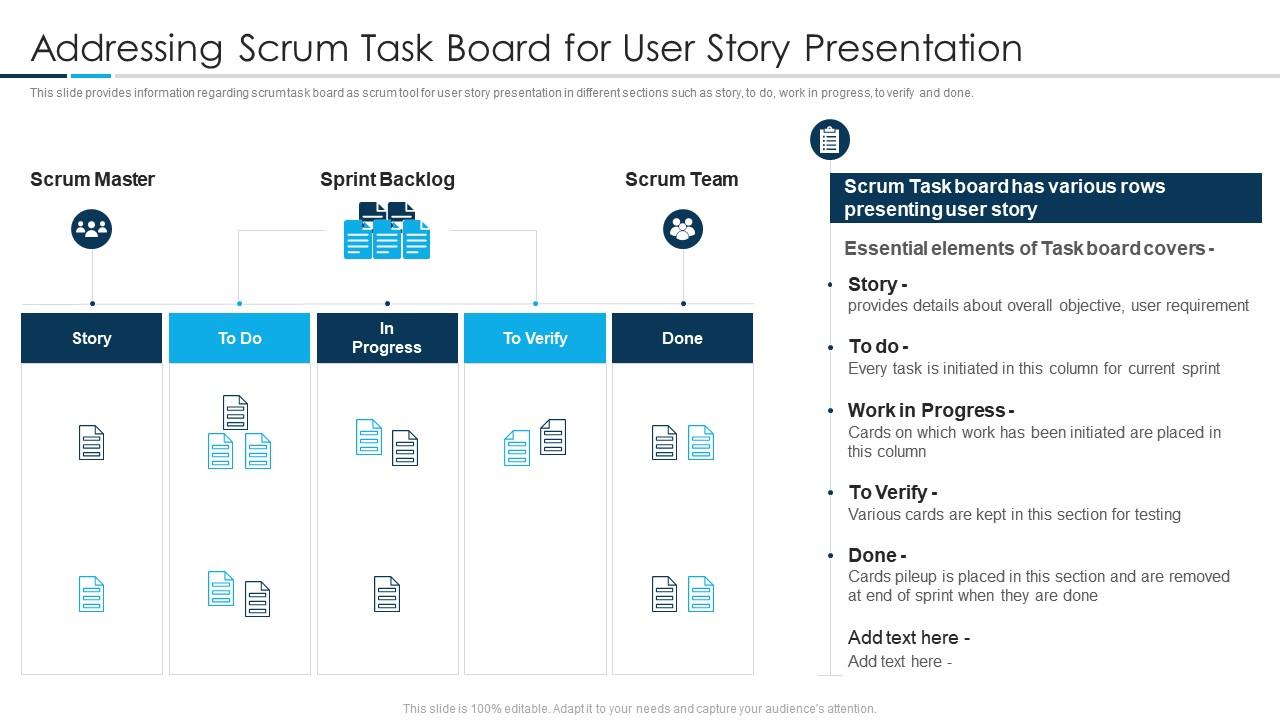
Template 6: Addressing Scrum Task Board for User Story Presentation Scrum Tools Agile Teams IT
Present the scrum task board for user story tracking across five workflow sections. The slide organizes Story, To Do, Work in Progress, To Verify, and Done in a single visual frame. Each section makes the user story task lifecycle transparent to every team member. Clear column separation drives accountability without any extra explanation needed. The fully editable design lets you insert your team's actual stories and task statuses. For a deeper look at how scrum task boards support agile teams, visit SlideTeam's scrum task templates blog. Download this template now and make your user story progress undeniable.
Download this PowerPoint Template
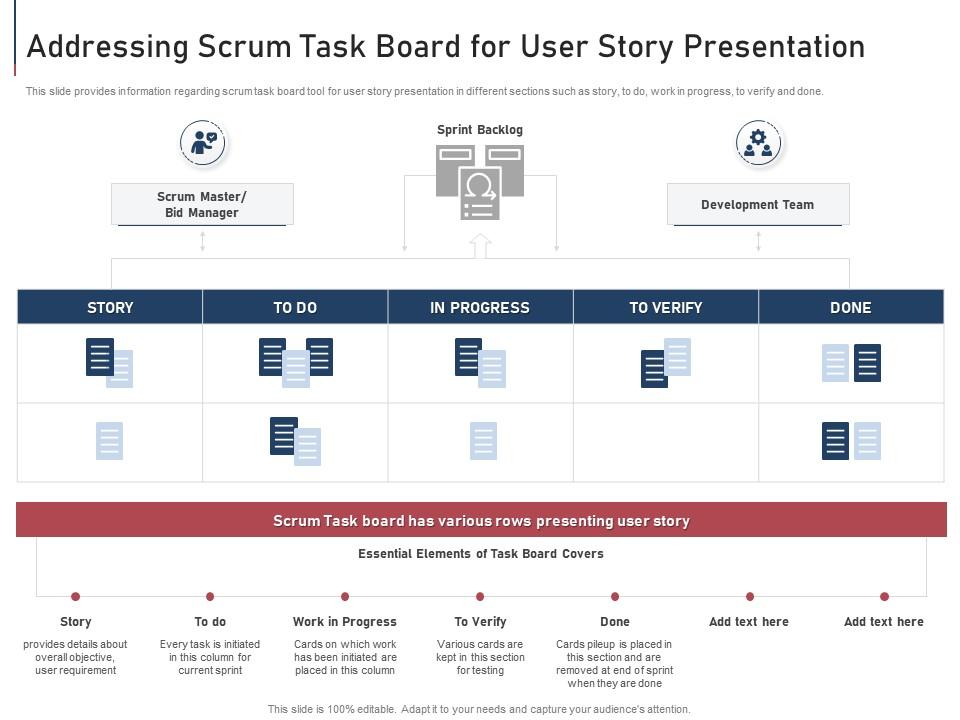
Template 7: Addressing Scrum Task Board for User Story Presentation Module Agile Implementation
Structure your user story presentation with a scrum task board built for agile implementation. The slide covers Story, To Do, Work in Progress, To Verify, and Done across three clearly defined stages. Each section drives engagement by making Development, Team, and Progress visible simultaneously. The layout integrates directly into agile bidding and implementation workflows. Use this to facilitate agile task board reviews and implementation planning sessions. Transform your agile implementation presentations today. Download this template now and keep your sprint board communication sharp.
Download this PowerPoint Template
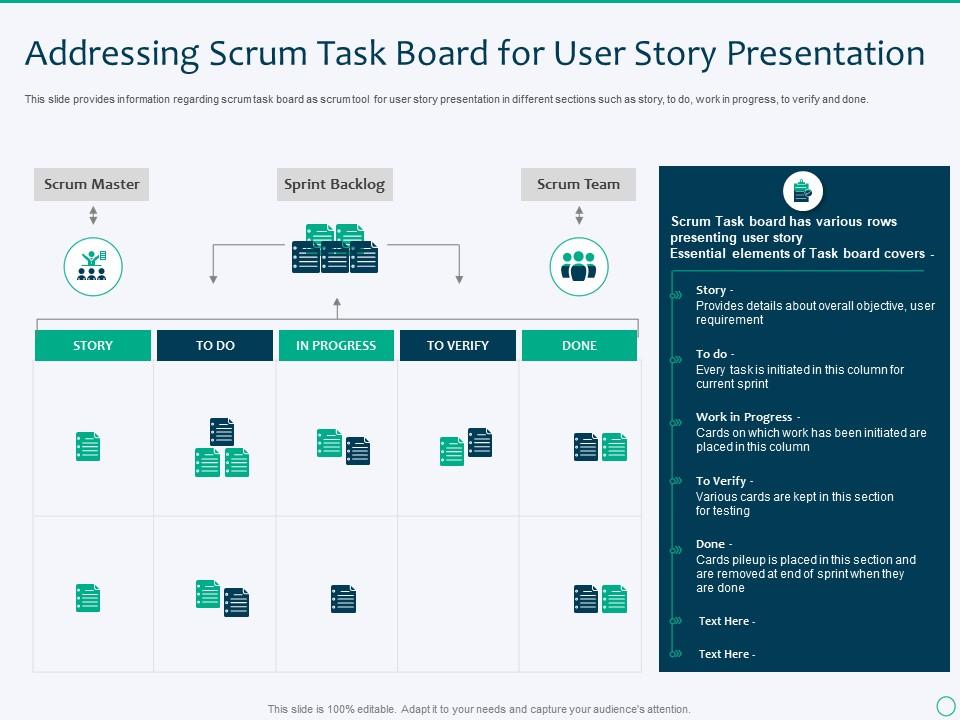
Template 8: Addressing Scrum Task Board for User Story Presentation IT
Give Scrum Masters a purpose-built task board for clear user-story presentation. The slide sections out Story, Sprint Backlog, Work in Progress, To Verify, and Done in a single view. Each column maps directly to Scrum Master oversight responsibilities during daily standups. The structured layout supports real-time sprint backlog task tracking without added complexity. Use this to run Scrum Master–led task reviews and sprint backlog discussions. Elevate your Scrum Master toolset presentations today. Download this template now and own your sprint board conversations.
Download this PowerPoint Template
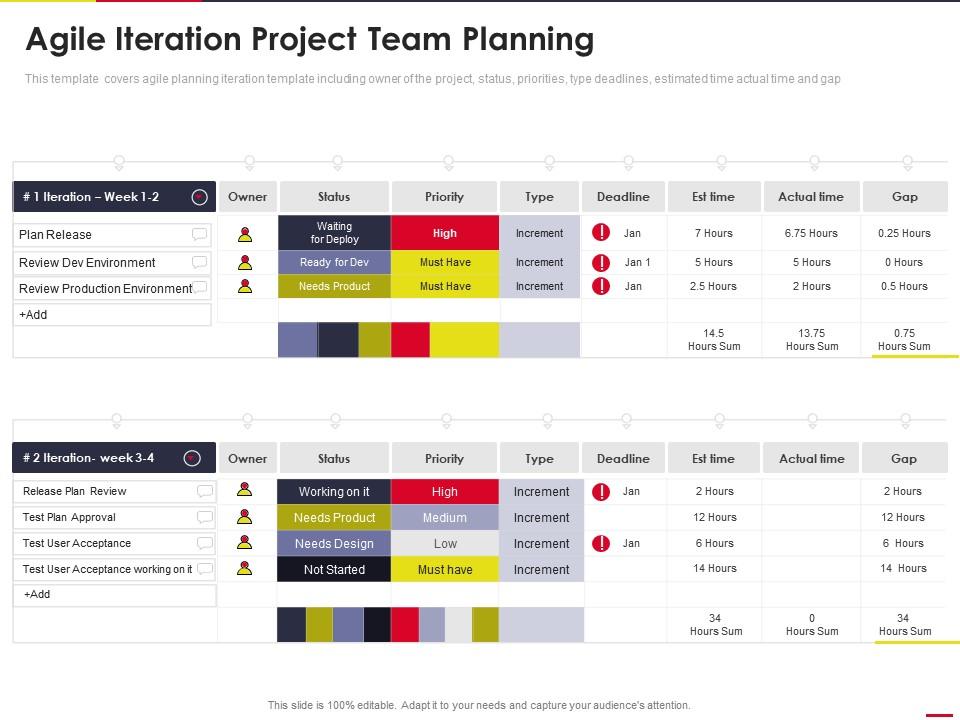
Template 9: Agile Iteration Project Team Planning IT
Plan every agile iteration with owner, status, priority, type, deadlines, and time tracking in one slide. The layout captures both estimated and actual time alongside gap analysis for each task. Instant visibility into High, Medium, and Low priorities keeps the team focused on what matters. The structured table format makes agile task tracking reviews fast and actionable. Editable fields let you update every row to reflect your current sprint in minutes. Use this to run iteration planning and sprint progress reviews with full team alignment. Transform your agile iteration planning presentations today. Download this template now and close the gap between planned and actual delivery.
Download this PowerPoint Template
Template 10: Agile Project Team Work Planning Template Agile Project Team Planning IT
Combine workforce resource distribution with full agile project planning in one layout. The slide covers Key Stakeholders, Product Backlog, High-Level Sprint Planning, Project Team, and Business Analyst in a connected view. Each element links planning decisions to the people responsible for executing them. The structured format accelerates sprint task planning discussions and resource allocation reviews. Use this to present product backlog task ownership and team capacity plans to stakeholders. Elevate your agile project planning presentations today. Download this template now and align every resource behind your sprint goals.

Download this PowerPoint Template
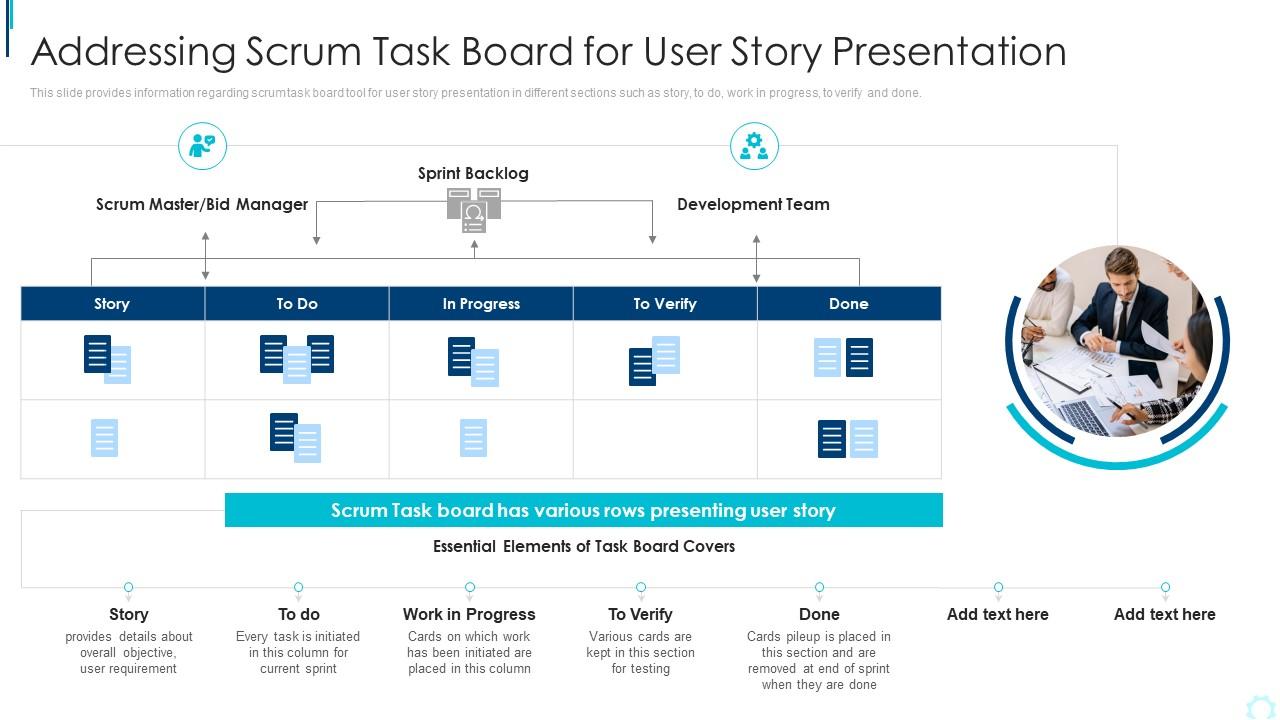
Template 11: Addressing Scrum Task Board for User Story Presentation Planning and Execution
Deliver a focused scrum task board dedicated to user story presentation and execution tracking. The single-stage layout covers Story, To Do, Work in Progress, To Verify, and Done with precision. Simplified structure means teams new to scrum task workflows can adopt it immediately. The clean design keeps every standup and planning session focused on real task progress. Fully editable layout lets you configure the board to your team's current sprint items. Use this to communicate task completion status during sprint planning and execution cycles. Transform your scrum task presentations today. Download this template now and keep every story moving.
Download this PowerPoint Template
Template 12: Agile Software Development Sprint Planning Agile Development Planning
Drive sprint delivery with a three-stage agile software development planning framework. The slide covers Plan, Develop, Deliver, and Assess—anchored to the goal of shipping a functioning product each sprint. Each stage makes the connection between planning decisions and delivery outcomes explicit. The structured layout supports IT sprint task planning discussions with clarity and speed. Innovatively designed elements are fully editable to match your development cycle. Elevate your sprint planning presentations today. Download this template now and build delivery confidence across every sprint.

Download this PowerPoint Template
Template 13: Agile Playbook Sprints Required for Agile Product Development
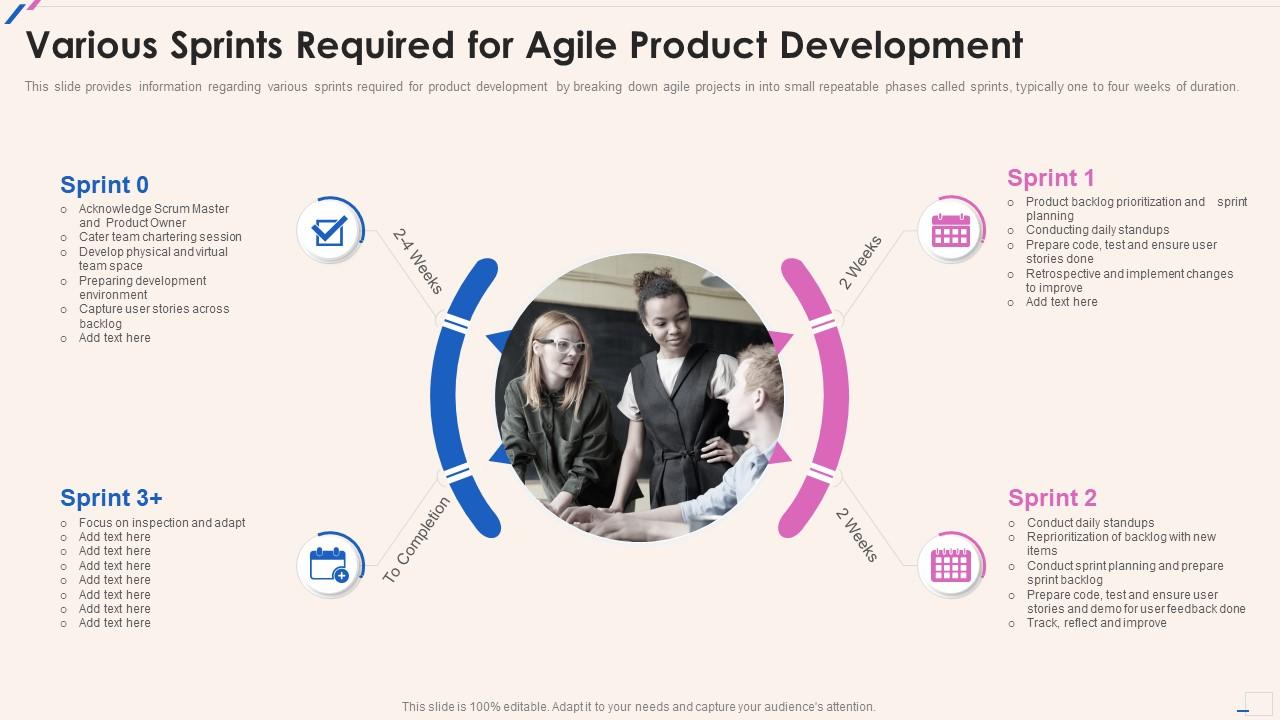
Break agile product development into four structured, repeatable sprint phases. The slide covers Sprint Planning, Daily Standups, Product Backlog Prioritization, and Scrum Master acknowledgment across a clear four-stage layout. Each phase maps to a specific team action, making the sprint cycle tangible and executable. Visual separation between phases keeps complex multi-sprint roadmaps readable at a glance. The completely editable design adapts to one-week or four-week sprint structures. Use this to present multi-sprint agile development plans to product and engineering teams. Transform your agile product development presentations today. Download this template now and turn your backlog into a delivery engine.
Download this PowerPoint Template
Template 14: Addressing Scrum Task Board for User Story Presentation IT
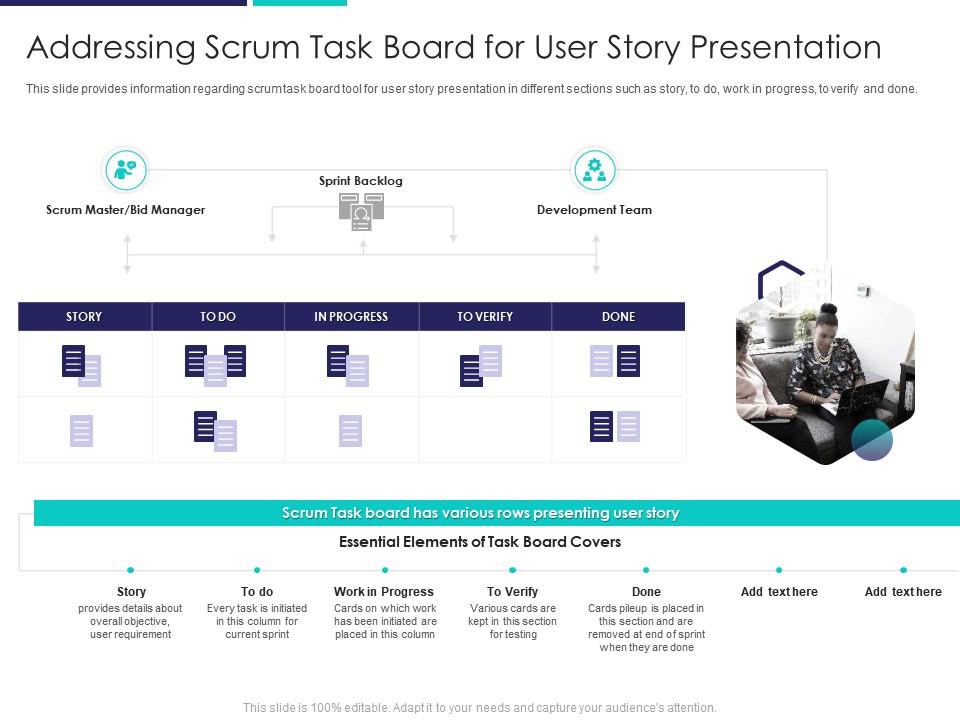
Deploy the scrum task board specifically within bid and proposal agile workflows. The slide structures Sprint Backlog, Development Team, Work in Progress, and Done in a single focused layout. Each section makes the scrum task workflow transparent for procurement and project delivery teams. The design bridges the gap between agile methodology and proposal management processes. Fully editable fields let you map the board to any bid cycle or deployment context. Use this to present agile task board adoption in bid, proposal, and IT delivery projects. Elevate your agile deployment presentations today. Download this template now and bring scrum discipline to every proposal process.
Download this PowerPoint Template
Template 15: Scrum Project Task Management Dashboard
Monitor every sprint metric in one comprehensive scrum project task management dashboard. The slide captures sprint velocity, scope changes, task category, task progress, planned vs. finished counts, and bug vs. story breakdown simultaneously. Each metric delivers an immediate read on sprint health without switching between tools. The structured dashboard format turns raw sprint data into clear, stakeholder-ready insights. Instantly available and fully editable, the layout fits any team's sprint reporting cycle. Use this to present scrum task completion data and sprint performance reviews confidently. Transform your task management dashboard presentations today. Download this template now and make every sprint review count.

Download this PowerPoint Template
Deliver Winning Scrum Task Presentations with SlideTeam
SlideTeam's PowerPoint templates are the best in the industry for scrum task management and agile sprint planning. These content-ready slides give your team instant structure—from task board layouts to sprint dashboards—saving hours of formatting time. Use these ready-made frameworks to communicate task priority, sprint progress, and backlog status with confidence. Deploy these pre-designed templates to run tighter sprints, clearer standups, and more productive retrospectives.
FAQs on Scrum Task
What distinguishes a Scrum task from a user story in the context of sprint planning?
A user story describes what a user needs and why. A scrum task is a specific piece of work a team member does to deliver that story. In sprint planning, the team first commits to user stories, then breaks each into tasks. Tasks are technical and internal; stories are outcome-focused and customer-facing. One story typically generates three to eight tasks.
How should a Scrum team determine the appropriate granularity when breaking down user stories into tasks?
A task should take one person no more than one day to complete. If a task runs longer, split it. If it's under an hour, it may be too small to track. The right size keeps daily standups honest—every task should show visible movement within 24 hours. Teams learn the right granularity through two to three sprints of honest retrospectives.
What criteria define a well-formed Scrum task, and how does this differ across teams with varying maturity levels?
A well-formed scrum task has a clear action, a single owner, and a time estimate. It connects directly to one user story. Early-stage teams often write tasks that are too vague or too large. More experienced teams write tasks that are actionable within a single workday. The main difference is specificity—mature teams know exactly what 'done' looks like for each task before the sprint starts.
How does task ownership in Scrum differ from traditional project management assignment models?
In traditional project management, a manager assigns tasks to individuals. In Scrum, team members self-assign tasks during sprint planning or daily standups. No one tells you which task to pick—you commit based on capacity and skill. This shifts accountability from a manager to the whole team. The team owns the sprint outcome collectively, not individually.
What role do Scrum tasks play in making sprint progress visible during daily standups?
Tasks make sprint progress concrete. At each standup, team members report which tasks moved, which are blocked, and what they'll pick up next. Without task-level detail, standups default to vague status updates. A visible task board—with To Do, In Progress, and Done columns—turns abstract sprint goals into daily, trackable actions every team member can see.
How can teams avoid the anti-pattern of tasks becoming mini-waterfalls within a sprint?
Mini-waterfalls happen when tasks follow a strict sequence—design, then build, then test—with no overlap. Avoid this by writing tasks that can run in parallel where possible. Testers should write test tasks at sprint start, not after development ends. Daily standups should flag sequential bottlenecks early. The fix is collaboration within the sprint, not a handoff chain between phases.
What strategies help teams accurately estimate effort for Scrum tasks without over-engineering the process?
Use hours, not story points, for task estimation—tasks are short-horizon work. Each team member estimates their own tasks based on past experience. Compare estimates to actuals in retrospectives to improve over time. Avoid group estimation for tasks; it slows the process. A simple rule: if you've done it before, use that time. If not, add a 50% buffer.
How does the definition of done apply at the task level versus the user story level?
At the task level, done means the specific action is complete—code written, test passed, copy approved. At the user story level, done means the full story meets the team's agreed definition of done, including testing, review, and acceptance criteria. A story isn't done until all its tasks are done and the story itself passes acceptance. Task-level done feeds into story-level done.


