

 0 Comment
 Customer Reviews

The audit's scheduled. Someone's already pulled the old checklist from last quarter.
It's the same one. Updated once, maybe twice. A few checkboxes filled in, a few left blank without explanation. Nobody's quite sure if "server patched" means patched last week or last year. And when the auditor asks, there's a pause—the kind that lasts a beat too long.
IT infrastructure reviews feel organized until they're not. The spreadsheet exists. The shared drive folder exists. But the actual picture of what's running, what's vulnerable, what's overdue—that lives in three different people's heads and nobody's written it down properly.
Here's the real problem. Infrastructure isn't static. A server gets added. A cloud service gets spun up without formal documentation. A vendor changes an SLA. None of it makes it onto the checklist, because nobody owns the checklist. And by the time the next IT infrastructure audit rolls around, you're reconciling reality with a document that's already six months behind.
It compounds when you add compliance. GDPR, ISO 27001, internal security reviews—they all want documentation. Not a summary. Not a verbal walkthrough. A clear, repeatable record of what was checked, when, and by whom. Without that structure, even a well-run IT team looks disorganized on paper.
So checklists exist for this reason. Not because IT teams don't know what to check—they usually do. But because knowing and documenting are different things, and the gap between them is where audits go sideways.
SlideTeam's IT infrastructure checklist templates close that gap. Pre-designed slides covering everything from network security and data center management to cloud infrastructure and disaster recovery—ready to use without starting from a blank slide. These content-ready frameworks give your team something concrete to present, share, and update.
Here's what's available across the collection.
Template 1: Checklist to Monitor IT Infrastructure Guide to Build IT Strategy Plan for Organizational Growth
Keeping IT infrastructure on track requires a clear view of every functional area. This PowerPoint slide is built for IT managers and CIOs who need a structured monitoring checklist. It maps key activities across data and cloud storage, hardware capabilities, and software performance—all in one view. Useful for quarterly IT infrastructure reviews or board-level IT strategy presentations. Explore more must-have IT infrastructure checklist templates for additional frameworks. The template is 100% editable and customizable.

Download this PowerPoint Template
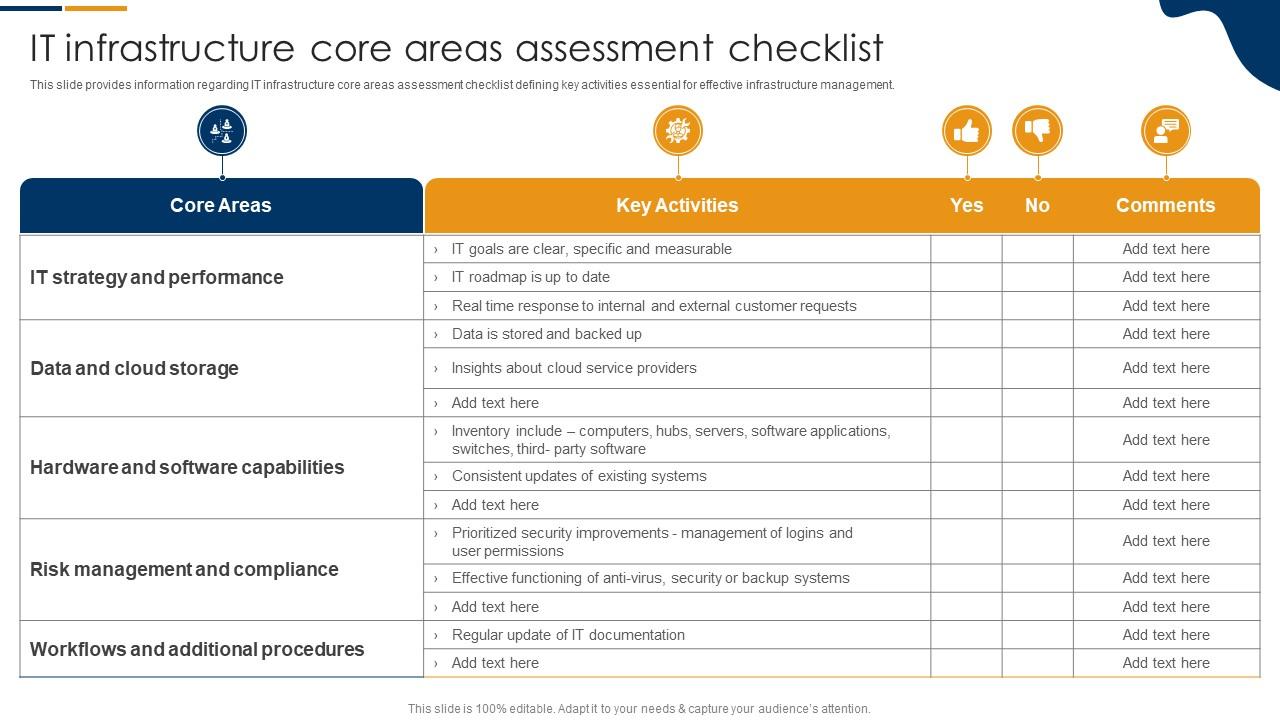
Template 2: IT Infrastructure Core Areas Assessment Checklist Information Technology Infrastructure Library
Core area assessments in IT infrastructure often get siloed across teams. This PPT preset brings them together—covering risk management, software capabilities, and security improvements in one consolidated checklist. IT leads and compliance officers reach for this when preparing for an IT infrastructure assessment or an internal audit review. It follows an Information Technology Infrastructure Library structure, making it easy to align activities with established IT management practices. The template is 100% editable and customizable.
Download this PowerPoint Template
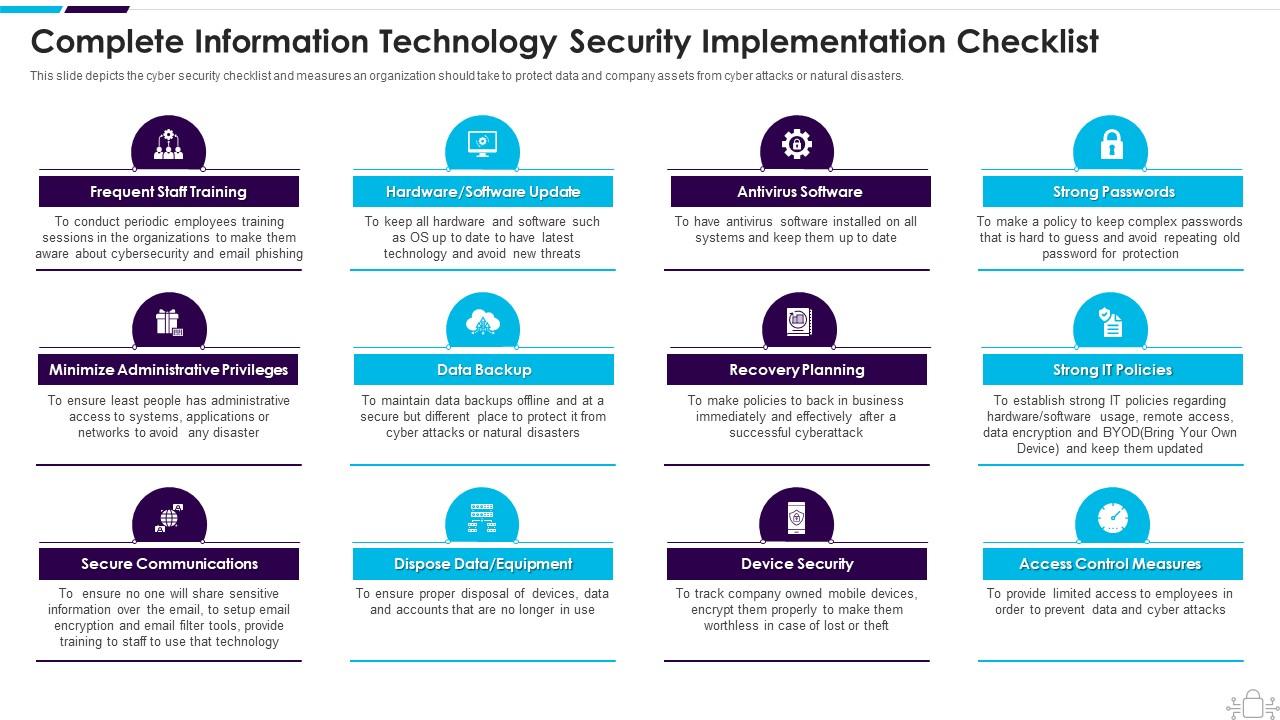
Template 3: Information Technology Security Complete Information Security Implementation Checklist
Protecting company assets starts with knowing exactly what to check. This twelve-stage cybersecurity checklist captures the full scope of information security implementation. Frequent staff training, administrative privilege controls, and data backup protocols are all mapped clearly. Each stage translates directly into an actionable task for your security team. Use this to build structured cybersecurity checklist presentations for audits, leadership reviews, or compliance briefings. Transform your information security presentations today. Download this dynamic template now and unlock a comprehensive data protection framework.
Download this PowerPoint Template
Template 4: Ready to Use IT Security Checklist Template for Corporate Needs
Corporate IT security reviews demand clarity and consistency. This ready-to-use IT security checklist template delivers a visually compelling structure for presenting security protocols across business units. The design combines professional aesthetics with practical content organization. It captures the full scope of network security checklist requirements for boardroom meetings and client pitches alike. Use this to ensure every security discussion lands with precision and authority. Transform your corporate IT security presentations today. Download this dynamic template now and make every security review count.
[product_image id=1461212]
Template 5: Professional IT Security Checklist PPT for Effective Planning
Effective IT infrastructure planning requires more than good intentions—it needs a documented, presentable framework. This IT security checklist PPT delivers exactly that, with a polished design built for planning sessions. Every section is structured to guide your audience through key security priorities without losing attention. It supports IT compliance checklist presentations and internal security audits equally well. Use this to run tighter, more credible security planning conversations. Transform your IT security planning presentations today. Download this dynamic template now and elevate every planning discussion.
[product_image id=1457533]
Template 6: Checklist to Monitor Infrastructure Functional Areas PPT Sample
Monitoring IT infrastructure across functional areas needs more than a spreadsheet. This complete deck delivers a structured checklist framework covering each operational domain your team manages. The visual layout keeps complex infrastructure monitoring information organized and easy to follow. It's built for IT managers presenting infrastructure status to leadership or operations teams. Use this to bring order and professionalism to every infrastructure review session. Transform your infrastructure monitoring presentations today. Download this dynamic template now and drive clearer operational oversight.
[product_image id=1850228]
Template 7: Information Technology Service Transition Checklist PPT
IT service transitions carry real risk when steps get missed or poorly communicated. This PPT template structures the full service transition checklist so nothing falls through the cracks. The design blends visual clarity with functional depth, helping IT teams walk stakeholders through each transition phase. It's particularly useful for change management reviews and post-migration briefings. Pair this with a broader IT infrastructure template collection for end-to-end coverage. Transform your IT service transition presentations today. Download this dynamic template now and manage every transition with confidence.
[product_image id=1622807]
Template 8: Data Center Infrastructure Management Security Checklist PPT
Data center security requires a checklist that's as rigorous as the environment itself. This complete deck covers data center infrastructure management and security verification in one structured presentation. The design grabs attention instantly and keeps complex security content readable for both technical and non-technical audiences. Use it to present data center checklist reviews to leadership or during infrastructure audits. Transform your data center security presentations today. Download this dynamic template now and demonstrate rigorous infrastructure oversight.
[product_image id=1559632]
Template 9: Essential IT Security Checklist PowerPoint Template for Businesses
Businesses need IT security checklists that are both thorough and easy to present. This PPT preset is built for that exact need—covering key security requirements in a clean, professional format. IT leads and compliance teams use this slide when presenting security status to executives or during business continuity reviews. The structure supports clear communication across all levels of an organization. The template is 100% editable and customizable.
[product_image id=1452050]
Template 10: Infrastructure Management Monitoring and Capacity Information Technology Infrastructure Library
Infrastructure management and capacity planning belong in the same conversation. This PPT template follows an Information Technology Infrastructure Library framework, giving IT operations teams a structured way to present monitoring and capacity data together. It works well for IT infrastructure management reviews and operational planning sessions. For practitioners building out a full IT infrastructure assessment, this deck provides the backbone. See top IT infrastructure assessment templates for complementary frameworks. The template is 100% editable and customizable.
[product_image id=1809027]
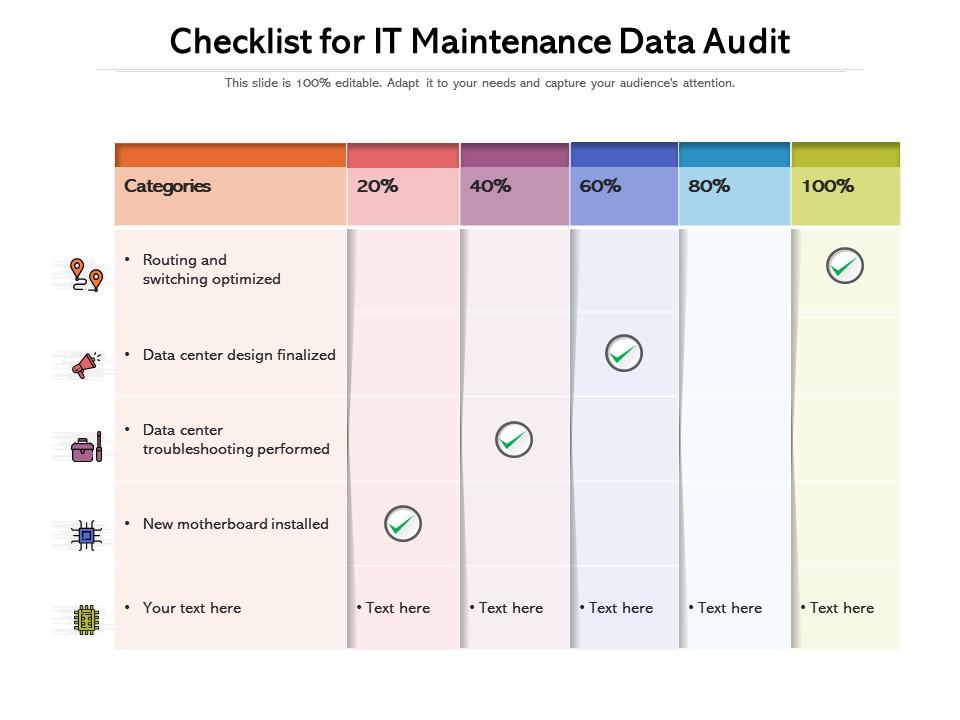
Template 11: Checklist for IT Maintenance Data Audit
IT maintenance and data audit activities need to be tracked, not just completed. This slide delivers a clear checklist structure for documenting maintenance tasks and audit progress side by side. IT administrators and system managers reach for this when preparing maintenance logs or presenting audit readiness. The format keeps tasks visible and accountable across review cycles. Transform your IT maintenance audit presentations today. Download this dynamic template now and build a reliable maintenance record your team can stand behind.
Download this PowerPoint Template
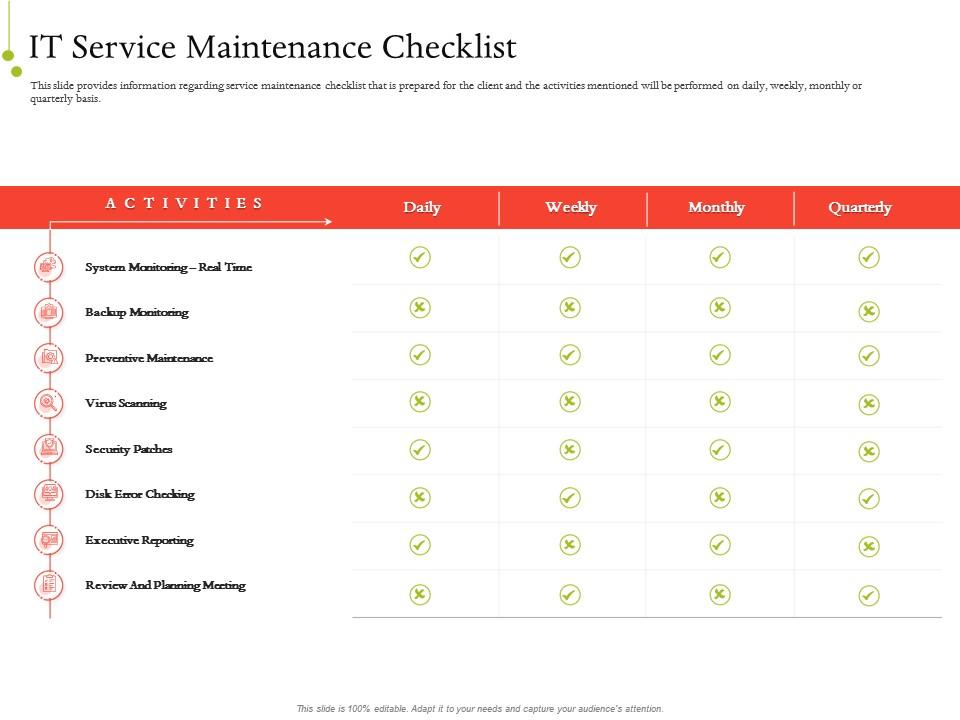
Template 12: IT Service Infrastructure Management IT Service Maintenance Checklist PPT Infographic Template Maker
Service maintenance checklists lose value when they're not tied to a clear schedule. This PPT preset maps IT service activities across daily, weekly, monthly, and quarterly cycles. IT service managers use this when presenting maintenance plans to clients or internal operations teams. It covers monitoring, planning, security, and executive reporting in one consolidated view. Useful for IT infrastructure maintenance planning and service delivery reviews alike. The template is 100% editable and customizable.
Download this PowerPoint Template
Template 13: Information Technology Checklist for Risk Management
IT risk management checklists only work when tasks are prioritized by urgency and status. This template presents a clear risk management checklist covering technology assessments, cyberattack prevention, regulatory compliance, and server and firewall configuration. Each task is flagged for timing, making it easy to track what needs immediate attention. It supports IT infrastructure audit presentations and compliance review sessions. Transform your IT risk management presentations today. Download this dynamic template now and take control of your technology risk posture.

Download this PowerPoint Template
Template 14: Data Center Migration Checklist for Computing Environment
Data center migrations fail when checkpoints aren't clearly assigned and tracked. This slide maps the full migration checklist for a computing environment—covering business case identification, stakeholder buy-in, and asset portfolio assignment. Project managers and IT architects reach for this when presenting migration readiness to leadership. For teams working through a broader IT infrastructure evaluation, this deck keeps the migration phase organized. Browse top IT infrastructure evaluation templates for additional planning support. The template is 100% editable and customizable.
[product_image id=1179093]
Template 15: Data and Network Security Checklist
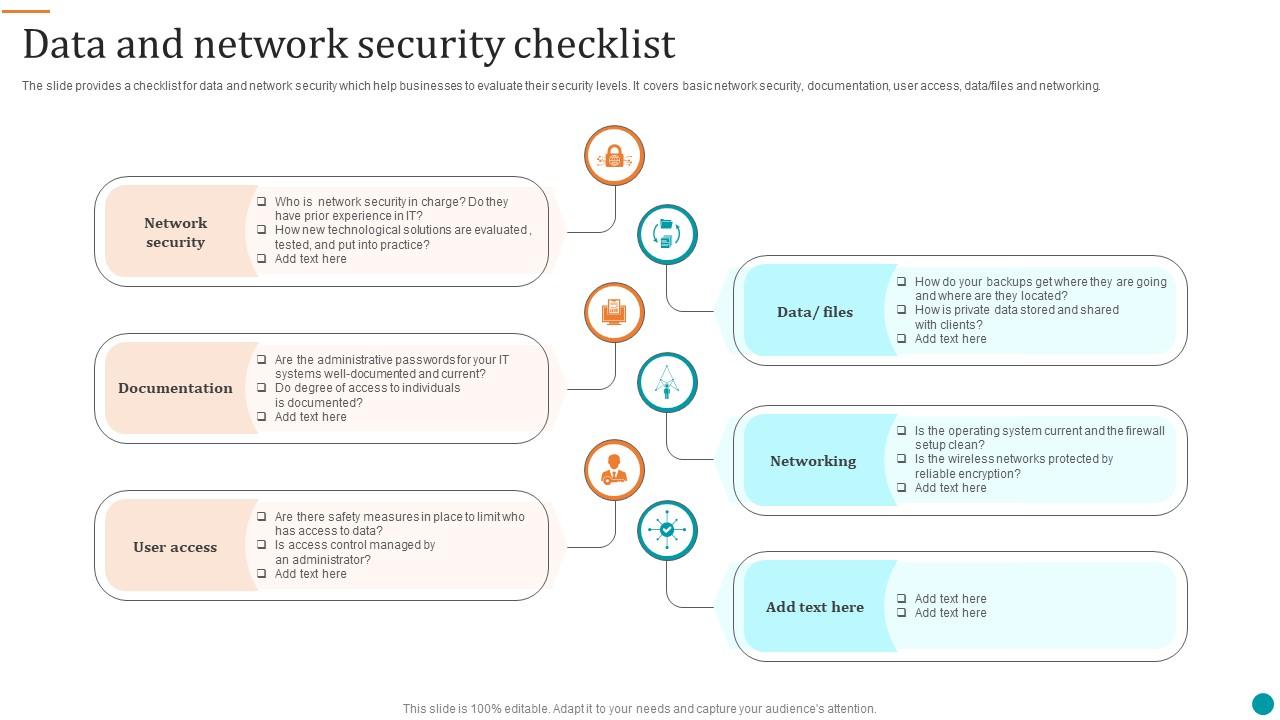
Network security and data protection checklists serve a practical purpose—they tell you exactly where your exposure is. This PPT preset covers six key areas: basic network security, documentation, user access, data files, and networking controls. Security analysts and IT compliance leads use this when conducting a network security checklist review or presenting security levels to management. It gives a fast, structured read on where gaps exist. The template is 100% editable and customizable.
Download this PowerPoint Template
Template 16: Checklist to Monitor IT Infrastructure Functional Areas Blueprint Develop Information IT Roadmap Strategy
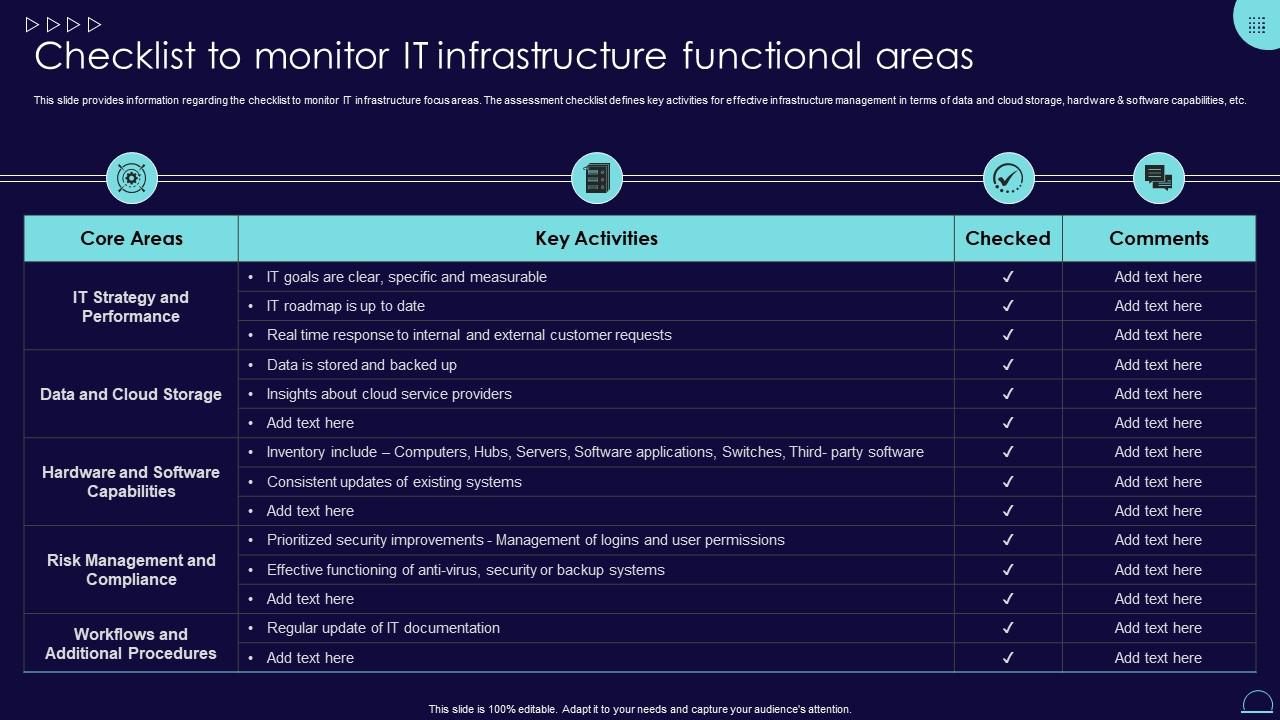
IT roadmap planning starts with knowing the current state of your infrastructure. This template provides a structured checklist for monitoring IT infrastructure functional areas—covering data storage, cloud capabilities, hardware, and software. It's designed for IT leaders building an IT infrastructure planning roadmap or presenting infrastructure blueprints to executive teams. The checklist format keeps every functional area visible and easy to assess. Transform your IT infrastructure roadmap presentations today. Download this dynamic template now and build a clearer path forward.
Download this PowerPoint Template
Template 17: M&A IT Integration Checklist PowerPoint Presentation Slides
Mergers and acquisitions create immediate IT integration pressure. This deck covers the full M&A IT integration checklist across 18 professionally designed slides. IT integration leads and CIOs use this when managing technology consolidation across two organizations. It gives structure to a process that's notoriously hard to document. See IT infrastructure risk assessment templates that complement M&A integration planning. The template is 100% editable and customizable.
[product_image id=127359]
Template 18: Checklist to Improve IT Service Delivery Management
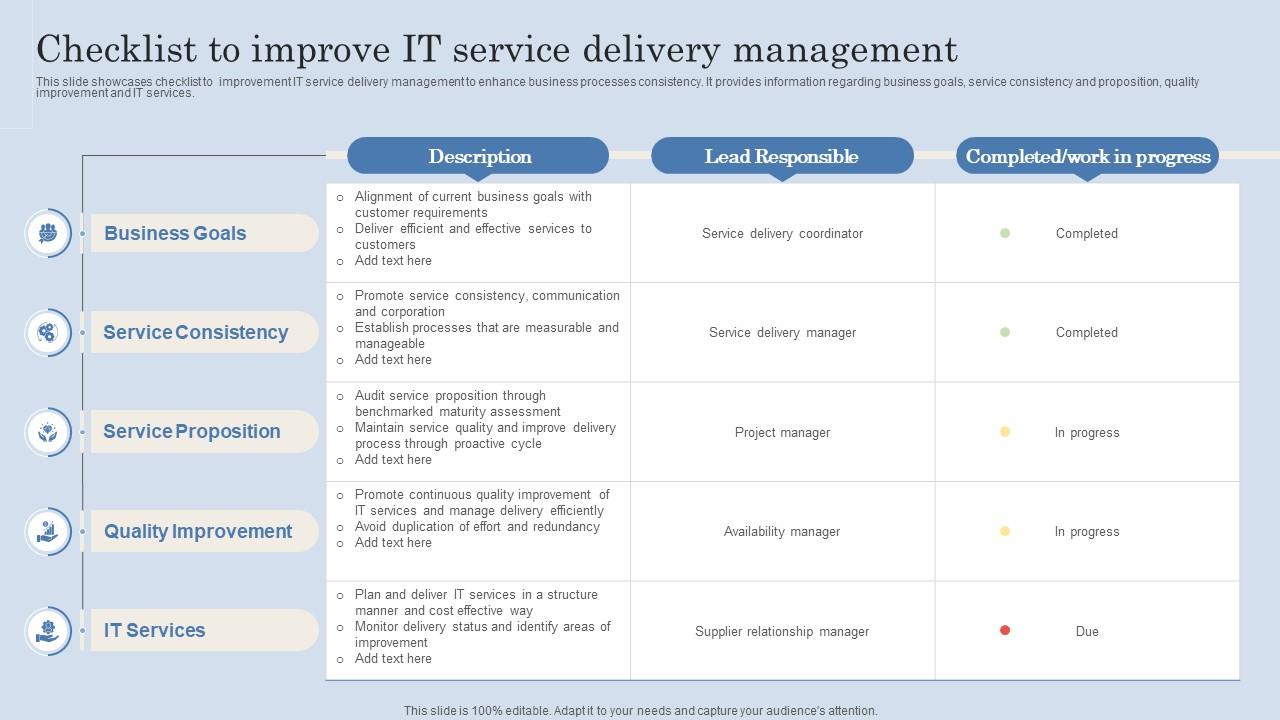
IT service delivery gaps are easier to fix when they're documented against clear goals. This template presents a structured checklist for improving IT service delivery management across three areas: business goals, service consistency, and service proposition. IT service managers and operations leads use this to align their teams and present improvement plans to stakeholders. The layout is clean and immediately usable for quality improvement reviews. Transform your IT service delivery presentations today. Download this dynamic template now and drive measurable consistency across every service touchpoint.
Download this PowerPoint Template
Template 19: Checklist to Monitor IT Infrastructure Functional Areas IT Cost Optimization and Management Strategy
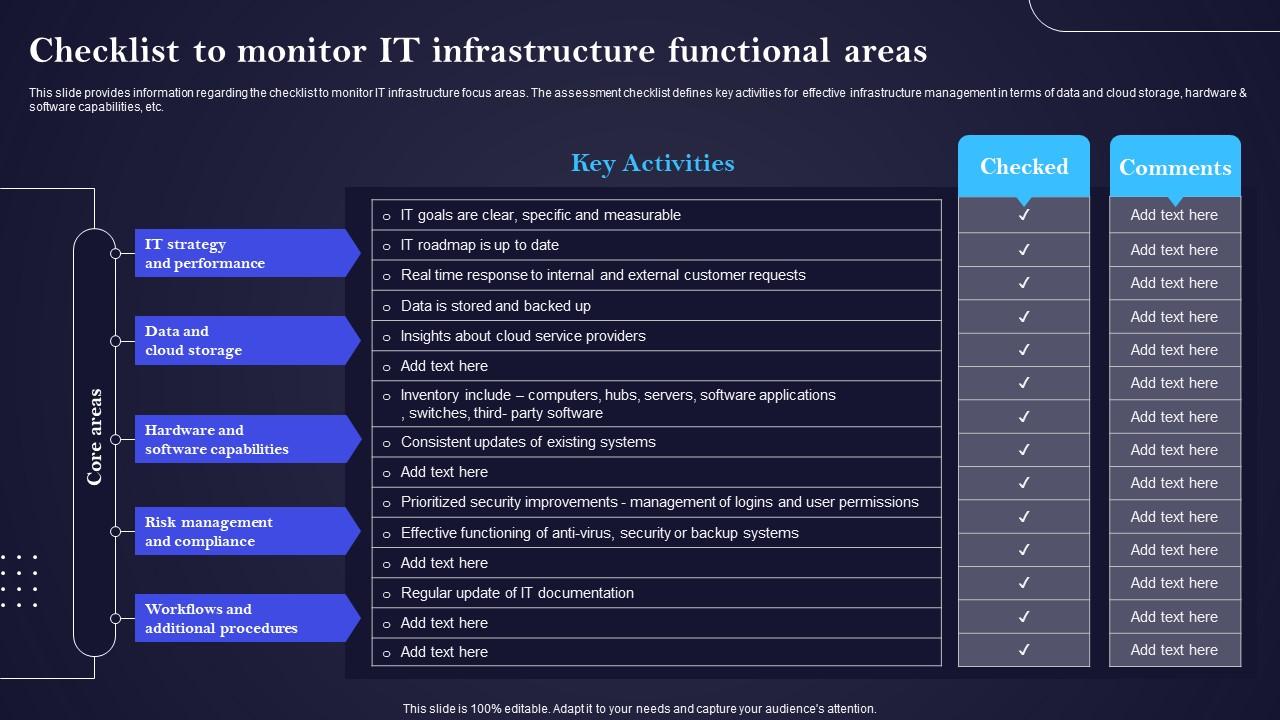
IT cost optimization requires a clear view of what infrastructure is actually doing. This checklist template maps functional areas—cloud storage, software capabilities, and IT strategy—against cost management objectives. IT finance leads and CIOs use this when presenting cost optimization reviews or infrastructure rationalization plans. The structured format makes complex cost and capability tradeoffs easy to communicate. Transform your IT cost optimization presentations today. Download this dynamic template now and make every infrastructure dollar accountable.
Download this PowerPoint Template
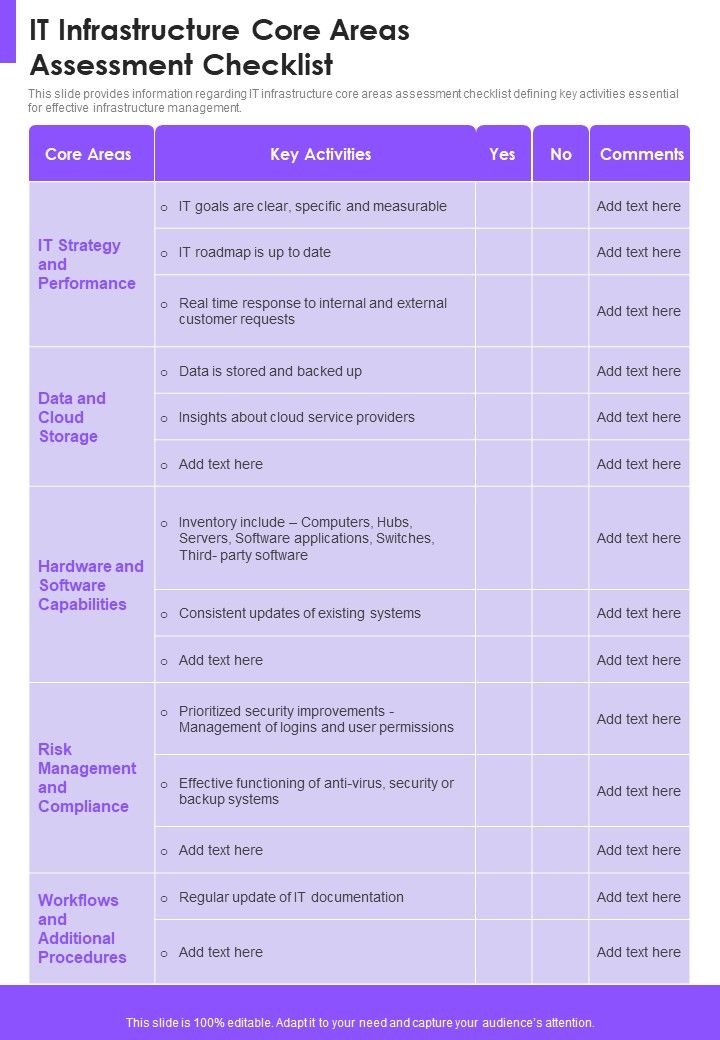
Template 20: IT Infrastructure Core Areas Assessment Checklist One Pager Sample Example Document
One-page IT infrastructure assessments are useful when a full deck isn't the right format. This PPT one-pager consolidates core area assessment checklist data into a single, scannable layout. IT managers use this for quick stakeholder updates, executive briefings, or pre-meeting summaries. It pairs well with detailed assessment decks when you need both depth and a summary view. The template is 100% editable and customizable.
Download this PowerPoint Template
Elevate Every IT Infrastructure Review with SlideTeam
SlideTeam's PowerPoint templates are the best in the industry for IT infrastructure checklists. These content-ready slides save your team hours of structuring time while ensuring every audit, assessment, and compliance review is presented with professional clarity. From network security and disaster recovery to cloud infrastructure planning, these ready-made frameworks cover the full scope. Deploy these PowerPoint slides to run tighter infrastructure reviews and keep your IT operations fully accountable.
FAQs on IT Infrastructure Checklist
What are the critical components that should be included in an IT infrastructure checklist for a mid-sized enterprise?
A mid-sized enterprise checklist should cover hardware inventory, software licensing, network security controls, data backup, and access management. Add server health monitoring and patch management status. Include cloud services in use and their configurations. Compliance requirements—GDPR, ISO 27001—should also appear as a standing section. These six to eight areas give a reliable baseline for any IT infrastructure audit.
How does a well-structured IT infrastructure checklist help in minimizing system downtime and improving business continuity?
A structured checklist forces teams to verify backup integrity, failover systems, and recovery procedures before an incident occurs. It assigns clear ownership to each task, so gaps don't go unnoticed. Regular checklist reviews catch single points of failure early. Teams with documented checklists recover faster because the response steps are already written down and assigned.
What role does network security play in an IT infrastructure checklist, and what specific protocols should be evaluated?
Network security is the first line of defense in any IT infrastructure checklist. Evaluate firewall rules, VPN configurations, and user access controls as a baseline. Check patch levels on network devices and review intrusion detection system alerts. Also verify that network segmentation separates critical systems from general traffic. These four areas cover most common exposure points.
How frequently should organizations review and update their IT infrastructure checklist to stay aligned with evolving technology standards?
Review the checklist quarterly at a minimum. Major changes—new cloud services, vendor shifts, regulatory updates—should trigger an immediate review outside the regular cycle. Annual reviews are not enough given how fast IT environments change. A living checklist tied to change management ensures it stays accurate and actionable.
What are the key differences between an IT infrastructure checklist for cloud-based environments versus on-premise setups?
Cloud-based checklists focus on identity management, API security, and shared responsibility models with providers. On-premise checklists prioritize physical security, hardware lifecycle, and local network controls. Cloud setups require regular review of provider compliance certifications. On-premise setups need documented patch schedules and hardware refresh cycles. The core security goals are the same; the verification points differ.
How can an IT infrastructure checklist be tailored to meet compliance requirements such as GDPR, HIPAA, or ISO 27001?
Start by mapping each compliance requirement—GDPR data handling, HIPAA access controls, ISO 27001 risk management—to specific checklist items. Assign a compliance owner to each section. Include evidence collection tasks, not just verification checkboxes. Schedule checklist reviews to align with compliance audit cycles. This turns the checklist into audit-ready documentation, not just an internal tracking tool.
What disaster recovery elements are non-negotiable in any comprehensive IT infrastructure checklist?
Non-negotiable disaster recovery checklist items include tested data backups, a documented recovery time objective, and a clear incident response plan. Offsite or cloud backup storage is required. Failover systems must be verified, not just configured. Regular recovery drills—at least twice yearly—confirm that the plan actually works when needed.
How should hardware lifecycle management be documented and tracked within an IT infrastructure checklist?
Document each hardware asset with purchase date, warranty expiry, and expected end-of-life date. Track this inside the IT infrastructure checklist with a refresh schedule attached. Flag assets within 12 months of end-of-life for replacement planning. Assign ownership of each asset to a specific team member. This turns hardware lifecycle management from a reactive task into a planned process.