


Business Process Automation To Improve Operational Efficiency Powerpoint Presentation Slides





Try Before you Buy Download Free Sample Product
 Impress Your
 Audience
 100%
100% Editable
 Save Hours
 of Time


Automation uses the latest technology to perform perplexing tasks with minimum human intervention. With the ongoing manual process, the organization faces many issues that eventually lower the productivity and efficiency of their employees. Grab our competently designed Business Process Automation to Improve Operational Efficiency template that will assist businesses in introducing automation tools within various business areas to enhance the overall operational efficiency. Initially, the PPT provides an overview of the multiple challenges faced by the company with manual processes, impact on business performance, need to introduce automation, etc. The PowerPoint presentation includes comprehensive information about the major areas where process automation is required, such as onboarding new employees, customer support, social media management, and supply chain management. Further, the deck contains a few slides on the business process automation roadmap and various online courses which will be helpful for the organization to provide BPA training to employees. Lastly, it covers the KPI metrics dashboard through which managers can monitor the performance of automation tools in multiple areas of the business. Download it now.
People who downloaded this PowerPoint presentation also viewed the following :
Content of this Powerpoint Presentation
Slide 1: This slide introduces Business Process Automation to Improve Operational Efficiency. State your company name and begin.
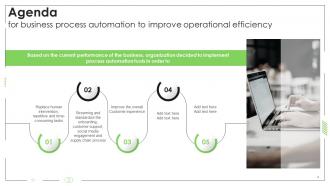
Slide 2: This slide states Agenda of the presentation.
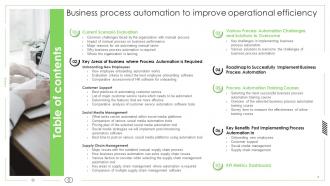
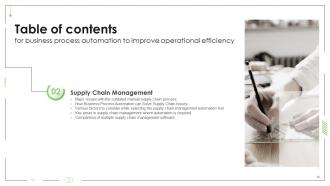
Slide 3: This slide shows Table of Content for the presentation.
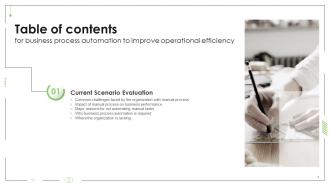
Slide 4: This slide depicts title for five topics that are to be covered next in the template.
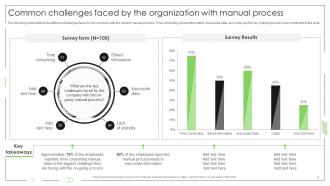
Slide 5: This slide outlines the different challenges faced by the company with the current manual process.
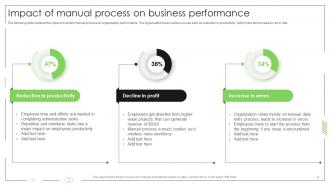
Slide 6: This slide outlines the impact of current manual process on organization performance.
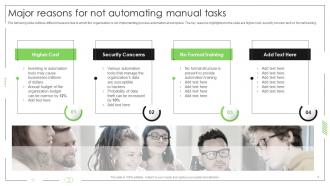
Slide 7: This slide outlines different reasons due to which the organization is not implementing process automation at workplace.
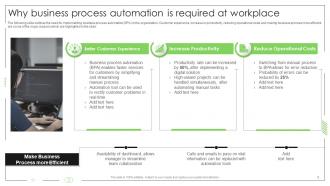
Slide 8: This slide outlines the need for implementing business process automation (BPA) in the organization.
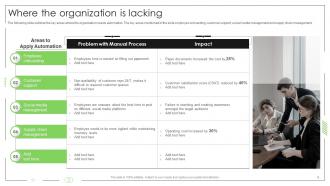
Slide 9: This slide outlines the key areas where the organization needs automation.
Slide 10: This slide depicts title for three topics that are to be covered next in the template.
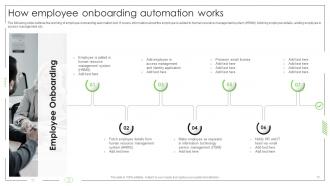
Slide 11: This slide outlines the working of employee onboarding automation tool.
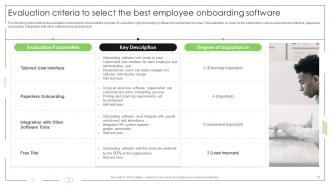
Slide 12: This slide outlines the evaluation criteria which will assist the company to select the right onboarding software for recruitment process.
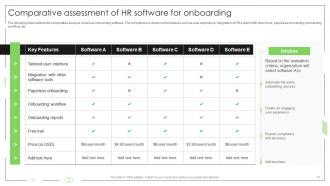
Slide 13: This slide outlines the comparative analysis of various onboarding software.
Slide 14: This slide depicts title for four topics that are to be covered next in the template.
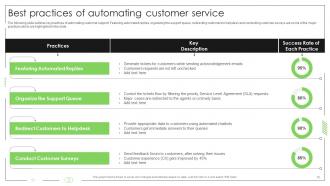
Slide 15: This slide outlines key practices of automating customer support.
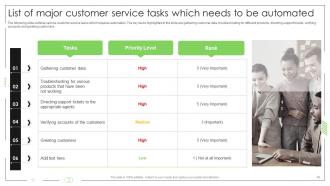
Slide 16: This slide outlines various customer service tasks which requires automation.
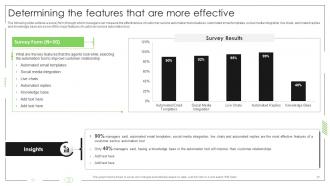
Slide 17: This slide outlines a survey form through which managers can measure the effectiveness of customer service automation tools features.
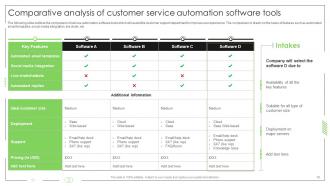
Slide 18: This slide outlines the comparison of various automation software tools which will assist the customer support department to improve user experience.
Slide 19: This slide depicts title for five topics that are to be covered next in the template.
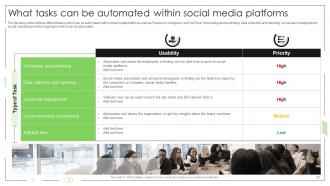
Slide 20: This slide outlines different tasks which can be automated within social media platforms such as facebook, instagram, and youtube.
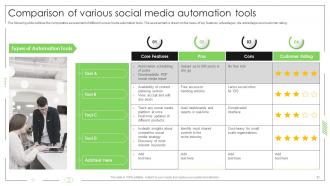
Slide 21: This slide outlines the comparative assessment of different social media automation tools.
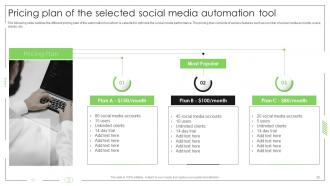
Slide 22: This slide outlines the different pricing plan of the automation tool which is selected to optimize the social media performance.
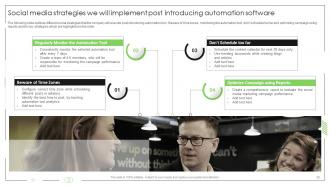
Slide 23: This slide outlines different social strategies that the company will execute post introducing automation tool.
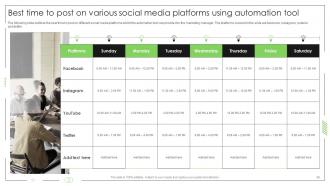
Slide 24: This slide outlines the best time to post on different social media platforms which the automation tool can provide it to the marketing manager.
Slide 25: This slide depicts title for five topics that are to be covered next in the template.
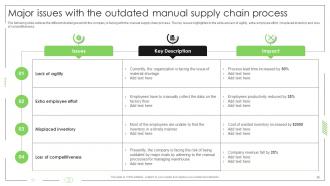
Slide 26: This slide outlines the different challenges which the company is facing with the manual supply chain process.
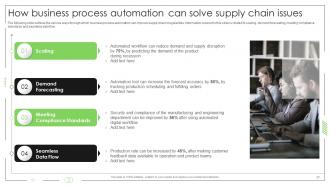
Slide 27: This slide outlines the various ways through which business process automation can improve supply chain irregularities.
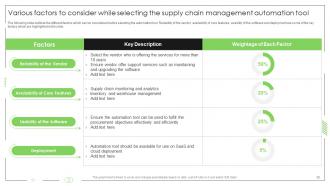
Slide 28: This slide outlines the different factors which can be considered before selecting the automation tool.
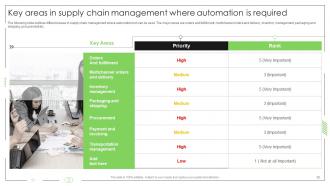
Slide 29: This slide outlines different areas in supply chain management where automation tool can be used.
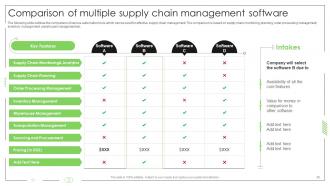
Slide 30: This slide outlines the comparison of various automation tools which can be used for effective supply chain management.
Slide 31: This slide depicts title for two topics that are to be covered next in the template.
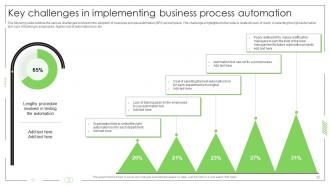
Slide 32: This slide outlines the various challenges involved in the adoption of business process automation (BPA) at workplace.
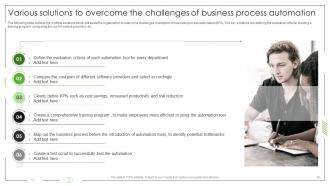
Slide 33: This slide outlines the multiple solutions which will assist the organization to overcome challenges in adoption of business process automation (BPA).
Slide 34: This slide depicts title for the topic that are to be covered next in the template.
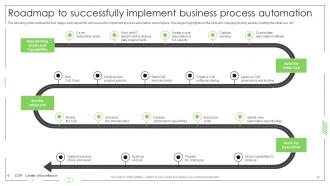
Slide 35: This slide outlines the four stage roadmap which can be used to implement process automation at workplace.
Slide 36: This slide depicts title for three topics that are to be covered next in the template.
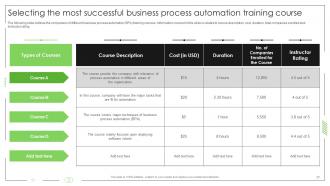
Slide 37: This slide outlines the comparison of different business process automation (BPA) training courses.
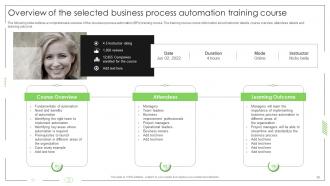
Slide 38: This slide outlines a comprehensive overview of the business process automation (BPA) training course.
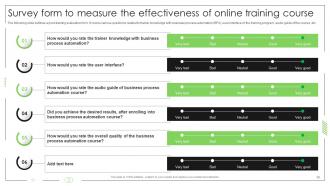
Slide 39: This slide outlines a post-training evaluation form.
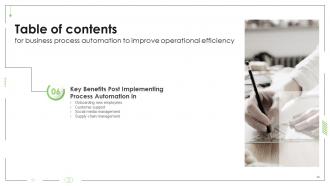
Slide 40: This slide depicts title for four topics that are to be covered next in the template.
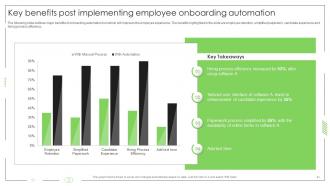
Slide 41: This slide outlines major benefits of onboarding automation tool which will improves the employee experience.
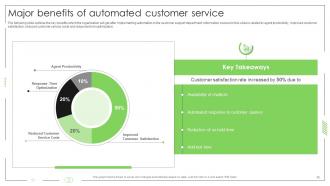
Slide 42: This slide outlines the key benefits which the organization will get after implementing automation in the customer support department.
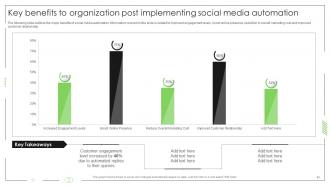
Slide 43: This slide outlines the major benefits of social media automation.
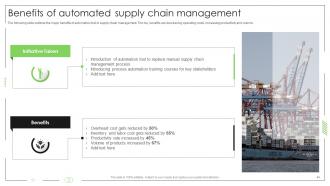
Slide 44: This slide outlines the major benefits of automation tool in supply chain management.
Slide 45: This slide depicts title for four topics that are to be covered next in the template.
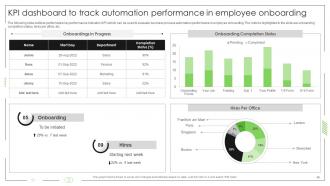
Slide 46: This slide outlines performance key performance indicator (KPI) which can be used to evaluate business process automation performance in employee onboarding.
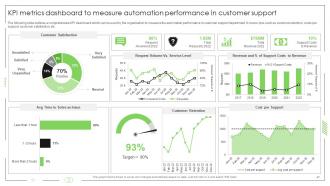
Slide 47: This slide outlines a comprehensive KPI dashboard which can be used to measure the automation performance in customer support department.
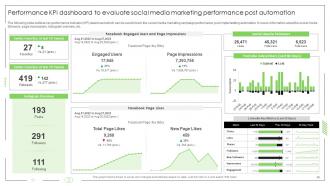
Slide 48: This slide outlines key performance indicator (KPI) dashboard which can be used to track the social media marketing campaign performance, etc.
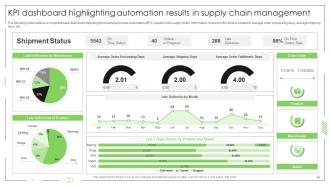
Slide 49: This slide outlines a comprehensive dashboard depicting the business process automation (BPA) results in the supply chain.
Slide 50: This slide contains all the icons used in this presentation.
Slide 51: This slide presents title for additional slides.
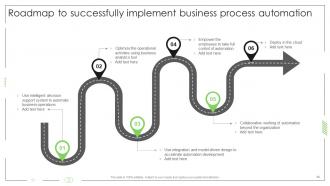
Slide 52: This slide shows Roadmap to successfully implement business process automation.
Slide 53: This is About Us slide to show company specifications etc.
Slide 54: This is Our Mission slide with related imagery and text.
Slide 55: This is Our Team slide with names and designation.
Slide 56: This slide depicts Venn diagram with text boxes.
Slide 57: This slide contains Puzzle with related icons and text.
Slide 58: This slide presents Roadmap with additional textboxes.
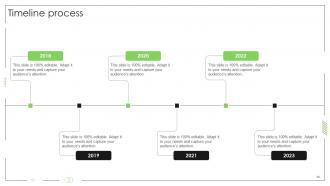
Slide 59: This is a Timeline slide. Show data related to time intervals here.
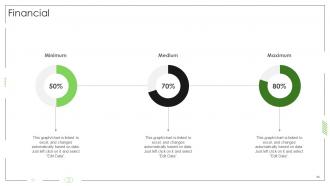
Slide 60: This is a Financial slide. Show your finance related stuff here.
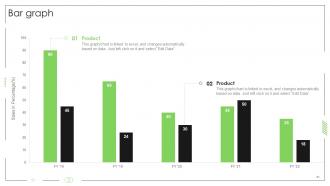
Slide 61: This slide presents Bar chart with two products comparison.
Slide 62: This is a Thank You slide with address, contact numbers and email address.
Business Process Automation To Improve Operational Efficiency Powerpoint Presentation Slides with all 67 slides:
Use our Business Process Automation To Improve Operational Efficiency Powerpoint Presentation Slides to effectively help you save your valuable time. They are readymade to fit into any presentation structure.








FAQs for Business Process Automation To Improve Operational Efficiency
Honestly, automation is a game-changer for cutting down on tedious work. Your team stops wasting time on repetitive tasks and can actually work on stuff that matters. Fewer mistakes happen too since robots don't get tired or distracted like we do. The money you save on labor costs adds up fast - I've seen companies cut operational expenses by like 30%. Your customers get way more consistent service, which is huge for retention. Oh, and you can grow without constantly hiring new people. Just pick your most boring, rule-based processes first and you'll probably see results within months.
So basically look for the boring, repetitive stuff your team does constantly - data entry, processing invoices, that kind of thing. Anything that follows the same steps every time is perfect for automation. Honestly, if people are complaining about doing the same tedious task over and over, that's your hint right there. Map out what you're currently doing and time each step. Oh, and definitely prioritize anything where mistakes cost you money or you need things running 24/7. Focus on the high-volume processes first since that's where you'll see the biggest time savings.
Look, tech is what powers automation - it knocks out all that repetitive stuff so you can actually think strategically. Workflow software routes approvals automatically. AI processes invoices. Chatbots answer the same customer questions over and over (thank god). Once you get these systems running right, the time savings are honestly crazy. I'd start by figuring out which manual processes are eating your day alive, then find tools to handle them. Don't go overboard though - pick one thing first and build from there.
Honestly, the biggest pain point is always your team pushing back - people hate change, even when it'll make their lives easier. Integration with your current systems is a nightmare too. Most companies mess up by trying to automate everything at once instead of starting with boring, repetitive stuff that actually saves money. Oh, and don't get me started on how everyone underestimates timing and costs. I'd say pick one simple process first, get that working smoothly, then expand from there. Training is huge - you can't just throw new tech at people and expect magic.
Just use free stuff you've probably got already. Zapier's free version is solid for connecting different apps together. Set up some basic email responses or workflows in Google/Office 365. I was honestly shocked how much the simple "if this happens, then do that" logic can handle. Start with whatever's driving you crazy - data entry, scheduling, invoicing, that kind of stuff. Even saving an hour daily adds up to like 250+ hours a year which is wild when you think about it. Pick something annoying this week and see what free tools can take it off your plate.
Dude, automation is a game-changer - we're talking 20-40% productivity gains because you're not wasting time on mind-numbing repetitive stuff anymore. Instead of data entry hell, your team gets to do actual strategic work and creative problem-solving. Way more engaging, honestly. The trick isn't slashing jobs though - retrain people for higher-value tasks where human judgment actually matters. I'd start with whatever manual processes eat up the most time and automate those bad boys first. Then focus on analyzing results and optimizing things. Trust me, once you see the difference it's hard to go back to the old way.
So automation speeds up everything - customers get instant replies instead of waiting around, orders process way quicker, and there's way less chance someone screws up their order or whatever. Your staff gets to skip the boring repetitive stuff and actually solve real problems. I mean, who wants to answer the same basic questions 50 times a day anyway? Start with whatever processes you're doing over and over for customers. Then just find some tools to handle that automatically. Win-win situation honestly.
Start measuring everything before you automate - you need that baseline data. Hard savings are easier: time saved multiplied by hourly rates, fewer errors, direct cost cuts. But honestly? The soft stuff often matters more. Employee morale goes up when they're not doing boring repetitive work anymore. Customer satisfaction improves with faster responses. Track it all for at least 6 months since there's always a learning curve at first. I'd actually argue the intangible benefits sometimes end up being worth way more than the obvious dollar savings.
Map out your processes step by step first - this part's honestly boring but you gotta do it. Pick something simple and repetitive to start, don't go crazy with complex stuff yet. Your team knows where the real headaches are, so get them involved early or you'll build something nobody wants to use. Always test in a sandbox before going live (learned that one the hard way). Track your wins afterward - time saved, fewer mistakes, whatever matters to you. Perfect one thing completely, then move to the next. Oh, and seriously don't skip the measuring part - you need those numbers to prove it's working.
Honestly, BPA works through APIs and webhooks that just plug into whatever you're already running - CRM, email, databases, all that stuff. No need to scrap everything you've got. Map out how your data currently flows first (seriously, this'll save you so much pain later). Pick one annoying task that bounces between systems and automate that first. Then build from there. I'd probably start with something simple between just two platforms - like automatically updating your CRM when someone fills out a form or whatever. The gradual approach actually works way better than trying to automate everything at once.
From what I've seen, finance, manufacturing, and healthcare companies are way ahead on automation stuff. Banks automate loan approvals and fraud detection now. Manufacturing does supply chain optimization and quality checks. Healthcare's getting into automated scheduling and insurance claims - though they're still playing catch-up honestly. Retail and logistics jumped on this hard after COVID too. My advice? Check out what your competitors are doing because some companies are getting left in the dust while others are saving tons of money and time.
Honestly, automation is a game-changer for compliance stuff. It tracks everything automatically so you've got that paper trail when auditors show up. No more worrying about someone skipping steps when they're swamped - the system just follows the same process every time. Risk alerts can trigger when things go wonky too. I'd probably start with whatever processes give you the biggest compliance headaches first. The reporting side is clutch - you can pull data super fast instead of scrambling around looking for documentation. Way less human error overall.
AI's getting crazy smart - we're talking real decision-making, not just following basic rules. There's this whole hyperautomation thing happening where different tools actually talk to each other across your workflow. Low-code platforms are letting non-tech people build their own stuff, which honestly blows my mind. Process mining finds problems you didn't even realize were there. My advice? Start with small pilot projects now. You don't want to be playing catch-up when everyone else is already running with this stuff.
So ML basically turns your boring automation into something that can actually think a bit. Instead of those rigid if-then rules, it spots patterns in your data and makes real decisions - like sorting support tickets or flagging weird invoice amounts. Pretty neat stuff, honestly. You can automate processes that need some judgment, not just the mindless repetitive tasks. It gets smarter over time by learning from your actual business data too. I'd start by looking at decisions you're making over and over based on data patterns - that's where you'll see the biggest wins.
Honestly, I'd start with just getting comfortable with whatever automation tools your work already has. Adaptability is clutch - things change fast. You'll definitely need solid critical thinking since you'll be dealing with the messy problems robots can't figure out. Data analysis matters way more now too. Communication skills are actually becoming super important (which is kinda ironic). You're constantly working with people AND systems. But here's the thing - curiosity might be the biggest one. Like actually wanting to dig into how stuff works. Tech literacy obviously, but don't stress about learning everything at once.
-
A perfect platform for all your presentation needs. Unlimited products at an affordable price.
-
SlideTeam is a great place for PPT templates. They have many templates on a single topic. It has made my life a lot easier.