

Change request form template ppt samples




Try Before you Buy Download Free Sample Product
 Impress Your
 Audience
 100%
100% Editable
 Save Hours
 of Time


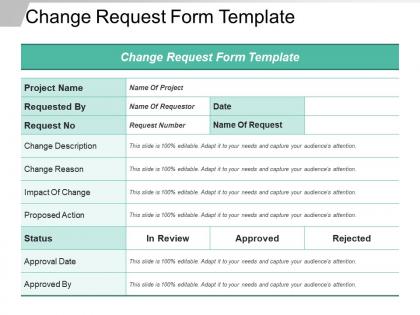
Introducing Change Request Form Template PPT Samples for project management. Employ this change management layout to present the proposed changes for a particular project. You can include components such as the project name, request number, the reason for changes, change status, etc. in this change process infographic. Utilize this project objective change slideshow to identify, implement, monitor and control the changes. Portray the various benefits of project modification to convince your management to accept your proposal with this objective alteration background image. Take advantage of this project management visual to show changes to some systems or products according to the deliverables of the project. As this graphic is adaptable, you are permitted to add additional data that relates to your project requirements. You can determine the schedule, budget, and scope of your project with this project request flow PowerPoint presentation. Hence, download this project mission background image to effectively monitor and control your business projects.
People who downloaded this PowerPoint presentation also viewed the following :
Change request form template ppt samples with all 5 slides:
Our Change Request Form Template Ppt Samples help foster enduring agreement. They ensure hatchets get buried forever.
FAQs for Change request form
Start with the must-haves: change description, business justification, and impact assessment. Those are your non-negotiables. Throw in requestor details, priority level, what systems get affected, timeline, and resources needed. Approval workflows are huge - trust me on this one. Don't skip rollback plans either because when stuff breaks (and it will), you'll want an escape route. Risk assessment and success criteria round it out nicely. The trick is finding that sweet spot where it's thorough enough to actually evaluate but won't make people groan when they see it. You can always add more fields later once you figure out what you're missing.
Honestly, change request forms are a lifesaver because they stop people from bombarding you with random requests. You'll get all the key info upfront - what they want changed, why, timeline, resources. Makes evaluating impact so much faster. Creates a paper trail too, which saves you when someone later claims they never approved something (happens more than you'd think). The best part? Stakeholders actually know how to properly submit stuff instead of cornering you for "quick favors" that aren't quick at all. Set up a basic template and suddenly you have an actual process instead of pure chaos.
Dude, standardized forms are seriously worth it. No more chasing people down for basic stuff like rollback plans or impact assessments. Each team gives you the same info format, so you're not playing detective every time. Your review process gets way faster too since everything's in the expected spots. Tracking patterns becomes almost stupidly easy when requests look identical. Oh, and definitely do a quick demo when you roll it out - people always mess up the first few times otherwise. Trust me, it'll save you so many headaches down the road.
Oh man, change request forms are lifesavers! They keep all the messy details in one spot instead of buried in your inbox somewhere. You'll have the why, the timeline, what you need resource-wise - all documented properly. Stakeholders can actually see the same info and make decent decisions together. No more "wait, who approved this?" moments either since everything's tracked. Honestly, I've seen projects go sideways when people skip this step. Just use it as your go-to reference whenever stuff changes on your project.
Look, that change request form isn't just busy work - it's actually pretty useful for spotting problems early. Fill it out and you'll naturally think through what might go sideways: timeline issues, resource problems, dependencies that could bite you later. Honestly, I've seen too many projects crash because someone skipped this step. It also creates a record of what got approved and why. Plus other people can catch risks you totally missed (we all miss stuff sometimes). Treat it like brainstorming session rather than just paperwork you have to get through.
Honestly, form design can make or break whether people actually fill the thing out. Group related stuff together - technical details in one spot, approvals in another. Don't go crazy with required fields (I've watched people just submit garbage data when they hit too many validation errors), but you still need the basics. Clear labels help a ton. Smart defaults too, if you can swing it. Maybe show sections progressively so it doesn't look overwhelming at first glance? Oh, and definitely test it with a few coworkers - they'll catch weird stuff you missed immediately.
Honestly, the worst thing you can do is make it super complicated - people will just nope out halfway through. Use dropdowns instead of making everyone type everything from scratch. Also, be specific with your labels! Don't just say "describe impact" without examples of what you're actually looking for. Ugh, and approval workflows - I swear half the templates I see collect all this info but nobody knows who's supposed to review it or when. Keep required fields minimal, add a priority field (trust me on this), and test it with real users first. Like, actually watch them fill it out before you launch it company-wide.
So it totally depends on what industry you're in. Healthcare forms need HIPAA stuff and patient safety questions - that's non-negotiable. Finance has to worry about regulatory compliance and risk assessments. Manufacturing? Focus on safety protocols and how long equipment will be down. Nobody wants production to halt over a bad change request. Tech companies can skip some of that and focus more on system dependencies and rollback plans instead. Honestly, just start with a basic template and add maybe 3-5 fields that cover whatever keeps your stakeholders up at night. Think about what questions they'll actually need answered when stuff hits the fan.
For tracking change requests better, I'd start with a project management tool like Jira or Asana - they're solid for workflow stuff. Slack integration is clutch for notifications, though honestly the constant pings can drive people nuts if you don't dial it back. SharePoint or Google Drive work great for storing all your supporting docs in one spot. Oh, and don't go crazy connecting everything right away. Pick one tool first, let your team get used to it, then add more. I made that mistake once and everyone was totally overwhelmed.
Oh man, change request forms are lifesavers! They make people actually think before suggesting random tweaks. Document what's changing and why, plus how it affects your timeline and budget. Trust me, those "tiny" changes always snowball into massive headaches. The form creates a paper trail so stakeholders can't just dump ideas on you without justification. It also gives you solid grounds to say no to dumb requests - which honestly feels pretty good sometimes. Make everyone fill one out for ANY modification, even if it seems minor.
Honestly, there's a bunch of useful stuff you can pull from change request data. Monthly volume shows how busy things get - some months are just nuts. Approval rates are key too, like what percentage actually makes it through. Response times matter way more than people think because waiting around for weeks kills momentum. I'd also look at request types to see what changes pop up most often. Department breakdowns help spot patterns, and you can track which systems cause the most headaches. Start simple though - grab volume and approval rates first, then add more layers once you get the hang of it.
Look, the approval workflow is honestly the most critical part of your whole form setup. Without it? Requests just sit there forever while everyone plays hot potato with who's supposed to handle what. I've watched so many good forms basically become digital black holes because nobody mapped out the next steps. You need clear stages, designated reviewers, and - this is key - escalation paths for when things get stuck. Otherwise your important changes disappear into corporate purgatory. The right workflow gets the right people reviewing stuff in order and actually speeds up decisions instead of creating more bottlenecks.
Dude, fill out every single required field or you'll just get bombarded with follow-up questions. Be specific with technical details and explain why you need it done. I swear, I've watched requests sit for weeks because someone literally wrote "fix the thing" - like what thing?? Attach screenshots if you have them. Reference old ticket numbers. Oh, and definitely mention your timeline upfront plus any dependencies. That way they can actually prioritize your stuff properly instead of guessing what's urgent.
So those change request forms? They're basically data treasure troves. You'll start seeing patterns in what keeps breaking and what users are actually asking for. Monthly reviews help you spot the stuff that needs real fixes instead of just quick patches. Honestly, the paper trail alone is worth it - shows you which changes actually worked vs the ones that crashed and burned. Plus having a standard way to collect feedback makes it way easier to figure out trends. Oh, and prioritizing becomes so much clearer when you can see which issues keep popping up.
Check it every three months minimum. But honestly? Anytime you're getting the same dumb questions repeatedly, that's your cue to fix something. Same goes if people keep messing up the same sections - your form is probably confusing them. Major process updates or new compliance stuff means you need to review it right away. I always set a quarterly calendar reminder because otherwise I'll totally forget. The whole point is making it actually usable so people fill it out right the first time instead of going back and forth with corrections. Trust me, it's worth the effort.
-
Graphics are very appealing to eyes.
-
Excellent design and quick turnaround.