


Circular workflow includes four iterative steps of pdca




Try Before you Buy Download Free Sample Product
 Impress Your
 Audience
 100%
100% Editable
 Save Hours
 of Time


Get folks to ignore disheartening aspects with our Circular Workflow Includes Four Iterative Steps Of Pdca. Enable them to handle demoralizing elements.
People who downloaded this PowerPoint presentation also viewed the following :
Content of this Powerpoint Presentation
Description:
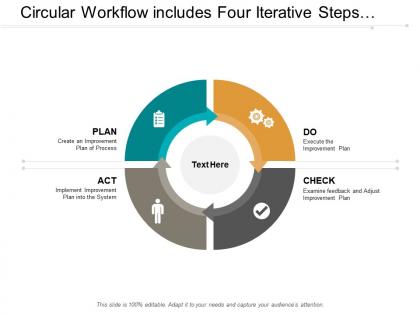
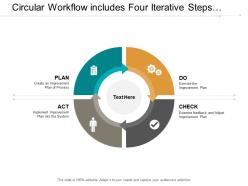
The image features a PowerPoint slide titled "Circular Workflow Includes Four Iterative Steps," representing the PDCA (Plan-Do-Check-Act) cycle, which is a repetitive four-stage model for continuous improvement in business process management. The slide shows a circular diagram divided into four colored segments, each representing a step in the PDCA cycle:
1. PLAN:
"Create an Improvement Plan of Process" - typically involves identifying a problem and planning for change.
2. DO:
"Execute the Improvement Plan" - where the plan is implemented on a small scale to test its effect.
3. CHECK:
"Examine feedback and Adjust Improvement Plan" - involves evaluating the results of the test and identifying what was learned.
4. ACT:
"Implement Improvement Plan into the System" - if the test is successful, the new process is implemented fully.
The central part of the diagram provides a space labeled "Text Here," suggesting that additional details can be inserted. Each step of the cycle has an associated icon that illustrates the action to be taken.
Use Cases:
The PDCA cycle slide can be utilized across a broad range of industries for process improvement and quality management:
1. Manufacturing:
Use: Enhancing production line efficiency
Presenter: Operations Manager
Audience: Production Team, Quality Control Staff
2. Healthcare:
Use: Improving patient care procedures
Presenter: Healthcare Administrator
Audience: Medical Staff, Hospital Management
3. Education:
Use: Developing and refining teaching methods
Presenter: Curriculum Developer
Audience: Teachers, Academic Staff
4. Software Development:
Use: Iterative development and feature updates
Presenter: Software Engineering Lead
Audience: Development Team, Product Managers
5. Environmental Management:
Use: Implementing sustainability initiatives
Presenter: Environmental Officer
Audience: Corporate Staff, Environmental Specialists
6. Marketing:
Use: Optimizing marketing campaigns
Presenter: Marketing Analyst
Audience: Marketing Team, Executives
7. Quality Assurance:
Use: Continuous quality improvement
Presenter: Quality Assurance Manager
Audience: QA Team, Management Staff
Circular workflow includes four iterative steps of pdca with all 5 slides:
Grab the advantage our Circular Workflow Includes Four Iterative Steps Of Pdca create. They ensure conditions in your favor.

FAQs for Circular workflow includes four iterative
So PDCA is pretty straightforward - Plan (figure out the problem and your fix), Do (test it small first), Check (see if it actually worked), then Act (roll it out if good, or pivot if not). What's cool is how it loops - your Act becomes your next Plan, so you're always improving. Way better than just crossing your fingers and hoping stuff works out, honestly. Each cycle feeds the next one, which is kinda genius when you think about it. Just pick something minor you're working on and run through it once. You'll get it immediately.
Don't create a whole new system - just weave PDCA into meetings you already have. Pick one tiny problem to start with. I learned the hard way that going big immediately is a disaster waiting to happen. Your team needs to get the basics: Plan a small test, Do it, Check what actually happened (be brutally honest here), then Act on it. Visual stuff helps tons - simple boards or templates so people can see progress at a glance. The trick is making it feel normal, not like you're adding more red tape. Try a 30-day cycle first on something really concrete and see how it goes.
Honestly, PDCA is just a fancy way to say "don't wait till the end to figure out you messed up." You plan something small, try it out, then check if it actually worked. Based on what you learn, you adjust before moving forward. The whole point is catching problems early instead of discovering them when it's too late to fix anything. I always tell people to start tiny - like just one piece of your project. You'll be surprised how much smoother things go when you're constantly tweaking as you learn stuff.
Dude, PDCA is literally everywhere once you start noticing it. Toyota built their whole lean thing around it - pretty genius honestly. Healthcare uses it all the time for patient safety stuff and cutting down medical errors. Software teams do it naturally with sprints - plan, code, review, adjust based on feedback. Hotels and restaurants run PDCA cycles to fix customer complaints and streamline operations. What's awesome is how adaptable it is. You can throw it at basically any process that needs tweaking. My advice? Pick something small in your department first and just try it out.
Honestly, most people rush the planning part and don't actually figure out what problem they're solving. Keep your tests small in the Do phase - I learned this the hard way when we bit off way too much. Don't get so pumped about results that you skip analyzing them properly (guilty of this myself). The Act phase isn't just "we're done!" - you gotta feed what you learned back into the next round. Oh, and start super simple with your first cycle. You need to get the hang of the rhythm before tackling anything complex.
Honestly, data collection is where most PDCA efforts live or die. You need it in the Check phase to see if your plan actually worked - can't just wing it and hope for the best. Too many teams skip this part because collecting data feels boring, but you're basically guessing without it. The analysis part is huge too since it shows you the "why" behind what happened. Pro tip: figure out your key metrics during the Plan stage so you're not scrambling later trying to measure random stuff. Short answer - no data means no real improvement.
Honestly, without leadership backing you up, PDCA becomes this pointless box-checking thing. Your bosses have to actually walk the walk and give people time to do it right. But here's the thing - involving your actual team matters just as much. They're the ones who know what's really broken. I've watched so many of these initiatives crash and burn when it's just management pushing it down. People need to feel safe bringing up problems without getting blamed. Otherwise you're just wasting everyone's time going through fake improvement motions.
Yeah, totally doable with remote teams! Just gotta get smart about your tools. Shared docs work great for the Plan phase - make sure everyone knows who's doing what and when. Daily standups help track the Do part (though honestly they can feel excessive sometimes). Check is actually easier remote since you can set up real-time dashboards everyone can see. Then Act is just updating your shared processes and docs. The trick is making everything visible since you can't just pop over to ask how things are going. I'd start with one simple cycle and document it all digitally first.
Track your leading and lagging indicators through each PDCA phase. Start by setting baselines in Plan - figure out what success actually looks like. Monitor process stuff during Do (adherence, resource usage, early signals). Check is where you compare results to targets, and honestly? Most people's initial assumptions are completely wrong here, but whatever - that's the point. Act phase means watching sustainability metrics so your improvements don't just fall apart later. Keep it to 3-5 key metrics though. Any more than that and you'll get lost in spreadsheets instead of focusing on what moves the needle.
PDCA is way more straightforward than Six Sigma - honestly, you could start using it on your next work problem today. Six Sigma needs all this formal training and statistical analysis stuff (kind of overkill unless you're dealing with really complex defects). PDCA? Just four steps you repeat: plan something small, do it, check what happened, then adjust. Works for anything - I've used it for random productivity issues. Six Sigma's better for heavy-duty data problems, but PDCA doesn't need special tools or training. Next time something's bugging you at work, just cycle through those steps and see what happens.
Yeah totally! PDCA fits really well with Agile sprints. Your sprint planning becomes the Plan phase. Do is obvious - that's your actual sprint work. Then Check maps to sprint reviews and retros, while Act is where you implement those improvements next sprint. Honestly, I think they're like... made for each other? Both are all about that iterative improvement cycle. Just keep your PDCA cycles short and synced up with your sprints. Oh and pro tip - focus on one improvement per sprint instead of going crazy trying to fix everything. You'll actually see progress that way.
Look into basic PDCA workshops or grab some online courses from lean/six sigma places. Your team needs that foundation first. I've watched so many groups get stuck overthinking everything - honestly, just dive in and learn as you go. That's what makes PDCA great. Try small, low-risk stuff to practice on. "The Improvement Guide" is pretty good if you're into books. Internal lean coaches can help too, if your company has them. Pick something stupidly simple for round one. Maybe a 30-day project where you can actually finish the whole Plan-Do-Check-Act cycle without wanting to pull your hair out. Build confidence first, then tackle bigger things.
So PDCA basically forces your team to actually sit down and talk to each other - which honestly, most teams suck at. The Check phase is where everyone has to share what they found, and suddenly people aren't hiding in their own little corners anymore. Then when you hit Act, the whole group decides what to do next based on what you all learned together. It creates this natural rhythm where you're constantly planning, doing stuff, checking back in, then adjusting as a team instead of everyone just doing their own thing. Try it on your next project - you'll be surprised how much more connected everyone gets.
Honestly, there's a bunch of ways to tackle this. Asana and Trello are solid for tracking your PDCA cycles - keeps everyone on the same page. When you hit the Check phase, Tableau or Power BI are great for visualizing data (though Excel works fine if you're not going crazy with complexity). I'd grab Lucidchart for mapping out processes during planning. Google Workspace is clutch for collaboration too. My advice? Start with tools your team already knows. You can always get fancier later once you've got the rhythm down.
Yeah, PDCA works great for strategic planning! Plan out your main objectives first, then test small pilot programs instead of going all-in. Most companies totally bomb this next part - actually Check your results against KPIs and get real feedback. I swear half the strategic plans I've seen just gather dust because nobody measures anything. After that, you Act by either scaling what worked or tweaking what didn't. You can run several cycles at once for different initiatives. Honestly though? Start with just one goal so you don't overwhelm yourself.
No Reviews