


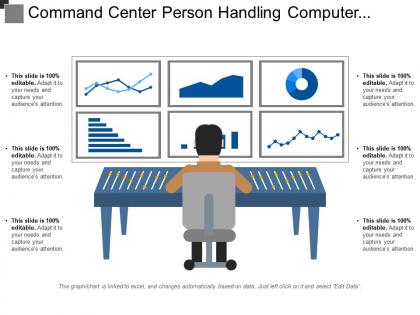
Command center person handling computer system screen




Try Before you Buy Download Free Sample Product
 Impress Your
 Audience
 100%
100% Editable
 Save Hours
 of Time


Disseminate the facts contained in the document with our Command Center Person Handling Computer System Screen. Be able to divulge the contents.
People who downloaded this PowerPoint presentation also viewed the following :
Command center person handling computer system screen with all 6 slides:
Be the destination of choice with our Command Center Person Handling Computer System Screen. Customers will always be at your doors.


FAQs for Command center person handling
So you're basically running the whole show when things go sideways. Juggling multiple emergencies at once, staying in touch with field teams, keeping the bosses in the loop with updates. The hardest part? Deciding who gets help first when everyone's screaming it's urgent. You'll be glued to radios and screens, documenting everything as it happens. Honestly, having your protocols nailed down ahead of time is a lifesaver - otherwise you're just winging it when stuff hits the fan. Oh, and don't let anything slip through the cracks or you'll hear about it later.
So basically it's life safety first, then property, then keeping operations running. Most places use a triage system like hospitals do - worst stuff gets handled immediately. Color codes or severity rankings help you decide fast. Honestly, major incidents are chaos at first because priorities keep shifting as more info comes in. But if you nail down your facility's priority matrix until it's automatic, you'll be fine. Oh and communicate constantly with your team about who's going where - that's huge. The overwhelming feeling goes away once you get used to sticking to protocols.
Start with good comms - radios, VoIP, messaging apps so everyone stays in the loop. Real-time dashboards are a lifesaver for tracking what's happening where. Backup power is non-negotiable because nothing sucks worse than going dark mid-crisis. Also grab incident management software and GIS mapping tools for the big picture view. Oh, and definitely set up data backups - learned that one the hard way! The whole game is having backups for your backups. When one thing breaks (and it will), you need something else ready to jump in.
Dude, skip the jargon when talking to outside agencies - they won't get your internal codes anyway. Plain English saves everyone headaches. Do regular check-ins to keep people updated, and honestly? Better to overcommunicate than leave folks hanging during emergencies. Make your radio checks consistent and always have backup communication ready. I learned this the hard way once. Don't wait for people to ask for updates - just share info proactively. Set this stuff up now before you're scrambling in an actual crisis situation.
You'll definitely need solid multitasking skills and good situational awareness - that stuff's critical. Communication is huge too since you're always coordinating with different teams and need to relay info clearly when things get crazy. Technical skills obviously matter because you're juggling multiple monitoring systems. But honestly? The stress management part is what really separates people. Some operators just handle pressure better than others, especially during incidents. Quick decision-making under pressure is key. If you can, try shadowing experienced operators first. You'll learn way more watching how they actually prioritize things in real-time than any training manual could teach you.
So data analytics takes all that messy incoming info and turns it into stuff you can actually act on. No more drowning in random alerts - you'll see clear patterns and trends that help you figure out what to prioritize. It's like having a really smart filter for all the noise. You can spot things like which incidents tend to escalate, where your resources get bottlenecked, or even catch potential failures before they blow up. Honestly, most people sleep on this. Start digging into your old incident data - there's probably gold in there that'll help you stay ahead of problems instead of constantly playing catch-up.
You'll need your high school diploma first, obviously. Most places want specialized training in emergency communications and incident command systems too. Depends what you're going for - police dispatch, fire, security, whatever. Honestly, a lot of employers will train you on the job anyway. But getting certified in EMD or doing a community college emergency management program makes you way more competitive. Oh, and typing speed is weirdly a big deal at some places? Check job postings in your area first though. See what they're actually asking for, then figure out which certs to get.
Dude, breaks aren't optional during those crazy long shifts - your brain literally needs the reset. Step away from the screens every few hours, even if it's just for 10 minutes. I swear some people think they're superheroes trying to power through 12+ hours straight, but that's when mistakes happen. Keep water and decent snacks around (not just vending machine junk). Oh, and lighting makes a huge difference - those fluorescent lights will drain you fast. Don't be afraid to tell your team when you're hitting a wall either. We've all been there.
Dude, good collaboration is literally the difference between a smooth operation and total chaos. Your team needs to share intel and coordinate responses without missing anything. Some days you'll be juggling multiple incidents - that's when having people who actually communicate becomes crucial. Bad teamwork means stuff falls through the cracks, people duplicate work, or worse, someone hoards critical info then disappears when you need them most. Cross-train everyone so they can jump in anywhere. Clear protocols help too, though honestly, sometimes you just gotta wing it and trust your team's got your back.
So basically they've got layers on layers of security. Access controls mean you only see what your clearance allows - no exceptions. Everything gets encrypted during transmission too. Physical stuff is nuts though. Restricted areas everywhere, cameras watching, and you can't leave anything on your desk. The monitoring systems automatically blur out classified material, which honestly feels kinda Big Brother but whatever. You'll do security training constantly - like, more than you'd expect. They drill handling protocols and reporting procedures into your head. My biggest advice? Don't wing it with their SOPs, even for stuff that seems harmless. I've seen people get burned assuming something wasn't sensitive.
Honestly, the hardest part is just the sheer amount of info coming at you constantly. Your brain gets fried after staring at screens for 12 hours - like, genuinely can't think straight anymore. I'd say focus on getting really good at prioritizing what actually matters vs what's just noise. Checklists help a ton for the routine stuff so you don't have to think as much. Take those little breaks when you can, even just 30 seconds to look away from the screen. Oh and don't be afraid to ask someone to repeat something if it doesn't make sense - better safe than sorry when you're dealing with critical ops. Having a good team makes all the difference too.
Dashboards are seriously helpful for keeping track of everything without drowning in data. Your brain processes visual stuff way faster than scrolling through endless text logs - like, heat maps instantly show you where incidents are clustering, and status indicators flag problems right away. The cognitive load difference is huge. I learned this the hard way after staring at raw data for hours once. Short sentences work. But you also want dashboards you can actually customize because priorities shift between different situations and team members. Spotting patterns and anomalies becomes almost automatic when the info's laid out visually instead of buried in reports.
Document everything while it's actually happening - don't wait until later when you'll forget half the details. I made that mistake once and spent hours trying to piece together what happened weeks after. Stick to what you actually saw or heard, no guessing. Timestamps are your best friend for tracking when stuff went down. Write down who said what, what actions got taken, any resources that were deployed. Keep it factual but thorough. Oh, and do a quick scan before you submit to make sure you didn't miss anything obvious.
So basically you're always training on something new - workshops, simulation drills, certifications for stuff like AI analytics or drone systems. The tech moves crazy fast, honestly feels never-ending! Your department usually covers ongoing education, but networking with other operators helps too. Professional associations are solid for staying in the loop. Industry publications... eh, sometimes they're useful. Really though, you just gotta stay flexible. Each new tool becomes another weapon in your arsenal when things go sideways. Can't get comfortable with the same old systems forever, you know?
Honestly, remote ops are pretty solid now - way safer for your people and you get that flexibility. But when shit hits the fan, nothing beats being in the same room. You can read everyone's body language, make those instant calls together. There's just this energy you miss through screens, you know? That said, the tech keeps getting better and having remote as backup is clutch if your main spot gets blown. Just don't let your remote guys feel like they're just staring at monitors - keep them looped into what's actually happening on the ground.
-
Appreciate the research and its presentable format.
-
Informative presentations that are easily editable.