


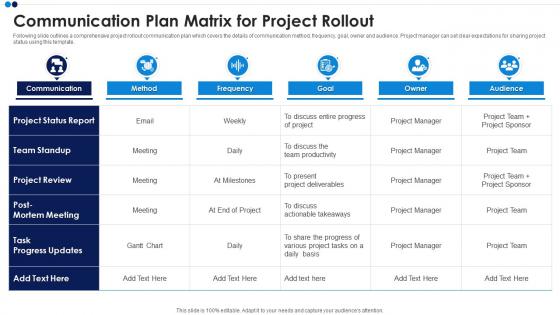
Communication Plan Matrix For Project Rollout




Try Before you Buy Download Free Sample Product
 Impress Your
 Audience
 100%
100% Editable
 Save Hours
 of Time


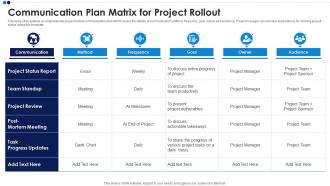
Following slide outlines a comprehensive project rollout communication plan which covers the details of communication method, frequency, goal, owner and audience. Project manager can set clear expectations for sharing project status using this template.
People who downloaded this PowerPoint presentation also viewed the following :
Communication Plan Matrix For Project Rollout with all 6 slides:
Use our Communication Plan Matrix For Project Rollout to effectively help you save your valuable time. They are readymade to fit into any presentation structure.





FAQs for Communication Plan Matrix
So you'll need to figure out your stakeholders first - like who actually needs to know what. Then map out your content, how you're gonna communicate (email, meetings, whatever), and timing. Don't forget who's doing what! Honestly, the feedback part is huge - I learned that the hard way on my last project. Such a mess when people can't ask questions. Oh and throw in some success metrics if you can, otherwise you're just shooting in the dark. Start basic with these pieces, you can always make it fancier later when things get crazy.
So basically it stops those awful "wait what's happening??" moments that totally kill projects. You figure out who needs updates, what kind of info they actually care about, and when to send it. That way your stakeholders aren't left in the dark, team members know what they're supposed to be doing, and you're not frantically trying to explain why everything's behind schedule. Honestly works great for messy projects with tons of people involved - though I learned the hard way that you actually have to use the thing once you make it, not just stick it in some random folder and forget about it.
For communication plan matrices? Google Sheets is probably your best bet - super straightforward and everyone knows it. Excel works too if that's what your team uses. Monday.com and Asana are solid if you want automatic tracking and task assignments. Notion's gotten pretty popular lately for the filtering features, though honestly it can be overkill. I'd just go with whatever tool your team already lives in daily. There's nothing worse than creating this perfect matrix that nobody updates because they hate logging into yet another platform. Keep it simple.
So basically, the communication plan matrix is like your cheat sheet for keeping everyone happy. Map out who needs what info and when they want it. I swear, once you start using one, you'll wonder how you survived without it. List all your stakeholders first, then figure out their preferred ways to get updates - some love emails, others want face-to-face meetings (ugh). Don't forget timing requirements too. Seriously saves you from that awkward moment when someone's like "wait, nobody told me about this." Makes juggling different groups way less stressful.
Honestly, audience analysis is everything - it's what your whole communication plan hangs on. Figure out who you're talking to first. What do they actually care about? How do they like getting info? Some people want detailed emails, others just want a quick Slack ping. Without knowing this stuff, you're basically throwing messages at a wall and seeing what sticks (which never works, trust me). Once you've got that down, it'll tell you which channels to use, how to frame things, when to send stuff, and even who should deliver the message. I always map out each group's preferences before touching anything else in the matrix.
Check it monthly if things are moving fast, quarterly at minimum. Seriously, I've watched teams completely miss the mark because they're still emailing someone who left three months ago. Major milestones? Definitely review it then. Team changes too. Actually, anytime communication starts feeling weird or broken, that's your cue. Just set a calendar reminder - takes like 15 minutes and saves you from those awkward moments where you realize you've been sending updates to the wrong person for weeks. People come and go, priorities flip overnight. Your matrix should keep up.
Honestly, the worst mistake is overcomplicating your matrix. You'll build this elaborate thing that sits in a folder gathering digital dust. Weekly updates seem smart until you're scrambling for content every Tuesday. Make sure someone actually owns each piece of communication - can't just dump everything on marketing (though they probably expect it by now). Also, don't blast the same message across every channel you have. People hate that. Start simple, test it with a couple teammates first, then roll it out. Way less headache that way.
Honestly, track if your messages actually hit the right people when they needed them. Check delivery rates and ask for feedback - are people still going "wait, what's happening?" all the time? If those confused questions drop off, you're doing something right. Survey your team about whether info was clear and timely. Did decisions happen faster with less back-and-forth confusion? That's the real win. Oh, and do quick check-ins after big project phases to see what actually worked. Sometimes the simple stuff tells you more than fancy metrics ever will.
So for your communication matrix, mix formal and informal stuff. Email works for official updates, Slack/Teams for daily check-ins. Video calls when things get complicated, face-to-face for anything sensitive. One-way channels are solid too - newsletters, dashboards, status boards. Perfect for info dumps without needing replies back. Text messages? Save those for truly urgent stuff or you'll annoy everyone. Town halls for big announcements, workshops for training people up. Honestly, the key is matching each channel to what your audience actually prefers and how urgent the message is. Otherwise it's just another useless document.
Oh man, cultural stuff makes communication planning so much trickier than you'd think. Some cultures want super formal, detailed updates while others just need quick bullet points. High-context vs low-context is huge too - certain teams need tons of background info or they get confused. Time zones are the obvious thing, but religious holidays and local business practices mess with timing way more than I expected when I first dealt with this. Don't forget different channels work better in different places. Honestly, just survey people upfront about what they prefer instead of guessing.
Start with message templates and nail down your talking points - honestly, this part's boring but saves you so much headache later. I'd just throw everything in a shared Google doc that's easy to update. Figure out who you're actually talking to and tweak the messages for different groups, but don't go crazy changing the main points. Oh, and have someone (maybe you?) quickly review stuff before it goes out. We do weekly check-ins too which helps catch weird messaging before it spreads. The whole thing's way less complicated than people make it sound.
Think of it as your emergency cheat sheet - maps out who to contact, how to reach them, and what messages they need during a crisis. You'll have stakeholders, contact details, and communication channels all organized in one spot. Trust me, when things go sideways you don't want to be frantically wondering whether to call or email your boss first. The pressure is insane during emergencies, so this prevents anyone important from getting forgotten. Plus you can customize messages for different groups - what you tell employees isn't the same as what goes to investors, obviously. Update it every few months and actually practice using it.
Communication plan matrices are lifesavers - they map out who gets what info and when, so no more confusion about roles. Like, you'll know exactly whether to ping someone on Slack or send a proper email (saved me from awkward follow-ups countless times). The best part? Everyone can see what's happening across the whole team instead of working in bubbles. My advice - start simple. List your key people and figure out what they actually need to know, not just what sounds important. Trust me, it'll prevent those "wait, who was supposed to do this?" moments that derail everything.
Add specific columns to your matrix for feedback stuff - like which method you'll use (surveys, one-on-ones, whatever), timing, and who's collecting it. I literally always forget this step and end up panicking later trying to figure out if anything actually worked. Set deadlines for when feedback needs to come back and who's gonna analyze it. Don't just cross your fingers hoping people will volunteer their thoughts. You need to actively build those feedback loops and track them like any other project task. Make collecting feedback as organized as sending the original messages out.
Watch out for data privacy stuff - your matrix can't accidentally show who gets sensitive info. GDPR applies if you're handling personal data, plus whatever industry regs you deal with (HIPAA, SOX, etc.). Retention policies matter too. Some messages need saving for years, others should get deleted fast. Don't create audit trails that'll cause problems down the road - learned that one the hard way at my last job. Honestly the whole thing's pretty boring but it'll save you headaches later. Run your draft by legal first though.
-
The templates are the best in class. Very clear and innovative graphics! I am excited to explore and download more presentations.
-
I’m not a design person, so I couldn’t make a presentation to save my life. Thankfully, they have all kinds of templates that I regularly use for my work.