

Comparative Analysis Of Das Nas And San Storage Area Network San




Try Before you Buy Download Free Sample Product
 Impress Your
 Audience
 100%
100% Editable
 Save Hours
 of Time


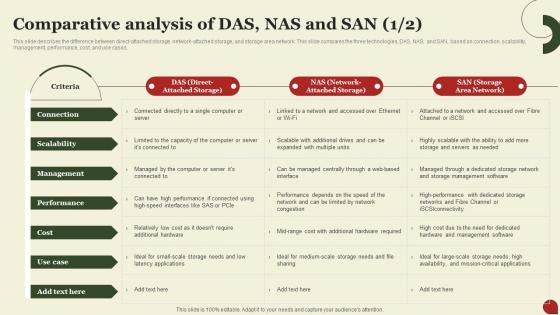
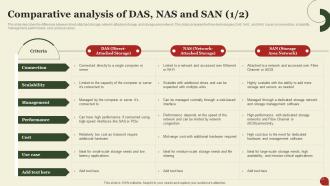
This Slide Describes The Difference Between Direct-Attached Storage, Network-Attached Storage, And Storage Area Network. This Slide Compares The Three Technologies, DAS, NAS, And SAN, Based On Connection, Scalability, Management, Performance, Cost, And Use Cases.
People who downloaded this PowerPoint presentation also viewed the following :
Comparative Analysis Of Das Nas And San Storage Area Network San with all 10 slides:
Use our Comparative Analysis Of Das Nas And San Storage Area Network San to effectively help you save your valuable time. They are readymade to fit into any presentation structure.








FAQs for Comparative Analysis Of Das Nas And San Storage
So basically, DAS plugs right into your server - like a massive external drive. NAS sits on your network as its own file server, which is nice because everyone can hit it at once. Then there's SAN, which builds its own separate high-speed network just for storage stuff. Way more complex but performs like crazy. Honestly, I'd just figure out how many people need access and what kind of performance you actually need. That'll tell you which direction to go. SAN's overkill for most situations anyway.
DAS is gonna be your fastest option - you're plugged straight into the storage so there's no network getting in the way. SAN is pretty quick too with those fiber channel connections, but you're still bouncing through a network. NAS tends to be the slowest since it runs over regular Ethernet and deals with file-level stuff (honestly can be annoying when you need things fast). Though I'll say, gigabit and 10GbE have made NAS way more decent lately. Really just depends what speeds you actually need - sometimes "fastest" isn't worth the extra hassle or cost.
Honestly, go with DAS when you need fast, dedicated storage that stays put. Perfect for high-performance workstations or single-server databases. Also great if you're dealing with super sensitive data that can't leave your local setup - security's tight that way. Budget-wise it's your friend since there's no network gear to buy. The trade-off though? You can't really share it across multiple systems, and scaling up later gets messy. But if your storage needs are pretty contained to one machine, DAS just works. Sometimes simple is better, you know?
NAS runs into walls way faster because you're pushing files through regular Ethernet - gets messy quick when everyone's fighting for bandwidth. Block-level access with SAN? Totally different game. You get dedicated storage networks, so scaling capacity doesn't choke your performance. It's kinda like... busy street vs freight trains, if that makes sense. More clients on NAS means that single head unit gets hammered. With SAN you can just keep adding arrays without breaking what's already working. Honestly, if you're thinking big growth, don't wait - figure out your bandwidth needs now and go SAN before you hit those NAS limits.
So with DAS you're stuck relying on whatever RAID setup and backup software your local server has - basically flying solo on redundancy. NAS is way better here since it comes with built-in RAID options and can sync data between devices. Plus those snapshot features are actually pretty cool. SAN takes it up another level with fancy replication and automated failover across your whole network. Here's the thing though - scalability matters. DAS caps you at one system's limits while SAN can spread redundancy across different locations. Just look at how much data you've got now and where you think it's headed. That'll tell you which route makes sense for your budget.
DAS is dirt cheap upfront - just grab some drives and plug them straight into your server. NAS costs more since you need the actual device, but at least you can share storage between systems. SAN though? That's where your wallet starts crying, especially with all those fancy switches and infrastructure costs. Here's the catch - DAS might save you money now, but you'll run into limits fast when you try scaling up. SAN costs way more but honestly gives you enterprise-level performance. I'd probably start by figuring out what you actually need storage-wise and how much you think you'll grow.
So DAS barely touches your network since it's plugged straight into the server. NAS runs on regular Ethernet though, which can totally mess with other stuff when you're moving big files - trust me on that one. SAN uses its own dedicated fiber setup, so no competing with regular traffic, but you'll need separate infrastructure. Honestly, if network congestion's bugging you, just go DAS for single servers. Multiple servers? Yeah, you're probably looking at SAN territory. NAS is kinda the middle ground but can get messy.
So NAS is way simpler - it just uses file-level stuff through SMB or NFS protocols. You're basically setting user permissions like you would on any file system. SAN's a whole different beast though. Block-level security with LUN masking, zoning, fancy fiber channel switches. Plus encryption everywhere. Here's the kicker - NAS shares your regular network so you gotta worry about network security too. SAN builds its own isolated storage network which is honestly overkill for most people. Figure out if you need file-level or block-level control first.
So here's the deal with file sharing on these three. DAS is pretty much useless for this - it's stuck on one computer, so forget about sharing anything. NAS though? That's your best bet. It's literally made for file sharing with stuff like SMB and NFS, so your whole team can jump on and grab files over the network. SAN is kinda the odd one out - it shares storage space between servers, but regular people can't just hop on and access files directly. It's more like sharing empty hard drive space than actual files, if that makes sense. Honestly, just go NAS if you want simple file sharing.
So basically, DAS crushes everything during peak times since it's wired straight to your server. No network drama to deal with. NAS gets pretty sluggish though - all that traffic fighting for the same bandwidth makes things crawl. SAN's somewhere in the middle performance-wise, but honestly it scales so much better when you've got multiple servers. I'd probably go DAS if it's just one server getting hammered, but you'll want decent SAN gear for anything bigger. Network speed matters way more than people think with this stuff.
Honestly, it depends on what you've got set up. DAS is kinda annoying - you'll need backup software to push everything to the cloud since it's stuck to one server. NAS boxes are way easier though, most have cloud sync built right in now. SAN gets tricky because you're dealing with block storage, but cloud gateways can handle it. My advice? Check what your storage vendor already offers for cloud connections first. That's usually the path of least resistance, and trust me, you don't want to overcomplicate this stuff if you don't have to.
So DAS is solid for small businesses or if you're working solo and need fast storage right on your device. For sharing files across teams? NAS is your best bet - works great for home offices and small companies. Now SAN is where the big players live... hospitals, banks, huge corporations with crazy virtualized setups that need insane database speeds. Honestly though, most people overthink this stuff. Start simple with DAS or NAS based on whether you need to share files or not. You can always upgrade later if you outgrow it.
DAS is super straightforward - you're just dealing with drives attached to your server, like your laptop but way bigger. With NAS you get that nice web interface for managing files remotely, which is great for small teams. SAN though? That's a whole different beast. You'll be wrestling with fabric switches, LUNs, zoning configs - honestly it can eat up your entire day if you let it. Most places end up needing dedicated storage people just for SAN stuff. My advice? Start with NAS management and get comfortable there first. SAN will still be complicated later, trust me.
So for data recovery - DAS is honestly the worst since everything's stuck on one server. Server dies? You're toast until you restore from somewhere else. NAS is way better because it's on your network, plus most have RAID built in. SAN though? That's where you want to be - centralized storage with proper enterprise backup stuff. Recovery times are actually decent. Oh, and seriously test your recovery process first. I learned that the hard way once - thought everything was backed up properly until I actually needed it. Don't be like me.
So SAN is basically the gold standard for virtualization - it gives you shared block storage that all your hypervisors can hit at once. Live migration, HA, all that good stuff just works. NAS can work too if you mount shared filesystems, though I'd say it's better for file-heavy stuff. DAS though? Honestly kind of a pain because your storage gets locked to specific hosts. You lose so much flexibility that way. If you're building anything serious, go SAN. Way easier to manage and you won't hate yourself later.
-
Extensive range of templates! Highly impressed with the quality of the designs.
-
Use of different colors is good. It's simple and attractive.