

Competitive Analysis Powerpoint Presentation Slides






Try Before you Buy Download Free Sample Product
 Impress Your
 Audience
 100%
100% Editable
 Save Hours
 of Time


Chart out all your strategies, competitive advantages and give a complete overview of your competitors to your business partners with our competitive analysis PowerPoint presentation slides. This competitive analysis PPT slide lets you list down different competitors, their names and logos. This Competitive Analysis PPT template also allows you to make analysis reports based on different criteria of your competitors, their market positioning, product positioning, market share and company’s growth. This beautifully crafted slide lets you analyze marketing strategy and competitor’s revenue, profits, their market shares, sales revenues, sales developments, performance indicators of sales and revenues. This PowerPoint presentation allows you to visualize strategy based on their facts and figures, to make classification of your competition and see if the competition is internal or external, strategic assessment of their products range and market segmentations. Just download this Competitive Analysis presentation slide and set out your goals and make your strategy for the future. Get your ideas intact with our Competitive Analysis Powerpoint Presentation Slides. Get that feeling of being complete.
People who downloaded this PowerPoint presentation also viewed the following :
Content of this Powerpoint Presentation
Slide 1: This is an introductory slide to Competitive Analysis. State company name and begin.
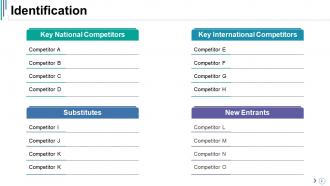
Slide 2: This slide shows an Identification table with- Key National Competitors, Substitutes, Key International Competitors, New Entrants.
Slide 3: This slide showcases Logos Of Competitors with their respective icons. Add them here.
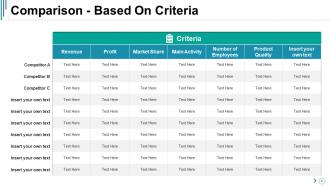
Slide 4: This slide showcases Comparison - Based On Criteria in a tabular form.
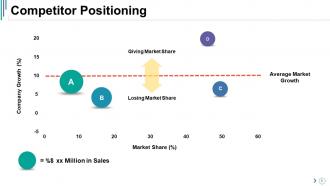
Slide 5: This slide showcases Competitor Positioning with the following points- Market Share (%), Company Growth (%), Losing Market Share, Giving Market Share, Average Market Growth.
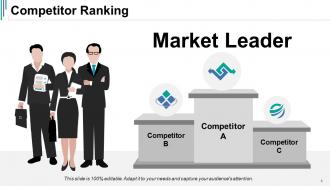
Slide 6: This slide showcases Competitor Ranking with Market Leader in people silhouettes and icon imagery to go with.
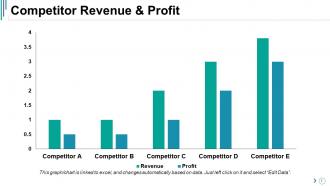
Slide 7: This slide showcases Competitor Revenue & Profit in a bar graph/ chart form.
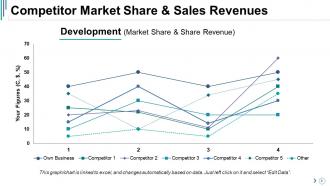
Slide 8: This slide states Competitor Market Share & Sales Revenues in a line graph form.
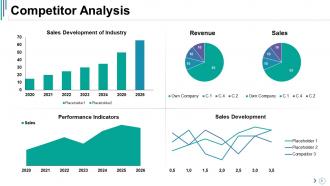
Slide 9: This slide presents Competitor Analysis in charts and graphs.
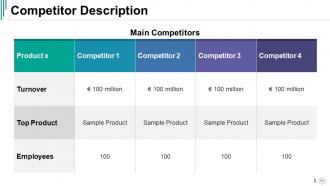
Slide 10: This is a Competitor Description slide showing Main Competitors in a tabular form.
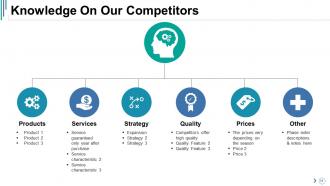
Slide 11: This is Knowledge On Our Competitors slide showing- Services, Expansion, Strategy, Quality, Prices, Other.
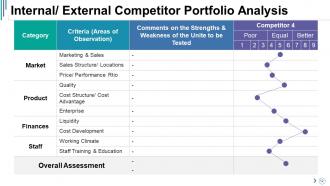
Slide 12: This slide states Internal/ External Competitor Portfolio Analysis in a tabular form.
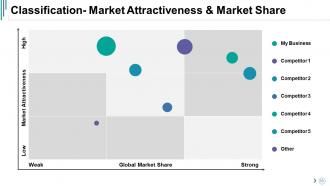
Slide 13: This slide states Classification- Market Attractiveness & Market Share in a matrix form.
Slide 14: This slide displays Sales Performance Of Competitors in bar graph form.
Slide 15: This slide shows Strategic Positioning with the following content- Strategic Advantage, Strategic Target, Other, Differentiation, Cost Advantage.
Slide 16: This slide presents Assessment & Market Position Of Competitors’ Product/ Product Range.
Slide 17: This slide shows Market Segmentation in a tabular form.
Slide 18: This slide states Competitors’ Average Price/ Product in a bar graph form.
Slide 19: This slide states Competitive Advantage with respect to Advantage and Competitors.
Slide 20: This slide states Other Corporate Strategy with Main Competitors and their strengths and weaknesses.
Slide 21: This is a Social Media Analysis graph slide.
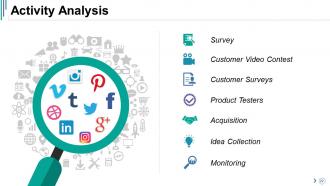
Slide 22: This is an Activity Analysis slide with magnifying glass imagery. Use it to show the following- Monitoring, Survey, Customer Video Contest, Customer Surveys, Product Testers, Acquisition, Idea Collection.
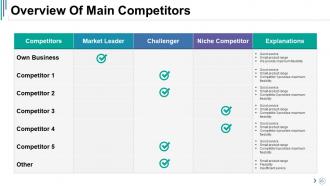
Slide 23: This slide presents an Overview Of Main Competitors in a tabular form.
Slide 24: This is a Coffee Break slide to halt. You can change the content as per need.
Slide 25: This slide is titled Charts and Graphs to move forward. You can change the slide content as per need.
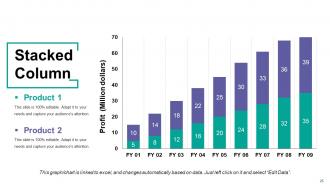
Slide 26: This is a Stacked Column graph slide to show product/ entity comparison, specifications etc.
Slide 27: This is a Scatter With Smooth Lines And Markers slide to show product/entity comparison, specifications etc.
Slide 28: This slide presents an Area Chart for entity/ product comparison.
Slide 29: This is a Stacked Line Chart slide to show product/ entity comparison, specifications etc.
Slide 30: This is a Scatter Chart to present product/ entity comparison, specifications etc.
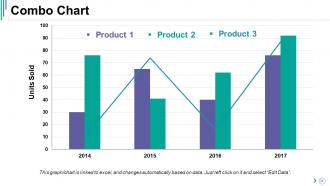
Slide 31: This is a Combo Chart slide for product/ entity comparison etc.
Slide 32: This slide is titled Additional Slides. You can change the slide content as per your needs.
Slide 33: This slide contains Our Mission with text boxes.
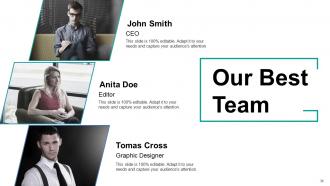
Slide 34: This slide helps depict Our Best Team with text boxes.
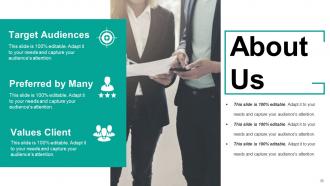
Slide 35: This is an About Us slide. Provide a brief introduction about company/ team here.
Slide 36: This is Our Goal slide. State your important goals here.
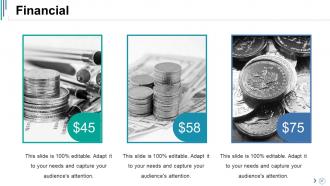
Slide 37: This slide presents Financial scores to display.
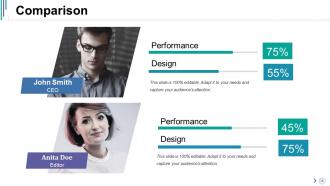
Slide 38: This is a Comparison slide to compare product/ enitities etc.
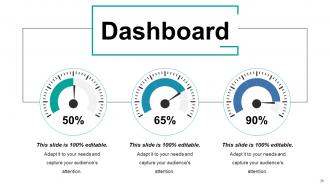
Slide 39: This is a Dashboard slide to state metrics, Kpis etc.
Slide 40: This is Our Target slide. State them here.
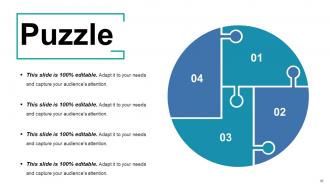
Slide 41: This is a Puzzle image slide to show information, specifications etc.
Slide 42: This is a Quotes slide to convey messages, beliefs etc. You can change the slide content as per need.
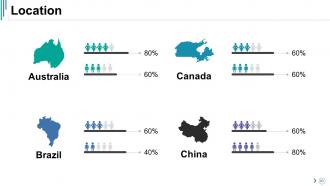
Slide 43: This is a Location slide with map imagery to show global presence, growth etc.
Slide 44: This is an Important Notes slide to post important information, highlights etc.
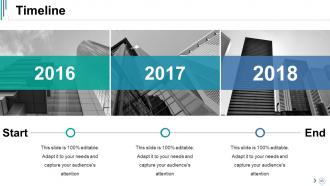
Slide 45: This slide shows a Timeline. State highligting factors etc. here.
Slide 46: This is a Lego image slide. State information, specificiations etc. here.
Slide 47: This is a Hierarchy image slide to show information, organization/ team structure, specifications etc.
Slide 48: This is a Mind Map slide to show behavioural segmentation, information or anything relative.
Slide 49: This is a People's silhouettes slide. Use it the way you want to show solutions etc.
Slide 50: This is a Matrix slide to show information, specifications etc.
Slide 51: This is a Circular image slide to show information etc.
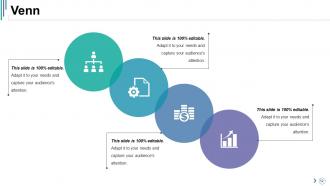
Slide 52: This is a Venn diagram slide to show information etc.
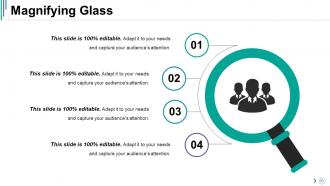
Slide 53: This slide displays a Magnifying Glass imagery. State information, specifications etc. here.
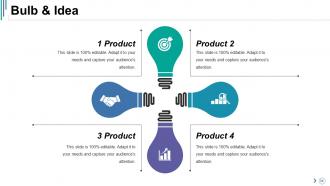
Slide 54: This is a Bulb & Idea image slide to show ideas, innovative information etc.
Slide 55: This is a Thank You image slide with Address, Email and Contact number.
Competitive Analysis Powerpoint Presentation Slides with all 55 slides:
Advise folks about intelligent banking with our Competitive Analysis Powerpoint Presentation Slides. Elaborate on joint accounts.
-

Competitive Analysis
-
Identification
-
Logos Of Competitors
-
Comparison Based On Criteria
-
Competitor Positioning
-
Competitor Ranking
-
Competitor Revenue Profit
-
Competitor Market Share Sales Revenues
-
Competitor Analysis
-
Competitor Description
-
Knowledge On Our Competitors
-
Internal External Competitor Portfolio Analysis
-
Classification Market Attractiveness Market Share
-
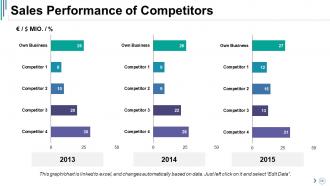
Sales Performance of Competitors
-
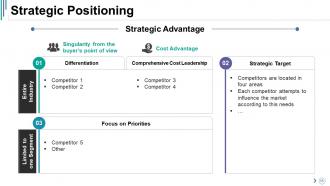
Strategic Positioning
-
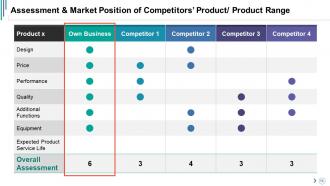
Assessment Market Position of Competitors Product Product Range
-
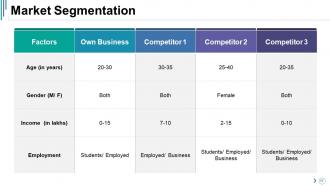
Market Segmentation
-
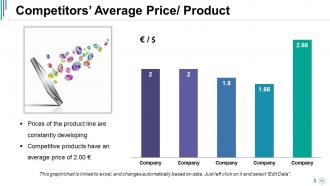
Competitors Average Price Product
-
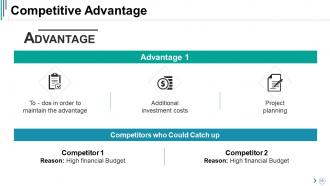
Competitive Advantage
-
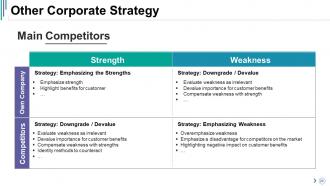
Other Corporate Strategy
-
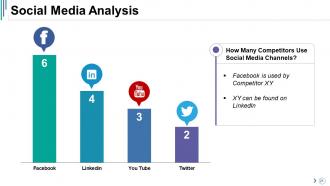
Social Media Analysis
-
Activity Analysis
-
Overview Of Main Competitors
-

Coffee Break
-
Charts Graphs
-
Stacked Column
-
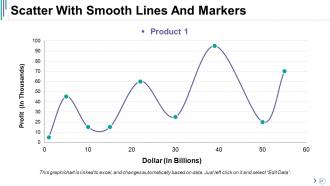
Scatter With Smooth Lines And Markers
-
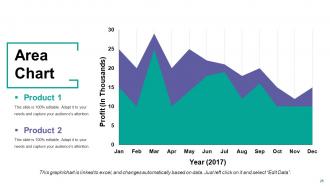
Area Chart
-
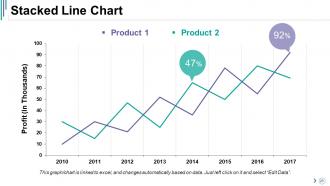
Stacked Line Chart
-
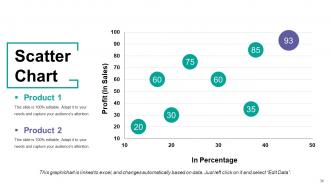
Scatter Chart
-
Combo Chart
-
Additional Slides
-

Our Vision Mission
-
Our Best Team
-
Target Audiences
-

Our Goal
-
Financial
-
Comparison
-
Dashboard
-

Our Target
-
Puzzle
-

Competitive Analysis
-
Location
-
Important Notes
-
Timeline
-
Lego
-
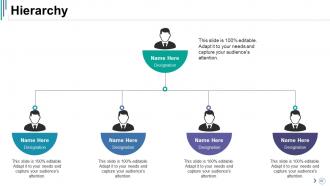
Hierarchy
-
Mind Map
-
Silhouettes
-
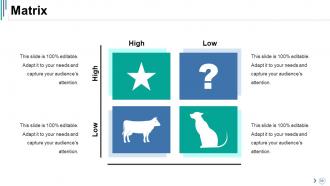
Matrix
-
Circular
-
Venn
-
Magnifying Glass
-
Bulb Idea
-

Thank You
FAQs for Competitive Analysis
Honestly, the customization is crazy good - you can tweak literally everything down to animation timing and individual fonts. Canva's templates still look kinda dated tbh. What really sets us apart though is the industry-specific content suggestions instead of just giving you empty slides. Your stuff syncs across all devices automatically too, plus version history (lifesaver when you're going back and forth on edits). Oh, and the design quality is just way cleaner overall. You should definitely compare our template gallery with theirs - it's pretty night and day once you see them together.
We're at $14/month, which puts us right in the middle. Canva Pro and Envato are around $12-15, so pretty similar. Slidebean and Beautiful.ai charge $20+ but honestly? Their templates aren't *that* much better. The thing is, we use credits while most others do unlimited downloads. Some people dig the flexibility, others think it's annoying. We're competitive but not exactly a steal. Oh, and you'll want to check what competitors are doing every few months - prices shift more than you'd think and we don't want to accidentally price ourselves out.
So all our competitors are obsessed with SaaS and e-commerce stuff - that's why everything looks the same with boring white backgrounds and blue accents everywhere. Getting old, right? They're totally sleeping on creative industries and nonprofits though. These businesses actually want personality in their designs! We could crush it by going bold with colors and layouts that don't look like every other template out there. Local businesses especially are dying for something different. Perfect gap for us to jump into.
Honestly, it's all over the place - some companies pump out new templates every week, others do monthly or quarterly drops. The weekly ones are usually just trying to game SEO and keep people hooked on checking back constantly. Can get pretty exhausting to follow tbh. But here's the thing: if you're releasing super fast, you're pressured to innovate quickly but might sacrifice quality. Slower cycles let you actually focus on making stuff good. Your users will definitely notice if you're always lagging behind trends though, so you gotta find that balance where you're not killing your design team.
Check app store reviews for your competitors - that's where people really vent about what sucks. Social media comments are good too, plus sites like G2 where users get brutally honest. I set up Google Alerts but honestly they're pretty messy. The real gold is finding patterns in complaints - like if everyone hates the same missing feature or pricing model. Make a simple spreadsheet of common pain points across different competitors. Then figure out what you can actually fix better than them. That becomes your game plan for standing out.
Most companies hit up LinkedIn and Instagram pretty hard these days. Google Ads are everywhere too. Blog content and email campaigns round out the usual suspects - though honestly, some of their blogs are pretty boring. Trade shows used to be huge but that's more hit-or-miss now. I'd peek at how often they're posting and if they're actually getting engagement. Search some industry terms and see whose ads pop up. Make a basic spreadsheet tracking like 3-4 channels for a month. You'll start seeing their patterns real quick.
Your templates are actually crushing it on usability - users finish tasks 15% faster and make fewer mistakes than with competitors. Mobile responsiveness is where you're getting hammered though (yeah, I know you've heard this a million times). Initial setup is also dragging you down. People love how intuitive your interface feels, but TemplateHub's onboarding is just smoother. Honestly? I'd hit that mobile gap hard in your next sprint. Maybe throw in some work on those clunky first-time user steps too.
People love drag-and-drop stuff and those pre-made content blocks - makes everything so much easier. Real-time collaboration is big too. Visual editors crush text-heavy options every time because users want to see changes happen instantly without touching code. Auto-formatting is seriously underrated (who has time for margin tweaks?). One-click styling and mobile previews get crazy engagement rates. Here's what I'd do: check out your top 3 competitors' most downloaded templates, see what interactive elements they're using, then build something similar but with your own spin. Don't just copy though - that's obvious and looks lazy.
Honestly, our customization stuff is pretty solid - colors, fonts, layouts, all that basic branding work. The drag-and-drop editor actually works without making you want to throw your laptop (unlike some competitors I won't name but their editor is trash). Where we're lacking? Animation controls are kinda basic compared to others. But real talk - most clients don't need fancy motion graphics anyway. I'd definitely push our editor being super smooth and the quick previews when you're comparing options. Those features actually save time instead of just looking flashy.
Hey! Your competitors are getting way more interactive lately - clickable prototypes, live polls, real-time data instead of boring static slides. Also seeing tons of storytelling frameworks and these weird asymmetrical layouts that look more like magazine spreads than typical corporate decks. Everyone's basically killing bullet points for visual stuff - icons, infographics, whatever works. The modular thing is huge though - presentations you can totally rearrange depending on who's in the room. Oh wait, did you see what [competitor name] did at that conference? Their whole approach was actually pretty genius and might give you some ideas for your pitch.
So I looked at the competitive data - most companies are hitting 65-78% loyalty rates, but TechCorp's crushing it at 80%. Their secret sauce? Personalized onboarding, solid customer success teams, and honestly their product just works better than ours (annoying but true). They're also doing way more community stuff and educational content. Oh, and here's the kicker - they start renewal talks like 6 months earlier than we do. Makes sense when you think about it. Want me to dig deeper into what your top three competitors are actually doing? Could be useful.
Check what your competitors are actually doing beyond basic social posts. Some host Reddit AMAs or Twitter Spaces - way better than just posting into the void. Discord communities are huge right now too. I'd look for user-generated content campaigns or how they respond to comments (most brands suck at this honestly). Micro-influencer partnerships are everywhere if you know where to look. Customer spotlights work really well too. The key thing? Figure out which platforms get their audience most fired up. That's where you'll want to focus first instead of spreading yourself thin everywhere.
Honestly, most templates are just broken on mobile - it's ridiculous in 2024. Plus they all look identical and super outdated. Loading times are terrible too. Start with clean designs that actually work on phones. Give people real customization options, not just color swaps. Speed matters more than you think - nobody waits around anymore. Make your stuff look current and unique. The bar is pretty low since everyone's using the same generic layouts from like 2015. Oh, and test with actual users constantly. They'll tell you exactly what sucks that you never noticed.
So most platforms basically put watermarks on their free stuff or limit you to the boring templates. Premium unlocks the good layouts, better fonts, and proper export options - pretty standard playbook. What really bugs me though? Some make their "free" templates look decent in previews but you need paid elements to actually use them properly. Super annoying. The smart ones give you genuinely solid free options but make premium so much better you can't resist upgrading. Check what limits your competitors use and figure out which upgrade nudges feel natural instead of pushy.
Okay so the big stuff right now: AI that suggests layouts automatically based on your content - super helpful. Real-time collaboration is getting way better than Google Slides (thank god). Interactive elements are everywhere now too, like embedded polls and clickable prototypes. Smart templates that auto-match your brand colors and fonts are really taking off. Animation presets finally don't look terrible anymore! Voice-to-slide generation is what the big companies are pushing, plus automatic speaker notes. Honestly though? I'd focus on the AI design help and collaboration tools first - those seem to be what people actually use most.
-
Excellent template with unique design.
-
Thanks for all your great templates they have saved me lots of time and accelerate my presentations. Great product, keep them up!