


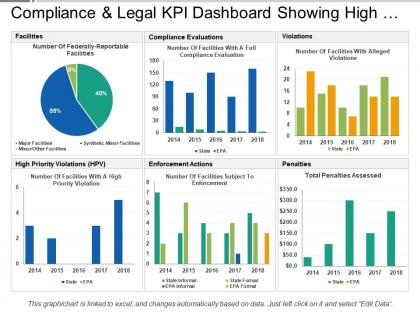
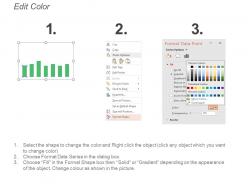
Compliance and legal kpi dashboard showing high priority violations





Try Before you Buy Download Free Sample Product
 Impress Your
 Audience
 100%
100% Editable
 Save Hours
 of Time


Most people are visual learners and learn better through the use of graphics than with words. Our Compliance And Legal Kpi Dashboard Showing High Priority Violations is a perfect blend of graphics and words to tailored to suit your needs.
People who downloaded this PowerPoint presentation also viewed the following :
Compliance and legal kpi dashboard showing high priority violations with all 6 slides:
Exorcise all the ghosts with our Compliance And Legal Kpi Dashboard Showing High Priority Violations. Don't allow fears to haunt you.

FAQs for Compliance and legal kpi dashboard showing
Focus on metrics that actually drive decisions - compliance rates, overdue items, and risk exposure by department. Trend data is where you'll find the good stuff though, shows if things are getting better or worse. Track your audit findings and how long fixes are taking, plus any regulatory deadlines coming up. Honestly, executives just want to spot problems fast, so keep your main dashboard simple. Six to eight core metrics max, then they can dig deeper if needed. Way too many dashboards try to show everything at once and end up being useless.
Honestly, charts and graphs are game-changers for compliance stuff. You'll spot trends and weird outliers way faster than staring at endless spreadsheet rows. Heat maps work great for showing risk levels across departments - way better than just telling your boss "scores varied somewhere." Pick bar charts when you're comparing things, line graphs for tracking changes over time. That kind of thing. Start with whatever issue keeps popping up in your reviews and make a visual around it. Trust me, turning boring data into something you can actually understand at a glance makes everything so much easier.
Put your worst violations right at the top - compliance people shouldn't have to dig around looking for problems. Red and green color coding works great (violations vs compliant stuff). I've honestly seen way too many dashboards that try to cram everything onto one screen and they're basically useless. Make sure different people can filter for what they actually need to see. Navigation should be super obvious - like, your grandma could figure it out obvious. Oh, and definitely test it with real users first because they'll find weird issues you never would've thought of. Trust me on that one.
So instead of finding compliance problems weeks later, you catch them right when they happen. Your dashboard grabs live data from everywhere, spotting violations and failed controls instantly. Honestly beats the hell out of those old spreadsheet days - what a mess that was. You'll get alerts when things go sideways, track issues before they blow up, and actually have current data for auditors instead of that last-minute scramble we all know too well. Start with your key risk indicators first. That's where you'll see results fast.
Dude, automation will save your sanity here. Manual updates are where everything goes wrong - someone always forgets to pull the latest numbers or fat-fingers something into a spreadsheet. Set up automated feeds from your systems so the metrics update themselves. Real-time data without the headache. I swear, half the compliance dashboards I've seen are basically decorative because nobody maintains them. Automation handles the formatting consistency too, which is honestly underrated. You'll actually be able to trust what you're looking at instead of second-guessing whether Jim remembered to update last week's report.
So basically you want to build different dashboard views for different people. Executives just want the big picture stuff - high-level risk summaries and trends. Compliance folks need all the nitty-gritty violation tracking and remediation updates. IT teams? They're practically glued to those technical metrics and system health data anyway. The trick is setting up filters and permissions right. You don't want board members getting buried in operational weeds, and you definitely don't want to overwhelm your frontline people with strategic stuff they can't really act on. Just figure out what each group actually needs to get their work done first, then build around that.
Honestly, just go with Tableau or Power BI - both are great for compliance stuff and auditors don't hate looking at them. Your company might already have ServiceNow or MetricStream, which work fine but can be pretty clunky to use day-to-day. Excel's not glamorous but it'll do the trick if you're working with a tight budget. Oh, and whatever you pick, make sure it connects to your current systems automatically. Trust me, you don't want to be updating spreadsheets manually every month. Start basic and add fancy features later.
Ugh, data quality and stakeholder buy-in are gonna be your biggest headaches. All your compliance stuff is probably spread across like 5 different systems - consolidating that into one dashboard is honestly brutal. Then you've got to figure out which KPIs actually matter to regulators vs what makes executives feel good about themselves. Different departments will fight you on basic data definitions too, which is... fun. Oh and start small! Pick one compliance area first, get that data rock solid, then slowly add more. Way less painful that way.
Think of compliance dashboards as your heads-up before regulations blindside you. They track new requirements and show gaps in your current setup. The timeline view is clutch - you'll actually see which changes are gonna wreck your schedule (spoiler: probably all of them). You get auto alerts when new stuff drops, can assign tasks, track progress. Honestly wish I'd set this up sooner at my last job. Start with notifications from your main regulatory bodies first. Way better than finding out about deadlines through panic emails from leadership.
Honestly, start with role-based access controls - you don't want random people seeing sensitive stuff. Real-time monitoring is huge too, plus audit trails so you know who's been poking around. Encryption's obviously a must for stored data and anything moving between systems. MFA is basically expected at this point (annoying but necessary). Set up automated alerts for weird activity and compliance issues. Oh, and data masking helps hide sensitive info from people who shouldn't see it. Generate detailed security reports - compliance audits are brutal without proper documentation. Trust me on that one.
Track how often people actually use it first - that's your baseline. Response times to violations should get faster, and you'll want to see if you're catching issues before auditors show up (honestly, this is make-or-break stuff). Check whether stakeholders can answer compliance questions quicker than they used to. Your audit scores and regulatory findings tell the real story though. Time saved on manual reporting matters too, but the ultimate win? When executives stop bugging you for random compliance reports because they can just pull up the dashboard. That's when you know it's working.
Honestly, compliance dashboards are game-changers because they flip you from constantly putting out fires to actually seeing problems coming. You'll catch compliance gaps in real-time instead of getting blindsided during audits (which is the worst). Leadership finally gets clear data to decide where to spend money and focus on the riskiest stuff. The visual aspect is huge too - way easier to explain compliance status to executives who don't want to dive into all the nitty-gritty details. My advice? Start with whatever's keeping you up at night compliance-wise and build your dashboard around those specific metrics first.
So basically you'd add forecasting models that crunch your old compliance data to spot future problem areas. Pretty neat stuff - it's like having a heads up before things go sideways. The dashboard shows risk scores and alerts when patterns suggest you're heading toward violations. Heat maps work great for this, showing which departments are sketchy or predicting how audits might go. I'd start with whatever compliance metrics stress you out the most. Then grab your data people and build models around those specific things. Way better than playing catch-up after problems hit.
Static dashboards are basically frozen snapshots - like taking a photo of your compliance data at one moment. Dynamic ones refresh automatically with live data, so you're always seeing what's happening right now. Honestly, I'd go static if you just need reports for meetings or quarterly reviews since they load super fast. But if you need to catch compliance issues as they pop up? Dynamic all the way. My old boss was obsessed with real-time monitoring and it actually saved us from a few disasters. Really depends on whether you're looking backward or need to stay on top of current stuff.
Honestly, your compliance dashboard can be way more useful than just staring at numbers all day. Show teams the real-time gaps - it's so much better than death-by-PowerPoint training sessions. Monthly 15-minute walkthroughs work great. Walk through wins and problem spots, then dive into actual scenarios. Different departments should see their relevant sections so they're not totally clueless about their responsibilities. The visual stuff makes explaining compliance way less painful than trying to lecture people. Oh, and those regular dashboard reviews? They're goldmines for catching issues before they blow up.
-
Very unique and reliable designs.
-
Easy to edit slides with easy to understand instructions.