


Construction Progress Status Powerpoint Ppt Template Bundles




Try Before you Buy Download Free Sample Product
 Impress Your
 Audience
 100%
100% Editable
 Save Hours
 of Time


Our Construction Progress Status Powerpoint Ppt Template Bundles are topically designed to provide an attractive backdrop to any subject. Use them to look like a presentation pro.
People who downloaded this PowerPoint presentation also viewed the following :
Construction Progress Status Powerpoint Ppt Template Bundles with all 22 slides:
Use our Construction Progress Status Powerpoint Ppt Template Bundles to effectively help you save your valuable time. They are readymade to fit into any presentation structure.






FAQs for Construction Progress Status Powerpoint
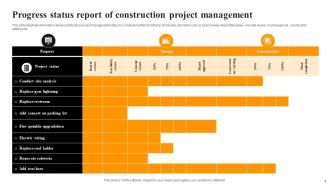
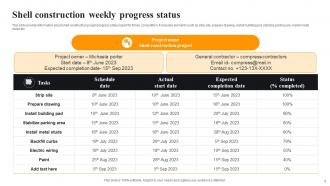
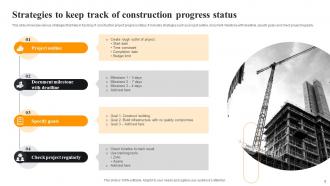
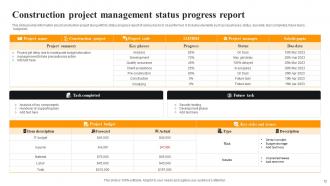
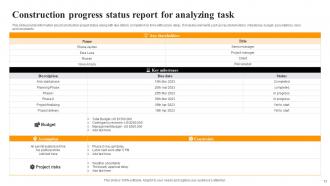
Track your main milestones: kickoff, permits, foundation, framing, rough-in work, drywall/flooring, and final inspections. Permits are honestly such a headache but you can't skip monitoring them. Set target dates vs actual dates for everything so delays don't sneak up on you. Weekly site manager check-ins are clutch. Also keep an eye on your budget burn rate - my buddy learned that lesson the hard way. Each phase should have clear completion markers so you'll catch problems before they spiral into bigger issues.
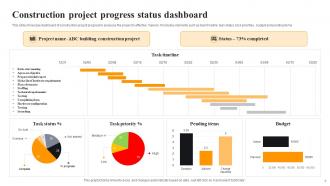
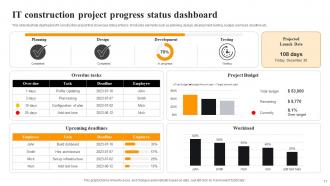
Dude, the dashboards are actually game-changing - you can see exactly where everything stands without calling anyone. Delays get flagged before they blow up your timeline. All the reporting happens automatically too, so you're not constantly bugging superintendents for updates. Everyone sees the same live data coming in from the field, which kills those awkward "wait, I thought you were doing that" moments. The visual timelines look pretty slick honestly. Short version: no more information black holes where half your team doesn't know what's happening.
Honestly, I'd track percentage of work packages done and your actual vs planned schedule - those two will save your butt. Earned value is solid too (how much work you actually finished vs what you thought you'd finish). Labor hours can work but gets weird when scope creeps in... which it always does, let's be real. For stakeholder meetings though? Physical completion percentages for big milestones are gold. Pick two of these and check them weekly. You'll catch problems way earlier instead of scrambling at the last minute.
Ugh, weather is honestly the worst for construction schedules. Rain and snow shut everything down for safety, then you're scrambling to update all your milestone dates. I always tell people to pad their original timeline by like 10-15% - learned that the hard way on a job last year. Track weather delays separately from other screwups so your client knows it wasn't poor planning. High winds are sneaky too, can't do crane work or roofing. The trick is calling stakeholders before deadlines get missed, not after.
Honestly, site inspections are your sanity check - they show you what's actually happening vs what the paperwork claims. I always take tons of photos because my brain definitely doesn't remember details from three weeks ago. You'll catch quality issues before they turn into money pits, plus spot safety problems early. The schedule thing is huge too - you can see if timelines are realistic or complete fantasy (usually the latter, let's be real). Don't just show up when stuff goes sideways. Regular visits are way better for staying ahead of problems.
Dude, just talk to each other more - it stops those "wait, what's happening with X?" panic moments that derail everything. Daily check-ins catch problems before they snowball. I watched one project where the electrical crew mentioned a delay during standup, so plumbing jumped ahead instead. Saved them like three weeks, honestly. Skip the weekly email novels nobody reads anyway. Set up quick daily touchpoints and shared dashboards so everyone's looking at the same info. Real-time updates between field crews and PMs make such a difference. Trust me on this one.
Ugh, data silos are the worst - teams and subcontractors all use different systems so you can't see what's actually happening. Communication falls apart constantly. Weather messes up your timelines, scope changes come out of nowhere without documentation. Manual progress reports? Total joke. I swear every project gets stuck at "90% done" for like three months straight. You really need integrated software that connects everyone and does automatic updates. Otherwise you're just guessing half the time. Oh, and make sure whatever system you pick actually talks to the tools people are already using.
So basically you fly drones over your job sites to get overhead shots - way better than trudging around taking notes, trust me. The AI compares what it sees to your project timeline and 3D models. Pretty neat stuff actually. It'll catch delays automatically, figure out completion percentages, even spot safety problems you might miss. Real-time dashboards show you exactly where things stand. Oh and the measuring thing is surprisingly accurate too. I'd start with just one drone survey per week and see how it goes from there.
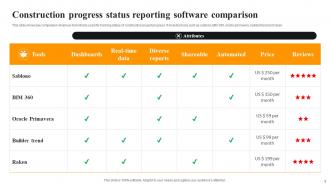
Honestly, Gantt charts are still your best bet - Procore and Buildertrend make decent ones. Project works too if you're keeping it simple. Dashboard stuff like Smartsheet is actually way easier to read than most PM software, which is kinda backwards but whatever. For the visual side, photo apps that do before/after shots are clutch. Some guys I know use those 360-degree cameras for site captures. If you've got 3D models already, BIM software can show actual vs planned progress pretty well. Just pick whatever works with what you're already using - nobody's gonna adopt something that's a pain to set up.
Ugh, yeah they're totally connected. One screws up the other every time. So delays mean you're stuck paying extra for labor, equipment rentals, all that overhead stuff that wasn't planned for originally. Then when costs blow up early, teams panic and start cutting crew sizes or taking shortcuts to save cash - which obviously just slows everything down even more. Honestly the whole thing becomes this messy cycle. I'd say check both your timeline and budget every week, maybe even twice a week if things are sketchy. The longer you wait to fix problems, the worse both get.
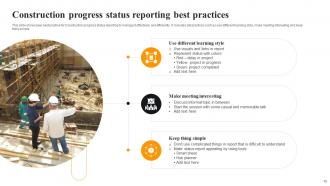
Set up weekly reports with the same template every time - track stuff like percent done, budget issues, delays. Photos are clutch, people eat that visual stuff up way more than paragraphs of text. Don't list everything that's going smoothly (boring). Focus on what's actually screwed up or behind schedule. Try to automate the data collection if you can - project management software that pulls real hours and costs will save you tons of time. Start simple with one page. You'll figure out what else to add based on the annoying questions they keep asking you.
Dude, those regulatory checkpoints are basically unmovable roadblocks in your timeline. Can't skip 'em, can't rush 'em. Build in serious buffer time for permits and inspections - I've watched projects crash and burn because teams thought approvals would happen faster. Track everything: when you submit stuff, how long reviews actually take, plus those annoying resubmission cycles that always pop up. Honestly, the whole thing's a pain but you gotta map out every required approval upfront. Then you can at least plan your work around all the waiting.
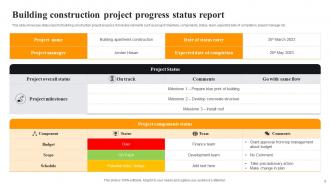
Dude, those progress reports are like taking your project's temperature - you'll spot problems while they're still fixable instead of when they've blown up into chaos. Catching a 2-day delay now beats explaining a 2-week nightmare later, trust me on that one. They're also clutch for tracking your resources, deliveries, all that stuff. Your clients will love the updates too, and honestly? Makes billing way less awkward when you can show exactly what got done. Just grab a simple template and actually use it every time. I know it feels tedious when things are smooth, but you'll be so grateful when the project hits those inevitable rough patches.
Dude, stakeholder involvement literally makes or breaks timelines. Keep owners, architects, subs, and the city talking - decisions happen way faster that way. Poor communication? I've watched it add months to projects, no joke. Early engagement means people spot problems before they get expensive and approve changes without the usual BS delays. Regular check-ins are clutch for building trust. Oh, and being upfront about progress keeps everyone on the same page instead of working against each other. Transparency sounds cheesy but it actually removes roadblocks faster than you'd think.
So with residential jobs, you can get away with weekly check-ins and just hit the basic stuff - are we on time, on budget, any issues? Commercial is a whole different beast though. Those clients want daily updates, sometimes even hourly if something big is happening. They're tracking everything - when materials show up, how many guys are on site, cost breakdowns for every little thing. Makes sense since there's way more money and people breathing down everyone's neck. I learned this the hard way on my first big commercial gig - thought I could wing it with simple photo updates. Nope! Now I just ask upfront what they actually want instead of guessing.
-
The pricing page of this website is very sorted. I felt no pain while buying the PPTs.
-
Awesome use of colors and designs in product templates.