


Corporate Payroll Flowchart For Employee Overtime




Try Before you Buy Download Free Sample Product
 Impress Your
 Audience
 100%
100% Editable
 Save Hours
 of Time


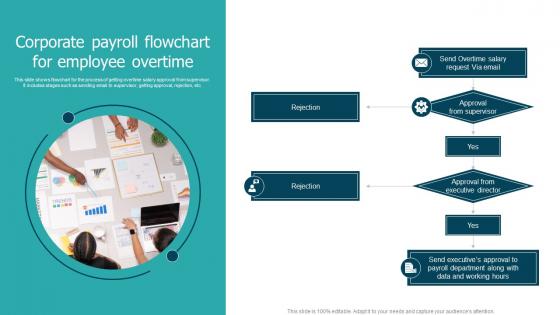
This slide shows flowchart for the process of getting overtime salary approval from supervisor. It includes stages such as sending email to supervisor, getting approval, rejection, etc.
People who downloaded this PowerPoint presentation also viewed the following :
Corporate Payroll Flowchart For Employee Overtime with all 6 slides:
Use our Corporate Payroll Flowchart For Employee Overtime to effectively help you save your valuable time. They are readymade to fit into any presentation structure.





FAQs for Corporate Payroll Flowchart
Start with employee data input and time tracking - that's your foundation. Then work through gross pay calculations and all the deduction stuff (taxes, benefits, garnishments). Approval workflows are super important because you don't want random people making changes. Map out payment processing next - paychecks, direct deposits, all that. Honestly, the reporting and compliance piece is kind of a pain but you can't skip it. Build in error checks throughout or you'll hate yourself later. I'd sketch the main flow first, then add decision points. Makes it way less of a headache.
So basically, a payroll flowchart shows you every single step in your process - and trust me, you'll be shocked at how convoluted things have gotten. It's like finally seeing all the random detours you take without realizing it. You can spot where approvals get stuck forever or where someone's doing the same data entry twice. Once everything's mapped out visually, streamlining becomes obvious. Your team stops playing the "wait, what's next?" game every week. Start by charting what you're doing now, then pick the three most annoying time-wasters to fix first.
Dude, go with Lucidchart or Visio for corporate payroll stuff. Both have solid templates and your HR/finance people can actually collaborate on them without wanting to throw their laptops out the window. Draw.io works great too if you're trying to keep costs down - it's free which is always nice. Trust me, don't even think about PowerPoint for this. I made that mistake once and it was a nightmare. Payroll has way too many decision points and approval steps. You need real flowchart software that can handle all those branches and conditions without looking like garbage. Definitely start with a template though - saves tons of time.
Honestly, making a flowchart is like the best way to catch all those compliance things before they bite you. You're forced to write down every step, so nothing gets missed - overtime rules, tax stuff, minimum wage calculations, all that. Auditors actually prefer seeing everything documented too, which is kinda weird but whatever works. The visual part really helps you see where you might be skipping required steps. I'd start by mapping what you're doing now, then check it against your local labor laws. You'll probably find gaps you didn't even know existed.
Start by mapping out every step from time tracking to those final paychecks - seriously, don't skip anything. I'm weirdly obsessed with color-coding different departments, but it actually works! Use standard flowchart symbols so anyone can read it. Show who handles each step and build in backup plans for when stuff inevitably goes sideways. Test it with different scenarios like new hires or terminations. The whole point is that someone new can grab your flowchart and not bug you with a thousand questions later.
Dude, flowcharts are a game-changer for payroll stuff. Way better than reading through endless procedures that put you to sleep. You can actually see how everything connects - employee info flows into calculations, then approvals, then boom, paychecks go out. The shapes and colors make it obvious what's a decision point versus just a regular step. I'm always surprised more teams don't use them honestly. Plus you'll spot weird bottlenecks right away that you totally missed before. Oh, and definitely color-code who does what - saves so much confusion during busy periods.
So automation just takes care of all the boring stuff in payroll - data entry, tax calculations, compliance checks. Your system pulls employee hours automatically and calculates deductions instead of you doing it by hand (which would drive me insane honestly). Paychecks get generated with way less manual work. You still need to handle exceptions and approvals yourself, but most of the tedious tasks disappear. Errors drop big time too. Just figure out which parts of your current process can run on autopilot versus what actually needs your brain involved.
Oh, payroll flowcharts are honestly great for this! New people can actually see how everything connects instead of just getting random tasks thrown at them. Walk them through it step by step - data collection, processing, final payments. They'll get how their piece fits way quicker. Some places I know literally laminate these and stick them right at desks (kind of old school but it works). During those first couple weeks, let them use it as a cheat sheet. Really helps when they can see which departments talk to each other. Definitely encourage questions about whatever steps they'll own.
Keep it simple - don't throw every tiny detail into your flowchart or it'll be impossible to follow. Hit the big stuff: data collection, calculations, approvals, distribution. Most people make them way too linear but payroll's messier than that with parallel processes everywhere. You'll want decision points for overtime and bonuses obviously. Oh and definitely include the boring stuff like corrections and compliance checks - I know it's not exciting but you'll regret skipping it later. Test drive it with your team first. If they're confused, you know it needs work.
Look, I'd review that flowchart every 6-12 months minimum. New software rollout? Update it right away. Same goes for policy changes or regulatory stuff. Quarterly reviews work well too - just set a reminder or you'll forget. Honestly, outdated flowcharts are worse than having none at all. I've watched teams get completely lost because nobody updated theirs after a system change. Even small tweaks matter - like new approval steps or different deadlines. Oh, and actually tell your team when you make changes. Sounds obvious but people forget that part all the time.
Honestly, it's all about how many people need to sign off on stuff. Small companies? Super simple - maybe just your manager's approval and boom, you're done. But big corporations are a total nightmare with like 5 different departments involved. HR, finance, legal... everyone wants their piece of the action. Small places can just handle weird situations by hand, but when you've got thousands of employees, everything needs to be automated or you'll lose your mind. I swear enterprise flowcharts look like someone threw spaghetti at a wall. Just map out who actually makes decisions at your company first - that's your starting point.
Your payroll flowchart basically touches everything else in the company. It dumps straight into your general ledger, messes with budgets and forecasting, plus all the tax stuff. Benefits admin pulls from it too, along with workers' comp and year-end reports. Honestly feels like everything depends on payroll data somehow! Timekeeping systems connect to it, expense reports tie in, even HR onboarding processes need that info. Oh, and make sure people can actually see these connections in your flowchart - nobody thinks about how changing one payroll thing breaks like five other processes downstream.
Yeah, totally! Payroll flowcharts are honestly game-changers for catching bottlenecks. Map out your steps visually and the problem spots just jump out at you. Like, you'll suddenly notice "wow, we're always stuck waiting three days for manager sign-offs here." Plus you catch those weird redundant steps that everyone just does because... well, because that's how it's always been done. I know teams who literally cut their processing time in half this way. Start by charting your current mess of a process, then mark where the usual delays happen. Trust me, you'll have those "aha" moments.
Dude, there's actually tons of good stuff you can track with that flowchart. Processing times are huge - like how long each step takes and where things get stuck. Error rates too, especially at those manual entry points. I'd definitely look at approval delays since managers always seem to sit on stuff forever. Bottlenecks are easy to spot once you map out the timing for each stage. Oh, and you can see which parts burn through the most time or cause headaches. Most companies have no clue how much waste is built into their process. Start timing everything and you'll find some quick wins pretty fast.
Honestly, you've gotta build this into your routine or it'll bite you later. Monthly reviews are way better than quarterly if you can manage it. Set up alerts from your payroll provider and government sites - regulations change fast these days and you don't want to get caught off guard. Make sure one specific person owns this, don't just hope it happens naturally. Your legal team should be involved too since they spot stuff payroll people miss. Oh, and schedule your first session this month and make it recurring. Trust me on this one.
-
The customer care of SlideTeam is very responsive. I was having a payment issue and they fixed it for me in no time.
-
The templates are the best in class. Very clear and innovative graphics! I am excited to explore and download more presentations.