


Creating Cyber Security Awareness Among Employees Complete Deck




Try Before you Buy Download Free Sample Product
 Impress Your
 Audience
 100%
100% Editable
 Save Hours
 of Time


Enhance your organizations cybersecurity defenses and protect against cyber-attacks by prioritizing cyber security awareness and implementing comprehensive training programs. Our Creating Cyber Security Awareness Among Employees presentation delves into global cyber security trends, highlighting the increasing need for heightened awareness among employees. By understanding the causes and impacts of cyber-attacks, such as data leakage and unauthorized access, you can address common threats like malware, phishing, man-in-the-middle attacks, and ransomware. The PPT offers a robust cyber security risk management process, guiding you through best practices for mitigating risks and developing proactive cyber attack mitigation plans. By integrating these strategies, you can minimize the occurrence and impact of cyber threats on your business operations. Additionally, the deck provides valuable tools and metrics to evaluate the effectiveness of your cyber security awareness training programs, enabling you to continuously improve your defenses. With a focus on cyber security awareness, training, and mitigation planning, this deck empowers you to create a resilient and secure environment. Download the deck now to bolster your organizations cyber security posture and safeguard your valuable information assets.
People who downloaded this PowerPoint presentation also viewed the following :
Content of this Powerpoint Presentation
Slide 1: This slide introduces Creating Cyber Security Awareness Among Employees. State your company name and begin.
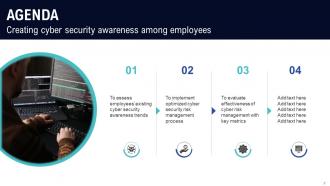
Slide 2: This slide states Agenda of the presentation.
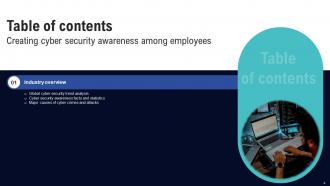
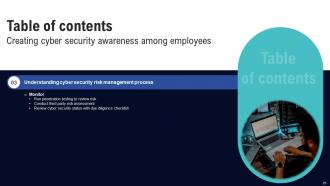
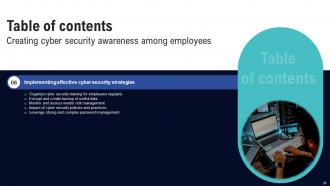
Slide 3: This slide shows Table of Content for the presentation.
Slide 4: This slide highlights title for topics that are to be covered next in the template.
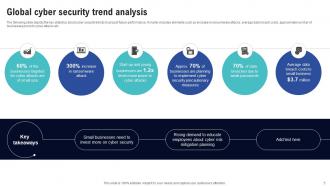
Slide 5: This slide presents Global cyber security trend analysis.
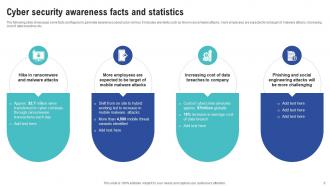
Slide 6: This slide displays Cyber security awareness facts and statistics.
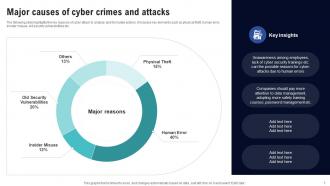
Slide 7: This slide represents Major causes of cyber crimes and attacks.
Slide 8: This slide highlights title for topics that are to be covered next in the template.
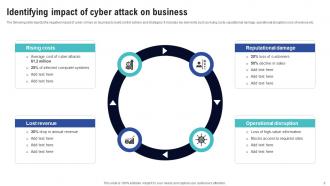
Slide 9: This slide showcases Identifying impact of cyber attack on business.
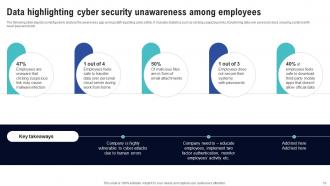
Slide 10: This slide shows Data highlighting cyber security unawareness among employees.
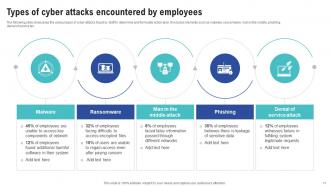
Slide 11: This slide presents Types of cyber attacks encountered by employees.
Slide 12: This slide highlights title for topics that are to be covered next in the template.
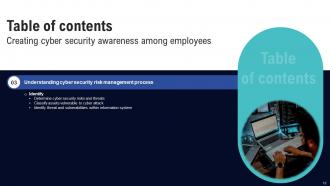
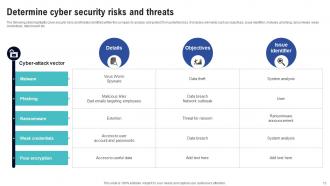
Slide 13: This slide displays Determine cyber security risks and threats.
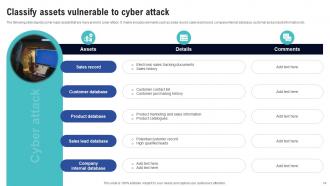
Slide 14: This slide represents Classify assets vulnerable to cyber attack.
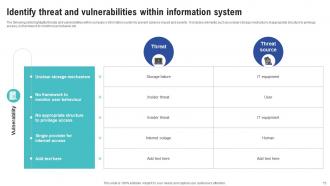
Slide 15: This slide showcases Identify threat and vulnerabilities within information system.
Slide 16: This slide highlights title for topics that are to be covered next in the template.
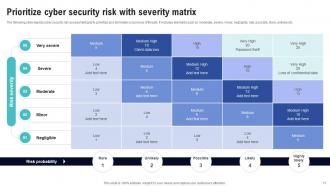
Slide 17: This slide shows Prioritize cyber security risk with severity matrix.
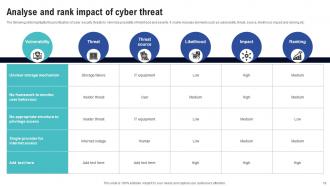
Slide 18: This slide presents Analyse and rank impact of cyber threat.
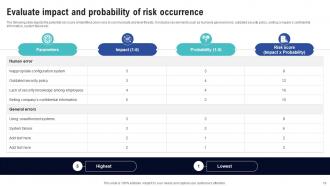
Slide 19: This slide displays Evaluate impact and probability of risk occurrence.
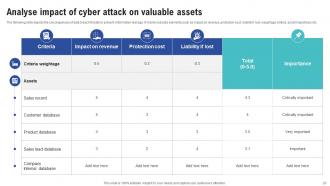
Slide 20: This slide represents Analyse impact of cyber attack on valuable assets.
Slide 21: This slide highlights title for topics that are to be covered next in the template.
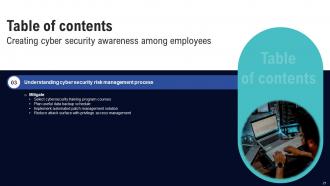
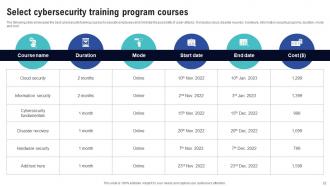
Slide 22: This slide showcases Select cybersecurity training program courses.
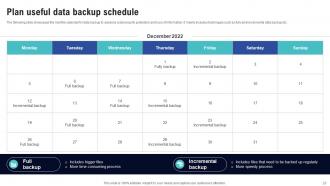
Slide 23: The following slide showcases the monthly calendar for data backup to advance cybersecurity protection.
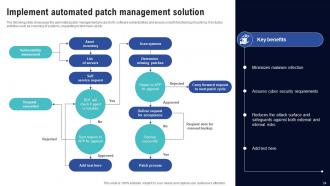
Slide 24: This slide shows Implement automated patch management solution.
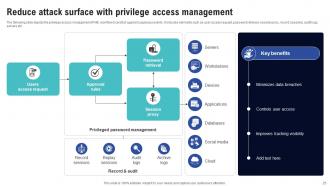
Slide 25: This slide presents Reduce attack surface with privilege access management.
Slide 26: This slide highlights title for topics that are to be covered next in the template.
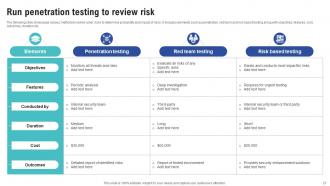
Slide 27: This slide displays Run penetration testing to review risk.
Slide 28: This slide represents Conduct third party risk assessment.
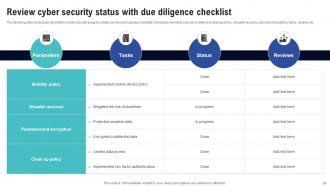
Slide 29: This slide showcases Review cyber security status with due diligence checklist.
Slide 30: This slide highlights title for topics that are to be covered next in the template.
Slide 31: This slide shows Select tools to reduce cyber security failure.
Slide 32: This slide highlights title for topics that are to be covered next in the template.
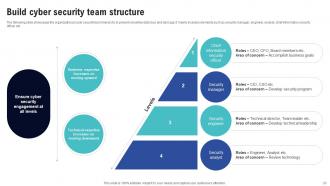
Slide 33: This slide presents Build cyber security team structure.
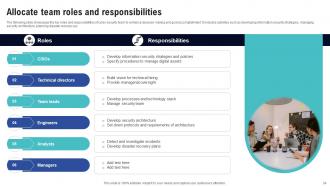
Slide 34: This slide displays Allocate team roles and responsibilities.
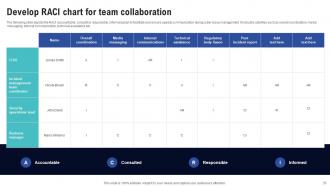
Slide 35: This slide represents Develop RACI chart for team collaboration.
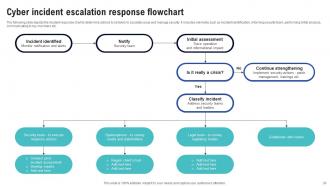
Slide 36: This slide showcases Cyber incident escalation response flowchart.
Slide 37: This slide highlights title for topics that are to be covered next in the template.
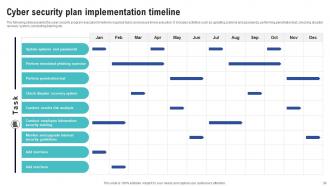
Slide 38: This slide shows Cyber security plan implementation timeline.
Slide 39: This slide highlights title for topics that are to be covered next in the template.
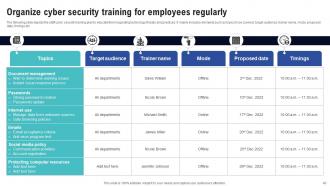
Slide 40: This slide presents Organize cyber security training for employees regularly.
Slide 41: This slide displays Encrypt and create backup of useful data.
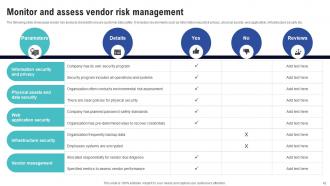
Slide 42: This slide represents Monitor and assess vendor risk management.
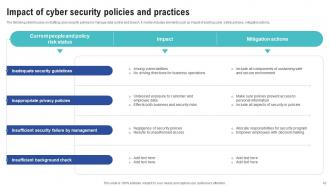
Slide 43: This slide showcases Impact of cyber security policies and practices.
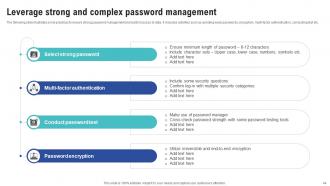
Slide 44: This slide shows Leverage strong and complex password management.
Slide 45: This slide highlights title for topics that are to be covered next in the template.
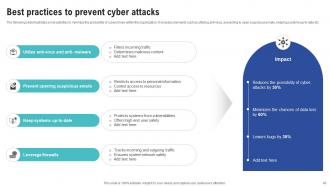
Slide 46: This slide presents Best practices to prevent cyber attacks.
Slide 47: This slide highlights title for topics that are to be covered next in the template.
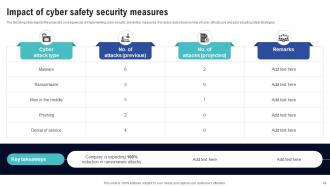
Slide 48: This slide displays Impact of cyber safety security measures.
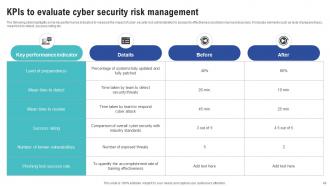
Slide 49: This slide represents KPIs to evaluate cyber security risk management.
Slide 50: This slide highlights title for topics that are to be covered next in the template.
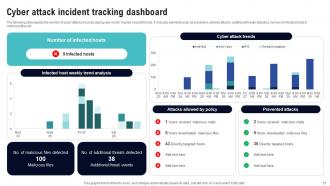
Slide 51: The following slide depicts the number of cyber-attacks incurred during year end to monitor security trends.
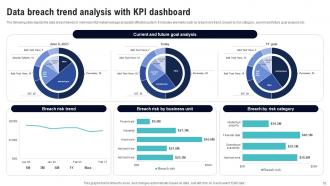
Slide 52: This slide showcases Data breach trend analysis with KPI dashboard.
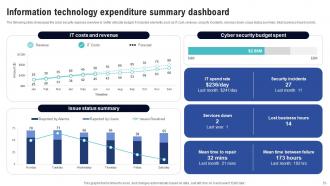
Slide 53: This slide shows Information technology expenditure summary dashboard.
Slide 54: This slide contains all the icons used in this presentation.
Slide 55: This slide is titled as Additional Slides for moving forward.
Slide 56: This is About Us slide to show company specifications etc.
Slide 57: This is Our Mission slide with related imagery and text.
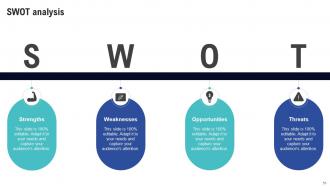
Slide 58: This slide shows SWOT describing- Strength, Weakness, Opportunity, and Threat.
Slide 59: This slide provides 30 60 90 Days Plan with text boxes.
Slide 60: This slide shows Post It Notes. Post your important notes here.
Slide 61: This slide displays Mind Map with related imagery.
Slide 62: This slide displays Column chart with two products comparison.
Slide 63: This is a Financial slide. Show your finance related stuff here.
Slide 64: This is Our Team slide with names and designation.
Slide 65: This is a Thank You slide with address, contact numbers and email address.
Creating Cyber Security Awareness Among Employees Complete Deck with all 69 slides:
Use our Creating Cyber Security Awareness Among Employees Complete Deck to effectively help you save your valuable time. They are readymade to fit into any presentation structure.














FAQs for Creating Cyber Security Awareness Among
Dude, phishing emails are probably the worst - I bet there's one sitting in your inbox right now. Ransomware's brutal too, plus you've got insider threats from your own people. Malware comes through sketchy downloads, hackers steal login credentials, and they're even going after your vendors with supply chain attacks. Social engineering is wild though - scammers just talk employees into handing over access. Most breaches? Still happen because someone clicked the wrong link or used "password123." Get your team trained on spotting fake emails and turn on multi-factor authentication everywhere.
Okay so watch out for sketchy stuff like "URGENT!!!" subject lines and those weird "Dear Valued Customer" greetings. The sender's email address is usually a dead giveaway too - like it'll be [email protected] or something obviously fake. I always hover over links before clicking to see where they actually go. The "your account expires in 24 hours" thing gets me way more than I'd like to admit though, especially when I'm stressed. If something feels off, just call or text the company directly instead of clicking through the email. Honestly, most of it comes down to just pausing for a second before you click anything.
Look, passwords are literally your only barrier between hackers and your stuff. Weak ones like "password123" are a joke - might as well hand over your login info. Each account needs its own unique, complex password because once they crack one, they'll try it everywhere else. That's where password managers come in clutch. They create crazy strong passwords and store them so you don't have to memorize gibberish like "X7$mK9
-
Wow! The design and quality of templates on SlideTeam are simply the best.
-
SlideTeam never fails to surprise me with its amazing PPT designs. Thanks team for providing me with your constant support!