


Crm Mini Project Charter With Project Goals Crm Digital Transformation Toolkit




Try Before you Buy Download Free Sample Product
 Impress Your
 Audience
 100%
100% Editable
 Save Hours
 of Time


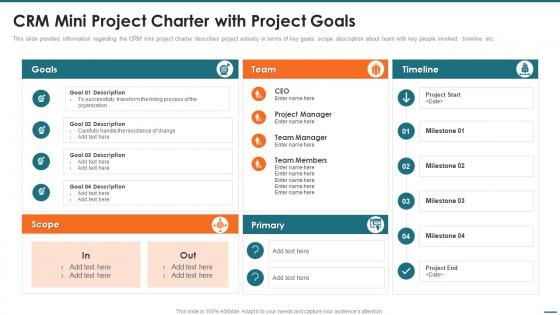
This slide provides information regarding the CRM mini project charter describes project entirety in terms of key goals, scope, description about team with key people involved, timeline, etc.
People who downloaded this PowerPoint presentation also viewed the following :
Crm Mini Project Charter With Project Goals Crm Digital Transformation Toolkit with all 6 slides:
Use our Crm Mini Project Charter With Project Goals Crm Digital Transformation Toolkit to effectively help you save your valuable time. They are readymade to fit into any presentation structure.





FAQs for Crm Mini Project Charter With Project Goals Crm
So basically we're trying to clean up your whole lead management mess and get better visibility on customer data between teams. The big goal? Boosting sales conversions by at least 15%. All that manual follow-up work your sales team's been drowning in - we're automating most of it. Should save everyone's sanity honestly. We'll also connect your existing tools better so they actually talk to each other, plus build some standard workflows for nurturing prospects. You'll end up with cleaner data, way faster response times, and higher quality leads moving through your pipeline. The project brief has all the timeline stuff and metrics if you want the details.
So your main people are sales team, marketing, customer service, and IT - anyone dealing with customer stuff daily. Your project sponsor (probably some sales or ops director) controls the money and big decisions. Honestly though? Focus on the actual users first - they can totally sink your project if they hate what you build. You might need a data person too if you're doing analytics. Oh, and map out who has influence vs who just needs updates. Trust me, knowing who approves what saves you so much headache later.
So for this mini CRM project, we're just tackling the basics - contact management, lead tracking, and a simple sales pipeline. You can add customer info, see where leads are in your process, plus get some basic conversion reports. We're deliberately keeping things simple right now (honestly, most CRMs try to do way too much from the start). Want to nail these three things before adding any bells and whistles. The detailed user stories are in the project scope doc, but yeah - the whole point is building something that's actually useful from day one instead of some bloated mess.
So we're looking at 8 weeks total if we kick off Monday - puts us at mid-March. First two weeks are discovery and requirements gathering, then development runs weeks 3-6, and we wrap with testing plus rollout. Honestly? The timeline's pretty brutal considering everything else on our Q1 plate, but management's pushing hard for this. Here's the thing though - if stakeholders don't sign off by week 2, we're screwed on the back end. Oh, and definitely save week 7 for user testing since they'll need your feedback before launch.
So we're tracking this in a few ways - user adoption first (shooting for 85%+ in quarter one), then lead conversion rates and how fast deals close. Data quality scores matter too because honestly, bad data just screws everything up. Monthly dashboard reviews will cover pipeline visibility and customer satisfaction. The big milestone? ROI calculation at 6 months. Oh, and definitely bookmark that metrics dashboard when it goes live - way better than waiting around for monthly meetings to see how things are going. Trust me on that one.
Honestly, you don't need much for a CRM mini project. Any decent laptop works since most CRMs are cloud-based anyway. For your team, grab a project lead and maybe 1-2 devs depending on how complex this gets. Definitely pull in someone from sales though - they'll catch requirements issues you'd miss otherwise. Oh, and don't skip QA, learned that the hard way once. Hardware's pretty minimal since you're probably using Salesforce or HubSpot or whatever. I'd figure out which platform first, then worry about who's available to help.
Honestly, data migration is gonna be your biggest nightmare - it's always messier than you expect. Plus people hate change, so you'll get pushback from anyone who's comfortable with how things work now. Integration with existing tools can get weird too. Oh and training? Plan for way more sessions than you think. There's always someone who needs extra help (not judging, just reality). I'd budget extra time for cleaning up that legacy data mess and maybe do smaller training groups instead of one massive session that nobody remembers.
Start with one-on-one interviews - sales reps, support people, managers. They'll give you the real story about daily workflows and what's actually broken. Focus groups are worth doing too, even though they can be a mess sometimes. Honestly, the chaos often leads to the best insights. Don't forget a survey for broader input from everyone else. Document everything they're currently doing, especially the weird workarounds and random Excel files they've cobbled together - that stuff tells you what's missing. Oh, and do the interviews first since you'll want those insights to shape your survey questions.
So we'll do an ETL migration - extract, transform, load. Basically audit your current data first because there's always way more duplicates and random junk than anyone thinks. Clean everything up, then move it over in chunks instead of all at once. Way safer that way. Should take 2-3 weeks total. Oh, and definitely back up your customer database before we touch anything - learned that lesson the hard way on a project last year. Batching it out means less downtime and we can fix problems as they pop up.
So Sarah from IT and Mike from Sales are running the training together. Mike's handling all the sales workflow stuff, which makes sense since he actually does this job every day. Sarah's got the tech side covered - system setup, how to navigate everything. You'll get both group sessions and some one-on-one time based on your role. They're doing it in phases starting next month. Definitely don't sleep on those calendar invites when they come through! I'm honestly pretty happy they paired these two up instead of just dumping it all on someone random.
So you'll want role-based access controls - only the right people see sensitive customer stuff. Everything gets encrypted when it's stored and when it moves around. The system logs who accessed what and when, which honestly saves your butt during audits. Regular security check-ups are a must. Make sure you're hitting GDPR, CCPA, and whatever other privacy rules your customers fall under. Built-in data retention policies will auto-delete old records based on legal requirements. Oh, and map out your current data processes now so the transition doesn't suck later.
So you've got three solid options: Salesforce, HubSpot, and Dynamics 365. Salesforce is crazy powerful but honestly? Probably way more than you need, plus it gets expensive quick. HubSpot's perfect if you're a smaller team - their free stuff is actually pretty decent to start. Dynamics 365 might be your best bet though since it'll play nice with all your Microsoft stuff (no integration nightmares). Oh, and my cousin's company went with Dynamics last year and loves it. Anyway, figure out your non-negotiables first, then we can see which one fits best.
Honestly, focus on three main things: training, communication, and showing people what's in it for them personally. Run actual hands-on sessions instead of boring demos. Quick reference guides help too. But here's the thing - you gotta show users how this thing makes their job easier, not more complicated. I've watched so many rollouts crash because management obsessed over fancy features instead of real benefits. Find your early adopters and turn them into champions who can help the stubborn people. Oh, and tackle your biggest skeptics first - once they're on board, they'll do half your selling for you.
So we've got $25k total for the CRM thing - that covers licensing, setup, consultants if we need them. Pretty tight honestly, but should work if you focus on the basics first. Most vendors can do a solid setup in that range. Skip the fancy stuff for now and go with must-haves only. Oh, and definitely get quotes from at least three companies because prices are all over the place. The budget breakdown spreadsheet might help too - want me to shoot that over?
Okay so first thing - get your key people's contact info now before you forget. You'll want department heads, actual users, IT folks. Set up feedback sessions at the big milestones: wireframes, prototype, and right before you go live. Honestly, don't just email people asking "thoughts?" - nobody responds to that. Be specific about what you need from them each time. I'd do bi-weekly check-ins during development too since CRM stuff can really mess things up if you go off track. Way better to catch issues early than scramble later.
-
The presentations are very helpful. I am always able to get appropriate templates for the different topics related to my profession.
-
The Designed Graphic are very professional and classic.