

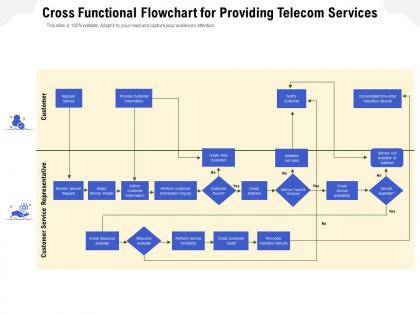
Cross functional flowchart for providing telecom services




Try Before you Buy Download Free Sample Product
 Impress Your
 Audience
 100%
100% Editable
 Save Hours
 of Time


Our Cross Functional Flowchart For Providing Telecom Services are topically designed to provide an attractive backdrop to any subject. Use them to look like a presentation pro.
People who downloaded this PowerPoint presentation also viewed the following :
Cross functional flowchart for providing telecom services with all 2 slides:
Use our Cross Functional Flowchart For Providing Telecom Services to effectively help you save your valuable time. They are readymade to fit into any presentation structure.

FAQs for Cross functional flowchart for
So basically you've got customer inquiry/order first, then feasibility check, provisioning, installation, testing, and finally service delivery. Support and billing come after - those never end lol. Your flowchart might look different though depending on if it's mobile, broadband, or enterprise stuff. Each stage needs clear handoff points plus feedback loops for when shit hits the fan. Honestly I'd map out what you're doing now first. See where things get stuck before trying to fix anything. Breaking down the steps further or combining them really depends on your specific setup.
So onboarding is literally where everything starts - capture the lead, then you're doing identity checks, credit stuff, picking services. Here's the thing though: if your systems aren't connected properly, you're screwed. All that onboarding data feeds straight into provisioning and billing setup. I've seen companies mess this up and then wonder why they're drowning in support tickets later. Short sentences work better sometimes. The foundation has to be solid or you'll pay for it downstream with billing headaches. Integration with your CRM is non-negotiable here.
So basically automation does the grunt work - routing requests, setting up new connections, network configs, basic troubleshooting. All without anyone touching it. You'll find it in everything from onboarding customers to billing (honestly, billing automation is a lifesaver). Manual errors drop way down, and stuff that used to take hours now happens in minutes. When you're looking at your processes, hunt for repetitive tasks or those annoying approval delays where things just sit there waiting. That's where you want to automate first.
Customer service pops up everywhere in your telecom flowchart - it's not just one spot but touches basically every stage. Initial inquiries, order processing, installation, billing problems, tech support... the whole nine yards. Honestly, it's kind of a pain to map out because customers can drop in anywhere! Each interaction needs to update their profile and service status. Oh, and you'll definitely want clear escalation paths - trust me on that one. Show how tickets get created and resolved at each point. It gets messy but that's just how telecom works.
Honestly, start with customer acquisition time and how fast you're activating services - those are huge. Track first-call resolution too because repeat calls are the worst. Network uptime is obviously critical (angry 2am calls about outages will ruin your week), plus mean time to repair. Don't sleep on billing accuracy and churn rates either. Support ticket trends tell you a lot about what's breaking down. I'd pick maybe 3-4 of these that match your biggest headaches right now and build dashboards around those first. You can always add more metrics later once you've got the basics dialed in.
Look for places where things take forever or where everything funnels through one spot. Time each step first - that's honestly the only way to know what's actually broken vs what just feels slow. Your flowchart will show you where requests pile up, like when network config holds up provisioning or approval loops kill onboarding speed. Once you map it visually, patterns jump out. Maybe accounting always bottlenecks the chain. Or manual handoffs create weird delays between departments. I swear, seeing it all laid out makes problems so obvious you'll wonder how you missed them before.
Honestly, Visio's still king for this stuff - telecom folks love it for complex network diagrams. But if you want something web-based, Lucidchart or Draw.io are solid (no more annoying file sharing). PowerPoint works too if it's simple, though it gets ugly real quick with bigger workflows. Oh, and there's fancy tools like Bizagi if you're thinking automation down the road. My take? Just use whatever your team already has. You can always switch later if the tool starts fighting you more than helping.
Look, flowcharts are game-changers for this stuff. Everyone can finally see where their piece fits and who gets it next. No more endless email chains trying to figure out whose turn it is. When you're in those brutal cross-department meetings, just point to the chart - "we're here, you're next." Done. Your team will know exactly what the other guys expect from you and when they need it. Honestly saved my butt so many times. Maybe try walking through yours with the main people next week? Way easier than explaining it over and over.
Map out your customer journey first - from when they request service until activation. Use standard flowchart symbols so your whole team can actually read the thing. Don't make my mistake of cramming every tiny detail into one chart. Keep it high-level, then drill down into sub-processes later if you need to. Those handoff points between teams? Mark them clearly - that's where everything usually goes sideways. Try adding time estimates for each step too. Once you're done, walk through some real scenarios with your team. You'll catch gaps you totally missed.
Break it into separate branches for each service - mobile, broadband, enterprise, whatever you've got. Keep the basic framework the same (inquiry, verification, activation stuff) but customize the middle parts. Mobile needs SIM activation and device setup, broadband's all about line testing and equipment installs. I tried doing one giant flowchart once and it was a nightmare - way too confusing. Better to make service-specific versions that connect at the start and end points. Map your top 3 services first. You'll start seeing the patterns pretty quick, then you can template the others.
Ugh, compliance is like having speed bumps every few miles on your project highway. You'll hit approval gates for spectrum stuff, customer data, service launches, pricing - the works. Honestly the worst part? Everything takes forever because you're waiting on reviews and paperwork at every turn. I learned this the hard way on my last project - should've mapped out all those checkpoints upfront. Skipping them isn't worth it though. We're talking massive fines or they'll literally shut you down. Build those waiting periods into your timeline from the start or you'll be constantly pushing deadlines back.
Look at your customer complaints from last quarter - they'll show you exactly where your flowchart is broken. People get pissed about hold times, getting bounced around between departments, having to repeat their info three times. Your internal team won't catch this stuff because they're too close to it. Map out where customers actually struggle, then fix those spots with better decision points or shortcuts. I swear, customers see things you'll never notice. Their complaints are basically a roadmap for making your process actually work instead of just looking good on paper. Focus on the issues that keep popping up.
So basically, flowcharts help you catch problems before customers even hit them. Map out every step they go through - trust me, there's way more involved in simple stuff like activating service than you'd think. You'll spot where things get stuck and can fix bottlenecks that create those annoying wait times. Your team gets it too since they can see the whole customer journey instead of just their piece. Makes handoffs between departments way cleaner. Automation becomes obvious for the repetitive stuff. Start with what you're doing now, then go after whatever customers complain about most.
Honestly, think of it like a visual roadmap for new hires - way better than making them slog through boring procedure manuals. Walk them through real customer scenarios using the flowchart and they'll get those decision points super quick. Who escalates what, when to pass things along, all that stuff. Those first few weeks are brutal anyway, so anything that cuts through the chaos helps. I'd have them shadow calls while following the flowchart - it just clicks faster that way. Plus your experienced people can stay consistent when they're training instead of everyone doing their own thing.
Honestly, the worst thing you can do is go overboard with details - your flowchart becomes this giant tangled web nobody wants to look at. Keep it high-level, hit the main touchpoints. Don't skip decision points and error paths though, telecom stuff breaks constantly (we both know this lol). Here's what kills me - people build these without talking to the ops teams first. Those guys know exactly where everything gets stuck. Start basic, run it by operations, then only add the complicated stuff where you actually need it. Simple beats perfect every time.
No Reviews