


Cyber Safety Powerpoint Ppt Template Bundles




Try Before you Buy Download Free Sample Product
 Impress Your
 Audience
 100%
100% Editable
 Save Hours
 of Time


Embark on an enlightening exploration of Cybersecurity in our comprehensive presentation. Delve into the critical realm of information security, uncovering strategies and tools to safeguard digital assets. Explore the nuanced landscape of cybersecurity in cloud computing, understanding the pivotal role of protective measures in cloud-based environments. Witness how security services fortify defenses against cyber threats, ensuring resilience in an ever-evolving digital landscape. Join us to discover the proactive stance against cyber threats, understanding how cybersecurity measures form the cornerstone of a robust defense, protecting data integrity and fostering trust in the digital realm.
People who downloaded this PowerPoint presentation also viewed the following :
Cyber Safety Powerpoint Ppt Template Bundles with all 22 slides:
Use our Cyber Safety Powerpoint Ppt Template Bundles to effectively help you save your valuable time. They are readymade to fit into any presentation structure.
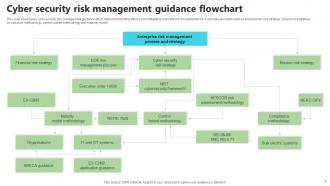
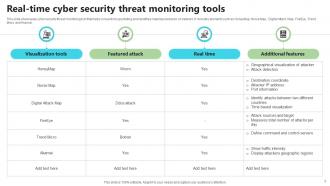
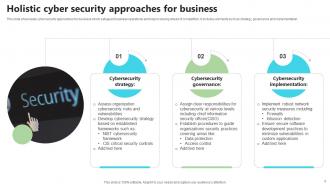
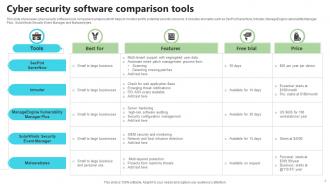








FAQs for Cyber Safety Powerpoint
Honestly, just get a password manager first - that alone fixes like 80% of your problems. I was skeptical at first but it's a game changer. Keep everything updated too, those patches aren't just suggestions. Don't click sketchy links even if they're from your mom (her account might be hacked). Back up your stuff regularly because Murphy's law is real. Oh, and stop oversharing on social media - nobody needs to know you're on vacation in real time. Start with the password thing though, seriously.
First thing I'd do is Google yourself - you'll probably be horrified at what comes up lol. Then go through your social media and tighten up those privacy settings. Seriously, we've all overshared over the years without realizing it. Get a password manager if you don't have one already, they're honestly game-changers for creating unique passwords. Two-factor authentication is a must for your important stuff. Be way more careful about posting personal details online too. Bad guys are scary good at connecting random dots. Just do a quick privacy audit on your main accounts this week - takes maybe 10 minutes but it's so worth it.
Ugh, where do I even start? Phishing emails are everywhere - fake messages trying to steal your passwords or trick you into clicking sketchy links. Ransomware's the worst though, it literally locks all your files until you pay some random hacker. Then there's social engineering where scammers pretend to be your bank or IT guy to manipulate you. Oh, and data breaches happen constantly now so identity theft is super common. Honestly, just use different passwords for everything and turn on two-factor authentication. Also verify who you're talking to before giving out personal stuff - learned that one the hard way!
Dude, you absolutely need strong passwords - they're literally what stops hackers from ruining your life. Mix up 12+ characters with uppercase, lowercase, numbers and symbols. I used to be that idiot using "password123!" thinking I was so smart, but apparently hackers crack those instantly. Try passphrases instead like "Coffee$Morning&Rain2024" - way easier to remember but still tough to break. Don't use birthdays or your dog's name since that's plastered all over your Instagram anyway. Oh, and get a password manager! Then you only memorize one master password. Seriously saves so much headache.
Honestly, skip the boring slideshow approach - nobody remembers that stuff anyway. Do interactive training sessions covering phishing, passwords, and basic web safety. Run fake phishing tests to catch who's clicking sketchy links, then give extra help to whoever needs it. Make sure you've got solid policies about downloads and USB drives. Oh, and create a culture where people actually feel comfortable reporting weird stuff without looking dumb. The biggest thing? Don't treat this like a one-time checkbox. Do refreshers every few months because threats keep evolving.
Honestly, first thing you should do is check your privacy settings - most of us set up our accounts years ago and never looked back! Make everything private, turn off location tracking, and disable those weird "people you may know" features (seriously, how does Facebook even know these people??). Also super important to control photo tagging - make sure you approve anything before it shows up on your timeline. The annoying part is you'll need to revisit these settings every couple months since apps love sneaking changes past us during updates. Takes like 10 minutes but totally worth it.
So encryption basically scrambles your data so only the right people can read it. Like when you're shopping online or sending emails - it keeps hackers from snooping if they intercept stuff. Picture it as a locked safe where only you and whoever you're sending to has the key. I'd definitely use encrypted messaging apps if I were you. Also turn on full-disk encryption for your devices. Oh and that little padlock icon when you're browsing? Always look for that - means the site's actually secure. Honestly it's probably the best protection you can have these days.
Watch out for the obvious stuff - weird spelling, sketchy email addresses, and those "Dear Valued Customer" greetings. They love creating fake panic too, like "your account will be suspended in 24 hours!" Total BS most of the time. Before clicking any links, hover over them first to see where they actually go. Honestly though? These scammers are getting way better at looking legit. When something feels sketchy about an email asking for your info, just go straight to the actual website yourself instead of clicking their links. Your gut's usually right about this stuff.
Dude, public Wi-Fi is sketchy as hell. Hackers can grab your passwords and personal stuff super easily - it's like your data is just floating around unprotected. I'd definitely get a VPN to encrypt everything. Also don't log into your bank or anything important on those networks. Turn off that auto-connect thing too, it's annoying anyway. Oh and those completely open networks? Skip them. Go for ones that at least need a password. Honestly I just assume someone's always watching when I'm on coffee shop wifi. Better safe than sorry, you know?
So basically, these tools let you see what your kids are up to online and block sketchy websites. You can set time limits too, which is honestly a lifesaver during homework time. Some even track social media stuff - feels kinda invasive but whatever, cyberbullying is real. The trick is starting strict with little kids then backing off as they get older. Like, my neighbor still monitors her 16-year-old's every click and that kid's gonna go wild in college. You want them learning to make good choices themselves, not just following rules because they have to.
Oh no! First thing - screenshot everything before it vanishes. Change your passwords ASAP. If there's money missing, call your bank right away. File a report on the FBI's IC3 website (ic3.gov) - I know it sounds bureaucratic but they actually do stuff with these reports. Local police too for the paper trail. Speed matters here because some fraud protections have annoying time limits. Save all your docs somewhere safe since you'll probably need them later for insurance or whatever. This whole thing sucks but you've got this!
Start with the basics - phishing, passwords, social engineering. Most people get hacked because they clicked something sketchy, so focus there first. Interactive training works better than boring presentations nobody pays attention to. Run fake phishing tests every few months to see who's actually learning. Don't use generic corporate examples - make scenarios that actually relate to your company. Oh, and this can't be a one-and-done thing. You need regular refreshers, maybe quarterly? Update everything when new scams pop up. It's annoying but way cheaper than dealing with a breach later.
So cybersecurity is all the technical stuff - firewalls, encryption, preventing data breaches. Cyber safety is more about protecting yourself from online harassment, scams, sketchy content. Your company probably handles most of the security infrastructure (thank god because that stuff's complicated). But cyber safety? That's on you. Learning to spot phishing emails, managing what you post, reporting trolls. The terms get confused constantly - I mix them up too sometimes. I'd start with basic cyber safety since that's what'll actually help you day-to-day online.
Okay so basically updates fix security holes that hackers target. Yeah they're super annoying when you're trying to get work done, but think of it this way - running old software is like leaving your house unlocked. Developers find these weak spots in their code and rush out patches before the bad guys can exploit them. Your browser, apps, OS - they all need this stuff regularly. Honestly just turn on automatic updates if you can. Way easier than remembering to do it manually, and you won't have to stress about it.
Look, AI's gonna be wild - hackers will get smarter with it, but at least we'll have better defense tools too. Quantum computing though? That could literally break all our encryption, which is terrifying if you ask me. The IoT explosion means tons more attack vectors everywhere. Plus everything's moving to the cloud anyway, so security there is becoming make-or-break. Oh, and you'll probably want to start updating your security policies now rather than scrambling later when these threats actually hit. Trust me on that one.
-
Editable templates with innovative design and color combination.
-
Spacious slides, just right to include text. SlideTeam has also helped us focus on the most important points that need to be highlighted for our clients.