

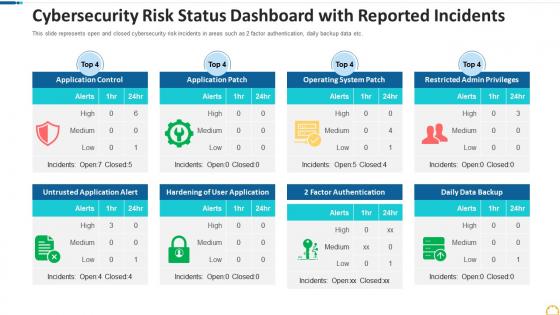
Cybersecurity risk status dashboard with reported incidents




Try Before you Buy Download Free Sample Product
 Impress Your
 Audience
 100%
100% Editable
 Save Hours
 of Time


Our Cybersecurity Risk Status Dashboard With Reported Incidents are topically designed to provide an attractive backdrop to any subject. Use them to look like a presentation pro.
People who downloaded this PowerPoint presentation also viewed the following :
Cybersecurity risk status dashboard with reported incidents with all 9 slides:
Use our Cybersecurity Risk Status Dashboard With Reported Incidents to effectively help you save your valuable time. They are readymade to fit into any presentation structure.








FAQs for Cybersecurity risk status dashboard
Focus on threat detection stuff first - alerts, incidents, malware blocks. Then add vulnerability management (patch levels, open vulns by severity) and network security indicators like failed logins and suspicious traffic. Compliance status is obvious but necessary. Oh, and definitely include user behavior analytics - seriously, insider threats are such a blind spot for most orgs. Don't just show current snapshots though. Trends over time tell the real story since patterns matter way more than one-off data points. Start there, then customize based on whatever's stressing your CISO out most.
So basically instead of checking yesterday's security logs, you're watching everything happen live. Threats pop up? You know instantly. Attack patterns developing? You can see them unfold in real time rather than discovering them three days later when it's too late. The response time difference is huge - we're talking minutes vs hours. You can actually watch your security fixes work (or not work, which honestly happens more than you'd think). Set up some automated alerts for the critical stuff so you don't have to babysit the dashboard constantly. It's like switching from security footage to live cameras.
Honestly, visuals are a game-changer for security stuff. Instead of drowning in endless text logs, you can spot weird patterns instantly - like that random traffic spike from Eastern Europe at 3am showing up bright red on your heat map. Way faster than scrolling through spreadsheets for hours. Heat maps, charts, dashboards - they make it so much easier to catch threats and explain what's happening to your boss too. I'd start simple though, just pick whatever metrics actually matter to your team first. The fancy stuff can wait.
So these dashboards basically show you all your security incidents in one place with risk scores and color coding. Red stuff = deal with it now, yellow can wait a bit. Pretty straightforward. You can filter by which systems got hit or what type of attack it was, which is super handy when you're drowning in alerts. Honestly, without the visual priorities I'd have no clue where to start - there's always like 50 things going wrong at once. Just tackle the critical alerts first, then work down the list. Way better than trying to remember what's urgent in your head.
Start with the big stuff - critical alerts right up front where your team can't miss them. Red for serious threats, yellow for warnings, keep it simple. Don't try shoving everything onto one screen (learned that the hard way). Group similar stuff together and make filtering actually usable - sounds obvious but you'd be surprised how often this gets screwed up. Your analysts need to spot problems fast, especially during those fun 2am emergencies. Let them drill down for details after they've caught the main issue. Test it with real people who'll actually use it daily.
Look, integration is what separates good dashboards from useless ones. You don't want to be manually pulling data from like 10 different tools - that's a nightmare. Get something that connects to your SIEM, endpoint detection, vulnerability scanners, whatever you're already using. Real-time visibility across everything is the whole point. Think of it like having one screen showing all your security cameras instead of running between monitors. The automation stuff gets pretty wild once everything's connected. My advice? Find dashboards with solid API support and integrations that actually work with your current setup. Trust me on this one.
Watch out for malware, phishing, and unauthorized logins - that's the core stuff. Ransomware's been brutal lately, so definitely track that along with DDoS attacks. Set up alerts for weird login patterns and any sketchy data transfers. Network traffic spikes are another red flag. Honestly, insider threats worry me the most sometimes - your own people can do way more damage than outsiders. Automated alerts are a lifesaver here because nobody wants to babysit dashboards 24/7. Oh, and data exfiltration attempts - almost forgot that one but it's huge.
So compliance frameworks tell you exactly what metrics to track - stuff like how fast you respond to incidents, access reviews, patch timelines. SOC 2, ISO 27001, whatever you're dealing with. Map out those requirements first, then build your dashboard around them. Trust me, you don't want to be frantically pulling reports when auditors show up (been there, it sucks). The key is automation - your dashboard should capture everything automatically with proper audit trails. Makes life so much easier when you can just point to the data instead of scrambling around spreadsheets.
You'll want to focus on three main ones: Mean Time to Detection (MTTD), Mean Time to Response (MTTR), and Mean Time to Recovery. MTTD tracks how fast your team catches threats. MTTR is about response speed once you've confirmed something's actually happening. Recovery time is pretty self-explanatory - when everything's back to normal. Don't sleep on escalation time though, seriously. Most teams forget about it but it shows you exactly where things get stuck in your process. Set up alerts when these go over your targets so you can fix bottlenecks before they bite you.
Honestly, ML is a game-changer for cybersecurity dashboards. You can spot weird patterns in network traffic and user behavior way faster than doing it manually - which let's be real, nobody has time for anymore. The cool part is it learns what normal looks like, so you get way fewer false alarms (thank god). It'll flag things like sketchy login attempts or unusual data movement before they become real problems. My advice? Figure out what boring analysis stuff your team spends hours on and find ML tools to handle that first. You'll actually be able to focus on the threats that matter.
So basically, cybersecurity dashboards take all that messy security data and turn it into visuals that executives can actually wrap their heads around. Real-time threat levels, incident response times, compliance stuff - all without the tech jargon that makes their eyes glaze over. Honestly, the best part is you're done scrambling to build PowerPoints every single week. Now you've got automated reports showing trends and ROI through charts and heat maps they actually like looking at. It keeps everyone in the loop and - bonus - makes budget requests way easier when you have solid data backing you up.
Honestly, the constant data changes are brutal - we're talking updates every few minutes sometimes. Different security tools refresh at totally different rates, and legacy systems? Don't even get me started on how slow those are. You'll also deal with conflicting data sources or feeds just randomly going offline. Each vendor formats stuff differently too, which creates a nightmare when you're trying to integrate everything. My advice? Build redundancy into your setup and set up automated checks. That way you'll catch stale data before your team makes any bad calls based on outdated info.
Time-series line charts work great for showing security metrics over months/quarters - vulnerability fixes, patch compliance, incident response times, that kind of stuff. Color-coding is honestly a game changer for quick visual reads. Trend arrows next to your current numbers help too, shows if you're actually improving or not. I'd stack maybe 3-4 key metrics on one dashboard so leadership gets the whole story without scrolling around. Don't go overboard with data though - you'll lose people fast if there's too much noise on the screen.
Think of user behavior analytics as your dashboard's BS detector. It watches how people normally work, then freaks out when something's off. Like if Sarah from accounting hits the finance database at 3am - yeah, that's probably not actually Sarah. Way better than getting buried under random alerts all day. You'll want to set up baseline profiles for your main users first though. Makes the whole thing way more accurate instead of just... screaming about everything. Honestly saves so much time once it's dialed in right.
Honestly, just ask each team what their top 3 daily must-haves are first. SOC analysts need real-time threat feeds and incident queues right in their face. Managers want the big picture - risk scores, compliance status, that kind of stuff. CISOs need board-ready summaries because trust me, explaining SIEM alerts to executives is painful. Most platforms have drag-and-drop widgets anyway, so you can customize views by role and set different permission levels. Oh, and custom filters are clutch for keeping everyone focused on what actually matters to them.
-
Very unique, user-friendly presentation interface.
-
Colors used are bright and distinctive.
-
Colors used are bright and distinctive.