


Dashboard Highlighting CRM Ticketing Tool Operations Deploying ITSM Ticketing Tools




Try Before you Buy Download Free Sample Product
 Impress Your
 Audience
 100%
100% Editable
 Save Hours
 of Time


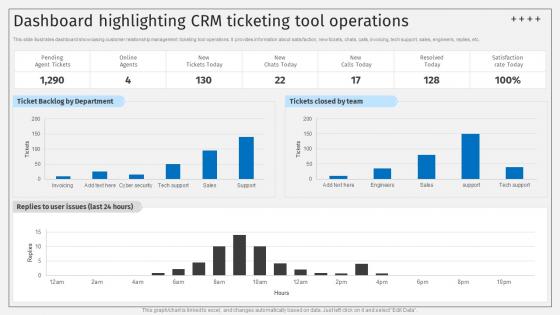
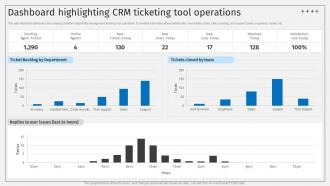
This slide illustrates dashboard showcasing customer relationship management ticketing tool operations.It provides information about satisfaction, new tickets, chats, calls, invoicing, tech support, sales, engineers, replies, etc.
People who downloaded this PowerPoint presentation also viewed the following :
Dashboard Highlighting CRM Ticketing Tool Operations Deploying ITSM Ticketing Tools with all 7 slides:
Use our Dashboard Highlighting CRM Ticketing Tool Operations Deploying ITSM Ticketing Tools to effectively help you save your valuable time. They are readymade to fit into any presentation structure.





FAQs for Dashboard Highlighting CRM Ticketing Tool Operations Deploying
Start with automation - ticket routing, escalation rules, response templates. That stuff will save your team so much time. Make sure it plays nice with your email, phone system, whatever CRM you're using now. The interface is huge too - I've seen teams abandon perfectly good systems because they were clunky to use daily. You need customizable fields, SLA tracking, mobile access that doesn't suck. Reporting's important so you can see what's actually working vs what isn't. Demo at least 2-3 options with your actual team since they're stuck using it every day.
Oh dude, automation is a game changer for support teams. It handles all the boring repetitive tasks - like auto-assigning tickets based on keywords and sending those instant "we got your message" emails to customers. Your agents can actually focus on real problem-solving instead of shuffling tickets around. The system automatically pulls up customer history too, which honestly beats scrolling through endless old conversations any day. Urgent stuff gets escalated without anyone babysitting the queue. Response times get cut in half since tickets land with the right person immediately. I'd start with auto-assignment rules first - that's where you'll notice the biggest difference.
Honestly, data analytics is a game-changer for ticketing stuff. You'll spot trends in volume spikes and see which problems keep coming back. Track your resolution times and figure out where things get stuck - usually it's something obvious you didn't notice before. The best part? You can actually predict when you'll get slammed and prep for it. No more panic when Monday rolls around with 50 new tickets. Set up some basic dashboards first, then dive into whatever metrics actually matter for your team's workflow.
Check what integrations your CRM already has first - Salesforce and HubSpot usually play nice with the major ticketing platforms. You want something that syncs customer data and ticket history automatically. Trust me, your team will hate you if they're constantly jumping between systems. The good ones let you create tickets right from CRM records and map custom fields between both platforms. I'd honestly just start with whatever pre-built options you have since building custom integrations is a total pain. Most modern tools handle this pretty seamlessly now.
Match your categories to how you actually work - billing stuff, bugs, feature requests, whatever makes sense. Priority-wise, I do impact vs urgency. Multiple users can't log in? That's urgent. Someone wants a purple button? Not so much. Don't go crazy with categories though - I've watched teams create like 20 different buckets and it just becomes chaos. Auto-rules help for the obvious stuff, but you'll want manual overrides. Oh, and get everyone on the same page about what goes where. Nothing's worse than constantly moving tickets around because Bob thinks everything's "high priority."
Dude, customer feedback is literally your roadmap for improving your CRM tool. People will hit you up asking for better automation, cleaner interfaces, stuff like that. At first some requests seem random or super specific, but trust me - patterns show up fast. Multiple customers complaining about the same workflow? That's your next priority right there. I learned this the hard way after building features nobody even used. Track everything systematically and focus on what gets mentioned most often. Oh, and don't ignore the integration requests - everyone wants their tools to play nice together these days.
Data migration is gonna be your biggest pain - nothing transfers over as cleanly as they claim it will. Plus getting everyone on board? Good luck with that. People absolutely hate switching systems once they're comfortable. Configuration gets crazy overwhelming too since there's like a million settings to mess with. Oh and don't forget integration nightmares with whatever tools you're already using. Honestly, I'd start small with just a few people first. Budget way more time for cleaning up data than you think you need, and seriously invest in proper training from day one.
Honestly, CRM ticketing is a total lifesaver for team chaos. Everyone can jump into shared queues and see what's happening instead of flying blind. Those internal notes are clutch - you can hash out weird issues without customers seeing your confusion. The auto-routing feature? Chef's kiss. Tickets automatically go to whoever has the right skills or bandwidth. No more disasters where multiple people reply to the same person (been there). Oh, and set up your routing rules first thing - learned that one the hard way. Train people on internal notes too since that's where most collaboration happens.
Track your first response times, resolution times, and customer satisfaction scores - that's your foundation right there. Ticket volume trends and escalation rates matter too. Also watch agent productivity stuff like tickets per day, though honestly some of those "productivity" metrics can be pretty misleading if you're not careful. Your backlog size is huge, especially with different priority levels. SLA compliance rates will save your butt when things get crazy. I'd start with maybe 3-5 metrics that actually affect how customers feel about your service. Don't get caught up in dashboard metrics that just look impressive but don't help anyone.
Dude, mobile CRM is a game changer for your support team. They can handle tickets from literally anywhere - on the train, between meetings, wherever. Response times get way better since nobody's stuck at their desk waiting to help customers. Your field guys can update stuff in real-time from job sites too, which customers love. I mean, I've seen teams solve problems during their coffee breaks (maybe that's good, maybe not lol). Just watch out though - you'll need to set some boundaries or your people will be answering tickets at midnight.
So basically, just build it right into your ticketing system. Most CRMs have customer portals where people can search articles and track their own tickets. Honestly saves you tons of time on repetitive stuff. I'd start with your most common ticket types - like password resets or whatever - and create help content for those first. Chatbots work pretty well for basic questions too. Oh, and make sure you keep updating your knowledge base because outdated info is almost worse than no info. You can even set it up so relevant articles pop up before someone submits a ticket, which is pretty smart.
Okay so first thing - make sure they encrypt everything (data moving around AND stored data). You'll want multi-factor authentication too, obviously. Check what compliance stuff they handle - GDPR, HIPAA, whatever applies to you. Don't give everyone access to everything either; granular permissions are your friend here. Honestly, I'd dig into their security history because nobody wants to end up in the news for the wrong reasons. Oh and this is crucial - set up a solid process for when people leave so their access gets cut off right away. I've seen too many companies mess that part up.
So third-party integrations basically connect your CRM to everything else you're using - email, project management, Slack, whatever. Game changer honestly. Your agents won't have to jump between like five different apps just to solve one ticket. Everything syncs up automatically so data flows between systems without anyone doing extra work. I'd start by figuring out which tools make your team switch contexts the most (that's usually email and your knowledge base). Those are the ones worth connecting first. It turns your ticketing system into this central hub where everything just... works together.
Start with the basics - ticket creation, routing, status updates. Your team needs training on your actual workflows, not generic stuff. Common issue categories and response templates are lifesavers once people stop being stubborn about using them. Customer communication training is key too. Managers will want those reporting dashboards, obviously. Oh, and set up practice scenarios! Let staff mess around with different ticket types without stressing about real customers. Build from there - advanced features can wait until they've got the foundation down. Makes the whole rollout way smoother.
So basically, incident management is for when everything's on fire and tons of users can't access stuff. Tickets are more like individual help requests - password resets, "how do I do this" questions, that kind of thing. With incidents, you're racing to get systems back up. There's usually escalation chains, severity levels, the whole nine yards. Teams have to coordinate fast. Tickets though? Those go in a queue and agents work through them one by one following normal procedures. Honestly the biggest difference is urgency. Incidents need all hands on deck immediately, while tickets can wait a bit if needed.
-
Great work on designing the presentation. I just loved it!
-
Attractive design and informative presentation.