

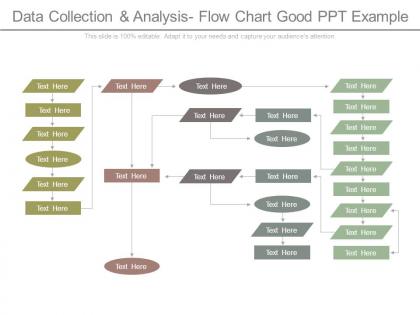
Data collection and analysis flow chart good ppt example




Try Before you Buy Download Free Sample Product
 Impress Your
 Audience
 100%
100% Editable
 Save Hours
 of Time


Bring your business acumen to the fore with our Data Collection And Analysis Flow Chart Good Ppt Example. Be able to initiate crowd funding.
People who downloaded this PowerPoint presentation also viewed the following :
Data collection and analysis flow chart good ppt example with all 7 slides:
Foil any attempt at deceit with our Data Collection And Analysis Flow Chart Good Ppt Example. It helps identify hidden agendas.
FAQs for Data collection and analysis flow chart
So there's basically 5 steps: collect your data, clean it up, analyze, interpret, then report findings. Cleaning is honestly the worst part - takes forever and you'll find the weirdest errors. Analysis comes next where you run your stats or whatever methods work. Then you figure out what it all means and write it up clearly. Oh, and don't skip ahead to the fun analysis stuff when your data's still messy. I've done that before and had to backtrack completely. Map out where you are first - it'll save you hours of headache later.
Honestly, mapping out your data collection is a game changer. You'll catch duplicated work and bottlenecks that are totally invisible when it's all just sitting in documents somewhere. Your team stops wasting time wondering what's next or whose job something is. The visual makes it obvious where things get stuck or where you're asking for the same info twice. Stakeholders actually pay attention instead of checking their phones during updates – which, let's be real, happens way too often. Just sketch out what you're doing now first, then circle the parts that suck.
Honestly, I'd start with draw.io since it's free and pretty solid for data workflows. Lucidchart is another good option - way more polished but costs money after the trial. If your company already pays for Microsoft stuff, Visio works fine though it's kind of a pain to use sometimes. Miro's cool if you need your whole team editing together in real-time. Oh, and don't sleep on PowerPoint for quick stuff - I know it sounds weird but it actually handles basic flowcharts better than you'd think. Try draw.io first and see how it goes.
First things first - figure out your main research questions. Those are gonna guide everything else. After that, check what data sources can actually answer them (not just whatever's sitting around being convenient). I usually throw together a quick matrix ranking stuff by how relevant it is, how reliable, and whether the data's fresh. Year-old social media trends are basically useless, honestly. Your timeline matters too - that "perfect" dataset won't help if it takes forever to get and you need answers next week. Budget constraints are real. Just make a priority list and tackle your top three sources first.
Data validation is your quality control checkpoint - catches errors and missing stuff before it screws up your analysis. You're running checks to make sure everything's accurate and follows the right format. Like proofreading but for numbers instead of words. Honestly, I've seen people skip this step and regret it big time when their results are completely off. The smart move? Build these checks right into your data collection so you catch problems immediately. Way better than finding out weeks later when you're supposed to present your findings and everything's garbage.
So basically, flow charts let you see your whole data collection process laid out visually. You'll catch biases way easier this way. Maybe you discover you're only gathering data during work hours and totally missing night shift workers or something. Each step becomes obvious - sampling, recording, all of it. Short sentences help you spot the gaps. Longer ones show you where human judgment might mess things up or where your procedures get inconsistent. Honestly, I wish more people did this before diving into research. Just sketch it out first and really look at each decision point. Game changer.
Build validation checks directly into your collection process - data type checks, ranges, required fields, all that stuff. Honestly, train your team well because most errors come from sloppy human entry. Set up duplicate detection and stick to standard formats for dates and numbers. Automated validation rules should be your first move since they'll catch tons of problems without you lifting a finger. Also throw in some audit trails so you know who messed with what data and when. Oh, and do random spot checks - they're surprisingly good at catching weird issues before they snowball.
So when you keep going back and tweaking your flowchart, you'll catch stuff that totally flew under the radar the first time around. Missing decision points, places where data gets duplicated or just disappears - all that messy stuff becomes way more obvious. Honestly, it's just like debugging code where the first draft is always garbage. Each revision is basically stress-testing your logic against real scenarios you've actually dealt with. What really helps is walking through it with actual data examples to see where things fall apart. I learned this the hard way on my last project, but it's worth the extra rounds.
Honestly, most people mess up by not validating their data or just collecting stuff without knowing why they need it. Flow charts are clutch because they make you think through everything first - like how you'll actually check if the data's good. You'll catch weird gaps in your process that way too. Makes training other people so much easier when it's all mapped out visually. Trust me, spend time on the workflow diagram before you start collecting anything. The cleanup work later is brutal if you don't.
Honestly, flow charts are a lifesaver for explaining data stuff to people who aren't super technical. Like, you can show your whole process visually - from collecting raw data to getting actual insights. Non-tech folks can finally see where things get stuck or slow down. Plus they'll understand what data sources you're pulling from and how you make decisions. I always make one before big project meetings now (learned this the hard way after way too many confusing emails). It's like having a translator between analyst-speak and normal human language.
Honestly, I'd start with data quality - is what you're collecting actually accurate and complete? Response rates matter too because nobody wants skewed results from like 12% participation. Cost per data point is something your boss will definitely ask about, so track that. Oh, and timeliness is huge - there's nothing worse than getting perfect data two weeks after your deadline. Don't forget to check for sampling bias either. That stuff can completely mess up your analysis even if everything else looks good. Just benchmark where you're at now with these metrics, then figure out what's broken.
Honestly, you can throw AI into almost every part of your data collection process. I'd start with automated tools that grab data from multiple sources at once - way easier than doing it manually. Then let AI handle quality checks and spot weird anomalies as data comes in. The pattern recognition stuff is pretty neat too, cuts down on so much busy work. Oh, and for those decision points in your flowchart? Set up automatic triggers that sort data based on whatever rules you want. My advice though - don't go crazy right away. Pick one step to automate first, see how it goes, then build from there.
Sankey diagrams are clutch for complex data flows - they show exactly how stuff moves between stages. Swimlane flowcharts work well when multiple teams are in the mix. Hierarchical tree diagrams are useful for nested processes but honestly get chaotic pretty quick. Network graphs handle interconnected data sources nicely. Don't overlook basic process maps with color-coding either. Oh, and start with whatever's causing your biggest headache first, then trace it backwards - that's where the visualization actually pays off. Way easier to spot problems that way.
So for flow charts, the shapes totally depend on what kind of data you're working with. Quantitative stuff? Make it linear - measurement steps, stat checkpoints, validation boxes in a straight line. But qualitative is way messier (which honestly makes sense). You'll need diamond decision nodes for when you're interpreting things, circular loops for going back and forth, rectangles for your coding steps. Think of quant like an assembly line vs qual being more like... I dunno, a spider web? Just map out what you actually do first, then pick shapes that match your real process.
Seriously, document everything - version numbers, dates, what you changed and why. I learned this the hard way when someone on my team made a "quick fix" without telling anyone and we couldn't figure out why our data was suddenly wonky. Get stakeholder approval first, backup your old versions, and actually tell people when stuff changes. The change log should track who did what. Trust me, three months from now you'll be scrambling to remember why you collected certain data points that way. It's boring but saves your sanity later.
-
The Designed Graphic are very professional and classic.
-
Presentation Design is very nice, good work with the content as well.