

Detailed Gitflow Branching Strategy Of Devops




Try Before you Buy Download Free Sample Product
 Impress Your
 Audience
 100%
100% Editable
 Save Hours
 of Time


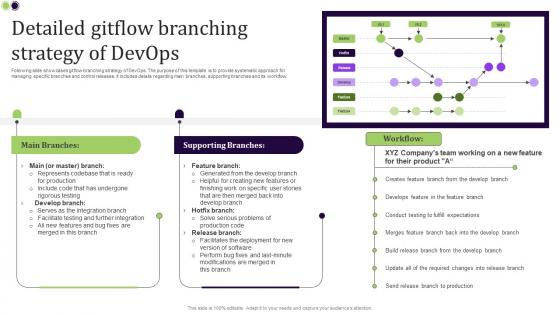
Following slide showcases gitflow branching strategy of DevOps. The purpose of this template is to provide systematic approach for managing specific branches and control releases. It includes details regarding main branches, supporting branches and its workflow.
People who downloaded this PowerPoint presentation also viewed the following :
Detailed Gitflow Branching Strategy Of Devops with all 9 slides:
Use our Detailed Gitflow Branching Strategy Of Devops to effectively help you save your valuable time. They are readymade to fit into any presentation structure.









FAQs for Detailed Gitflow Branching
So Gitflow basically sets up different branches for different stuff - main for production, develop for integration, then separate ones for features and hotfixes. Yeah, it feels super rigid when you first start using it (I kinda hated it tbh), but that's actually why it works so well with teams. Everyone knows exactly where their code should go and how it moves around. No more of that "uh, which branch has the current version?" chaos when you're working with other people. The merge conflicts become way less of a nightmare too. Definitely try it on your next group project - trust me, the setup hassle is worth it.
So Gitflow is super structured with all these branches - master, develop, feature, release, hotfix (honestly kind of overkill sometimes). GitHub Flow? Way simpler. Just master and feature branches. GitLab Flow falls somewhere in the middle, throwing in environment branches for staging stuff. Really depends on your team's vibe. Complex release schedules with lots of people? Gitflow's your friend. But if you're pushing code constantly, GitHub Flow is clutch. I've used both and GitHub Flow feels way less stressful day-to-day, but bigger teams seem to need that extra structure Gitflow gives them.
Honestly? Gitflow's great for bigger teams doing scheduled releases every few weeks. You get that clean separation between dev, testing, and prod code which is clutch when things get messy. But don't bother if you're working on smaller stuff - way too much overhead. Where it really helps is supporting multiple versions at once, plus junior devs love having that structured workflow to follow. I've seen teams get bogged down with all the branching though. If you're doing continuous deployment instead of formal releases, skip it entirely and go with something simpler.
Okay so Gitflow basically uses five branches to keep everything organized. There's **main** for production code, **develop** where you integrate stuff, **feature branches** for individual work, **release branches** when you're prepping deployments, and **hotfix branches** for when production breaks and you're panicking. Honestly the best part? You never touch main directly. Saves you from so many disasters, trust me on this one. Features go into develop first, then develop flows to main through releases. Just create develop from main, then branch your features off develop. Sounds complicated but you'll get the hang of it pretty quick once you actually start using it.
So basically you create a release branch from `develop` when you're ready to ship - something like `release/v1.2.0`. That branch is only for final testing and bug fixes, no new features (trust me, that rule saves you headaches). Once everything looks good, merge it into both `main` and `develop`, then tag main with your version. This way main stays clean with production code while your team keeps building on develop. Honestly, the whole process works pretty smoothly once you get the hang of it. Just cut your next release branch whenever develop has enough features worth shipping.
Oh yeah, hotfix branches - those are basically your "oh shit" patches when production is on fire and users are freaking out. You pull straight from main, fix whatever's broken, then merge back to both main and develop so nothing gets out of sync. Only use them for legit emergencies though - crashes, security holes, data getting corrupted, stuff like that. Minor bugs? Eh, those can wait for your normal release. Keep the fix super focused and small. The whole point is getting it out there fast before more people get hit by whatever's broken.
So basically you want different triggers for each branch type. Feature branches just need basic tests and linting - nothing crazy. When stuff hits develop, that's where you run the heavy testing since all the features are coming together there. Release branches should deploy to staging and do any final checks. Main/master is production only, and honestly? This is where teams screw themselves by cutting corners. Don't do that. The setup's pretty straightforward - develop goes to your dev environment, release hits staging, master goes live. Configure your CI/CD to auto-deploy when code lands on these branches and you're golden. Way cleaner than doing it manually every time.
Honestly, the biggest pain is just how complicated it gets - there's so many branches to track that your team will probably be confused for weeks. Merge conflicts become way more common too since features just sit there forever in their own little bubbles. The whole release process feels super heavy, especially coming from something simpler. And look, if you're a small team or deploying all the time? It's total overkill. Make sure everyone actually understands the workflow first - good docs help. But real talk, sometimes plain GitHub flow is just... better.
Honestly, just drop the develop branch - it's overkill for small teams. Work straight off main for most stuff. Feature branches are still worth it though, that's where the real teamwork happens. Release branches? Skip 'em unless you're doing proper releases. But keep hotfix branches around, trust me on that one. The magic is really in your PR process and code reviews anyway - that's where you'll catch the good stuff. Oh and don't overcomplicate it from the start. Add the fancy workflow stuff later if you actually need it.
Dude, branch naming consistency is huge - saves so much headache later. Make sure everyone knows when to branch off develop vs main, because that confusion will bite you. Feature branches that sit around forever? Total merge hell, trust me on this one. I'd set up automated testing if possible, makes everything smoother. Communication about what's currently in develop prevents most conflicts before they happen. Always test stuff in develop first before it hits main. Oh and write down your team's gitflow rules somewhere - people forget this stuff constantly and you don't want to explain it every week.
Honestly, gitflow works great with agile - you can tackle multiple features at once without everyone tripping over each other. Each user story gets its own feature branch, so teams work independently then merge back when done. Release branches are super handy for sprint demos since you can polish what you're showing while devs keep building new stuff. And if production breaks? Hotfix branches let you patch things fast without messing up your current sprint. I'd say try matching your feature branches to user stories - makes sprint planning way smoother. Works better than I expected when we first tried it.
Honestly, gitflow is a game-changer for team communication. You get this shared language where "feature/user-login" or "hotfix/payment-crash" tells everyone exactly what's happening and how urgent it is. No more digging around wondering which branch actually has the latest stuff - that's the worst. The branch naming becomes like a roadmap you can see in your git history. You can set up automated notifications at key points too. I started using consistent prefixes last year and wow, what a difference. Short sentences work. Your whole team will thank you.
Honestly, start with the git-flow extension - it's free and gives you commands like `git flow feature start` that do all the heavy lifting. Way better than memorizing a million branch names. If your team's more visual (like mine was), SourceTree or GitKraken have Gitflow baked right in. Just clicking buttons instead of typing commands. You can also set up Jenkins or GitHub Actions to handle the boring merge/deploy stuff automatically. But yeah, I'd mess around with git-flow first to get the hang of it. Once you're comfortable, maybe graduate to a GUI if that's more your team's vibe.
Here's what I'd track: deployment frequency, lead time from branch creation to production, and rollback rates. Merge conflicts are huge too - if those spike, something's wrong with your process. How long branches stay open matters because nobody wants to deal with those ancient feature branches that become merge nightmares. Hotfix frequency is another good indicator since it usually means gaps in your workflow. Honestly, just throw these into a basic dashboard and check monthly with the team. You're not aiming for perfect numbers, just want to catch trends that show if Gitflow's actually helping or just slowing you down.
Dude, you absolutely need documentation for Gitflow or your team will be lost. I'm talking branch naming, merge rules, the whole thing - write it down somewhere. Maybe just a wiki page with examples and common commands? I've watched entire teams ditch Gitflow because nobody could remember how hotfixes work (which honestly, fair enough). Don't overthink it though. Start with whatever workflows you use most and go from there. Even something basic will save you from endless "wait, which branch do I merge into again?" conversations.
-
“Slides are formally built and the color theme is also very exciting. This went perfectly with my needs and saved a good amount of time.”
-
“I've always gotten excellent slides from them and the customer service is up to the mark.”