

Digital Image Processing Powerpoint Template Bundles Ppt Sample





Try Before you Buy Download Free Sample Product
 Impress Your
 Audience
 100%
100% Editable
 Save Hours
 of Time


Our Digital Image Processing Powerpoint Template Bundles Ppt Sample are topically designed to provide an attractive backdrop to any subject. Use them to look like a presentation pro.
People who downloaded this PowerPoint presentation also viewed the following :
Content of this Powerpoint Presentation
Slide 1: This is the cover slide of the presentation " Digital Image Processing."
Slide 2: The purpose of this slide is to demonstrate how digital image processing facilitates crop monitoring and optimizing agricultural practices and yield.
Slide 3: The purpose of this slide is to delve into advanced techniques in digital image processing, showcasing cutting-edge methods for image enhancement and analysis.
Slide 4: The purpose of this slide is to explore the use of digital image-processing cameras in autonomous vehicles, highlighting their role in perception and navigation systems.
Slide 5: The purpose of this slide is to outline the fundamental steps involved in digital image processing, providing a foundational understanding of the process.
Slide 6: The purpose of this slide is to showcase how digital image processing technology enhances the driving experience, focusing on safety and convenience features.
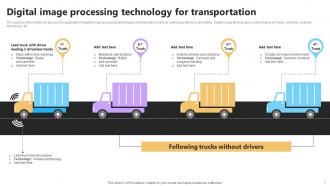
Slide 7: The purpose of this slide is to discuss the application of digital image processing technology in transportation systems, optimizing efficiency and safety.
Slide 8: The purpose of this slide is to present a product inspection report utilizing digital image processing, showcasing its role in quality control and assurance.
Slide 9: The purpose of this slide is to illustrate tracking and detecting capabilities in surveillance using digital image processing, enhancing security and monitoring.
Slide 10: The purpose of this slide is to compare digital image processing software, aiding users in selecting the most suitable solution for their needs.
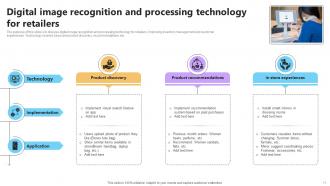
Slide 11: The purpose of this slide is to discuss digital image recognition and processing technology for retailers, improving inventory management and customer experiences.
Slide 12: The purpose of this slide is to explore data image processing applications in remote sensing, highlighting its role in environmental monitoring and analysis.
Slide 13: The purpose of this slide is to present top applications of digital image processing across various industries, showcasing its versatility and impact.
Slide 14: The purpose of this slide is to analyze the Asia Pacific digital image processing market, providing insights into regional trends and growth opportunities.
Slide 15: The purpose of this slide is to discuss digital technologies for agriculture image processing, optimizing farming practices and resource management.
Slide 16: The purpose of this slide is to outline different types of digital image processing algorithms that will assist stakeholders to understand their functions and applications.
Slide 17: The purpose of this slide is to present use cases of digital image processing in various industries, showcasing its versatility and practical applications.
Slide 18: The purpose of this slide is to introduce a digital image processing and analysis dashboard, providing users with tools for image manipulation and analysis features.
Slide 19: This is Digital image format processing icon slide.
Slide 20: This is Custom digital image processing and cropping icon slide.
Slide 21: This is Digital website image processing icon slide.
Slide 22: This is a Thank You slide with address, contact numbers and email address.
Digital Image Processing Powerpoint Template Bundles Ppt Sample with all 30 slides:
Use our Digital Image Processing Powerpoint Template Bundles Ppt Sample to effectively help you save your valuable time. They are readymade to fit into any presentation structure.














FAQs for Digital Image Processing Powerpoint Template
So it usually goes: grab your image, then preprocess it (noise reduction, contrast stuff), segment out what you actually care about, extract features, and analyze/classify. Registration too if you're dealing with multiple images. Preprocessing is honestly such a time sink - way more than you'd think - but you can't skip it. Medical imaging, computer vision, photo editing, whatever you're doing will determine your exact steps. I'd figure out your end goal first though, then just work backwards from there to see what you actually need.
So compression is basically trading file size for quality, right? JPEG's lossy - it throws out data you won't really miss, perfect for photos. PNG keeps everything intact but you'll get huge files. I pretty much always use JPEG for web stuff unless I need transparency. WebP and AVIF are newer and honestly better than JPEG at the same quality levels. Oh, and don't go crazy with compression or you'll get those weird blocky artifacts. Just test different settings side-by-side until it looks good enough for your project.
So histogram equalization basically takes all your image's brightness values and spreads them out evenly across the whole 0-255 range. Super helpful for dark or washed-out photos where you can't see much detail. The algorithm calculates something called a cumulative distribution function - sounds fancy but it's actually pretty simple - then maps your old pixel values to new ones. Works amazing on underexposed shots or medical images. I use it all the time for surveillance footage too, though honestly sometimes it can look a bit overdone if you're not careful. Just try it on a dark photo and you'll see what I mean!
So filters basically smooth out those random intensity spikes that create noise while keeping the actual image intact. Gaussian filters are solid for general cleanup - they average surrounding pixels, though yeah, they'll soften edges a bit. Median filters work amazing for salt-and-pepper noise since they just grab the median value from neighboring pixels. Honestly, kernel size is where people mess up most. Too small? Noise stays. Too big? You'll kill important details. I always start tiny and gradually increase until it looks right. Trial and error beats overthinking it.
So spatial domain is just working directly with your pixels - like when you're adjusting brightness or doing blur effects. You're basically telling each pixel what to do based on what's around it. Frequency domain is different though. First you transform the whole image (usually with FFT), then mess with frequency components instead. Honestly, the audio comparison is pretty spot on - it's like editing a waveform vs using an EQ. I'd go spatial for most basic stuff since it's way more straightforward. But frequency domain rocks for getting rid of repetitive noise or targeting specific patterns you can't easily catch otherwise.
So edge detection basically finds where pixel brightness jumps really fast between neighbors - that's usually where objects meet. Canny and Sobel filters are pretty solid for this. The annoying part is getting the sensitivity right because too high and you'll see edges everywhere from random noise. I always convert to grayscale first and maybe add a tiny blur to clean things up. Once you've got decent edge maps, contour detection can help separate individual objects. Honestly took me forever to figure out the right preprocessing steps, but it makes a huge difference in the final results.
K-means is probably your best bet to start with - just tell it how many segments you want and it groups pixels by similarity. Pretty straightforward. Watershed's amazing for separating stuff that's touching (like cells under a microscope), and region growing builds outward from seed points you choose. Oh, and don't overlook basic thresholding methods - they're dead simple but work surprisingly well in a lot of cases. I'd honestly just try k-means first to see what you get, then maybe mess around with watershed if the boundaries look wonky. That's what I did on my last project anyway.
So ML basically handles all the pattern recognition stuff automatically instead of you coding every single rule by hand. Feed it tons of training images and neural networks (CNNs work great) will figure out edges, textures, shapes on their own. Way better than old-school template matching honestly. These models get pretty good at spotting objects even when lighting sucks or things are partially blocked. Oh and definitely start with pre-trained models like YOLO or ResNet - you'll save yourself a headache. They're already trained on massive datasets so you don't have to start from scratch.
Low-light photos are honestly such a pain. Noise is the worst part - everything gets super grainy when you brighten stuff up later. You'll lose a ton of shadow detail too, and colors just look off because there's not enough light hitting the sensor. Dynamic range gets crushed as well. I mean, modern denoising helps but it's still not perfect. Your best move is really getting a camera with a better sensor if you can swing it. Or try bracketing your exposures and blending them - that computational stuff actually works pretty well these days.
So basically, digital processing can make medical images way clearer for doctors to read. You can reduce noise, sharpen details, brighten dark spots with histogram equalization - all that stuff. Edge enhancement is clutch for making tumor edges pop out more. Honestly? Sometimes it's the difference between catching something early or missing it completely. The newer AI denoising is pretty sick too - lets hospitals use less radiation but still get super clean images. Oh, and if you're just starting out, mess around with basic contrast and noise filters first. You'll be shocked how much better things look.
So image restoration is basically digital photo repair - you're trying to fix corrupted or messed up images to get back the original quality. You'll run into this with blurry photos, sensor noise, compression artifacts, that kind of stuff. For blur, deconvolution filters work great. Wiener filtering handles noise pretty well. There's also inpainting techniques that literally fill in missing pixels, which is honestly pretty cool to watch. The newer AI approaches are surprisingly good too, though I'm still figuring those out myself. First thing though - figure out what type of degradation you're dealing with. Motion blur? Gaussian noise? That'll tell you which technique to use.
Color spaces are basically math models that turn colors into numbers - RGB does red/green/blue, HSV handles hue/saturation/value, stuff like that. Here's the thing though: picking the wrong one makes your life way harder. RGB works great for screens but sucks for fixing skin tones. HSV is amazing when you need to isolate specific colors since hue is separate. LAB? Perfect for brightness adjustments because it splits light from color data. Honestly, most people just default to RGB because they know it, but you'll save yourself headaches by matching the color space to whatever you're actually trying to do.
Honestly, traffic management is where you'll see the most obvious stuff - cameras using computer vision to time lights better and spot accidents instantly. Cities also have these surveillance networks that can flag weird behavior or track people. Environmental monitoring is pretty cool too, using satellites and drones to watch air quality and heat patterns. Medical imaging got way better thanks to this tech, and they even analyze crowd density now (pandemic stuff, you know). The craziest part? All this data trains AI systems to basically run cities automatically. Next time you're stuck at a light, just remember there's probably some algorithm deciding your fate lol. Check out how your local traffic system works - that's the easiest place to spot this technology in action.
So basically CNNs are game-changers because they figure out visual patterns on their own - no more spending ages manually coding features. You just throw raw pixels at them and they detect edges, then shapes, then complex stuff like faces. The magic happens in layers that build from simple to sophisticated. Pooling layers keep things computationally reasonable while preserving what matters. Honestly, traditional methods were such a pain compared to this. Oh and definitely start with something pre-trained like ResNet - you'll be shocked how well it works out of the box.
Honestly, the ethics around image processing can get pretty messy. First thing - always get permission before messing with people's photos, especially facial recognition stuff. Deepfakes are obviously a huge no-go since they can wreck someone's reputation or spread fake news. Also worth checking if your algorithms work fairly across different groups - bias is real and can make existing problems worse. I'd say set clear rules about what's okay from the start, be upfront about what you're doing with the images, and just... don't be a jerk about it, you know? Always think twice before launching anything.
-
Much better than the original! Thanks for the quick turnaround.
-
They saved me a lot of time because they had exactly what I was looking for. Couldn’t be happier!