


Disaster recovery plan it essential elements of disaster recovery plan




Try Before you Buy Download Free Sample Product
 Impress Your
 Audience
 100%
100% Editable
 Save Hours
 of Time


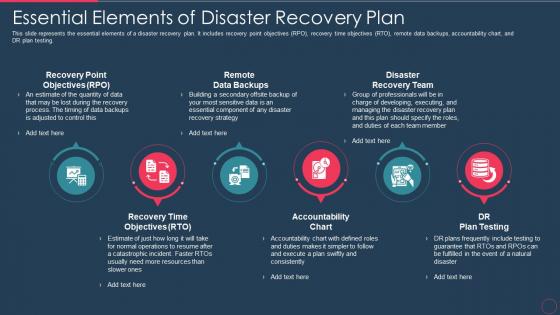
This slide represents the essential elements of a disaster recovery plan. It includes recovery point objectives RPO, recovery time objectives RTO, remote data backups, accountability chart, and DR plan testing.
People who downloaded this PowerPoint presentation also viewed the following :
Disaster recovery plan it essential elements of disaster recovery plan with all 9 slides:
Use our Disaster Recovery Plan It Essential Elements Of Disaster Recovery Plan to effectively help you save your valuable time. They are readymade to fit into any presentation structure.








FAQs for Disaster recovery plan it essential elements of
Okay so there's basically four things you need to nail down. Risk assessment first - figure out what could actually break and which systems you absolutely can't live without. Backup everything important, plus have backup infrastructure ready. Yeah it's pricey but trust me on this one. Communication is huge too - everyone needs to know exactly who to call and what they're supposed to do when things go sideways. Document your recovery steps and test them regularly. That last part is where most people mess up because nobody wants to run disaster drills until they're already screwed.
Test it twice a year minimum, and update whenever you change systems or staff. Most companies start strong then completely forget about it for like two years - trust me, don't do that. Your plan becomes worthless fast if it's referencing dead systems or people who left. I'd do testing every six months, full reviews quarterly. Set those calendar reminders right now because you'll absolutely forget. Oh and make sure someone actually owns this process - otherwise it just disappears into the void where all good intentions go to die.
Okay so basically you gotta figure out what could actually screw over your business first. Natural disasters, cyberattacks, power going out - list all that stuff. Then rank which ones would hurt the most. It's kinda like when you're buying insurance but way more in the weeds, you know? Don't waste time on crazy unlikely scenarios when ransomware's probably your biggest headache. I'd start with your most important systems and think backwards from there. This whole thing becomes your roadmap for where to spend money and effort on recovery planning.
Do a Business Impact Analysis first - basically you're ranking what hurts most when it goes down. Figure out which stuff makes you money, keeps big customers happy, or keeps regulators off your back. Then work out how long each thing can actually be broken before you're screwed (that's your Recovery Time Objective, btw). I'd make a simple scoring sheet - financial hit, customer impact, legal stuff. High scores get priority when disaster strikes. Oh and make sure everyone knows the rankings ahead of time. Trust me, you don't want people arguing about priorities while everything's on fire.
So you'll definitely need cloud backup - that stuff is honestly amazing for offsite protection without dealing with physical servers. Virtualization platforms and automated failover systems are must-haves too. Don't forget database replication if you've got critical data that can't go down. Network redundancy and communication tools keep everyone connected when things go sideways. Oh, and communication platforms obviously. Start by figuring out what you already have, then prioritize based on how fast you need to recover. Test everything regularly though - I've seen too many "bulletproof" systems fail spectacularly because nobody actually tested them.
Dude, stop burying your disaster plan where no one can find it. Get it out of that shared drive graveyard and actually train people on their roles. Make simple cheat sheets they can grab quickly - not some 50-page legal nightmare that'll confuse everyone when they're already stressed. Test your backup communication methods too. What happens if your main systems crash? Managers need to know how to get info out fast. Oh, and practice explaining everything beforehand. You don't want your first run-through to be during an actual emergency. That's just asking for chaos.
Honestly, most people never test their disaster plans and then act shocked when everything falls apart. Classic mistake. Don't just worry about your tech either - you need backup communication and alternate locations figured out. Keep your plan simple enough that Karen from accounting can actually follow it during a crisis (trust me on this one). Update contact info regularly because half your team probably changed their numbers since last year. Also map out which systems depend on each other beforehand. Test quarterly, make sure everyone knows what they're doing, and you'll be way ahead of most companies.
Dude, cloud backup is honestly a game-changer for disaster recovery. You get automatic backups without dealing with expensive hardware that'll probably crap out when you need it most. Your data gets copied across different regions, so if one goes down, you're still good. Plus you can spin up recovery stuff super fast without massive upfront costs - only pay when disaster actually hits. My old company learned this the hard way after their on-site backup failed during a flood (nightmare). Start by figuring out what systems you absolutely can't lose, then find a cloud service that matches your recovery timeline needs.
Think of your DR plan as part of your bigger business continuity strategy - not separate from it. DR gets your tech and data running again. Business continuity? That's everything else - staff, processes, buildings, communications. Map out which business processes matter most first. Then build your DR plan around supporting those. Sales keeping you alive? Prioritize those systems. Recovery times need to match what actually matters to your business. Oh, and use the same risk assessments for both plans - saves you from doing double work. Both should share the same contact lists too.
Track your RTO and RPO first - basically how fast you recover vs your goal, and how much data gets lost. Mean time to recovery matters too, especially for critical systems. But honestly? Testing is where most people screw up. Run regular drills and actually measure pass rates. I've seen so many "perfect" plans that fall apart when stuff hits the fan. Document everything during real incidents. That's your goldmine for seeing if your metrics match reality or if you're just fooling yourself.
Honestly, you've got three main things to worry about here. Encrypt everything - both when data's moving around and just sitting there. That way even if hackers grab your backups, they can't actually use them. Access controls are huge too because disasters make people do stupid things, so lock down who can touch what. Hash verification and checksums will catch any corruption issues before they bite you in the ass. Oh, and definitely test this stuff during your regular drills. You don't want to discover problems when everything's already on fire.
Start with role-specific training so everyone knows their piece of the puzzle. Quarterly tabletop exercises are huge - you walk through scenarios without breaking anything. Do full drills twice a year minimum. Documentation needs to live somewhere obvious (people always forget where stuff is). Quick reference cards help too. Oh, and keep those contact lists current - nothing worse than calling someone who left six months ago. Don't make it a once-yearly thing. Regular practice makes all the difference when things actually go sideways. Schedule your next tabletop now before you forget.
Honestly, vendors can totally screw you over during disasters if you're not careful. Map out which ones are actually critical to keeping your business running. Ask them about their recovery times, backup locations, and how they'll communicate during outages - some have surprisingly awful plans that'll leave you hanging. Don't just tack this onto your existing DR strategy as an afterthought either. Build vendor requirements right into the core of it. Oh, and definitely audit your current contracts for DR clauses and SLAs first.
First thing - figure out which regulations actually apply to you. HIPAA if you're in healthcare, SOX for public companies, PCI DSS when handling credit cards. GDPR's probably relevant too (unless you somehow avoid all EU customers, which... good luck with that). Each one has different backup requirements and recovery timelines you'll need to hit. The annoying part is these compliance rules will basically dictate how you prioritize everything and what documentation you'll need. So audit what regulations you're stuck with first, then build those requirements right into your disaster recovery plan from the start.
So basically ISO 27001 and NIST are your go-to blueprints for disaster recovery planning. They actually work, which is nice. ISO's all about risk management and keeping things improving constantly. NIST? Way more detailed with their step-by-step stuff - honestly it's kind of a lot at first but worth pushing through. Both help you figure out what assets matter most, set recovery goals, and get your testing sorted. You don't have to pick just one though. Tons of companies mix both approaches. Just match whatever your industry needs for compliance and build from there.
-
Designs have enough space to add content.
-
Awesome presentation, really professional and easy to edit.