


Dos and donts of content writing list powerpoint shapes




Try Before you Buy Download Free Sample Product
 Impress Your
 Audience
 100%
100% Editable
 Save Hours
 of Time


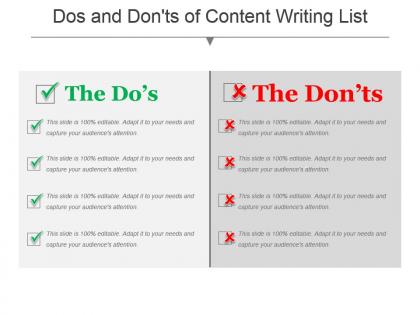
Our Dos And Donts Of Content Writing List PowerPoint Shapes will help you showcase dos and don’ts of various concepts such as marketing, sales, HR, accounts content, and more. The ticks and crosses in our templates represents the dos and the donts respectively. While there’s absolutely space available for creativity and your own explanation in the world of online content, there are also few things you’re better off not doing, and things that you should certainly do. By understanding the organization, their do’s and don’ts, their work culture completely, you will set yourself to be more fruit- bearing and gainful. Keeping this in mind, have a look at our dos and don’ts template and use it for content writing and it will definitely serve your purpose of being productive to the company. The presentation generates fruitful debate and reduces your time to do a task. So, make yourself clearer on any topic by using our content writing PPT and impress everyone. Our Dos And Donts Of Content Writing List Powerpoint Shapes help experiment with concepts. They generate fruitful debate.
People who downloaded this PowerPoint presentation also viewed the following :
Dos and donts of content writing list powerpoint shapes with all 5 slides:
Heads begin to bob with our Dos And Donts Of Content Writing List Powerpoint Shapes. They help in building consensus.
FAQs for Dos and donts of content writing
Effective presentation content writing includes clear messaging hierarchy, audience-focused language, concise bullet points, compelling storytelling elements, and strong visual-text integration. These components streamline complex information by eliminating jargon, maintaining consistent tone, and emphasizing key takeaways, with many organizations finding that strategic content structure enhances audience engagement and delivers more persuasive business outcomes.
Tailoring content involves analyzing your audience's expertise level, industry background, pain points, and preferred communication style, then adjusting your messaging, examples, and complexity accordingly. Research your audience beforehand through surveys or stakeholder interviews, use relevant case studies from their sector, and incorporate terminology they understand, while focusing on outcomes that directly address their specific challenges and strategic priorities.
Storytelling transforms presentations by creating emotional connections, simplifying complex concepts, enhancing audience retention, and driving actionable outcomes. Through narrative frameworks, presenters in sectors like healthcare, finance, and consulting deliver compelling case studies, customer journeys, and problem-solution arcs, ultimately enabling stronger stakeholder engagement and more persuasive business communications.
Complex information becomes engaging through strategic chunking, visual storytelling, progressive disclosure, relatable analogies, and interactive elements that guide audiences step-by-step through concepts. These approaches streamline comprehension by breaking dense material into digestible segments, using compelling visuals and real-world examples, with many organizations finding that audiences retain significantly more information when complex data is presented through structured narratives and clear visual hierarchies.
Visual best practices for slides include using high-quality images, maintaining consistent color schemes, incorporating relevant charts and graphs, ensuring proper text-to-visual ratios, and selecting icons that reinforce key messages. These elements work together by enhancing audience comprehension, reducing cognitive load, and increasing retention rates, with many organizations finding that strategic visual integration delivers more engaging presentations and clearer communication outcomes.
Maintaining consistent tone throughout presentations requires establishing clear voice guidelines, using standardized templates, and creating style references before content creation. Develop a comprehensive style guide that defines your preferred vocabulary, sentence structures, and messaging approach, then systematically review each slide against these standards, with many organizations finding that collaborative editing and peer reviews help identify tonal inconsistencies while ensuring professional cohesion.
Common presentation content pitfalls include overcrowding slides with text, using jargon-heavy language, lack of clear structure, weak headlines, and failing to align content with audience needs. These issues significantly reduce audience engagement and comprehension, with many organizations finding that streamlined, audience-focused content with strong visual hierarchy delivers better retention and more persuasive outcomes.
Slide content length depends on your audience's reading speed, presentation format, and key message complexity, with effective slides typically containing 20-40 words per slide for live presentations and up to 60 words for self-guided formats. Through strategic content hierarchy, presenters streamline complex information by prioritizing essential points, using bullet structures, and incorporating visual elements, ultimately delivering clearer messaging and enhanced audience engagement across diverse business environments.
Content retention techniques include storytelling frameworks, interactive elements, visual hierarchy optimization, repetition with variation, and strategic cognitive load management. These approaches enhance engagement by creating emotional connections, breaking information into digestible segments, and reinforcing key messages through multiple channels, with many organizations finding that combining visual storytelling with interactive components significantly improves knowledge transfer and long-term retention rates.
Structure your presentation content with a compelling opening that hooks your audience, clearly defined main points with supporting evidence, and smooth transitions between sections. Begin with an attention-grabbing statement or relevant statistic, organize your core message into 3-5 digestible segments with concrete examples, and conclude with actionable takeaways, ultimately delivering memorable experiences that drive audience engagement and business outcomes.
Effective calls to action in presentations include using action-oriented verbs, creating urgency with time-sensitive language, positioning CTAs at strategic slide transitions, offering clear next steps, and aligning requests with audience goals. These approaches enhance engagement by connecting presentation content to immediate business outcomes, while strategic placement throughout the presentation, rather than only at the end, ultimately drives higher response rates and measurable follow-through.
Keywords and SEO considerations significantly enhance content writing for online presentations by improving search visibility, driving organic traffic, and ensuring content reaches target audiences effectively. Through strategic keyword placement, meta descriptions, and SEO-friendly titles, organizations streamline discoverability while maintaining engaging narratives, with many businesses finding that optimized presentation content delivers higher engagement rates and competitive advantage in digital marketing efforts.
**INPUT**: What strategies can I use to make my presentation content more interactive? **OUTPUT**: Interactive presentation strategies include audience polling, Q&A sessions, breakout discussions, live demonstrations, and gamification elements. These approaches enhance engagement by encouraging participation, facilitating real-time feedback, and creating memorable experiences, with many organizations finding that interactive presentations deliver significantly higher retention rates and stronger audience connection. **Word count: 50 words**
Effective anecdotes and examples in presentations should be relevant, specific, and directly support your key messages, while resonating with your audience's experiences and challenges. Choose stories from recognizable industries like healthcare, finance, or retail that demonstrate clear outcomes, keep them concise and focused on measurable results, and strategically place them after key points to reinforce understanding and retention.
Content writing tools for presentations include Grammarly for grammar checking, Hemingway Editor for readability optimization, Canva for visual content creation, BuzzSumo for trending topic research, and CoSchedule's Headline Analyzer for compelling titles. These platforms streamline the writing process by enhancing clarity, ensuring error-free content, and providing data-driven insights, with many presentation creators finding that strategic tool combinations ultimately deliver more engaging audience experiences and improved communication effectiveness.
-
Graphics are very appealing to eyes.
-
Unique and attractive product design.