


End User Adoption Strategic Framework




Try Before you Buy Download Free Sample Product
 Impress Your
 Audience
 100%
100% Editable
 Save Hours
 of Time


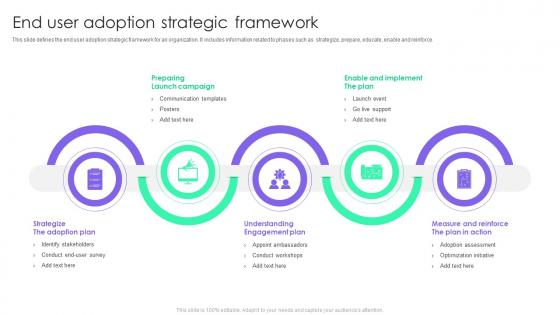
This slide defines the end user adoption strategic framework for an organization. It includes information related to phases such as strategize, prepare, educate, enable and reinforce.
People who downloaded this PowerPoint presentation also viewed the following :
End User Adoption Strategic Framework with all 6 slides:
Use our End User Adoption Strategic Framework to effectively help you save your valuable time. They are readymade to fit into any presentation structure.





FAQs for End User
Honestly, find your power users first - those early adopters who actually get excited about new stuff. They'll do half the work for you once they're on board. Skip the boring company-wide demos and do hands-on training based on what each person actually does. People need to know WHY this makes their life easier, not just what buttons to click. Oh, and definitely ask for feedback constantly then actually fix the stuff they complain about. Focus on quick wins too. Show them features that solve the annoying problems they deal with every day and you'll see adoption take off way faster.
Dude, personas totally change the game for training stuff. You can actually build materials around how different people work instead of making everyone suffer through the same generic content. Power users need different approaches than newbies, right? Tech people versus the ones who still call IT for everything - totally different strategies. I've watched so many training programs crash and burn because they skipped this step. Once you understand people's actual pain points and how they prefer to learn, your content will actually work. Oh, and definitely map your current training against your personas first - you'll be shocked at the gaps.
User feedback is your best friend for boosting adoption - seriously, it's like having a cheat sheet. People tell you exactly what's broken or confusing, so you can fix the stuff that actually matters. Short surveys work great, or just ask during onboarding calls. Here's the thing though: you can't just collect feedback and let it sit there. Users need to see you actually did something with their input. That's what keeps them engaged long-term. I learned this the hard way - we used to gather tons of feedback but never communicated back what changed because of it.
Dude, communication can totally make or break whether people actually use the new system. I've watched so many projects crash because nobody explained why the change mattered to users personally. People hate being blindsided, you know? Start early with your messaging plan - tell them what's changing AND what's in it for them. Keep updates flowing consistently across all your channels. Oh, and make it two-way! Let people ask questions and complain a bit. Honestly, half the battle is just addressing the "why" instead of dumping features on them. Leadership always thinks people will just figure it out themselves... they won't.
Track usage stuff like login frequency and how fast people complete tasks. But honestly, don't ignore the satisfaction scores - I've seen too many "successful" rollouts that everyone secretly hated. Support tickets tell the real story too. New user productivity timelines matter, plus retention at 30/60/90 days. Here's the thing though - measure everything before you launch or you'll have no clue if it's actually working. Stick to maybe 4-5 key metrics and check them weekly at first. More than that gets overwhelming fast.
Actually talk to your users first - surveys and focus groups will show you what's really bugging them. Most of the time it's not just "ugh, change sucks" but real worries about job security or feeling stupid with new tech. Look for patterns in what they're saying. Address those specific fears with training and clear communication about what's in it for them. Honestly? The biggest complainers often flip and become your best cheerleaders once they feel heard. Get some quick wins early on to prove the whole thing isn't a disaster waiting to happen.
So basically, people love competition and getting recognized for stuff - it's just how we're wired. Add some points or badges to boring tasks and suddenly they feel way more fun. Like those progress bars when you're filling out your profile? Pure genius. Your brain literally releases dopamine from these tiny victories, which is kinda wild when you think about it. Just make sure whatever game stuff you add actually helps your business goals instead of being pointless busy work. I'd start with something simple like tracking progress or letting people give each other props, then see what clicks.
Dude, support after launch is everything. Seriously - I've seen so many companies blow their budget on fancy rollouts then wonder why nobody's using the tool six months later. People forget their training, hit weird bugs, or just go back to whatever they used before when stuff gets complicated. You need help desk coverage, refresher sessions, maybe even user groups where people can troubleshoot together. Don't wait for people to complain either - check in with teams regularly. Oh, and make friends with your power users early. They'll basically become your unofficial evangelists if you treat them right.
Honestly, most companies just throw new software at people without explaining why they're changing things in the first place. Super frustrating for users who then push back hard. Training's usually terrible too - like sitting through boring slides for hours instead of actually learning how to use the thing. Oh, and nobody thinks about change management until it's too late. Leadership gets all excited at launch then disappears when people start complaining. Find your tech-savvy coworkers early and get them hyped about the new system. Give everyone different ways to learn - some people need hands-on practice, others want videos they can pause and rewind.
Honestly, visual aids are game-changers because people can actually *see* what to do instead of deciphering some confusing paragraph. Would you rather read instructions on filling out a form or just look at a completed example? No contest. Templates give users that comfort zone - they're not staring at a blank page wondering where to start. Screenshots and infographics make scary processes feel totally manageable. I mean, confident users adopt stuff way faster, right? Start with templates for your most common tasks, then add visual guides for anything that floods your help desk. Trust me on this one.
Honestly, just keep it super simple - nobody wants to read a manual on their first day. Focus on the stuff they'll actually use right away, then worry about fancy features later. Screenshots and quick videos work way better than walls of text (I mean, who has time for that?). Break everything down into tiny steps they can't mess up. The goal is making them feel like they're winning from minute one, not drowning in options. Oh, and definitely test this stuff with real people first - what makes sense to you might be confusing to everyone else. Maybe throw together a simple day-one checklist they can just check off.
Find the people who are genuinely excited about this change – not just whoever raises their hand first. Pick folks who others actually respect and trust. Give them early training and let them help shape how you roll things out. Honestly, make them feel important about it because everyone loves being the expert people come to. They can run training sessions and share wins with their teams. Spread your champions across different departments too. Oh, and don't forget to give them real support and recognition – they're doing you a huge favor here.
Dude, culture beats everything else when it comes to tech adoption. Like, you could have the slickest software but if your team's stuck in "that's not how we do things" mode, you're screwed. Get the office influencers excited first - they'll sell it way better than any PowerPoint deck. Leadership backing helps too, obviously. People need to feel safe trying new stuff without getting roasted if something goes wrong. I've seen amazing tools just sit there unused because nobody wanted to be the first to mess with them. It's wild how much mindset matters over actual features.
Seriously, don't do just one training session and call it done. People forget like 70% of what they learned within a week - it's wild but true. I made this mistake on my last project and it was painful. Space things out instead. Do your initial training, then hit them again at 2 weeks and maybe 30 days. Repetition is what actually makes stuff stick. Plus you'll catch people who were totally lost the first time around but were too embarrassed to speak up. Book those follow-up sessions NOW though. Once everyone gets busy, good luck getting people back in a room together.
Honestly, you've gotta think about your different user types from the start. Map out who's using this thing - your power users, casual folks, mobile people, different teams. Each group needs their own training approach, not some boring one-size-fits-all slideshow that puts everyone to sleep. Some people learn by doing, others want written guides they can reference later. Different communication styles work better for different personalities too. Oh, and definitely test this stuff with a few people from each group first - saves you from major headaches down the road when something doesn't land right.
-
Amazing product with appealing content and design.
-
SlideTeam provides PPTs on every single topic. Their templates suit my job very well. I am very grateful!