

ERP Software Implementation Process Plan




Try Before you Buy Download Free Sample Product
 Impress Your
 Audience
 100%
100% Editable
 Save Hours
 of Time


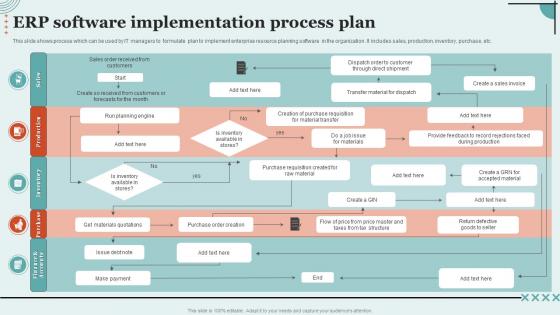
This slide shows process which can be used by IT managers to formulate plan to implement enterprise resource planning software in the organization. It includes sales, production, inventory, purchase, etc.
People who downloaded this PowerPoint presentation also viewed the following :
ERP Software Implementation Process Plan with all 6 slides:
Use our ERP Software Implementation Process Plan to effectively help you save your valuable time. They are readymade to fit into any presentation structure.





FAQs for ERP Software
So you've got your main phases: planning, design, development, testing, deployment, and support. Planning's huge - nail down objectives, get the executives on board, build a team with IT and business people. Then design comes in where you map everything out (trust me, skip documentation and you'll hate yourself later). Get end users involved during development and testing - way better to catch problems early. For deployment, start small. Roll out to one department first instead of going company-wide and potentially creating chaos. Oh, and change management is critical throughout the whole thing. People can totally make or break your project, so actually invest in training and communication from the start.
Start with checking four big things: your current tech setup, how well your org handles change, budget/timeline stuff, and data quality. Most companies totally blow it on the change management part - like, it's way harder than they think. Can your teams actually deal with everything getting flipped upside down? Is leadership really on board or just pretending? Your data needs to be clean too, otherwise you're screwed from day one. Also figure out if your IT folks can handle this or if you'll need outside help. Get real about where you suck before talking to any vendors.
Ugh, the classic mistakes are rushing timelines and crappy planning upfront. Everyone wants to throw in "just one more feature" too - scope creep kills projects. Then users hate the new system because nobody trained them properly, or leadership wasn't actually on board from the start. Honestly? Map out your current processes first, even if it's boring. Set deadlines that don't make everyone want to quit. Communication is everything - start talking to people before you even pick which system to buy. And seriously invest in training. I've seen too many good systems fail because people just... couldn't figure them out.
Look, change management will make or break your ERP rollout - I've seen too many projects tank because of this. People hate new systems by default, so you've got to sell them on WHY this is happening from day one. Train everyone properly before launch and find those department champions who actually want to help (they exist, trust me). Most failures aren't even tech problems - they're just people being stubborn or scared. Show quick wins early, listen to complaints, and don't save change planning for last. Seriously, start that people stuff right alongside your technical work.
Oh man, data migration is huge - you're basically moving all your business info into the new system. First thing? Clean up your data now. Those duplicate customer records you've been ignoring? Fix them before the move. Map out how your old fields match the new ones, then test everything multiple times with non-critical stuff first. I learned this the hard way - always budget way more time than seems reasonable. Keep backups of everything original. Seriously, if this goes wrong you'll be stuck with garbage data and have to start over. Run a small pilot first to catch the weird issues that always pop up.
Track both the obvious stuff and the fuzzy benefits to get real ROI numbers. The easy ones are cost savings - less manual work, faster processing, lower inventory costs, reduced IT expenses. But honestly, the soft stuff matters just as much even though it's harder to measure. Better decisions, happier customers - that all adds up. Most companies hit positive ROI around 18-24 months if they're actually tracking everything properly. Start documenting your current numbers now though, otherwise you'll have nothing to compare against later. Compare baseline to where you're at 6-12 months after launch.
Basically, cloud ERP runs on the vendor's servers while on-premise means you're hosting it yourself. Cloud is way faster to implement - we're talking weeks instead of months since there's less setup involved. You get automatic updates too, which is nice. On-premise gives you more control but man, you need solid IT resources and way more time. Most companies are just going cloud now unless they've got crazy security requirements or something. I'd figure out your IT situation first though - if you need this thing running ASAP, cloud's definitely the way to go.
Oh man, training is where ERPs live or die - I've seen this play out so many times. Don't just dump new software on people and hope for the best. Start with role-based sessions, then do hands-on workshops using real scenarios your team actually deals with. Quick reference guides are clutch too. Find some super-users who can be your internal cheerleaders and handle the random questions that pop up daily. The biggest thing? Make it ongoing, not just some crash course right before launch. People need time to actually absorb this stuff.
Figure out who all your stakeholders are first - users, executives, IT people, everyone. Map out what they actually care about. Weekly updates and feedback sessions are crucial because going quiet is basically project suicide. Get your key users involved in testing and decisions, don't just dump info on them later. You need a real change management plan covering training and pushback (there's always pushback). Oh, and assign some stakeholder champions - they're lifesavers for translating between the tech people and business folks. Honestly, communication makes or breaks these things.
Honestly, configuration beats customization every time if you can swing it. Most decent ERP systems already let you tweak workflows and business rules without messing with the actual code. Document everything like crazy when you do need custom stuff - seriously, you'll hate yourself later if you don't. Your vendor should tell you which customizations will break when they push updates (and they will). Map out what processes are actually unique to your business versus what you can just adapt to standard workflows. Oh, and start small. Test the hell out of everything. Always keep an upgrade path clear because new versions are inevitable.
Ugh, data format mismatches are going to be your worst enemy here. API compatibility is another nightmare, especially with legacy systems - honestly feels like connecting ancient tech to modern stuff sometimes. First thing: map out your current data flows before anything else. Figure out what needs real-time sync vs batch updates. Middleware might save your sanity for bridging weird gaps between systems. Run everything in parallel during testing phase (trust me on this). Getting your IT people and main users involved super early helps catch conflicts you'd never think of. Workflow disruptions always pop up right before launch otherwise.
Look, regulations basically control your whole ERP strategy right from the start. HIPAA for healthcare, SOX for finance, FDA stuff for manufacturing - you can't just slap these on later and call it good. Different industries need different data handling and audit trails, which totally changes what modules matter most. Honestly, some systems come pre-built for specific regulations and it'll save you tons of time. My advice? Map out your compliance needs first, then find an ERP that already handles your industry's main requirements. Way easier than trying to customize everything after the fact.
Honestly, picking the right vendor is huge - it'll make or break everything. Check their track record first, especially with companies your size. Those flashy demos are nice but focus on whether they actually get your business processes. Industry experience matters way more than you'd think. Don't just look at license costs either - factor in implementation, training, all that stuff. Integration capabilities are key too. Oh and definitely call their references! I know it's boring but trust me on this one. The cheapest option usually bites you later. Make a scoring sheet so you're not just going with your gut.
Start by training a core team who actually knows the system well - these are your go-to people. Don't make the mistake most companies do and get lazy after launch. Yeah, get vendor support contracts, but you can't just rely on them for everything. Build your own knowledge base too. Someone needs to own this thing and keep it all running smoothly - like a dedicated ERP person. Document common problems, set up escalation steps, and do regular system checkups. Oh, and budget for training new people because staff turnover is inevitable. Trust me on this one.
Cloud-first stuff is huge right now, plus everyone's cramming AI analytics into everything. Mobile interfaces are pretty much expected at this point. The AI hype is still annoying tbh, but some of it actually works for predictive insights and workflow automation. API-first designs are way better than the old monolithic systems - you can pick the best tools instead of getting stuck with one vendor's mediocre suite. Oh, and low-code customization is becoming standard. My advice? Focus on how well it integrates with what you already have rather than ripping everything out.
-
I am extremely pleased with these PPT slides that we used for our event. They were easy to modify and came out great in all aspects!
-
It makes easy work of my work presentations. I’ve never had to be nervous about my presentations for meetings.