


 0 Comment
 Customer Reviews

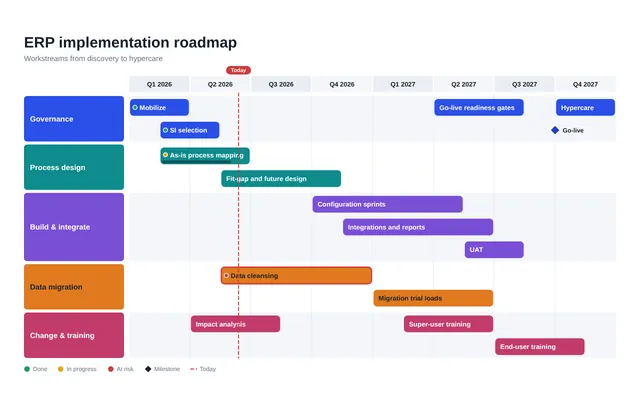
Consider the implementation of an ERP system, which is like building a strong bridge between where your organization is today and where it wants to reach. The ERP implementation timeline is the plan that maps out every step in this journey, helping businesses organize, execute, and track their progress. It acts as a guide to ensure the project stays on track and achieves its set goals without unnecessary stress or confusion.
This timeline starts with the design, where the system is planned to fit the business’s unique needs. It’s followed by data migration, the process of securely transferring important information into the new system. The next step in the timeline is customization, making sure the system works just the way your business needs it to. Testing and validation ensure that everything works properly before the system is completely rolled out.
(Explore our collection of Top 10 Implementation Schedule Examples with Samples and Templates that will enable you to execute your projects with efficiency and ease.)
An ERP implementation timeline assists in keeping everything structured, minimizing risks, and ensuring that nothing important gets missed. It’s not about rushing but about doing things right, step by step. By sticking to this timeline, businesses can transform the way they operate, making processes faster and more efficient. It’s a plan for success that keeps everyone aligned and focused, ensuring the transition is as smooth as possible.
Now, the exciting part is that you can make this complex process easier to understand with our best ten ERP Implementation Timeline Templates. You can think of them as your assets for curating strategies.
Each of these Templates is completely customizable and editable. You get structures in the form of content-ready slides, along with editing capabilities, which means the presentation can be tailored to the audience profiles.
Let’s explore!
Template 1: ERP Implementation Timeline Initiate Configure Optimize
This PPT Template outlines an enterprise resource planning (ERP) implementation timeline, divided into three main phases: plan, deliver, and close. Each phase includes specific steps such as starting the project, analyzing data, creating the system, validating the implementation, deploying the solution, and optimizing the system. The template is highly editable, allowing users to tailor it to their exact requirements while capturing their audience's attention. It provides a clear and structured framework to guide the implementation process, ensuring a smooth and efficient transition to the new system. Project managers, IT experts, and business leaders can use this template to effectively convey the implementation plan and track progress. Download now!

Template 2: ERP Technical Implementation Process Timeline
This PPT Template outlines the technical implementation process for an enterprise resource planning system (ERP). It includes the essential phases of implementation, such as discover, prepare, explore, realize, deploy, and run. Each phase has its own set of activities, including project documentation, change management, integration testing, and customer engagement. The slide also features a key takeaways section to note down relevant observations. This template can benefit a wide range of organizations, from small businesses to large enterprises, that are implementing or upgrading their ERP systems. Employ this template to plan, track, and execute the technical parts of the ERP implementation, ensuring an efficient shift to the new system. Grab it today!

Template 3: ERP System Project Implementation Timeline
What does the ERP system project implementation timeframe include? This PowerPoint Slide showcases a comprehensive timeline for enterprise resource planning (ERP) implementation. It includes tasks such as analyzing final deliverables, developing a business case, obtaining acceptance, submitting a budget, and selecting a vendor. This timeline helps companies to prioritize tasks and track progress throughout the ERP project lifecycle. It is useful to companies planning an ERP system installation since it identifies key milestones, stakeholder responsibilities, and the flow of operations from starting to go-live preparation. This template can help project managers, IT teams, and business stakeholders across the company in planning and resource allocation activities. Download now!

Template 4: Cloud ERP Implementation Go-Live Timeline
This PowerPoint Slide outlines an organized strategy for successfully implementing a new cloud-based ERP system. It presents essential activities and milestones for increasing return on investment while minimizing operational difficulties. The timeline features key aspects such as configuration activities, data conversion, security measures, team logistics, reconciliation, testing, and ongoing support. Employing this template could empower companies to efficiently plan and execute an easy switch to the new ERP system, simplifying operations and maximizing the return on their technological investments. Download now!

Template 5: Timeline to Implement ERP System
Implementing a new ERP system is a vital and challenging task for any company, even with careful planning and execution. This PowerPoint Template highlights a complete roadmap that will assist companies through the many stages of ERP deployment, from initial configuration to final go-live preparation. It outlines key milestones like data conversion, security measures, team logistics, reconciliation, and testing, ensuring a smooth transition to the new system. This template is extremely useful for project managers, IT leaders, and business stakeholders associated with installing enterprise resource planning solutions. It empowers them to optimize operations and maximize the return on their technological investments. Download now!

Template 6: Timeline to Implement ERP System for Effective Digital Transformation
This PPT Slide outlines a complete roadmap for deploying an ERP system to foster effective digital transformation within a company. The timeline outlines the essential stages of the implementation process, like setup, piloting, integration, cutover, and post-support, with clearly defined actions and milestones for each phase. It highlights the vital processes, which include system design and data migration, as well as end-user training and ongoing improvement. It assists companies in planning and executing a smooth ERP rollout consistent with their digital transformation objectives. Download today!

Template 7: Enterprise Resource Planning Implementation Timeline
Implementing an ERP system is a key step for any company because it establishes the groundwork for streamlining processes, increasing efficiency, and driving business transformation. The given slide depicts an in-depth plan to help companies handle the various stages of ERP adoption. It includes vital issues such as secure commitment, governance architecture, company transformation office, procurement methods, and change management. This template is a great tool for project managers, IT leaders, and executives who are involved with ensuring the effective implementation of an ERP system. Download today!

Final Thoughts
SlideTeam's collection of top ERP implementation timeline templates is designed to empower your journey. These slides recognize the challenges you face, like aligning cross-departmental goals and ensuring flawless coordination at every step. They are more than just planning tools; they are your trusted partners in overcoming the warriors of system design, data migration, user training, and go-live preparation. With these predesigned, content-rich templates, you can simplify the process, track progress effortlessly, and drive your ERP implementation toward success with clarity and confidence.
PS: Follow this link for our top five enterprise dashboard templates - more than just tools, they're your trusty allies in tackling modern organizations' tough analytics challenges.