

Event and wedding planners company profile powerpoint presentation slides




Try Before you Buy Download Free Sample Product
 Impress Your
 Audience
 100%
100% Editable
 Save Hours
 of Time


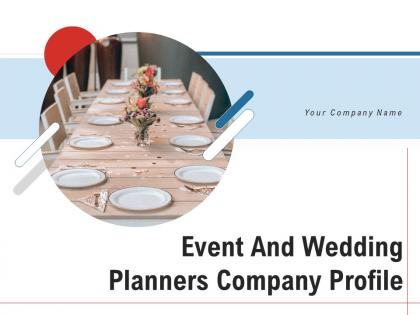
Create a stunning presentation by using Event And Wedding Planners Company Profile PowerPoint Presentation Slides. The presentation gives a brief overview of the company, with its vision and mission statement. Take advantage of the event organizer PowerPoint slide deck to showcase the scope of the event. You can easily modify the slides to provide information about the plan of action with the company’s activities. Utilize our attention-grabbing event management PowerPoint templates to discuss the pricing package that the company will charge. The content-ready PPT slideshow also demonstrates the significant clients of the firm with their names and designations. Showcase various events that the firm organizes with the help of the wedding planner’s PPT themes. You can also display the terms of local artists that appear at the event. Incorporate stunning visuals and icons to highlight the shows and performers that the company has arranged for the event. The presentation also includes information about 3D design and set up designed for the event.
People who downloaded this PowerPoint presentation also viewed the following :
Event and wedding planners company profile powerpoint presentation slides with all 44 slides:
Use our Event And Wedding Planners Company Profile Powerpoint Presentation Slides to effectively help you save your valuable time. They are readymade to fit into any presentation structure.


FAQs for Event and wedding planners company profile
Start with your venue and major vendors - they book up fast. Work backwards from your event date for all the deposit deadlines and when invites need to go out. I learned the hard way that vendors take *forever* to respond, so factor that in. Build in time for setup, any rehearsals you need, plus permits if it's that kind of event. My rule? Make your timeline, then add 20% more time to literally everything. Something always goes wrong (last year my caterer got food poisoning the week before). Trust me, you'll be so glad you built in those buffers when chaos inevitably strikes.
Okay so first thing - write down every single expense you can think of. Venue, food, tech stuff, staff, marketing, all of it. Then add like 10-15% extra because I swear something always breaks or costs more than expected. Use a basic spreadsheet to track what you're actually spending as you go. That way you'll catch problems before they get crazy. For the big ticket items, definitely get a few quotes and see if you can set up payment schedules that don't kill your cash flow all at once. Oh and do weekly check-ins with your team - keeps everyone honest about where the money's going.
Start with the big three: budget, how many people, and location. Visit when it'll actually feel like your event - don't tour a dinner venue at noon, you know? Ask about all fees upfront because they love sneaking in extra charges later. Check if their sound system is decent or if you'll need to hire outside help. Parking and accessibility matter more than you think. Honestly, I'd make a little scorecard for each place so you're not just picking the prettiest one. Way easier than trying to remember which venue had what afterward.
Honestly, tech can totally transform your event. Apps are great for networking and live polls - people love voting on stuff during presentations. QR codes speed up check-ins like crazy, and live streaming brings in remote attendees. Digital signs are clutch when speakers inevitably run over (happens every time, I swear). VR demos create those memorable wow moments that attendees actually talk about later. My advice? Don't go overboard trying everything at once. Pick two features max and nail those first.
Okay so first thing - check the venue has ramps, accessible bathrooms, wide pathways for wheelchairs. Reserve some good seating spots for people who need them. Catering's huge too, definitely ask about dietary restrictions ahead of time. Oh and if you're expecting a bigger crowd, maybe look into ASL interpreters or hearing devices? Honestly the best move is sending a quick survey beforehand asking what people need. Saves you from scrambling last minute and makes everyone feel included. Way better than guessing what accommodations to provide.
Dude, engagement is everything. Without it you're just talking to a wall of blank stares - been there, not fun. Interactive stuff saves the day: polls, Q&As, breakout rooms. Live demos are gold too. Honestly, anything's better than watching someone read slides for an hour straight. The trick is watching people's faces and switching gears when you lose them. I learned this the hard way at a conference once - had to ditch half my slides and do impromptu small groups instead. Plan these moments upfront when you're building your agenda. Don't just wing it.
Start promoting like 6-8 weeks ahead - trust me on this one. Social media's your best friend, especially with a catchy hashtag and some behind-the-scenes stuff. Email your existing contacts too, that's always solid. Try partnering with influencers or industry people who can spread the word. Honestly though? Sometimes just asking people face-to-face works better than any fancy digital campaign. Early bird pricing gets people moving fast. Oh, and if you've got content from previous events, use it - shows you're legit. Make yourself a content calendar so you're not stressed later.
Okay so first thing - always pad your timeline with extra time because stuff WILL go wrong. I can't stress this enough after watching a keynote speaker get food poisoning literally an hour before going on stage. What a nightmare! Keep backup contacts for everything important - venues, caterers, AV people. Make sure your team knows who's handling what crisis before it happens, otherwise you'll just be standing there like idiots when things fall apart. Oh and have your Plan B actually ready to go, not just some vague idea in your head. Trust me on this one.
Oh man, everything's going green right now - like potted plants instead of cut flowers, reusable signs, local vendors. Maximalist designs are back too, which is wild after all that minimalist stuff. Interactive elements are everywhere - photo walls, live art, tech that actually gets people involved instead of just standing around. Also biophilic design (fancy word for bringing nature indoors) with living walls and organic textures. Honestly feels like every event I go to has some massive plant wall now. For yours, I'd pick one cool interactive thing and throw in some greenery. Easy wins.
Track the obvious stuff first - attendance, registrations, revenue, social media buzz. But don't stop there! The real gold is in post-event surveys and actually talking to people afterward. Did they love it? Would they recommend it? Numbers don't tell you if someone had a terrible time but stayed anyway. Also check if you hit your original goals - more leads, brand awareness, whatever you were actually going for. Oh, and define what "success" means before the event starts, not when you're scrambling to write the recap report later.
Honestly, social media is a game-changer for events. Start posting like 6 weeks before - create an event page, share some behind-the-scenes stuff, and get a hashtag going. Instagram Stories work well, LinkedIn's solid for professional crowds. TikTok though? That's where younger people actually hang out these days. The real magic happens when attendees start posting their own pics and experiences - that user-generated content is gold. Different platforms hit different audiences, so don't put all your eggs in one basket. Just make sure people know your hashtag and encourage them to use it!
Start with the easy wins - digital invites instead of paper, and pick venues with decent public transit. Local caterers are your best friend here since they're already sourcing nearby ingredients. Set up proper recycling stations (people are clueless without clear signs, trust me). Compostable plates and cups work great, plus you can donate leftover food to shelters. Honestly, clients love this stuff now so it's smart business too. Don't try everything at once though - pick maybe two things per event and build up from there. Way less overwhelming that way.
Get all the boring stuff locked down first - travel, tech, timing, presentation formats. Set up a shared doc with everyone's contact details and session info. About a week out, shoot reminder emails with logistics and any changes. Trust me, someone WILL get sick or their flight will get cancelled, so have backup plans ready. During the actual event, assign each speaker a go-to person for questions - otherwise they'll all be bugging you constantly. Oh, and do quick tech checks before each session starts. Learned that one the hard way when a presenter's slides wouldn't load five minutes before showtime.
Okay so first thing - figure out what you absolutely can't live without vs what would just be nice. Get at least 3 quotes because prices are all over the place. Don't forget to actually check reviews and call their recent clients (I know, it's annoying but so worth it). Once you pick people, make a timeline with real deadlines that everyone can see. Check in regularly too, not just one massive planning meeting. Oh and this is huge - always have backup vendors ready to go for the important stuff. You'll thank me later when someone flakes!
Eventbrite's your best bet for tickets and registration - handles everything smoothly. I'd pair it with Asana for tracking all your vendor stuff and deadlines. Trust me, spreadsheets turn into a nightmare real quick (learned that the hard way). Cvent's amazing if you have the budget, but it's stupid expensive. Google Sheets works fine for money tracking since everyone can see it. Oh, and Monday.com's solid too if you prefer that over Asana. Start simple with the Eventbrite/Asana combo, then upgrade based on how big your events get.
-
Wonderful templates design to use in business meetings.
-
Understandable and informative presentation.
-
Great experience, I would definitely use your services further.
-
The Designed Graphic are very professional and classic.
-
Top Quality presentations that are easily editable.
-
Much better than the original! Thanks for the quick turnaround.
-
Top Quality presentations that are easily editable.
-
Very unique, user-friendly presentation interface.
-
Awesomely designed templates, Easy to understand.
-
Editable templates with innovative design and color combination.
-
Page:
- You're currently reading page 1
- Page 2
-
