


Getting Started With Maven Architecture And Lifecycle Powerpoint Presentation Slides




Try Before you Buy Download Free Sample Product
 Impress Your
 Audience
 100%
100% Editable
 Save Hours
 of Time


Our Getting Started With Maven Architecture And Lifecycle Powerpoint Presentation Slides are topically designed to provide an attractive backdrop to any subject. Use them to look like a presentation pro.
People who downloaded this PowerPoint presentation also viewed the following :
Content of this Powerpoint Presentation
Slide 1: This slide introduces Getting Started with Maven Architecture and Lifecycle.
Slide 2: This slide gives introduction of Maven
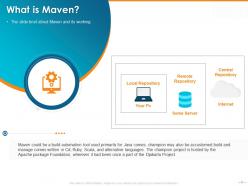
Slide 3: The slide brief about Maven and its working
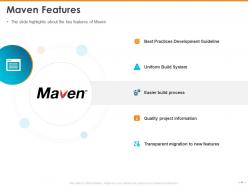
Slide 4: The slide highlights about the key features of Maven
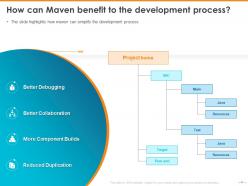
Slide 5: The slide highlights how maven can simplify the development process
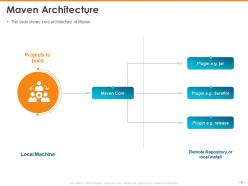
Slide 6: The slide shows core architecture of Maven
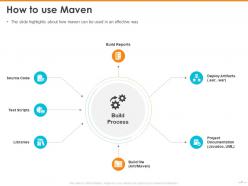
Slide 7: The slide highlights about how maven can be used in an effective way
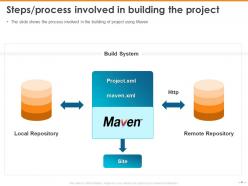
Slide 8: The slide shows the process involved in the building of project using Maven
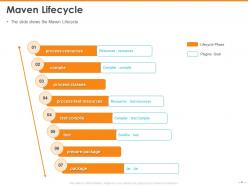
Slide 9: The slide shows the Maven Lifecycle.
Slide 10: This is Getting Started with Maven Architecture and Lifecycle Icons Slide
Slide 11: This slide is titled as Additional Slides for moving forward.
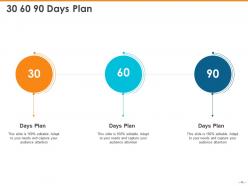
Slide 12: This is 30 60 90 Days Plan.
Slide 13: This slide displays Vision, Mission and Goal.
Slide 14: This is Our Team slide with Names and Designations.
Slide 15: This slide displays Our Goals.
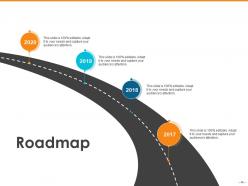
Slide 16: This slide depicts Roadmap process.
Slide 17: This is Financial slide.
Slide 18: This is About Us slide to showcase Company specifications.
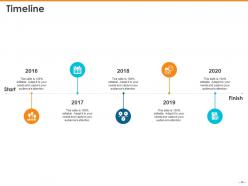
Slide 19: This slide displays Timeline process.
Slide 20: This is Thank You slide with Contact details.
Getting Started With Maven Architecture And Lifecycle Powerpoint Presentation Slides with all 20 slides:
Use our Getting Started With Maven Architecture And Lifecycle Powerpoint Presentation Slides to effectively help you save your valuable time. They are readymade to fit into any presentation structure.



FAQs for Getting Started With Maven Architecture And Lifecycle
Maven's core components include the Project Object Model (POM), repositories, plugins, dependencies, and the build lifecycle phases. These components interact seamlessly through Maven's declarative approach, where the POM defines project structure and dependencies, repositories store artifacts, and plugins execute specific tasks during lifecycle phases, ultimately delivering automated builds, dependency management, and standardized project structures across development teams.
The POM file serves as Maven's central configuration blueprint, defining project dependencies, build configurations, plugin specifications, and artifact coordinates that determine compilation, testing, and deployment behaviors. Through this declarative approach, development teams streamline project management by automating dependency resolution, standardizing build processes, and ensuring consistent deployments across environments, with many organizations finding that well-structured POMs significantly reduce configuration overhead while enhancing project maintainability and scalability.
Maven repositories store project artifacts and dependencies, with local repositories caching downloaded files on developers' machines, central repositories serving as Maven's default public repository, and remote repositories including custom organizational or third-party repositories. These repositories work hierarchically, with Maven first checking local storage, then remote configurations, and finally the central repository, enabling efficient dependency management and faster builds across development teams.
Maven's lifecycle phases include validate, compile, test, package, verify, install, and deploy, executed sequentially to ensure consistent project builds. These phases streamline development workflows by automating code compilation, testing, and deployment processes, with many software teams finding that this structured approach significantly reduces build errors, enhances project maintainability, and accelerates delivery cycles across development environments.
Maven automatically manages dependencies through its centralized repository system, downloading required libraries and resolving version conflicts using its POM configuration files. Compile-time dependencies like APIs and frameworks are needed during code compilation, while runtime dependencies such as database drivers are only required during execution, with many development teams finding that this separation streamlines deployment processes and reduces application bundle sizes.
Plugins extend Maven's core capabilities by providing specific tasks like compilation, testing, packaging, and deployment, enabling customized build processes for different project requirements. These components enhance functionality by automating complex workflows, integrating with external tools, and supporting specialized frameworks, with many development teams finding that strategic plugin combinations significantly streamline development cycles and improve deployment efficiency.
Maven's build lifecycle ensures consistency by enforcing standardized phases like validate, compile, test, package, and deploy that execute in predetermined order across all environments. This structured approach eliminates environment-specific variations through uniform dependency resolution, consistent directory structures, and automated build steps, with many development teams finding that Maven's lifecycle standardization significantly reduces deployment failures and streamlines continuous integration processes.
Maven's common goals include compile, test, package, install, and deploy, which map directly to specific lifecycle phases in the default build lifecycle. These goals execute sequentially through Maven's three built-in lifecycles (default, clean, site), with each phase automatically triggering all preceding phases, ultimately streamlining project builds and enabling consistent deployment processes across development teams.
Project versions in Maven are defined through the `
Maven profiles are environment-specific configurations that customize build processes for different deployment scenarios, such as development, testing, staging, and production environments. These profiles enable developers to manage dependencies, properties, and plugins dynamically, allowing software teams in enterprises like financial services and healthcare to streamline deployments across multiple environments while maintaining consistent code quality and reducing configuration errors.
Maven supports multi-module projects through a parent POM that defines shared configurations, dependencies, and build settings across child modules, enabling centralized management and consistent versioning. This architecture streamlines development workflows by allowing teams to build, test, and deploy related components together while maintaining modular separation, ultimately delivering faster development cycles, improved code reusability, and enhanced project scalability.
Maven dependency conflicts can be resolved through exclusions in pom.xml, dependency management sections, version pinning, and the dependency mediation principle. These strategies streamline project builds by eliminating version mismatches, reducing classpath issues, and ensuring consistent library versions, with many development teams finding that proper dependency management ultimately delivers faster deployments and more stable applications.
Maven supports environment-specific configurations through profiles, properties files, and resource filtering to manage different deployment targets. Profiles can be activated by environment variables, system properties, or command-line parameters, enabling developers to seamlessly switch between development, staging, and production settings while maintaining consistent build processes, ultimately streamlining deployment workflows and reducing configuration errors across enterprise applications.
Maven best practices include using standard directory layouts, separating main and test code, organizing packages by functionality, maintaining clear POM hierarchies, and implementing proper dependency management. These organizational principles streamline development workflows by enhancing code maintainability, facilitating team collaboration, and enabling seamless build automation, with many enterprise development teams finding that structured Maven projects significantly reduce integration complexities and accelerate delivery cycles.
Maven integrates seamlessly with CI/CD pipelines through automated build triggers, dependency management, and standardized lifecycle phases that support continuous testing and deployment. Popular CI/CD tools like Jenkins, GitLab CI, and Azure DevOps leverage Maven's consistent build process to automatically compile code, run tests, and deploy artifacts, with many development teams finding that Maven's repository management and version control streamline release cycles significantly.
-
The content is very helpful from business point of view.
-
Great quality slides in rapid time.