

Gitlab Flow Branching Strategy Of Devops




Try Before you Buy Download Free Sample Product
 Impress Your
 Audience
 100%
100% Editable
 Save Hours
 of Time


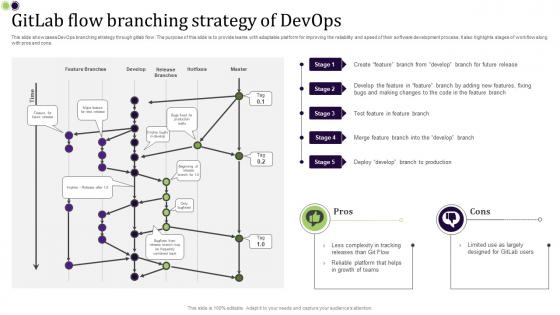
This slide showcases DevOps branching strategy through gitlab flow. The purpose of this slide is to provide teams with adaptable platform for improving the reliability and speed of their software development process. It also highlights stages of workflow along with pros and cons.
People who downloaded this PowerPoint presentation also viewed the following :
Gitlab Flow Branching Strategy Of Devops with all 9 slides:
Use our Gitlab Flow Branching Strategy Of Devops to effectively help you save your valuable time. They are readymade to fit into any presentation structure.








FAQs for Gitlab Flow Branching
Oh GitLab Flow? It's like the sweet spot between Git Flow and GitHub Flow honestly. You still do feature branches that merge to main, but here's where it gets cool - you can add branches for actual environments like staging or production. Way less headache than Git Flow's crazy release branches and hotfix stuff. The branches basically follow however you deploy things. So staging → production deployment? Your branches work the same way. Makes total sense once you try it. I'd start by sketching out how you currently deploy, then just match your branches to that flow. Pretty straightforward really.
So GitLab Flow basically hooks your CI/CD directly into how you branch - every time you push code or open a merge request, it kicks off your pipeline automatically. Pretty neat setup. All your branches get tested right away, which saves you from those annoying bugs making it to main. What I really like is how you can map different deployment stages to match your branches. Feature branches go to review environments, main hits staging, that kind of thing. Once you configure the deployment rules, passing tests trigger deployments to the right environments without you lifting a finger. Honestly beats doing manual deployments all day.
Okay so merge requests are basically how GitLab Flow works - you push your feature branch and create an MR when you're done. That triggers code review and testing before anything hits main. Way cleaner than other git workflows IMO. The cool thing is MRs become your documentation too, showing what changed and why. Write good descriptions though! I learned this the hard way when I spent like 30 minutes trying to figure out what past-me was thinking. Your future self will definitely appreciate the context when you're debugging at 2am.
Keep those feature branches super focused - one thing at a time. Branch off main, do your work, then get that merge request up ASAP. Honestly, I've watched teams let branches sit for weeks and it becomes a nightmare to untangle later. Rebase against main regularly so you don't hit conflict hell when merging. Name your branches something obvious like `feature/user-auth` - future you will thank you. Oh, and delete the branch right after merging! Nothing worse than a repo cluttered with dead branches that nobody remembers.
So for hotfixes, just branch straight off production, fix the issue, then merge back to production. Don't forget to forward-merge into main too or you'll hate yourself later. Some teams keep a hotfix branch open all the time for emergencies - honestly pretty smart. Your fix needs to hit all the important branches so it doesn't vanish in the next release. Oh and definitely test it in staging first, even when everything's burning down. I know it's tempting to skip that step but trust me on this one.
So GitLab Flow basically maps branches to your actual environments - main, then production and pre-production branches. Way easier than juggling a million feature branches when your team's spread across different time zones, trust me. The merge request thing is actually pretty smart because it forces people to document what they're doing and get reviews before pushing anything. Real-time CI/CD means everyone can see test results and deployment status instantly. I'd start by just mapping out whatever environments you're already using to branches - once you do that, it'll totally make sense.
Dude, GitLab Flow is pretty solid for code reviews. Every change goes through merge requests, so nothing hits main without someone looking at it first. Your team can comment on specific lines and suggest fixes right in the interface - way less annoying than trying to coordinate over Slack or whatever. Feature branches mean you get feedback early without breaking anything in production. The trick is getting your review rules sorted out beforehand so people actually know what they're doing. Oh, and reviewers can approve stuff conditionally which speeds things up. Honestly beats most other workflows I've tried.
Honestly? Your biggest headache will be getting people to unlearn Git Flow habits - all those branch rules make GitLab Flow feel too simple at first. Teams overthink it and add complexity where there shouldn't be any. Also, you need solid environment and deployment setups already in place, which GitLab Flow kinda assumes you have figured out. The "main branch is always deployable" thing freaks people out if they're not doing continuous integration yet. I'd say start with defining your environments clearly first, then do small merges to build everyone's confidence. Takes time but works.
So basically you just tweak GitLab Flow to fit however your team actually works. If you've got multiple environments, make branches for each one - like staging, pre-prod, whatever. Some teams don't even bother with a production branch and just deploy straight from main, which honestly makes sense sometimes. You can mess with the merge request stuff too, add your own approval rules, throw in different testing steps between environments. The whole point is just matching it to your actual deployment process and how your team is set up. Way more flexible than people think.
Dude, make each commit do just one thing - like fixing a specific bug or adding one feature. Your commit messages should be clear too, something like "Fix login error" instead of "updated things" or whatever. Interactive rebase is clutch for cleaning up messy commits before you merge. Also, rebase your feature branches instead of creating those ugly merge commits - honestly I used to hate rebasing but now I'm obsessed with keeping the history clean. Trust me, when you're trying to track down a bug at 2am, you'll be so grateful you can actually follow what changed and when.
So GitLab Flow hooks right into their issue tracking - super handy. You can link branches and merge requests to issues automatically, and when you create a branch from an issue, it names itself and stays connected the whole time. Tracking progress as code moves through dev → staging → production becomes way easier. Issues close automatically when merge requests hit main, which honestly saves so much headache. Your PMs get real visibility into what's deployed where, not just what developers finished coding. Oh, and you can link branches to issues straight from the interface - cuts down on all those manual status updates nobody likes doing.
So GitLab Flow actually makes releases way more predictable - you're working from one main branch and deploying through specific environment branches. Each branch shows you exactly what's hitting production, which is honestly pretty nice for visibility. Yeah, it can feel rigid at first, especially if you're used to doing whatever you want with branches. But that structure usually saves you headaches later. Everything becomes super traceable since changes follow the same path every time. I'd set up your environment branches first, then slowly move your release process over. Takes a bit of getting used to but it's worth it.
Honestly, communication is everything with GitLab Flow. Set up merge request templates so people actually describe what they're doing - those "fixed bugs" descriptions drive me crazy. Tag the right reviewers and explain WHY you changed something, not just what. Your team needs to agree on review timelines beforehand or things get messy. GitLab's commenting works great for code stuff. Bigger discussions? Move those to issues or Slack. Oh, and always ping reviewers when you address their feedback - they need to know you listened.
Honestly, GitLab's CI/CD pipelines are pretty decent once you stop fighting with the config files. Start with merge request templates and approval rules - boring but necessary. Their issue tracking actually works well for linking commits to features, which is nice for once. Throw in some monitoring like Prometheus later when you're not drowning in setup. The auto-DevOps stuff can save you hours of headache, though I'd still learn the manual way first. Slack integration helps too. Just nail down pipelines and merge requests before getting fancy with everything else.
Focus on deployment frequency and lead time first - those show how fast you're actually shipping. Mean time to recovery matters too for when stuff breaks. Change failure rate is huge though, tells you if you're improving quality or just being reckless with releases. I'd also watch merge request cycle time and hotfix frequency since GitLab Flow should cut down on those panic moments. Honestly, a weekly dashboard makes spotting trends so much easier. Plus your team gets to see the wins, which is always nice for morale.
-
Great product, helpful indeed!
-
Like always a great experience with you guys. Always there on the drop of hat to help.