


Handover Plan Powerpoint Ppt Template Bundles




Try Before you Buy Download Free Sample Product
 Impress Your
 Audience
 100%
100% Editable
 Save Hours
 of Time


Our Handover Plan Powerpoint Ppt Template Bundles are topically designed to provide an attractive backdrop to any subject. Use them to look like a presentation pro.
People who downloaded this PowerPoint presentation also viewed the following :
Handover Plan Powerpoint Ppt Template Bundles with all 17 slides:
Use our Handover Plan Powerpoint Ppt Template Bundles to effectively help you save your valuable time. They are readymade to fit into any presentation structure.
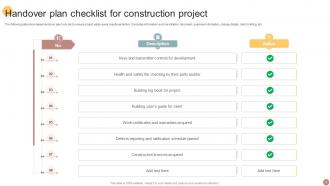
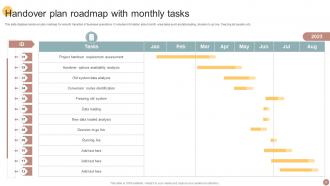
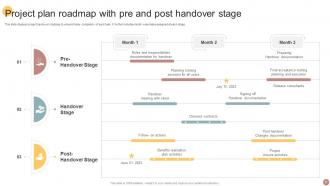
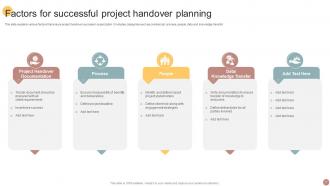





FAQs for Handover Plan Powerpoint
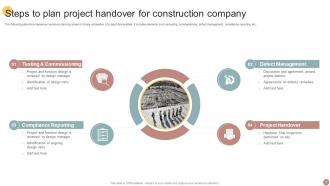
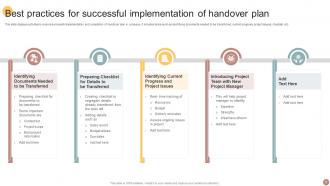
So you'll want to hit the big stuff first - where projects stand right now, who the key people are, and what deadlines are coming up. Passwords and system access are clutch (seriously, getting locked out sucks). Document where everything lives and any processes they'll need to know. Oh, and definitely include the weird client stuff or team personalities that never make it into official notes - that context is gold. Recent decisions and any fires that need putting out should be in there too. Honestly though, schedule time to walk through it together because just handing over docs isn't enough.
Honestly, handover templates are lifesavers. They create this standard checklist so nothing gets forgotten - projects, contacts, passwords, all that stuff. No more "wait what was Sarah even doing?" moments when people leave. Instead of your coworker doing some frantic brain dump their last week, they actually document things properly. The new person gets a clear picture of what they're walking into too. Oh and definitely customize it for your team - generic templates are pretty useless. I'd make it something you update regularly so it doesn't get stale.
You basically need to tweak your template for each industry's weird quirks and jargon. Healthcare? Add sections for patient data stuff and all those compliance headaches. Tech handovers are all about system access and code repos. Manufacturing focuses on safety protocols - I swear I've watched handovers bomb because someone used generic corporate-speak that left the new person totally lost. Build your base template first, then swap out sections and language based on what actually matters in that field. Don't forget industry-specific checklists and terminology guides.
Honestly, start this whole thing way earlier than you think - like weeks before they leave, not their last few days. Have the person leaving meet with their replacement multiple times, but here's the key part: get a manager or someone else in those meetings too so they can answer questions later. One big dump session never works, trust me on that one. After each conversation, write up what you covered in a shared doc that both people can edit. Short meetings work better anyway. Set up a clear way for the new person to ask follow-up questions once the other person's gone.
So basically, handover templates stop all that knowledge from just disappearing when someone leaves. You know how people carry everything in their heads? This forces them to actually write down the important stuff - who to contact, how things work, all that. Makes transitions way less chaotic too. When everyone uses the same format, new people can actually find what they're looking for instead of digging through random notes. Honestly, I wish more places did this consistently. Try it next time you're switching roles - future you will definitely appreciate having everything organized like that.
Honestly, you really need to talk to the people who'll actually use this thing before you build it. I'd grab maybe 3-5 folks - managers, team members, maybe some clients too. Ask them what sucks about handovers right now and what info they actually care about. Half the time what we think people need isn't what they really want, you know? The format matters too - some people love checklists, others prefer narratives. I've watched so many templates get created and then just... sit there unused because nobody asked the users first. Save yourself the headache and get their input upfront.
Honestly, ditch those Word docs and try something like Notion or Monday.com instead. They're way better for handovers because everyone can actually collaborate in real-time - add comments, check off tasks, upload files, whatever. Oh and definitely start doing quick screen recordings to explain stuff. Trust me, watching someone walk through a process beats reading a wall of text any day. You can set up automatic reminders too so things don't fall through the cracks. Don't go crazy with a million tools though - pick one and see how it goes first.
Don't make it super generic - that's the worst mistake I see. Those cookie-cutter templates are honestly pretty useless because they miss all the important stuff specific to each role. You want prompts for critical passwords, deadlines that are coming up, key people they'll need to work with. Also include WHY decisions were made, not just the what-to-do lists. Oh, and test it out with like one small handover first before you roll it out everywhere - you'll catch so many gaps that way. Trust me on this one!
So basically, watch how fast they get up to speed versus what you expected. Quality drops or unhappy customers during transition are red flags. I always notice when someone keeps asking the same stuff over and over - usually means the handover docs sucked. Check in at 30, 60, 90 days to see what actually stuck in their brain. Honestly though? The real proof is whether they stop bugging you with questions every five minutes. If they can run things solo without constantly reaching out, you nailed it.
Honestly, it depends on the timeline. Quick projects? Just jot down the immediate stuff - who to call, what's due tomorrow, that kind of thing. But longer assignments are a whole different beast. You'll want everything documented: processes, who knows what, ongoing work, budgets, plus all those random quirks nobody tells you about upfront. I once handed off a 6-month project with basically a Post-it note summary... total disaster. For anything over 3 months, block out at least a week for proper transfer sessions. Trust me on this one.
Oh man, definitely go digital-first with your handover template and make it super detailed. Can't just pop over to ask questions anymore, right? Record videos for the tricky stuff - trust me on this one. I got burned during our remote transition when everything turned into a game of telephone over email. Set up shared cloud folders that actually make sense, not just random dumps. Schedule proper video calls for knowledge transfer, but honestly? Build in way more time than you think you need. Slack back-and-forth takes forever compared to just talking. Those first few weeks, set up regular check-ins to catch what you missed.
So for ongoing stuff, jot down where everything stands right now and who's doing what. Milestones with actual dates are clutch. Flag any roadblocks or sketchy situations - seriously, they'll appreciate the heads up instead of walking into chaos. Recent decisions you've made, approvals still pending, budget info if money's involved. Oh and contact details for the important people, plus where you keep all the files (because nothing's worse than hunting for documents). Basically give them enough so they don't spend their first week trying to piece together what the hell is happening.
Quarterly reviews are probably your best bet, but honestly? Just update it whenever you hit a snag during an actual handover. That's when you'll spot the real issues anyway. Major org changes or new systems = immediate update time. Same goes when someone gives feedback that something's broken. Fresh team members are goldmines for this - they catch stuff you've been blind to forever. Quick tip: set that calendar reminder now or you'll totally forget. Been there! The whole thing's useless if it doesn't match what you're actually doing day-to-day.
You know how things always get dropped when people assume someone else is covering it? That's exactly why you need to write this stuff down. Get specific too - instead of "Sarah does marketing," write "Sarah sends the newsletter by Friday and updates social twice a week." Deadlines are huge because otherwise people just... don't do things lol. I learned this the hard way when our whole client onboarding got forgotten for like two weeks. Trust me, spending 30 minutes documenting who does what saves you from so much drama later.
Don't forget about confidentiality stuff and any data protection rules for your industry. Trust me, accidentally sharing restricted info is super awkward to deal with later. List out which systems and files have limited access - like what your replacement can jump into right away vs what needs special approvals first. Some client data might need extra training certifications too. Oh, and definitely loop in HR or legal early on. Nothing's worse than hitting compliance issues at the last minute when you're trying to wrap things up.
-
Professionally designed slides with color coordinated themes and icons. Perfect for enhancing the style of the presentations.
-
Happy to incorporate such stunning templates in my presentation. Made my presentation look professional and engaging.