


Help Desk Incident Management PowerPoint PPT Template Bundles




Try Before you Buy Download Free Sample Product
 Impress Your
 Audience
 100%
100% Editable
 Save Hours
 of Time


Our Help Desk Incident Management PowerPoint PPT Template Bundles are topically designed to provide an attractive backdrop to any subject. Use them to look like a presentation pro.
People who downloaded this PowerPoint presentation also viewed the following :
Help Desk Incident Management PowerPoint PPT Template Bundles with all 22 slides:
Use our Help Desk Incident Management PowerPoint PPT Template Bundles to effectively help you save your valuable time. They are readymade to fit into any presentation structure.

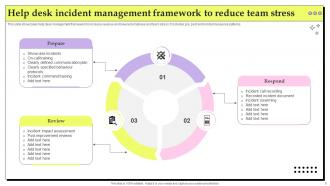
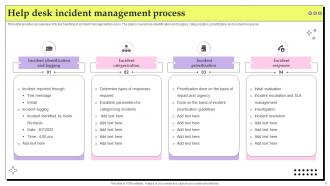
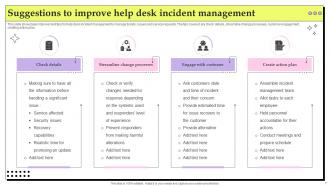
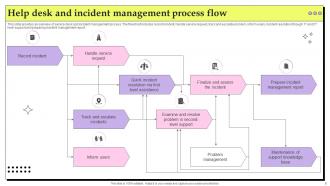
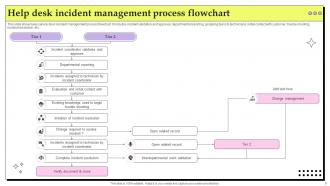
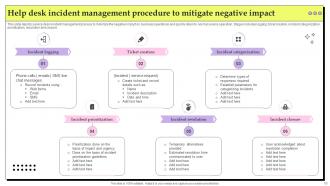
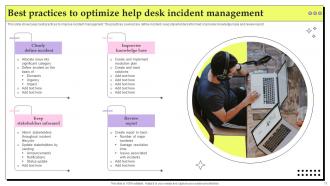
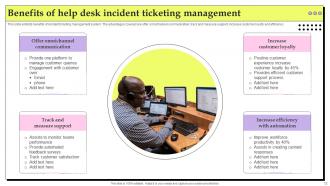
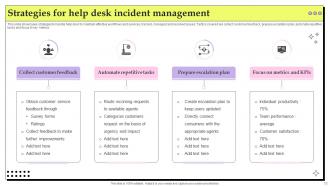
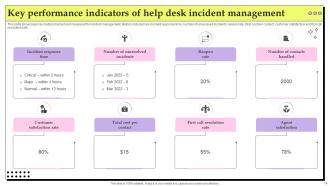





FAQs for Help Desk Incident Management PowerPoint
First thing - audit what you're doing now and find where stuff breaks down most. You'll need solid ticket tracking that logs everything automatically and sorts by how urgent it is. Quick routing to the right people is clutch for serious issues. Communication tools matter way more than people think - nobody wants to wonder if their problem just vanished into the void. Oh, and definitely get reporting so you can catch patterns before they become headaches. Your team needs easy access to old solutions and real-time status updates. SLA monitoring keeps response times honest too.
Dude, start with ticket routing - it'll automatically sort stuff by keywords or departments without anyone touching it. Password resets and basic FAQ responses? Total no-brainer to automate those. The escalation thing is clutch though - sets up alerts before you're about to miss deadlines. I'd honestly just pick one workflow first, maybe categorization, then add more once people see it actually works. My old team was skeptical at first but now they can't imagine doing it manually. It's basically like having someone working 24/7 handling all the boring repetitive crap so you can focus on actual problems.
Track these four to start: First Call Resolution Rate shows how often you solve things on the first try - honestly this metric matters way more than people think. Customer satisfaction scores are obvious but crucial. Mean Time to Resolution tracks how fast your team actually fixes stuff. Oh, and ticket volume trends help you figure out staffing needs. FCR is probably the biggest game-changer for keeping customers happy since nobody wants to call back three times about the same issue. Once you've got these down, you can dive into escalation rates and other detailed stuff.
Honestly, it depends on your industry - they all have different rules. Healthcare's got HIPAA breathing down their necks for patient data. Financial companies need SOX compliance with crazy detailed audit trails. Manufacturing? They're obsessed with safety incidents and equipment failures (makes sense when downtime costs millions per hour). IT folks care most about keeping systems up and figuring out user impact. Government agencies... don't even get me started on their security clearance stuff and endless approvals. My advice? Figure out what compliance frameworks you're stuck with first, then build your incident procedures around those. Way easier than trying to fix everything later.
Honestly, customer complaints are like a cheat sheet for what's actually broken. When people vent about slow responses or crappy communication, they're showing you blind spots you'd never catch otherwise. Nobody wants angry emails blowing up their inbox, but that stuff is pure gold for figuring out what to fix first. Look for patterns - like if everyone's complaining about the same thing, that's your priority right there. I'd track the common themes and use them to tweak your processes or update how you communicate during outages.
So basically, it's like triage for your IT problems. High priority stuff (like the whole system crashing) needs responses in under 15 minutes. Lower priority enhancement requests? Those can sit for days, honestly. Most places use impact vs urgency grids to auto-assign priorities - saves you from having to think about it every time. The trick is setting up clear criteria so you're not wasting time on tiny issues while actual fires are burning. Oh, and definitely train your team on when to escalate things. Trust me, proper priority rules will save your sanity.
Stop just putting band-aids on problems - you gotta dig deeper and figure out what's actually causing them. Build a knowledge base where you save all your solutions (yeah, documentation sucks but it saves your ass later). Set up monitoring so you catch stuff before users start complaining. After incidents, do reviews with your team to spot patterns. Honestly, half the time it's the same 3-4 issues over and over. Pick your worst recurring problems this week and trace them back to the real source. You'll be shocked how much time this saves you.
So basically it's like giving your help desk a shared memory bank of all the fixes they've tried before. Super handy when similar tickets roll in - instead of reinventing the wheel, they can just search what worked last time. Honestly, it's a game changer for those "wait, didn't we deal with this already?" situations. You're constantly building this database of solutions and workarounds that gets better over time. The trick is actually getting everyone to document their fixes properly though. Otherwise you end up with this useless mess that nobody wants to touch.
So for ticketing systems, ServiceNow, Jira Service Management, and Zendesk are basically what everyone uses - they're expensive but solid. Freshservice and ManageEngine ServiceDesk Plus work great if you don't want to spend crazy money. Spiceworks used to be my go-to for smaller teams but honestly it feels pretty dated now. Whatever you pick, just make sure it plays nice with your monitoring stuff and can auto-route tickets without you babysitting it. Oh, and definitely demo a few with your actual workflows first - I learned that the hard way!
Okay so first thing - get your incident priorities sorted out before things get crazy. Set up ticket templates for the usual stuff that always breaks, saves tons of time. I'd put your best people on the weird complex issues and let newer folks handle the basic password resets and whatever. Auto-responses are actually clutch here, buys you breathing room while people wait. Oh and don't be afraid to pull people from other teams when everything's on fire - honestly saved our butts more times than I can count. Track your response times live so you can shift people around as needed.
Start with ITIL basics - that's where you get the foundation for incident handling and escalation stuff. Obviously tech troubleshooting skills matter, but honestly the communication training might be even more important since you're dealing with pissed off users all day. Patience and empathy are huge when someone's laptop dies before their big meeting. Make sure everyone knows your ticketing system inside and out, plus whatever monitoring tools you've got. Oh, and do those scenario training sessions regularly - practicing real incidents as a team makes a difference.
ITIL basically gives your team a playbook so you're not just winging it when stuff breaks. Everyone follows the same steps for categorizing and escalating incidents - way less scrambling around. The metrics part is honestly boring at first, but you'll start catching patterns you missed before. Resolution times get faster since people actually know what they're supposed to do. Documentation improves too, which helps when someone's out sick or whatever. Don't try implementing everything at once though. Pick something simple like incident categories and go from there.
Dude, the worst thing you can do is leave people hanging with zero updates. Seriously kills trust. Teams also mess up by making everything "urgent" - total chaos. Document your fixes or you'll be solving the same crap repeatedly, which is soul-crushing honestly. Don't try being a hero either. Escalate on time, not when you're already drowning. Oh, and categorize stuff properly from the start. I learned this the hard way when our whole queue turned into a dumpster fire. Just keep users posted throughout the process.
So basically, when teams actually talk to each other, incidents get fixed way faster. Instead of those endless email threads that make you want to scream, your help desk can just message the network or security guys directly in Slack. Everyone stays in the loop without playing telephone. Here's the cool part - cross-training your Level 1 people means they won't escalate every little thing. Set up dedicated channels where teams can jump in the second something breaks. Honestly, it's like having a group chat for emergencies. Way better than the old school approach where nobody knows what's happening.
Honestly, the best thing you can do is dig into your incident data every month. Resolution times, how often stuff gets escalated, customer satisfaction - those numbers don't lie. I've watched teams completely turn around just from reviewing their messiest incidents regularly. Don't just patch things up though. Figure out why the same problems keep happening and fix the actual root cause. Oh, and definitely ask your team AND users what's driving them crazy. Trust me on this - only change one small thing per month. Otherwise you'll overwhelm everyone and nothing will stick.
-
Unique and attractive product design.
-
One word for SlideTeam–Versatile!