


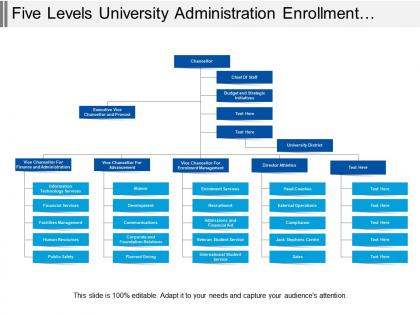
Five levels university administration enrollment services org chart




Try Before you Buy Download Free Sample Product
 Impress Your
 Audience
 100%
100% Editable
 Save Hours
 of Time


Serve an ace with our Five Levels University Administration Enrollment Services Org Chart. Game, set and Match are yours for the taking.
People who downloaded this PowerPoint presentation also viewed the following :
Five levels university administration enrollment services org chart with all 5 slides:
Readymade quality just a click away. That is a promise with our Five Levels University Administration Enrollment Services Org Chart.




FAQs for Five levels university administration enrollment
Okay so Enrollment Services breaks down pretty simply. Admissions does all the app reviews and decisions. Financial Aid handles scholarships and loans. Student Records deals with transcripts and registration stuff. The Registrar's Office manages academic records and graduation requirements - honestly they're probably who you'll deal with most. Oh and there's a Communications team that sends out all those annoying emails lol. Each section has leads reporting to the main director. Just figure out which department handles your thing first so you don't get transferred around five times.
So the org chart shows who handles what in the student journey - admissions, financial aid, registrar, student success, all that. Super helpful for avoiding those weird situations where everyone assumes someone else is calling the at-risk students (happens more than you'd think). Plus it maps out how decisions get made and who talks to who. When you need quick approvals for retention stuff, you'll know exactly who to bug. Honestly, I'd just take whatever strategies you're running now and see where they fit on the chart - might catch some gaps or weird bottlenecks you didn't notice before.
Honestly, just group similar jobs together - put all your admissions people under one manager, financial aid under another. Clear reporting lines are your friend here. And please, ditch those weird job titles like "Enrollment Associate III" because literally no one knows what that means. Include contact info for sure, maybe photos if people are cool with it. Don't go crazy with the design though - all those dotted lines and cluttered boxes just confuse everyone. The whole point is helping students and parents figure out who does what and how to reach them. Oh, and actually put it somewhere people can find it. Update whenever roles change, or at least quarterly.
Honestly, the org chart is a lifesaver for figuring out who actually does what in all the enrollment departments. You'll see who reports to who, which helps you avoid that awkward thing where you email the wrong person about a project. Look for teams that work with similar student groups - that's where you can find good collaboration opportunities. It also shows you the approval chain when you need sign-offs from multiple departments, which... trust me, happens more than you'd think. I always keep mine nearby during planning meetings so I can quickly spot who needs to be involved. Way better than guessing!
Start with something simple like Lucidchart or Visio - they're great for making clean org charts you can actually update without wanting to scream. Google Sheets honestly works too if you just need basic role tracking. BambooHR or Workday are worth it later when you want the fancy stuff that updates automatically when people get promoted or quit. The worst thing ever is having like 5 different versions floating around because nobody knows which one's current. Pick whatever your team will actually use and can access easily, then upgrade when you outgrow it.
Yeah, you should totally map this stuff right into your org chart. Look for roles that overlap - like admissions and financial aid people who both touch student records. Pick maybe 2-3 functions that would be disasters if they went down and start there. I'd create formal backup assignments so everyone knows their secondary coverage. The visual part matters too - add dotted lines or notes on the actual chart showing who's trained where. We did something similar at my last place and it saved us so much headache. Just don't try to cross-train everything at once or you'll burn people out.
Check your conversion rates first - how many prospects actually apply, then enroll, etc. Response times are huge because students get annoyed waiting for basic answers (honestly, who doesn't?). Track if your staff workload is balanced too. Some people might be drowning while others have nothing to do. Student satisfaction surveys tell you if your setup actually works for them. Both speed AND experience matter - a process that's fast but makes everyone miserable isn't worth much. Make sure you're measuring the human side, not just numbers.
Policy changes basically force you to restructure Enrollment Services - there's no way around it. New financial aid rules or data privacy stuff means you're suddenly hiring compliance people or shuffling teams around. I swear it feels reactive half the time. Your org chart ends up looking totally different every few years because of whatever Washington decides. The smart move is tracking policy updates early so you're not scrambling later. Though honestly, sometimes you're scrambling anyway because these changes come fast.
Honestly, the worst part is figuring out who reports to who - like do financial aid counselors fall under admissions or student services? Nobody ever agrees on that stuff. Cross-functional teams make it even messier since enrollment touches literally everything. You're probably stuck with some ancient structure that made sense in 1995 but doesn't match how anyone actually works now. Budget issues mean people juggle five different roles, which makes the hierarchy look insane. I'd start by mapping how work really flows first, then build your chart around that instead of cramming everyone into perfect little boxes.
Anonymous surveys work great for getting honest feedback about pain points and workload issues. Focus groups are solid too - frontline people spot bottlenecks that managers totally miss. Do some one-on-ones after that to dig into the messy stuff like unclear reporting lines. Here's the thing though: collect all this *before* you finalize anything, not after when it's too late. Ask what's currently broken AND what would actually make their jobs easier. Then use that intel to build your reporting structure and team setup. Sounds obvious but you'd be surprised how many people skip this step.
So our Enrollment Services org chart actually has DEI baked right in - not just tacked on later. They made sure to get diverse leadership across departments and set up reporting structures that actually work for everyone. Honestly, the inclusive decision-making thing makes everything way less messy too. You can see different perspectives represented from admissions counselors all the way up to the C-suite. I'd definitely ask your team leads about specific examples though - they can probably walk you through why certain roles got structured the way they did. It's pretty thoughtful when you see it laid out.
Make your org chart flexible so you can shift people around when enrollment changes. I'd go with generalist advisors who can cover multiple areas instead of super-niche specialists. Matrix reporting works too - you can temporarily move staff to wherever they're needed most during busy periods. The schools that nail this treat org charts like living documents, not rigid hierarchies. Honestly, rigid silos are the worst because you can't move resources where you actually need them. Check your structure yearly based on real enrollment numbers - that data tells the whole story.
Honestly, start with monthly meetings between admissions, financial aid, and registrar - keeps everyone on the same page about enrollment stuff. Slack or Teams helps too for quick questions. You know how it is, half the time people just don't know who the hell to ask about something! Rotating staff between departments occasionally is smart - builds actual relationships instead of just formal work connections. Oh, and maybe do an all-hands meeting once a month? See what's working and what isn't. We tried this last year and it cut down on so much back-and-forth confusion.
Honestly? Update that thing every quarter, bare minimum. During crazy busy enrollment periods, maybe even monthly. Staff turnover is absolutely nuts in enrollment - I swear people bounce around more than anywhere else. Your chart gets stale super quick when responsibilities keep shifting based on application volumes and deadlines. Trust me, I've watched teams burn hours just trying to figure out who the hell handles what because their org chart was ancient. Make someone own keeping it current - like actually put it in their job description. And update it right away whenever someone leaves or roles change.
Honestly, having a solid org chart for your enrollment team makes everything smoother for students. They won't get bounced around between departments when they just want to check their application status - which is super annoying, trust me. Students reach the right person faster when everyone knows their lane (admissions vs financial aid vs registration, etc.). Better coordination between your teams means fewer confused handoffs too. I'd map out who does what first, then make sure everyone actually knows the structure. Otherwise you'll still have that "let me transfer you" nightmare happening. Students notice when things run smoothly, and it makes a real difference in their experience.
No Reviews