

Implementation Guide For Waterfall Methodology In Project Management Powerpoint Presentation Slides




Try Before you Buy Download Free Sample Product
 Impress Your
 Audience
 100%
100% Editable
 Save Hours
 of Time


The Waterfall project management approach involves dividing a project into distinct, sequential phases, where each new stage commences after the completion of the previous one. Check out our comprehensive Implementation Guide for Waterfall Methodology in Project Management PowerPoint Presentation. It presents a step by step resource to help users grasp the Waterfall methodology in project management effectively. Our Waterfall project management deck covers essential aspects, including the conditions for implementing the Waterfall methodology, its advantages and disadvantages, the phases of the traditional Waterfall model, and the success and failure rates associated with this approach. Additionally, it provides valuable insights into suitable project conditions across various industries, the work breakdown structure for construction projects, an action plan for implementing the Waterfall model, and a monthly Gantt chart tailored explicitly for construction projects. Moreover, our Waterfall model PPT includes a cohort based model and a swim lane timeline designed for implementing the Waterfall approach in marketing projects. Lastly, it offers a statistical analysis of software development models, identifies suitable conditions for employing the Waterfall methodology in software development, and includes a monthly timeline for the software development process. Get access to this 100 percentage editable template now.
People who downloaded this PowerPoint presentation also viewed the following :
Content of this Powerpoint Presentation
Slide 1: This slide introduces Implementation guide for waterfall methodology in project management. Commence by stating Your Company Name.
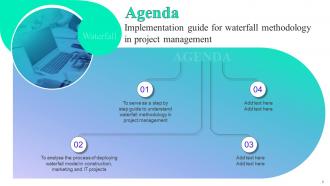
Slide 2: This slide depicts the Agenda of the presentation.
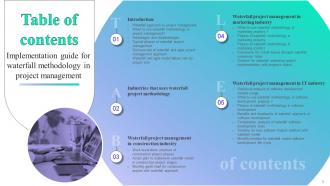
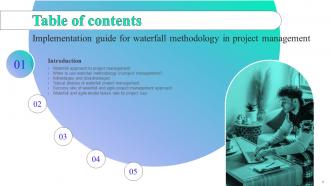
Slide 3: This slide includes the Table of contents.
Slide 4: This slide highlights the Title for the Topics to be discussed further.
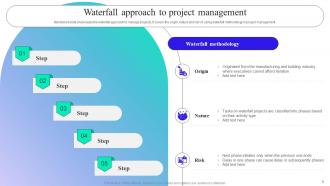
Slide 5: The Mentioned slide showcases the waterfall approach to manage projects.
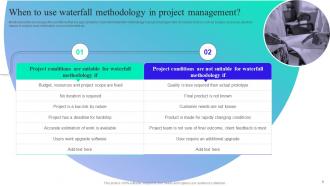
Slide 6: This slide presents When to use waterfall methodology in project management.
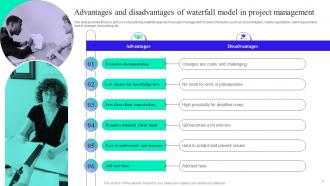
Slide 7: This slide exhibits the Advantages and disadvantages of waterfall model in project management.
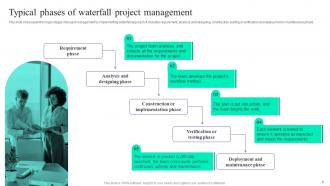
Slide 8: This slide states the Typical phases of waterfall project management.
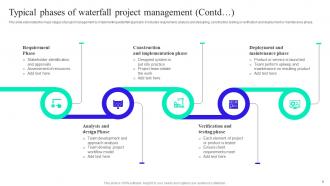
Slide 9: This slide continues the Typical phases of waterfall project management.
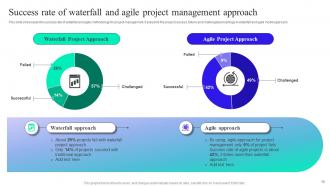
Slide 10: This slide showcases the success rate of waterfall and agile methodology for project management.
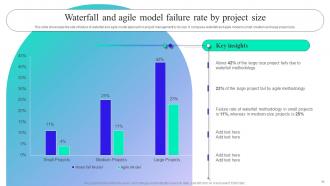
Slide 11: This slide highlights the Waterfall and agile model failure rate by project size.
Slide 12: This slide indicates the Heading for the Contents to be covered next.
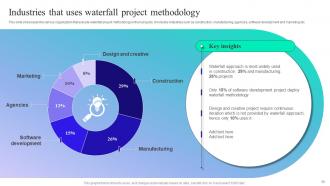
Slide 13: This slide sortrays the various organization that execute waterfall project methodology in their projects.
Slide 14: This slide includes the Title for the Ideas to be discussed further.
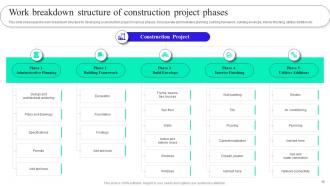
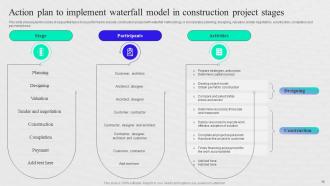
Slide 15: This slide showcases the work breakdown structure for developing a construction project in various phases.
Slide 16: This slide reveals the series of sequential tasks to be performed to execute construction project with waterfall methodology.
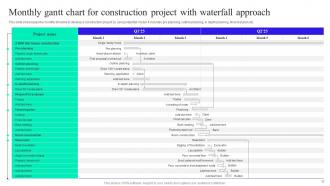
Slide 17: This slide highlights the Monthly gantt chart for construction project with waterfall approach.
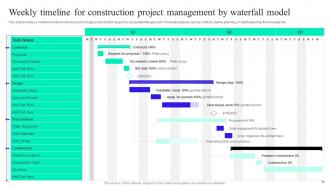
Slide 18: This slide portrays the Weekly timeline for construction project management by waterfall model.
Slide 19: This slide includes the Heading for the Ideas to be covered next.
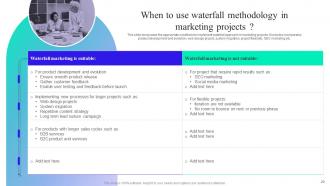
Slide 20: This slide showcases the appropriate conditions to implement waterfall approach in marketing projects.
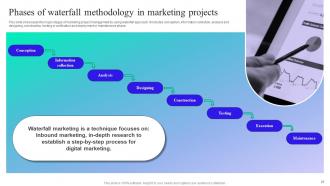
Slide 21: This slide states the Phases of waterfall methodology in marketing projects.
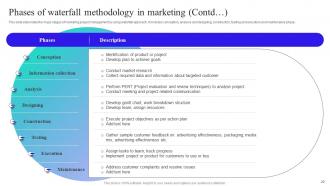
Slide 22: This slide continues the Phases of waterfall methodology in marketing.
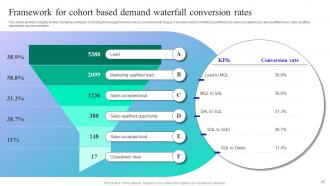
Slide 23: This slide displays the Framework for cohort based demand waterfall conversion rates.
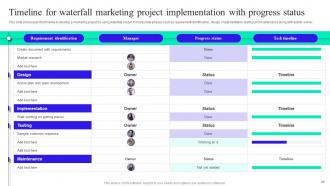
Slide 24: This slide presents the Timeline for waterfall marketing project implementation with progress status.
Slide 25: This slide contains the Title for the Topics to be discussed further.
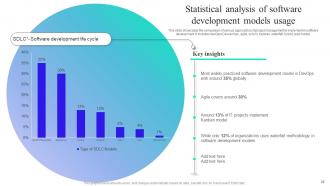
Slide 26: This slide represents the Statistical analysis of software development models usage.
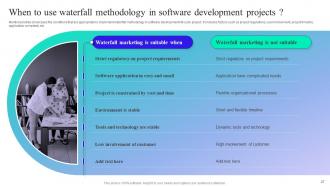
Slide 27: This slide deals with When to use waterfall methodology in software development projects.
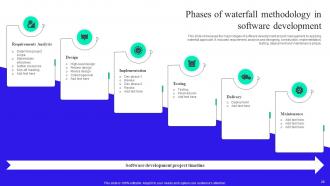
Slide 28: This slide exhibits the Phases of waterfall methodology in software development.
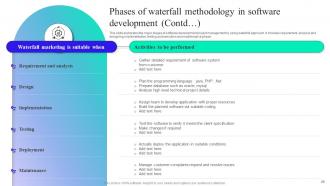
Slide 29: This slide continues the Phases of waterfall methodology in software development.
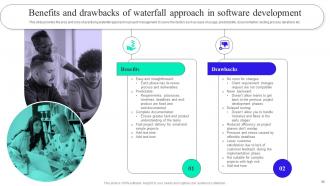
Slide 30: This slide presents the Benefits and drawbacks of waterfall approach in software development.
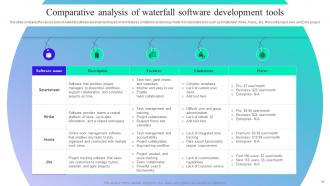
Slide 31: This slide shows the Comparative analysis of waterfall software development tools.
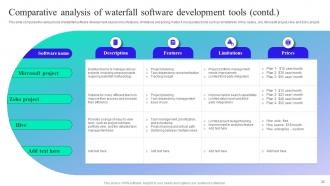
Slide 32: This slide continues the Comparative analysis of waterfall software development tools.
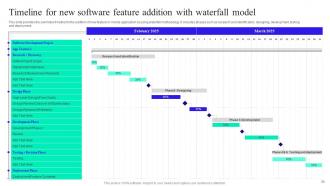
Slide 33: This slide depicts the Timeline for new software feature addition with waterfall model.
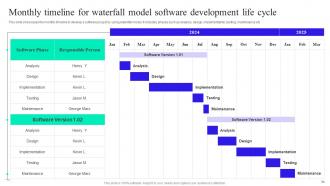
Slide 34: This slide portrays the monthly timeline to develop a software project by using waterfall model.
Slide 35: This is the Icons slide containing all the Icons used in the plan.
Slide 36: This slide is used for depicting some Additional information.
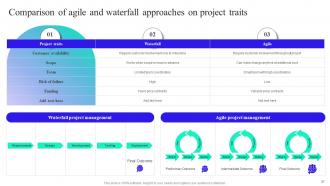
Slide 37: This slide outlines the Comparison of agile and waterfall approaches on project traits.
Slide 38: This is Our team slide. State your team-related information here.
Slide 39: This is Our mission slide for highlighting the firm's Vision, Mission, and Goal.
Slide 40: This is Our goal slide for stating the organizational goals.
Slide 41: This is the Idea generation slide for encouraging fresh ideas.
Slide 42: This slide contains the Post it notes for reminders and deadlines.
Slide 43: This slide exhibits the SWOT analysis.
Slide 44: This slide is used for the purpose of Comparison.
Slide 45: This is the Thank you slide for acknowledgement.
Implementation Guide For Waterfall Methodology In Project Management Powerpoint Presentation Slides with all 52 slides:
Use our Implementation Guide For Waterfall Methodology In Project Management Powerpoint Presentation Slides to effectively help you save your valuable time. They are readymade to fit into any presentation structure.





FAQs for Implementation Guide For Waterfall Methodology In Project Management
Okay so Waterfall has five phases that happen one after another: Requirements (figuring out what you're building), Design (planning the architecture), Implementation (the actual coding part), Testing (bug hunting), and Deployment/Maintenance (going live plus ongoing support). It's super rigid compared to Agile. Once you finish a phase, there's basically no going back - which honestly can be pretty stressful. Each phase needs deliverables and sign-offs before you move forward. Changes get way more expensive as you progress, so you better nail those requirements from the start or you'll regret it later.
So waterfall is super linear - you can't move to the next step until you're totally done with the current one. Requirements first, then design, build, test. Done. Agile's the opposite - short sprints where you're constantly tweaking things based on feedback. Honestly, waterfall only makes sense when you know exactly what you want and it won't change (rare these days). Agile lets you pivot when - not if - things shift. If stakeholders will be involved throughout or requirements might evolve, go agile for sure.
Honestly, Waterfall's biggest win is the structure - everything's mapped out upfront so there's no guessing what comes next. Your budget stays predictable since you plan it all beforehand. Documentation is thorough, which stakeholders seem to eat up. Each phase has clear milestones and deliverables. Works best when requirements won't change much (think regulatory stuff or construction). The predictability can be really reassuring on complex projects. Sure, it's not trendy anymore, but sometimes you need that rigid framework. Plus everyone knows exactly what they're supposed to deliver and when.
Waterfall's perfect for stuff with rock-solid requirements that won't change - like compliance systems or manufacturing. Government contracts love it because of all the documentation. Construction projects too, obviously. Honestly, it's pretty rigid for most software work these days, but if stakeholders know exactly what they want upfront? It can work. Industries like aerospace and medical devices stick with it because there's zero room for "oops we changed our minds." You need predictable outcomes and clients who won't send change requests every week. If your project scope is locked down tight, maybe give it a shot.
Honestly, Waterfall's biggest problem is you're stuck with whatever requirements you start with. Changes later? Good luck - they'll cost you big time. Plus you won't actually see working software until super late, which is terrifying if something's off. Testing gets pushed to the end too, so bugs just pile up instead of getting fixed as you go. The whole thing assumes projects follow a neat little path, but that's not reality at all. If you're forced to use it anyway, maybe try scheduling regular check-ins with stakeholders - at least then you might catch disasters before they explode.
Make templates for each phase and don't let people move forward without filling them out completely. Trust me on this one - skipping docs will screw you over later. Get your stakeholders to review stuff regularly so you catch missing pieces early. Also, ditch the Word doc ping-pong and use something collaborative where everyone can jump in at once. Oh, and assign specific people to own different sections - otherwise it becomes nobody's job. Build doc time into your actual project timeline instead of cramming it in at the end. Make it part of your exit criteria for each phase.
So with Waterfall, you basically get two shots at customer feedback - right at the start when you're gathering requirements, and then boom, at the very end when you deliver. That's it. Your team collects everything upfront, documents it all, then disappears into development mode for months. Honestly, it can get pretty stressful not knowing if you're still on track. The big moment of truth comes when you finally show them the finished product. Those initial requirement sessions better be rock solid though - I've seen projects go sideways when changes pop up later because they're a nightmare to handle.
Yeah, Waterfall can work but honestly it's pretty outdated these days. Basically you do everything in order - requirements, design, coding, testing, deployment - and you can't go backwards once you finish a phase. Works okay if your requirements are rock solid and won't change, like regulatory stuff or really rigid systems. But here's the thing - once you start coding, there's zero wiggle room. I've seen projects crash because stakeholders changed their minds halfway through (they always do). If you're thinking about it, just make sure those requirements are bulletproof first.
Honestly, it's all about flipping how your team thinks - from that "figure it out as we go" mindset to having everything mapped out first. Yeah, I know it feels weird after being so used to Agile's flexibility! But waterfall needs way more upfront planning and documentation than you're probably comfortable with. No more "we'll tackle that next sprint" - you gotta lock down requirements early. Train your people on detailed project planning and set up those phase gates. Oh, and definitely explain WHY you're making this shift. Otherwise they'll think you've lost your mind going backward!
So with Waterfall, you basically do all your risk planning upfront - figure out what could go wrong, make your backup plans, then cross your fingers nothing changes. Agile's totally different though. You're dealing with new risks constantly as they come up. Honestly, Waterfall works if your project's pretty straightforward, but it gets sketchy with complex stuff since you can't really pivot easily. The whole approach assumes you can predict everything from day one, which... good luck with that! If you're stuck doing Waterfall anyway, definitely pad your timeline. You'll need it.
So most teams I've seen go with MS Project - it's kind of the old reliable for waterfall since it handles all those sequential phases really well. Jira and Azure DevOps are solid for requirements tracking. Gantt charts in Smartsheet or Asana work too. Honestly, waterfall projects can get crazy diagram-heavy, so don't be surprised if you end up using Visio for flowcharts and process docs. Confluence is great for keeping all your documentation organized as you move through each phase. The real trick is finding something that tracks dependencies between phases properly. I'd honestly just start with whatever licenses your company already has - no point reinventing the wheel.
Waterfall's pretty straightforward - did you hit scope, budget, and timeline? That's basically it. Quality stuff matters too, like how many bugs you ended up with and whether the final product actually does what it's supposed to. Stakeholder happiness is key obviously. The whole thing's way more black and white than Agile, which honestly makes it easier to measure in some ways. Oh, and track how smoothly you moved between phases - lots of rework usually means something went wrong. Set your success criteria early though, so there's no confusion about what you're aiming for.
Yeah, requirements gathering in Waterfall is make-or-break stuff. Once you're past that phase, going back is a nightmare - like realizing you need more outlets after the walls are already up. The whole thing depends on getting everything locked down upfront since it's so linear. Spend serious time with your stakeholders now drilling into details. Document everything you can think of, even the obvious stuff. Trust me, what seems "obvious" today won't be in six months when you're deep in development. Those extra hours of planning will save you weeks of headaches later.
Honestly, scope changes are Waterfall's worst nightmare. The whole thing is built around having your requirements locked down from day one. So when changes pop up mid-project, you're basically screwed - might have to redo documentation, scrap testing plans, even throw out finished code. Going backwards through those rigid phases gets crazy expensive fast. It's kinda like renovating your kitchen after the house is done, you know? Waterfall really only makes sense when you're 100% sure requirements won't shift. Otherwise you'll just hate yourself later. Maybe look into Agile instead?
NASA's Apollo missions are the classic example - you literally can't iterate when people's lives are on the line in space. Big construction projects work the same way, like the Sydney Opera House. Banks use it for enterprise software rollouts, and healthcare loves it for compliance stuff since regulations are so rigid. Boeing does this with aircraft development too, which honestly makes sense given the stakes. The common thread? Fixed requirements and zero tolerance for the whole "move fast and break things" approach. If your project has strict constraints and can't afford surprises, Waterfall's probably your friend.
-
Spacious slides, just right to include text. SlideTeam has also helped us focus on the most important points that need to be highlighted for our clients.
-
Use of icon with content is very relateable, informative and appealing.