


Improving hospital management system pharmacy management system




Try Before you Buy Download Free Sample Product
 Impress Your
 Audience
 100%
100% Editable
 Save Hours
 of Time


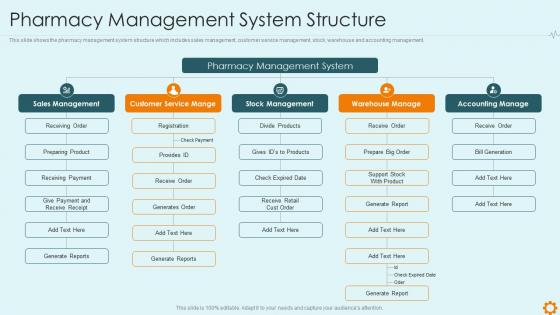
This slide shows the pharmacy management system structure which includes sales management, customer service management, stock, warehouse and accounting management.
People who downloaded this PowerPoint presentation also viewed the following :
Improving hospital management system pharmacy management system with all 6 slides:
Use our Improving Hospital Management System Pharmacy Management System to effectively help you save your valuable time. They are readymade to fit into any presentation structure.





FAQs for Improving hospital management system
Honestly, you need to nail five things when picking pharmacy software. Inventory tracking is huge - get one with auto-reorder alerts so you don't run out of insulin or whatever. Prescription management should cover intake through dispensing with safety checks built in. Insurance claims and billing integration will save your sanity (trust me on this). Patient profiles with med history and allergy tracking are non-negotiable. Reporting tools help with compliance stuff and seeing how your business is doing. Oh, and make sure whatever you pick can actually handle your prescription volume and the insurance companies you deal with most.
So these pharmacy systems are basically your safety backup - they'll catch drug interactions and allergy issues before you even finish typing. The barcode scanning is clutch because it stops you from grabbing the wrong bottle (happens more than you'd think). Plus they track inventory automatically so you won't accidentally give out expired stuff. Honestly, the drug interaction alerts alone are worth it - they catch way more problems than I expected when we first started using them. Super paranoid but in a good way, you know?
Honestly, automation saved my sanity when I worked in pharmacy. Set it up to reorder your high-volume stuff automatically when you hit certain stock levels. It'll track expiration dates too, which is clutch because nobody has time to manually check every bottle. The predictive ordering based on past data is pretty neat - though sometimes it gets weird around holidays. Way fewer counting mistakes compared to doing everything by hand. Best part? You actually get to focus on patients instead of staring at shelves all day. Start with your busiest medications first and work from there.
So basically your pharmacy system talks to the EHR through secure APIs - they share patient data instantly. When you write a prescription, it grabs their history, allergies, current meds from the EHR to catch any bad interactions. Pretty slick setup honestly. Then it sends the prescription info back to update their medical record so everyone's on the same page. You'll see way fewer med errors since both systems are using identical info. Oh, and make sure IT sets up user permissions right - pharmacy staff shouldn't be poking around patient data they don't need.
Honestly? Cloud stuff auto-updates and scales without you doing anything - total lifesaver when we all went remote during COVID chaos. Way cheaper upfront too since you're not buying servers. But on-premise means you control everything, your data stays put, and internet going down won't kill your whole operation. Downside is you're stuck with all the maintenance headaches and way higher startup costs. Really depends what matters more to you - if it's simplicity and saving money, go cloud. Need complete control over your data? Then on-premise is probably worth the hassle.
So these pharmacy systems are actually pretty solid for patient communication. Text alerts when prescriptions are ready, automated refill reminders - that stuff works. The patient portals are where it gets interesting though - people can request refills at 2am if they want, check their med schedules, ask questions without calling. You can also send targeted health tips and catch drug interactions before they're a problem. Oh, and the systems track who's not taking their meds regularly, so you can follow up with those patients. Honestly, I'd roll out the automated reminders first since you'll see results right away.
Focus on inventory turnover and prescription trends first - that's what actually matters. Good systems track seasonal demand shifts and spot slow-moving stock automatically. Patient adherence patterns are huge too, plus flagging drug interactions across your whole patient base. Financial stuff like profit margins per medication and insurance reimbursement tracking? Definitely need those. Most systems look impressive with fancy charts but give you garbage insights honestly. Oh, and make sure you can export everything easily - being stuck in their format forever sucks.
Your pharmacy system can handle most of this compliance stuff automatically - tracks controlled substances, spits out reports, flags expired meds. Regulators love seeing those audit trails during inspections. Most systems alert you about DEA deadlines and state requirements too. Trust me, manual tracking is a nightmare (learned that the hard way). Patient counseling docs and insurance compliance get handled through the same system. Oh, and don't be like me - actually run those compliance reports regularly instead of scrambling when inspection time rolls around. Makes life so much easier.
Honestly, the money's gonna hurt - these systems are expensive as hell. Your staff will probably complain nonstop because nobody likes learning new tech. Moving all your patient records and inventory data? Total headache waiting to happen. Insurance integration is annoying too, and don't get me started on making sure everything meets pharmacy regulations. Oh, and training always takes way longer than you think it will. People learn at totally different speeds which is... frustrating. Definitely try it at just one location first though - work out the bugs before you mess up all your stores.
Dude, these systems totally change the game for billing. Everything gets automated - insurance claims, copay calculations, the whole mess. Real-time electronic submissions mean you get paid faster and deal with way fewer rejections. The software handles all that boring verification stuff automatically, plus it'll catch prior auth issues before you even dispense anything. Trust me, after doing manual claims for years, this is such a relief. Oh, and make sure your team actually learns to read those benefit responses properly - saves so many awkward conversations when patients pick up their meds and freak out about costs.
Okay so first things first - encrypt everything, both stored data and anything moving between systems. Set up role-based access so people only see what they actually need for their jobs. Multi-factor authentication is annoying but honestly non-negotiable at this point. You should run security audits pretty regularly and train your staff - most breaches happen because someone clicks the wrong thing. Automated backups are obvious but you'd be surprised how many places skip this. Oh and have an incident response plan ready because when something goes wrong, you don't want to be figuring it out on the fly. Keep testing your security and updating software.
Dude, pharmacy management systems are lifesavers for controlled substances. They track everything automatically - from when stuff arrives to when you dispense it. Real-time inventory means you'll always know your Schedule II counts, which honestly saves so much stress during inspections. The best part? They flag sketchy prescription patterns and connect to state monitoring programs so you can check patient histories instantly. Set up alerts for weird refill patterns too. My buddy at CVS says their system caught a forger last month just from the automated flags. Takes like 30 seconds to run these checks now.
Honestly, training is make-or-break for this stuff. Your team will just keep doing things the old way if they don't get comfortable with the new system first. I've seen expensive software sit there collecting dust because nobody wanted to learn it properly. You'll want everyone trained on inventory tracking, prescription processing, insurance verification, reporting - the whole deal. Yeah, there's definitely a learning curve at first. But once they're actually using all the features instead of just the bare minimum? That's when you see the real payoff. Set up some hands-on training sessions and maybe throw together some quick reference sheets for the daily tasks.
So basically, the pharmacy system does all the heavy lifting for DUR - it'll flag drug interactions, allergies, dosing issues, all that stuff while you're processing scripts. Way quicker than checking everything manually, obviously. It tracks patient med histories too, which is huge because you'll spot patterns across visits that you'd totally miss otherwise. Some systems spit out reports showing your high-risk patients or what problems keep popping up. Just make sure whoever manages your system keeps the clinical rules current - I've seen outdated ones miss important safety stuff.
So the biggest things happening right now? AI inventory stuff is getting crazy good at predicting what you'll need. Cloud systems are everywhere now, and telepharmacy features are built right in. Mobile apps that don't suck, better connections with medical records - patients actually notice this stuff. Oh, and automated refills plus instant insurance checks are pretty much expected at this point. Honestly if your system is like 5+ years old, you're probably missing out on a lot. The predictive analytics alone might surprise you with how spot-on they are.
-
Helpful product design for delivering presentation.
-
Use of icon with content is very relateable, informative and appealing.