


Incident Management Model Powerpoint PPT Template Bundles




Try Before you Buy Download Free Sample Product
 Impress Your
 Audience
 100%
100% Editable
 Save Hours
 of Time


Our Incident Management Model Powerpoint PPT Template Bundles are topically designed to provide an attractive backdrop to any subject. Use them to look like a presentation pro.
People who downloaded this PowerPoint presentation also viewed the following :
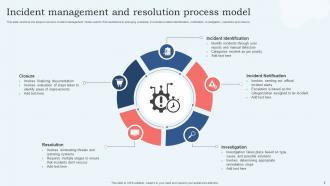
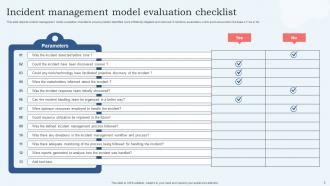
Incident Management Model Powerpoint PPT Template Bundles with all 17 slides:
Use our Incident Management Model Powerpoint PPT Template Bundles to effectively help you save your valuable time. They are readymade to fit into any presentation structure.
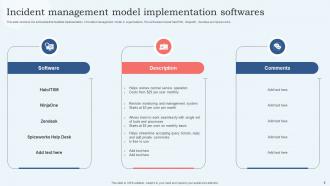
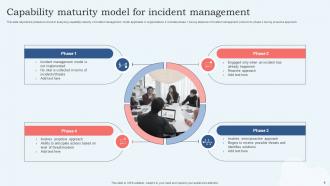






FAQs for Incident Management Model Powerpoint
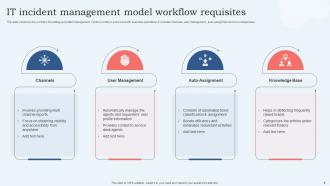
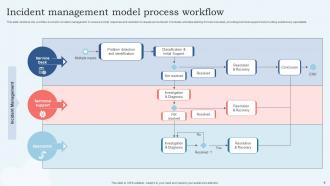
So you need incident detection and alerting first - automated stuff that actually pings the right people fast. Classification and prioritization come next, then coordination between response teams. Don't forget communication protocols and post-incident reviews. Clear escalation paths are huge too. Documentation is honestly such a drag but you'll thank yourself later when something breaks again. Map out what you're doing now and spot where things get stuck - that's usually where the biggest wins are. Oh, and make sure roles are crystal clear so nobody's standing around confused when everything's on fire.
Honestly, start with Mean Time to Resolution - that's your bread and butter metric for how fast you're actually fixing stuff. Customer satisfaction scores are huge too because sometimes your numbers look great but people are still pissed off, you know? I'd also watch your incident volume trends and response times. The volume thing is interesting because if you're really preventing issues upstream, you should see fewer repeats happening. First response time matters more than people think. But really, MTTR plus customer feedback will give you the clearest picture of where you stand right now.
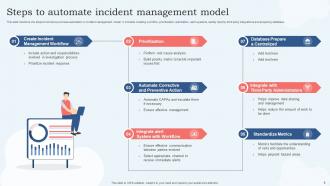
Dude, automation saves your sanity in incident management. Start with something basic like ticket creation or alert notifications - trust me, your team will thank you later. The real magic happens with alert correlation though, because nobody wants 50 duplicate tickets flooding their queue. Auto-escalation is clutch too when you're hitting SLA deadlines. Oh, and it handles all that boring post-incident paperwork automatically. Don't go crazy trying to automate everything at once. Pick whatever manual task annoys your team most and start there. Once you see how much time it frees up, you'll be hooked.
ITIL practices basically work like puzzle pieces for incident management. Change management tracks if recent updates broke something. Problem management digs deeper so you're not just slapping band-aids on everything - which honestly happens way too often. Configuration management shows you what's connected to what when stuff breaks. Knowledge management captures solutions so your team doesn't reinvent the wheel constantly. Service level management keeps you focused on SLAs (can feel like pressure but keeps everyone happy). Start by mapping what practices you already use during incidents, then spot the gaps. It's pretty straightforward once you see the connections.
Honestly, getting people to ditch their old habits is the worst part. Communication always falls apart too - someone forgets to loop in the right person and suddenly you're scrambling. Defining who does what gets messy, especially when stuff breaks across different teams. Oh, and good luck figuring out if you're actually improving anything without decent metrics set up first. Resource allocation is a nightmare when everyone thinks their fire is the biggest one. Start with just one team though, get that working smoothly, then expand. Way less painful that way.
Honestly, good communication protocols can save your ass during incidents. When everything's on fire, you need to know exactly who to call and what to say - none of that "um, should we tell the CEO?" nonsense at 3am. Set up your escalation paths ahead of time. Use templates for updates so you're not reinventing the wheel every time. I've watched teams trip over each other because nobody knew who was supposed to handle what. Dedicate specific channels for incident stuff. Figure out update schedules. Oh, and decide who's talking to customers vs internal people - that's huge. Map out your current process first and see where it usually falls apart.
Honestly, it comes down to speed and how much stuff is automated. IT shops have crazy detailed escalation processes because one server going down can wreck everything else fast. They've got all these monitoring tools and alerts firing off automatically. Healthcare, manufacturing - those guys focus way more on safety rules and staying compliant when things go sideways. Makes sense, right? But here's the thing - both industries still follow the same basic steps: catch the problem, fix it, then figure out what went wrong. You should definitely steal IT's automation approach though. Even manual processes work better with standard workflows and clear communication.
Honestly, automation is your best friend here - set up alerts that create tickets and route them automatically based on how bad the issue is. No more manually digging through a million notifications at 2am. Have your runbooks ready to go so people aren't googling "how to restart this service" during an outage (embarrassing but we've all been there). War rooms work great for big incidents since everyone stays in one place instead of scattered across Slack. The whole point is cutting out those annoying delays between "something's on fire" and actually putting it out.
Honestly, training makes or breaks your whole incident response. Your team will completely freeze up without it - I've seen this happen so many times. Everyone needs to know their exact role and how to escalate things fast. Practice with actual scenarios, not just boring presentations. Short bursts work better than marathon sessions anyway. Don't forget regular refreshers because people get rusty. It's like muscle memory - you want responses to be automatic when everything's falling apart and everyone's stressed.
Start with MTTD and MTTR - those are your bread and butter. Customer impact duration matters way more than leadership usually admits upfront. Track incident volume and escalation rates too. First-call resolution is clutch, plus watch for repeat incidents within 30 days (that's always annoying when they pop back up). Don't sleep on team burnout stuff either - after-hours calls and workload balance across everyone. Honestly though? Pick maybe 3-5 metrics tops when you're starting out. I made the mistake once of tracking like 12 different things and it was chaos. Get solid baselines first, then you can get fancy with more sophisticated tracking later.
Honestly, post-mortems are where you actually learn stuff - don't skip them even when you're crazy busy. Look at what broke down: was your monitoring too chatty? Did communication fall apart? Be real about root causes instead of slapping band-aids on symptoms. I always document the timeline, decision points, where we got stuck resource-wise. Some teams hate doing this but it's literally how you get better. Turn those findings into actual changes - maybe new processes, training, whatever. Otherwise you'll just repeat the same mess next time.
Start with business impact and urgency - customer outages always come first, then anything hitting revenue. I like using a simple matrix: high impact + high urgency equals P1 (drop everything mode), medium stuff becomes P2-P3, and low gets P4. Honestly, don't overthink the initial setup since you can tweak it later anyway. Your team needs to know which systems actually matter versus the ones that are just... there. How many users are screaming? Is there a workaround they can use? Those details matter too. Build something basic first and adjust when things inevitably break.
Honestly, async incident management is all about over-communicating. Ditch the war rooms for dedicated Slack channels where people can jump in fast. Your escalation needs multiple contact methods too - mobile alerts work better than desk phones when people aren't in office. The documentation becomes huge since you can't peek over shoulders anymore. Set up automated status updates every 15-30 minutes during big incidents - sounds excessive but trust me, it helps. Map out your current process first and spot anywhere you assume people are physically together. Those spots need the most work.
Oh dude, customer feedback is like your sanity check for incident management. You'll catch stuff your monitoring missed and actually understand how bad things really are for users. People will tell you exactly what they were doing when everything went sideways - super helpful context. Sometimes they apologize for "breaking" something that was totally on your end, which is honestly pretty sweet of them. Set up ways to get feedback during incidents AND after. Don't just wait for angry emails to roll in. Ask for it! Your response times will get way better once you know what's actually frustrating people versus what you think is the problem.
Honestly, AI can be a game-changer for incident management. Machine learning spots patterns in your logs and metrics, so you'll catch problems before they explode. When stuff does break, it helps with root cause analysis way faster. Plus automated triage is clutch - incidents get routed to the right teams instantly instead of some poor soul sorting alerts in the middle of the night. The predictive stuff is pretty wild too. I'd start with something basic like AI-powered alerting or ticket classification first, then build from there once you see how it works.
-
It is my first time working with them and that too on a friend's recommendation. I would say, I am not expecting such a worldly service at this low price.
-
I never had to worry about creating a business presentation from scratch. SlideTeam offered me professional, ready-made, and editable presentations that would have taken ages to design.