


Key elements of project management it powerpoint presentation slides




Try Before you Buy Download Free Sample Product
 Impress Your
 Audience
 100%
100% Editable
 Save Hours
 of Time


Project management focuses on developing a plan outline and how it can be managed. PMP will cater to all items that will determine project management and render core irrespective of industry or type of project. Check out our efficiently designed template on Key Elements of Project Management IT that cater to slides about managing integration, scope, time, quality, human resource, communication, risk, procurable, cost. The module cater slides about integration and scope management through project charter and work breakdown structure. It covers slides about time and quality management with project development timeline roadmap, time management in IT project schedule planning, etc. The template will cater to slides about human resource management in terms of key people involved in the project team, RACI for essential tasks assigned, project manager facilitation development matrix, etc. It caters to slides about communication management with a stakeholder communication plan and a project communication plan for the target audience. The template will cover risk and procurement management slides such as risk management action plan, vendor evaluation scorecard, etc. It will cover information regarding cost management through the work breakdown structure budget. Customize this 100 percent editable template based on your specific needs. Download the template now.
People who downloaded this PowerPoint presentation also viewed the following :
Content of this Powerpoint Presentation
Slide 1: This slide introduces Key Elements of Project Management (IT). State Your Company Name and begin.
Slide 2: This slide shows Agenda for Key Elements of Project Management (IT).
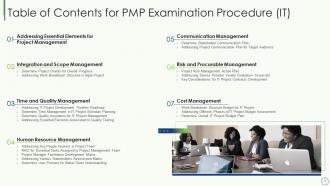
Slide 3: This slide presents Table of Contents for PMP Examination Procedure (IT).
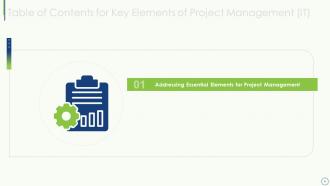
Slide 4: This slide shows Table of Content highlighting Addressing Essential Elements for Project Management.
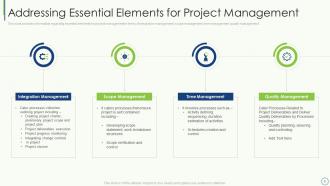
Slide 5: This slide displays essential elements for project management in terms of integration management, scope management, etc.
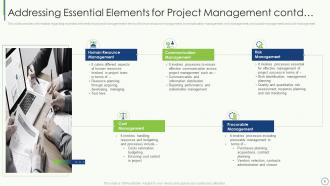
Slide 6: This slide shows essential elements for project management in terms of human resource management, communication management, risk management, etc.
Slide 7: This slide shows Table of Content for the presentation.
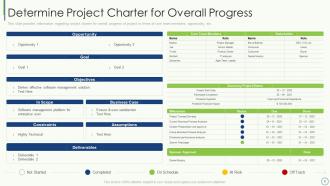
Slide 8: This slide presents project charter for overall progress of project in terms of core team members, opportunity, etc.
Slide 9: This slide shows work breakdown structure in agile project development with various activities involved during project development.
Slide 10: This slide displays Table of Content for the presentation.
Slide 11: This slide shows IT project development timeline roadmap for product releases, milestones, development, etc.
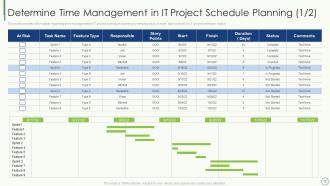
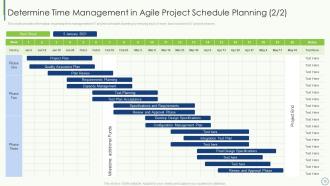
Slide 12: This slide shows time management in IT project schedule planning by keeping track of every task included in IT project.
Slide 13: This slide presents time management in IT project schedule planning by keeping track of every task included in IT project phases.
Slide 14: This slide shows quality assurance of IT project management in terms of merging of teams, performance and quality metrics.
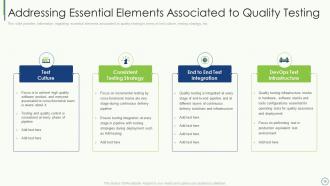
Slide 15: This slide displays Addressing Essential Elements Associated to Quality Testing.
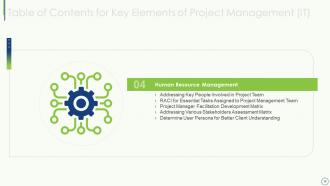
Slide 16: This slide shows Table of Contents for Key Elements of Project Management (IT).
Slide 17: This slide shows key people involved in project team such as product owner, team leader and development team.
Slide 18: This slide presents information regarding RACI for essential tasks associated to project.
Slide 19: This slide shows project manager facilitation development matrix in terms of skill set, personal assessment and development tactics.
Slide 20: This slide displays information regarding various stakeholder's assessment matrix by assessment on various parameters.
Slide 21: This slide shows user persona for better customer understanding in terms of user goals, bio description, etc.
Slide 22: This slide shows Table of Contents for Key Elements of Project Management (IT).
Slide 23: This slide presents stakeholder communication plan with details about objective, action, target stakeholders, etc.
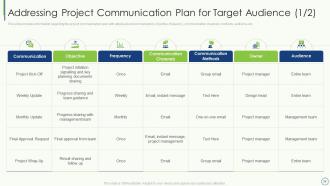
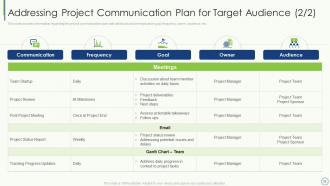
Slide 24: This slide shows project communication plan with details about communication, objective, frequency, etc.
Slide 25: This slide displays Addressing Project Communication Plan for Target Audience.
Slide 26: This slide shows Table of Contents for Key Elements of Project Management (IT).
Slide 27: This slide shows Project Risk Management Action Plan.
Slide 28: This slide presents Addressing Service Provider Vendor Evaluation Scorecard.
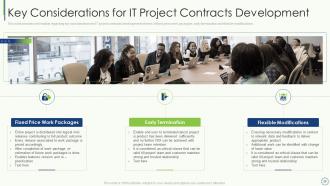
Slide 29: This slide shows key considerations for IT project contracts development.
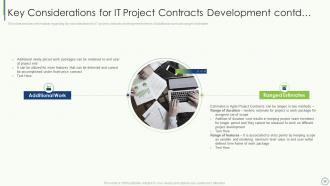
Slide 30: This is another slide continuing Key Considerations for IT Project Contracts Development.
Slide 31: This slide shows Table of Contents for PMP Examination Procedure (IT).
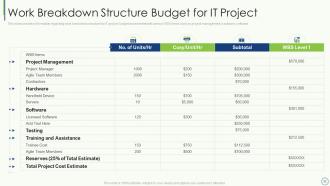
Slide 32: This slide shows work breakdown structure for IT project budget assessment with various WBS items.
Slide 33: This slide presents different phases of IT project budget assessment in terms of project phases, estimated hours, total costs involved, etc.
Slide 34: This slide provides information regarding overall IT project budget plan by addressing personnel, software/tools and other costs.
Slide 35: This slide displays Icons for Key Elements of Project Management (IT).
Slide 36: This slide is titled as Additional Slides for moving forward.
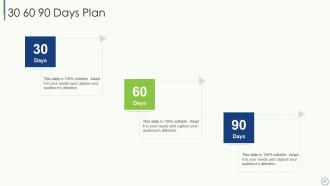
Slide 37: This slide shows 30 60 90 Days Plan with text boxes.
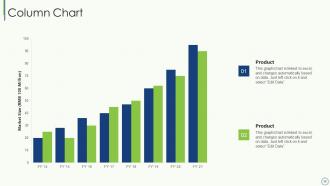
Slide 38: This slide presents Column Chart with two products comparison.
Slide 39: This slide shows Roadmap with additional textboxes.
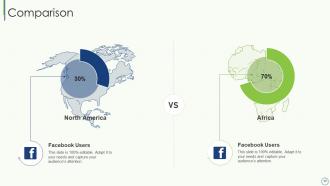
Slide 40: This is a Comparison slide to state comparison between commodities, entities etc.
Slide 41: This slide shows Puzzle with related icons and text.
Slide 42: This slide shows Line Chart with two products comparison.
Slide 43: This is a Timeline slide. Show data related to time intervals here.
Slide 44: This slide shows Post It Notes. Post your important notes here.
Slide 45: This is Our Target slide. State your targets here.
Slide 46: This is a Thank You slide with address, contact numbers and email address.
Key elements of project management it powerpoint presentation slides with all 46 slides:
Use our Key Elements Of Project Management IT Powerpoint Presentation Slides to effectively help you save your valuable time. They are readymade to fit into any presentation structure.
















FAQs for Key elements of project management it
So there's five main phases: initiation, planning, execution, monitoring, and closure. First you define what you're actually trying to accomplish. Then comes planning - honestly this is where I always want to rush but don't. Map out your timeline, figure out resources, all that stuff. Execution is the messy middle where everything happens and goes wrong simultaneously. You'll be monitoring progress constantly, tweaking things. Oh, and my boss always skips this but - closure matters. Wrap up properly, do a lessons learned meeting. Trust me, spend forever on planning because it saves your sanity later.
Honestly, stakeholder engagement can totally make or break your project. You need their buy-in and resources to actually succeed. Start involving them early - you'll catch problems before they blow up and manage expectations way better. I've watched so many projects crash just because people felt blindsided or left out of decisions. Trust me, it's painful to see. But engaged stakeholders? They become your biggest advocates and help clear obstacles. Don't just reach out when you need something or when stuff hits the fan. Regular check-ins are key.
Gantt charts are your best friend for this - they show everything visually with timelines and what depends on what. I love Trello for basic stuff, but Microsoft Project or Asana work better for complex projects. Critical Path Method sounds fancy but it's just figuring out which tasks absolutely cannot be late without screwing your whole deadline. Break big projects into smaller pieces (Work Breakdown Structure if you want the official term). Always build in buffer time because something will go wrong - trust me on this. Oh, and work backwards from your deadline instead of forward. Way more accurate that way.
Honestly, the trick is baking risk stuff right into your planning from the start - don't wait until everything's on fire. Get your team together and just brainstorm all the ways things could go sideways. Then figure out which ones are likely vs which would totally wreck you. I always assign someone to keep an eye on the big risks because otherwise everyone forgets. Oh and build some buffer time into your timeline! Trust me, I learned this the hard way on way too many projects. It's so much easier than scrambling later when deadlines are breathing down your neck.
Dude, communication literally makes or breaks your project. I've seen so many go sideways because someone didn't loop the right people in or assumed everyone was on the same page. Map out who needs what info and when - save yourself the headache later. Most conflicts happen when expectations aren't clear upfront. Set your protocols early and actually check that people get what you're saying (not just the polite head nods). Different stakeholders want different communication styles too, so figure that out first. Trust me, it's worth the extra effort.
Honestly, it comes down to how much your requirements might change. With Waterfall you do everything step-by-step - requirements, then design, then build, then test. Great if you know exactly what you want from day one. Agile breaks things into short sprints so you can pivot when (not if) stakeholders decide they want something totally different. Most teams mix both approaches now anyway. Waterfall's nice for predictable timelines, but Agile saves your sanity when dealing with indecisive clients. Pick based on how chaotic your project feels.
Honestly, communication is huge - like you'll spend half your time just making sure people actually know what's going on. Time management and staying organized are obvious ones too. Risk assessment sounds fancy but it's basically spotting problems before they blow up your timeline. Stakeholder management is key (aka keeping the important people happy). Oh and budgeting basics - nothing crazy complicated though. Projects always go sideways so being adaptable is a must. I'd say pick whatever feels like your weakest area right now and work on that first.
Honestly, you've got to nail down your project charter first - like, be super specific about what you're doing and what you're NOT doing. Make everyone sign off on it because trust me, people will conveniently "forget" what they agreed to when things get crazy. Document everything. I can't stress this enough. Also set up some kind of formal process for changes, otherwise you'll get those annoying "oh can we just add this tiny thing?" requests that aren't tiny at all. When that happens, just show them how it'll mess with your timeline and budget. Works every time. Oh and make a template for this stuff - you'll thank yourself later.
Okay so first thing - break your project into smaller chunks so you can actually estimate what each piece will cost. I always tack on like 10-20% extra because projects are sneaky expensive. Track spending weekly, not just when you hit big milestones. Look at what similar stuff cost you before if you've got that data lying around. Oh and don't forget overhead costs - that stuff adds up fast. The key is updating your forecasts constantly and telling stakeholders right away when things go sideways budget-wise.
Track the obvious stuff first - budget, timeline, scope. But don't sleep on stakeholder happiness and team morale, those matter way more than people think. Quality of what you're actually delivering is huge too. Honestly, I've seen so many projects that technically "succeeded" but solved absolutely nothing. Weekly check-ins with your team are clutch - way better than scrambling at the end when everything's already gone sideways. Oh, and throw together some basic dashboard so you're not just guessing. Did it actually fix the original problem? That's what really counts.
There are five main approaches: collaboration (finding solutions that work for everyone), compromise (trading off), accommodation (one person backs down), competing (pushing hard for your way), and avoidance. Honestly? Way too many PMs just avoid everything, which drives me crazy. Collaboration's your best bet for big conflicts since you keep relationships intact while actually fixing things. When you're mediating between others, get them to share their real concerns first - not just what they want. That's usually where the breakthrough happens. Oh, and don't be afraid to step back temporarily if things get heated.
Dude, get your change control process locked down from day one - seriously, don't wing it like I did (total disaster). Create a simple form that shows how changes affect your timeline, budget, and scope. You'll need a small group of decision-makers who can actually say yes or no fast. The part everyone screws up? Not telling the whole team immediately when something changes. I swear, communication gaps kill more projects than bad planning. Document every single change and update your project plan ASAP - I know it's boring but trust me. Changes are gonna happen no matter what, so just be ready for them.
Honestly, leadership makes or breaks projects. When deadlines get insane (and they will), your team looks to you for direction. Good communication is huge - nobody wants to guess what you're thinking. Delegate the stuff you don't need to micromanage. Shield your people from pointless corporate nonsense when you can. Make tough calls when things go sideways, which happens more than anyone admits. Your leadership style affects everything - team morale, whether stakeholders trust you, if people actually want to work with you again. Just be the kind of project manager you'd want to have.
Honestly, lessons learned are just your project wins and disasters written down for future reference. Document what worked and what bombed during retrospectives - but here's the thing most people mess up: they actually need to READ them later! Make yours searchable and specific, not vague garbage like "better communication needed." When you're starting a new project, pull up lessons from similar work first. Also look for patterns across projects since the same problems keep popping up everywhere. My team used to be terrible at this until we started our kickoffs by reviewing old lessons. Game changer.
Honestly, getting your resource allocation wrong is like shooting yourself in the foot before you even start. You'll hit bottlenecks when the right people aren't available - then your whole timeline goes out the window. I learned this the hard way on a project last year. It's basically like trying to make dinner but realizing you're missing half the ingredients. Burnt out team members from overallocation? Quality suffers from underallocation? Both suck equally. Map everything out early and check in weekly. Things always change anyway, so build buffer time or you'll regret it later.
-
I discovered this website through a google search, the services matched my needs perfectly and the pricing was very reasonable. I was thrilled with the product and the customer service. I will definitely use their slides again for my presentations and recommend them to other colleagues.