


Marketing campaigns ppt sample




Try Before you Buy Download Free Sample Product
 Impress Your
 Audience
 100%
100% Editable
 Save Hours
 of Time


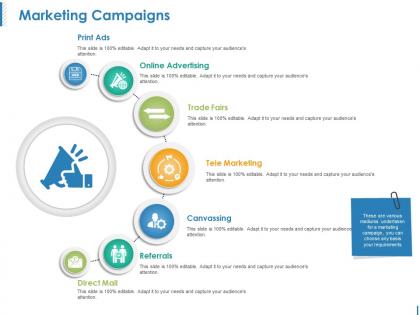
Broaden your approach with our Marketing Campaigns Ppt Sample. Give your thoughts an extra dimension.
People who downloaded this PowerPoint presentation also viewed the following :
Marketing campaigns ppt sample with all 5 slides:
Give folks the chance to flourish with our Marketing Campaigns Ppt Sample. They create a good growth environment.
FAQs for Marketing
Okay so for marketing campaign templates, you definitely need your objectives and target audience nailed down first. Key messaging and which channels you're using come next. Timeline's huge too - keeps everyone from going rogue with deadlines. Budget breakdown, success metrics, creative guidelines... all that stuff matters. Oh and honestly? Most people totally bomb the audience research phase. Don't skip it! Also throw in some A/B testing plans because why not optimize while you're at it. Once you've got these basics mapped out, just tweak the template for whatever industry you're in.
Honestly, templates are a game changer for campaign presentations. You get this ready-made structure so you're not sitting there staring at a blank slide deck forever. Just drop in your goals, audience, budget - whatever. I always used to forget about competitor research until the last minute, but templates have that stuff built right in. Makes you look way more organized than you actually are lol. The flow just makes sense to stakeholders too, which gets you approval faster. Grab a basic one and tweak it for your brand.
Okay so visual storytelling is honestly a game changer for campaign presentations. Don't just throw data and bullet points at people - that's how good ideas die in boring meetings lol. Build a actual narrative with visuals, mockups, mood boards, whatever works. Show them customer journey maps or before/after scenarios so they can picture what you're talking about. Way more engaging than just explaining everything. I always storyboard the key campaign moments first, then build the whole deck around those visual beats. People remember stories, not spreadsheets. Your stakeholders will actually get excited about the vision instead of zoning out halfway through.
Dude, check your past campaign data first - see what headlines, colors, CTAs actually worked. Most people just wing it with templates that look nice but don't convert for shit. Build those winning patterns into your template defaults. Like if your audience loves question-based headlines or responds to certain color combos, make that your starting point. Honestly saves so much time when you're not guessing every single time. You'll have proven formulas to work from instead of starting fresh each project. Way smarter than the usual "make it pretty and pray" approach most teams use.
Your templates need to feel like *you* made them. Same logo placement, fonts, and colors every time - seriously, don't let your team use random shades of blue that are "close enough." Create style guides with exact hex codes and font weights, then put everything in shared folders so nobody has to guess. Your copy should sound like your brand too, not some generic corporate speak. I've seen companies nail their visuals but then write like boring robots. Short version: someone should recognize your stuff before they even spot your logo. That's when you know you've got it right.
Templates are honestly a game changer for team stuff. Everyone works from the same base but can still do their own thing - designers mess with visuals, copywriters tweak the messaging, whatever. No more starting from zero every time, which is such a pain. Your campaigns actually look like they're from the same company too. You can even build approval workflows right into them, which is pretty neat. I'd start with maybe 2-3 templates for your most common campaigns and just see what happens. Trust me, collaboration gets way less messy.
Honestly, if you're launching a product or trying to get people hyped about your brand, visuals are everything. People need to *see* what you're selling to actually care. Instagram's literally built around this concept, right? Educational stuff works way better with infographics or videos too - nobody wants to read a wall of text about complicated topics. Events and lifestyle campaigns? Total no-brainer for visuals since you're basically selling a vibe or feeling. My take: go visual whenever you're trying to show something off, inspire people, or make them remember your brand. Save the text-heavy stuff for when you just need to share basic info.
Here's what I'd do - create one master template, then tweak the key stuff for each audience. Your B2B emails? Go formal with case studies and professional language. But for consumer social posts, get casual with lifestyle photos and relaxed copy. The actual offer stays the same, you're just changing how you talk to different groups. Honestly, mapping out your top 3 audiences first makes this way easier. Figure out how they like to be talked to, then build from there. I've watched teams cut their workload in half doing it this way.
Honestly, just go with Canva - I've used it forever and it's so easy. Their marketing templates are actually pretty good and you can swap in your own colors and fonts without much hassle. PowerPoint has some okay options built-in too, though they feel kinda stuffy sometimes. Figma and Adobe are way more powerful but who has time to learn all that? Unless you're doing this constantly, it's probably overkill. Start browsing Canva's marketing section and you'll find something decent fast. I always end up tweaking whatever template I pick anyway.
Honestly, seasons control way more of your design choices than you'd think. Fall needs those cozy, warm colors while summer screams bright and energetic - makes me want a vacation just looking at those templates lol. Your messaging tone shifts too. Holiday campaigns need that urgent "buy now" energy, but back-to-school stuff is more about planning ahead. Build your templates with swappable parts so you're not starting over each season. Figure out when your industry peaks first, then create variations that match what people expect to see. Way easier than rebuilding everything from scratch every few months.
So for your marketing template, definitely track the big three first - ROI, conversion rates, and cost per acquisition. Those are non-negotiable. After that, add engagement rates and click-through rates based on what campaigns you're running. Lead quality scores are clutch too if you're doing B2B stuff. Brand awareness metrics matter for top-funnel campaigns, though they're a pain to measure honestly. Don't go crazy with like 15 different metrics - stick to 5-7 max or you'll drown in data. Set up a simple dashboard that pulls everything weekly, then review monthly with your team to see what's actually moving the needle.
Templates are basically your lifesaver when you're running campaigns across different platforms. Set up your core stuff once - colors, fonts, messaging, layout - then just swap in channel-specific content. I learned this the hard way after my Instagram posts looked nothing like my email campaigns lol. Your brand won't look all over the place if you stick to templates. Team members can actually follow them too, which is huge. Short sentences work. Start with maybe 2-3 master templates for whatever channels you use most. You can always build more later, but honestly those first few will save you so much time.
HubSpot's pitch deck template is basically everywhere - millions of downloads for a reason. Airbnb nailed it early on with super visual, story-driven slides that just made sense. Buffer and Canva actually shared their templates publicly (kinda genius for brand awareness too), and you can see how clean formatting helped them stay consistent as they grew. The thing is, these examples all follow similar storytelling patterns. Study how they structure the flow and visual hierarchy, then adapt that framework to whatever you're building. Don't copy them exactly, but their approach to presenting information? That's gold.
Build your templates in chunks so you can easily swap pieces based on feedback. Test different headlines and CTAs against each other - seriously, most people just skip this part which is wild to me. After each campaign, jot down what bombed and what killed it, then update your main templates. Don't treat them like they're carved in stone. Performance data is great, but also grab qualitative feedback from your actual audience. Then just work those insights into your next version. It's way more straightforward than people make it sound.
Honestly, personalization at scale is where it's at right now. AI-driven stuff like adaptive subject lines and product recs based on user behavior are crushing it. Interactive content is gold too - polls, quizzes, anything people can actually click on performs way better than static posts. You should definitely build in UGC placeholders instead of those overly polished brand shots. Social commerce integration is pretty much non-negotiable now. Oh, and micro-influencers? They're converting circles around celebrities right now - probably because people trust them more. I'd make interactive elements and UGC spots standard template options if I were you.
-
Innovative and attractive designs.
-
Much better than the original! Thanks for the quick turnaround.