


Planning And Managing Ecommerce Project Flowchart




Try Before you Buy Download Free Sample Product
 Impress Your
 Audience
 100%
100% Editable
 Save Hours
 of Time


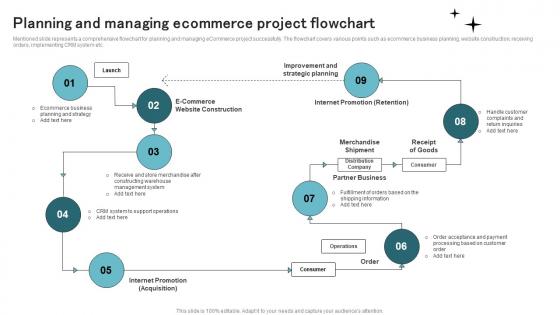
Mentioned slide represents a comprehensive flowchart for planning and managing eCommerce project successfully. The flowchart covers various points such as ecommerce business planning, website construction, receiving orders, implementing CRM system etc.
People who downloaded this PowerPoint presentation also viewed the following :
Planning And Managing Ecommerce Project Flowchart with all 6 slides:
Use our Planning And Managing Ecommerce Project Flowchart to effectively help you save your valuable time. They are readymade to fit into any presentation structure.





FAQs for Planning And Managing
So you've got planning first - defining what you actually need and the scope. Then design & development where you wireframe everything and build it out. Testing comes next and honestly, I can't stress this enough with checkout flows - test the hell out of those! Launch is obvious, but here's the thing: post-launch optimization never stops. You're constantly tweaking conversion rates and adding features based on what users do. Oh, and always pad your timeline between phases because something will take longer than expected.
Start with 2-week sprints - way easier to manage than those massive months-long projects. Break everything into user stories like "customers want to filter by price" instead of getting bogged down in technical jargon. Daily standups are honestly a lifesaver when you're coordinating dev, design, and marketing teams. Payment gateway issues will definitely pop up (they always do at the worst possible moment). After each sprint, do quick retrospectives to see what's actually working based on real customer data. I'd treat every feature like a mini-launch so you can pivot fast if the sales numbers aren't there.
Dude, you absolutely need customer feedback baked into every step - don't just slap it on at the end. Get input during wireframing, when you're testing prototypes, and definitely before launching big features. I've watched so many teams completely skip this step and then act shocked when nobody buys anything. It's honestly painful to watch. Feedback catches those annoying usability problems you'd never spot yourself. Plus it shows you what people actually want vs what you think they want. Build those feedback loops early and make it part of your regular process, not an afterthought.
Honestly, focus on payment processing and checkout first - that's where you actually make money. I'd map everything by business impact vs how hard it is to build. Quick wins are your best friend here. Talk to your customers about what's driving them crazy. Trust me, don't waste time on cool filtering features when basic search is still garbage (been there). Core stuff that gets people buying smoothly should be priority one. Maybe try a simple scoring system? Revenue impact, user complaints, and how much dev time you're looking at. Works pretty well for most situations I've seen.
Honestly, I'd probably start with **Asana** or **Monday.com** - both are solid for tracking timelines and getting everyone on the same page. **Jira** is decent if your devs are already in there, but man, it can be overkill sometimes. Don't sleep on **Trello** though, especially for smaller stuff. You'll definitely want **Slack** for quick back-and-forth and **Figma** for design handoffs. Here's the thing - pick whatever your team will actually stick with. I've seen too many projects fail because people kept switching between like 5 different tools. Start simple, then add more if you need it.
Honestly, start with one payment provider that has decent API docs - you'll thank yourself later. Test everything in sandbox mode first, obviously. Set up proper error handling because payments fail all the time. Oh and webhooks are crucial for keeping your system updated when payment statuses change. PCI compliance is a whole thing too but you probably know that already. I'd say get one gateway rock solid before adding more - trying to juggle multiple integrations from day one is just asking for trouble. Way easier to add the second and third ones once you've got the flow down.
Ugh, scope creep is the worst - everyone suddenly wants "just one tiny feature" right before launch. Break everything into smaller sprints so you're not drowning. Document requirements upfront and actually stick to them (I know, easier said than done). Integrations will mess with your timeline every single time, so pad that testing phase. Honestly, I've learned to just communicate delays early instead of scrambling to catch up later. Regular check-ins help too - keeps stakeholders from going rogue with random requests.
Dude, mobile responsiveness isn't optional anymore. Most ecommerce traffic is mobile now - like over half. I've watched so many projects crash because teams designed for desktop first, then tried shoving everything into mobile screens later. Bad idea. Start planning your mobile experience right from the beginning, not as some rushed afterthought. Also, budget way more time for testing than you think you need. Android devices especially... there's so many different screen sizes and quirks. It'll eat up your QA time fast. Users bounce immediately if your site feels clunky on their phone.
Focus on conversion rates, average order value, and customer acquisition costs first. Revenue growth and cart abandonment are no-brainers. Time-to-market is critical though - I've watched too many projects just... die because they took forever. Track user stuff like session time and bounce rates too. Don't forget technical basics like site speed and uptime. Honestly, the key is picking maybe 5-7 metrics that actually align with what you're trying to achieve. Otherwise you'll drown in all the data. Get your dashboard running from the start so you're not scrambling later.
Honestly, start by listing out all your vendors - payment stuff, shipping, inventory, whatever you're using. Don't just call them when everything's on fire (learned that the hard way). Set up some kind of shared dashboard so everyone can actually see what's happening with timelines. Watch out for conflicts too, like your payment system updating right when shipping integration is supposed to launch. That's always a mess. Have backup vendors ready because someone will flake. Oh, and nail down clear agreements upfront about deadlines and who to call when things get crazy. Makes life way easier later.
Honestly, start with Slack channels for each project - keeps things organized without being crazy formal about it. Regular standups are clutch too. I'm big on having devs actually sit with UX people during sprint planning because I've watched so many projects crash when marketing and engineering weren't on the same page (such a nightmare). Set up shared docs where everyone can see requirements and timelines. Those visual project boards are surprisingly helpful for spotting bottlenecks. Pick one tool people will actually use instead of forcing some enterprise thing nobody wants. Build from there.
Dude, you HAVE to build SEO into your eCommerce site from the start - don't just slap it on later. Do your keyword research during discovery. Plan the site structure with SEO in mind from day one. Your dev team needs to know about page speed and mobile stuff early too. I swear, watching companies try to retrofit SEO is like watching a train wreck in slow motion. Get those keywords to your content writers ASAP so they can actually write descriptions that'll rank. Also, make your SEO person and project manager talk regularly or things will go sideways fast.
Honestly, start with automated tests for the money-making stuff - checkout, payments, registration. Those break constantly and it's expensive when they do. Your staging environment needs to be identical to production or you're just lying to yourself. Load testing saved my butt last Black Friday when traffic went nuts. Don't forget cross-browser testing either, especially mobile since everyone shops on their phones now. Security testing for payment stuff is obviously non-negotiable. Oh, and build your test suite as you go - trying to catch up at the end is a nightmare.
Honestly, you gotta bake UX into your timeline from the start - don't make it an afterthought like I've seen way too many teams do. Get UX researchers involved during discovery, then scatter user testing checkpoints throughout development instead of cramming it all at the end. When you're defining MVP features, prioritize based on actual user journeys. Oh, and throw accessibility requirements into your acceptance criteria too. During sprints, schedule regular usability reviews with real users. Catching issues early will save your sanity later. Treat UX like a core requirement, not something you'll "figure out eventually."
Honestly, analytics are everything for ecommerce decisions. You'll want market data and competitor research during planning to validate your roadmap. User testing metrics during development? Total lifesaver - helps you pivot fast when things aren't working (saves so much money too). Post-launch, conversion rates and user behavior show exactly what's making you money versus what's tanking. Oh, and set up tracking early - way better than guessing what users actually want. I learned that the hard way on my first project.
-
SlideTeam makes creating presentations easy. Unlimited products, premium quality designs and affordable.
-
Kudos to SlideTeam for achieving the high success rate in delivering the top-notch slides.