

Project Management Powerpoint Presentation Slides





Try Before you Buy Download Free Sample Product
 Impress Your
 Audience
 100%
100% Editable
 Save Hours
 of Time


Heighten cohesion with our Project Management Powerpoint Presentation Slides. Increase the degree of cooperation existing.
People who downloaded this PowerPoint presentation also viewed the following :
Content of this Powerpoint Presentation
Slide 1: This slide introduces Project Management. State Your Company Name and begin.
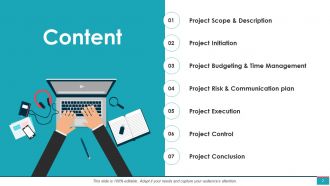
Slide 2: This slide shows Content of the presentation.
Slide 3: This is an optional slide for Contents.
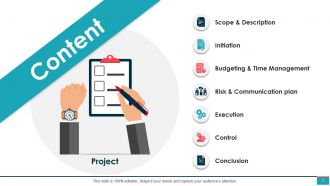
Slide 4: This slide shows Project Scope & Description describing- Project Brief, Project Description, Project Lifecycle, Project Management Process.
Slide 5: This slide presents Project Brief describing- Project Brief/ Summary, Objectives, Expected Outcomes, Status.
Slide 6: This slide displays Project Description with related imagery and text boxes to show information.
Slide 7: This slide represents Project Management Lifecycle describing- Concept, Meaning, Execution, Transfer.
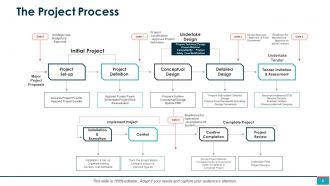
Slide 8: This slide showcases The Project Process with related diagram.
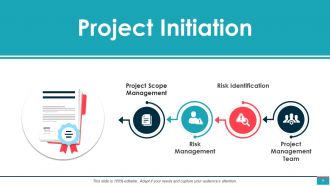
Slide 9: This slide shows Project Initiation describing- Project Scope Management, Risk Management, Risk Identification, Project Management Team.
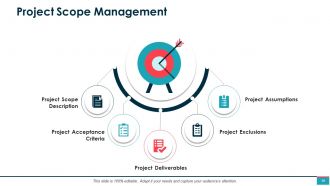
Slide 10: This slide presents Project Scope Management describing- Project Assumptions, Project Deliverables, Project Exclusions, Project Scope Description, Project Acceptance Criteria.
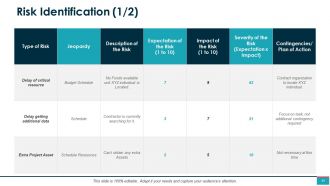
Slide 11: This slide displays Risk Identification in tabular form with categories as- Type of risk, description of risk, Impact of risk etc.
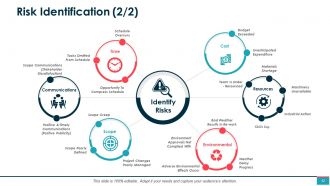
Slide 12: This slide represents Risk Identification describing- Communications, Time, Cost, Resources, Scope, Environmental.
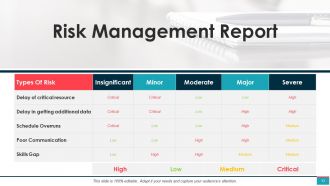
Slide 13: This slide showcases Risk Management Report in tabular form with categories as- Types of risk, Minor, moderate etc.
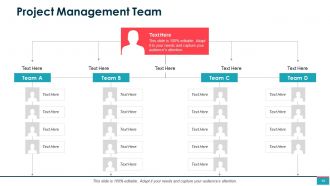
Slide 14: This slide shows Project Management Team in hierarchy form. Show your team member's details here.
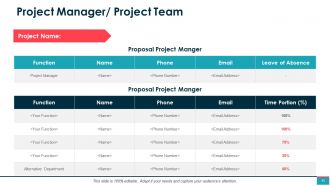
Slide 15: This slide presents Project Manager/ Project Team in tabular form with categories as- Function, Name, Phone, Email etc.
Slide 16: This slide displays Project Budgeting & Time Management describing- Project Budget, Project Timeline, Work Breakdown Structure, Activity Sequence.
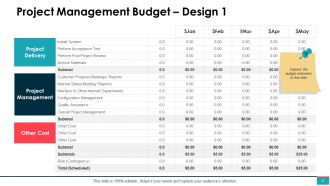
Slide 17: This slide represents Project Management Budget – Design 1 with Project Management, Project Delivery, Other Cost.
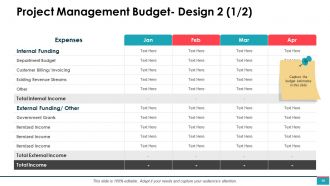
Slide 18: This slide showcases Project Management Budget- Design 2 with Internal and External Income.
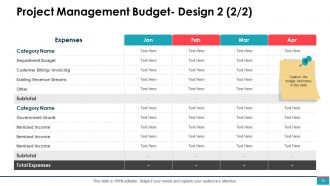
Slide 19: This slide shows Project Management Budget- Design 2 with total expenses.
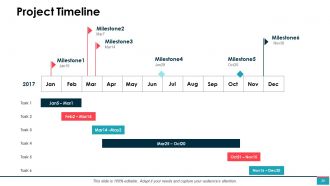
Slide 20: This slide presents Project Timeline with months, milestones etc.
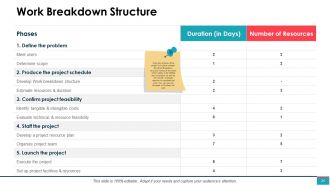
Slide 21: This slide displays Work Breakdown Structure listing all the tasks which needs to be fulfilled and its duration as well as the number of people required to complete that work.
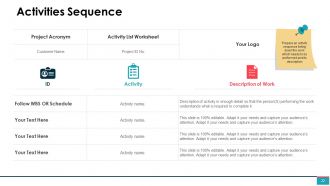
Slide 22: This slide represents Activities Sequence with text boxes to show information.
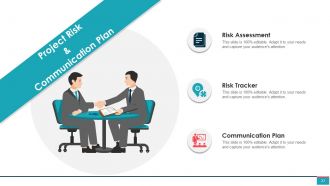
Slide 23: This slide showcases Project Risk & Communication Plan describing- Risk Assessment, Risk Tracker, Communication Plan.
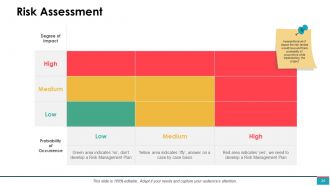
Slide 24: This slide shows Risk Assessment with level of impact the risk factors would have and there probability of occurrence while implementing the project.
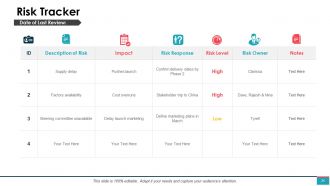
Slide 25: This slide presents Risk Tracker with Description of risk, Impact, risk response, risk level etc.
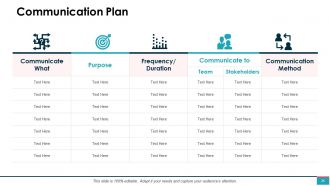
Slide 26: This slide displays Communication Plan in tabular form with categories as- Purpose, frequency/duration etc.
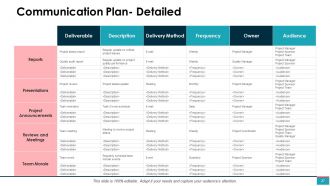
Slide 27: This slide represents Communication Plan- Detailed with deliverable, description, delivery method etc.
Slide 28: This slide showcases Project Execution describing- Task Matrix, Roles & Responsibilities, Project Work Plan, Project Management Gantt Chart, Project Cost Estimate, HR Management, Quality Management, Project Progress Summary, Project Management Dashboard, Issues Management.
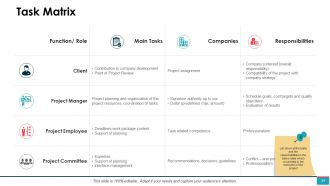
Slide 29: This slide shows Task Matrix with Function, main tasks, companies, responsibilities.
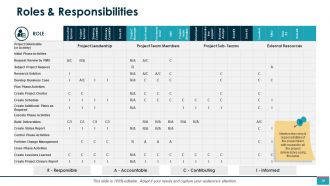
Slide 30: This slide presents Roles & Responsibilities in tabular form with related text.
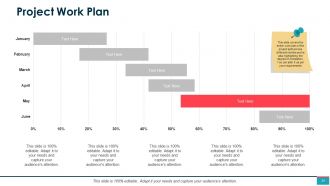
Slide 31: This slide displays Project Work Plan with graphs and text boxes to show information.
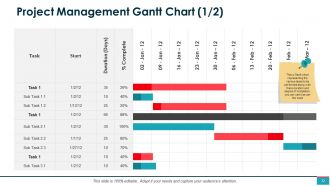
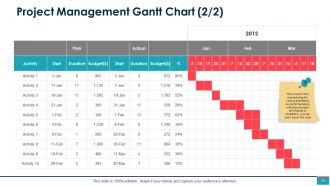
Slide 32: This slide shows Project Management Gantt Chart representing the various tasks to be performed along with there duration and degree of completion, you can use it as per the need.
Slide 33: This is another slide with Project Management Gantt Chart.
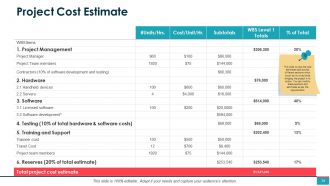
Slide 34: This slide presents Project Cost Estimate describing the cost estimates split across different sections which would be involved while bringing the project in to action. You can modify these sections and estimates as per the requirements.
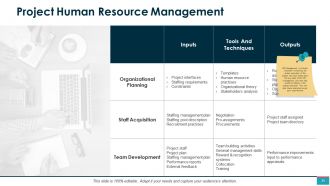
Slide 35: This slide displays Project Human Resource Management ensuring the proper execution of the project. We have listed down the key tasks of the HR management and how they would be helping in the project execution.
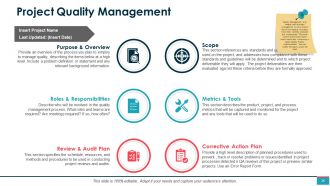
Slide 36: This slide represents Project Quality Management describing- Purpose & Overview, Scope, Roles & Responsibilities, Metrics & Tools, Review & Audit Plan, Corrective Action Plan.
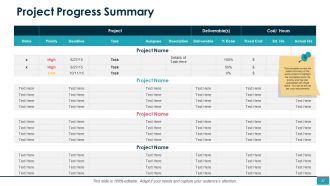
Slide 37: This slide showcases the Project Progress Summary to highlight the completion level, its priority and the cost associated with these tasks.
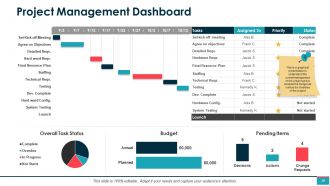
Slide 38: This slide shows Project Management Dashboard to understand the overall management of the project and to analyse the budget as well as the timelines of the project.
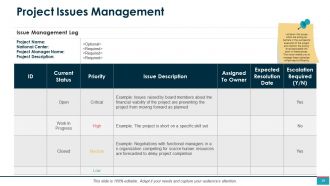
Slide 39: This slide presents Project Issues Management by listing down the issues which are acting as barriers in the successful execution of the project and mention the priority level associated with each of these issues.
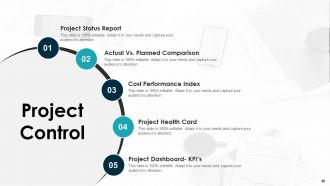
Slide 40: This slide displays Project Status Report describing- Actual Vs. Planned Comparison, Cost Performance Index, Project Health Card, Project Dashboard- KPI’s.
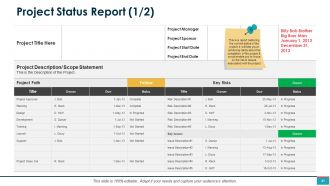
Slide 41: This slide represents Project Status Report to capture the current status of the project. It will help you in achieving clarity about the completion of the project & would enable you to focus on the risk & issues associated with the project.
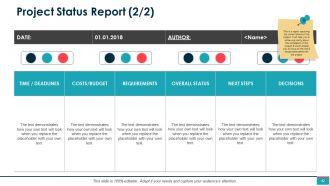
Slide 42: This is another slide on Project Status Report.
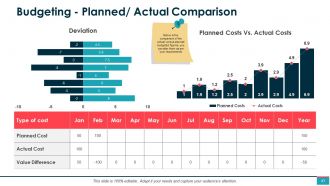
Slide 43: This slide showcases Budgeting - Planned/ Actual Comparison. You can alter the data as per requirements.
Slide 44: This slide shows Cost Performance Index to ascertain the actual cost incurred in executing each of the tasks and the variance in the actual & planned numbers.
Slide 45: This slide presents Project Health Card to cover the overall project status of different factors associated with the project, you can alter them as per your requirements.
Slide 46: This is another slide on Project Health Card.
Slide 47: This slide displays Project Dashboard in a gist form capturing all the important highlights of the project.
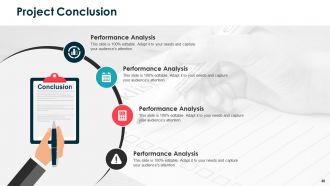
Slide 48: This slide represents Project Conclusion with related imagery and text boxes to show information.
Slide 49: This slide showcases Project Conclusion Report – Performance Analysis with categories as Project name, author, date, project members etc.
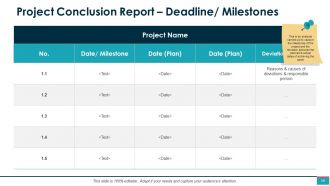
Slide 50: This slide shows Project Conclusion Report – Deadline/ Milestones to capture the milestones of the project and the deviation between the planned & actual dates of achieving the same.
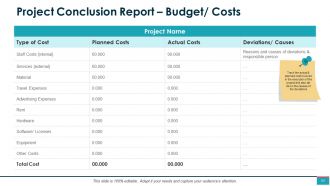
Slide 51: This slide presents Project Conclusion Report – Budget/ Costs to track the actual & planned cost involved in the execution of the project and also list down the causes of the deviations.
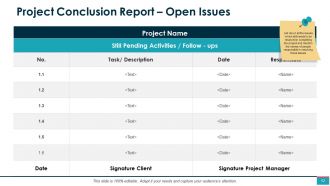
Slide 52: This slide displays Project Conclusion Report – Open Issues by listing down all the issues which still needs to be resolved in completing the project and mention the names of people responsible in resolving those issues.
Slide 53: This slide represents Project Management Steps describing- Implement, Monitor, Closure, Evaluate, Analyze, Design, Develop.
Slide 54: This slide showcases Project Management Skills as- People Management Skills, Soft Skills Management, Horizontal Management Skills, Change Management Skills, Managing Expectations, Technical Skills.
Slide 55: This slide shows Project Management Elements describing- Process, People, Tools.
Slide 56: This slide presents Project Management Framework as- Initiating, Planning, Executing, Closing.
Slide 57: This slide displays Project Management Phases as Initiation, Project set-up, Planning, Realization, Strategic Planning, Introduction, Acceptance.
Slide 58: This slide shows Project Management Icons.
Slide 59: This slide is titled as Additional Slides for moving forward.
Slide 60: This slide reminds about 15 minutes coffee break.
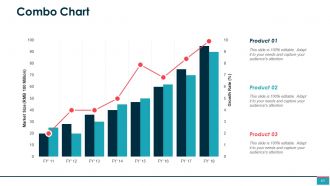
Slide 61: This slide shows Combo Chart with three products comparison.
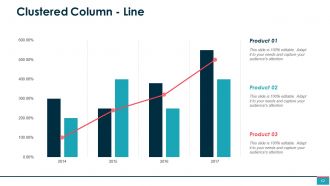
Slide 62: This slide presents Clustered Column - Line chart with three products comparison.
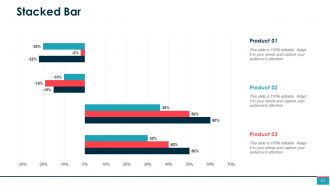
Slide 63: This slide displays Stacked Bar chart with data in percentage.
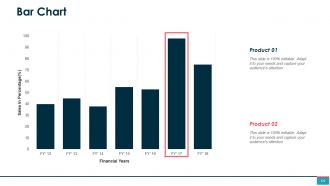
Slide 64: This slide represents Bar Chart with two products comparison.
Slide 65: This is About Us slide to show company specifications etc.
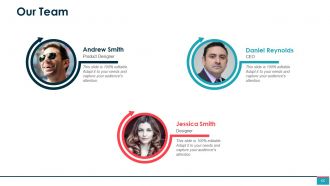
Slide 66: This is Our Team slide with names and designation.
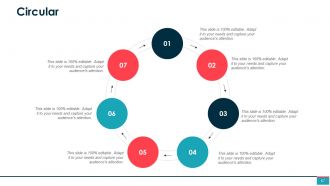
Slide 67: This is a Circular slide with text boxes to show information.
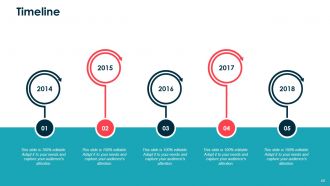
Slide 68: This is a Timeline slide. Show information related with time period here.
Slide 69: This is a Thank you slide with address, contact numbers and email address.
Project Management Powerpoint Presentation Slides with all 69 slides:
Our Project Management Powerpoint Presentation Slides have catchy designs. The enthusiasm they create is contagious.
-
Project Management
-
Content
-
Content
-
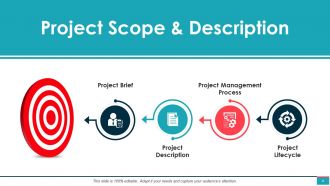
Project Scope Description
-
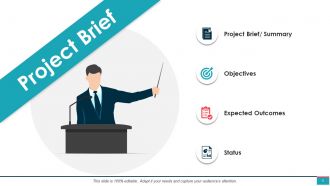
Project Brief
-
Project Description
-
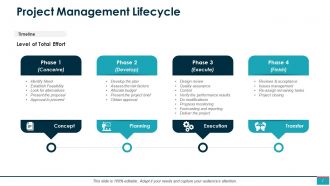
Project Management Lifecycle
-
The Project Process
-
Project Initiation
-
Project Scope Management
-
Risk Identification 1 2
-
Risk Identification 2 2
-
Risk Management Report
-
Project Management Team
-
Project Manager Project Team
-
Project Budgeting Time Management
-
Project Management Budget Design 1
-
Project Management Budget Design 2 1 2
-
Project Management Budget Design 2 2 2
-
Project Timeline
-
Work Breakdown Structure
-
Activities Sequence
-
Project Risk Communication Plan
-
Risk Assessment
-
Risk Tracker
-
Communication Plan
-
Communication Plan Detailed
-
Project Execution
-
Task Matrix
-
Roles Responsibilities
-
Project Work Plan
-
Project Management Gantt Chart 1 2
-
Project Management Gantt Chart 2 2
-
Project Cost Estimate
-
Project Human Resource Management
-
Project Quality Management
-
Project Progress Summary
-
Project Management Dashboard
-
Project Issues Management
-
Project Control
-
Project Status Report 1 2
-
Project Status Report 2 2
-
Budgeting Planned Actual Comparison
-
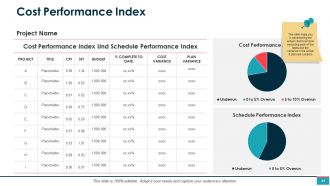
Cost Performance Index
-
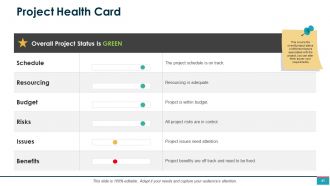
Project Health Card
-
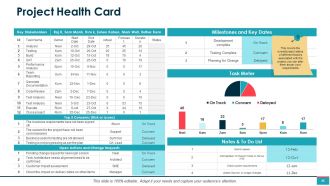
Project Health Card
-
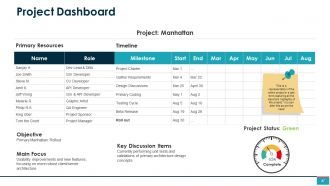
Project Dashboard
-
Project Conclusion
-

Project Conclusion Report Performance Analysis
-
Project Conclusion Report Deadline Milestones
-
Project Conclusion Report Budget Costs
-
Project Conclusion Report Open Issues
-
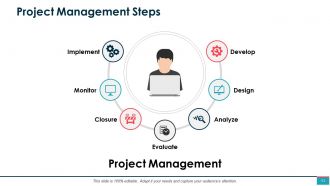
Project Management Steps
-

Project Management Skills
-

Project Management Elements
-
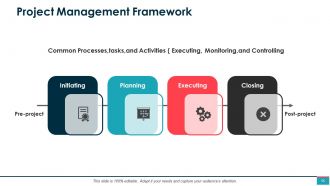
Project Management Framework
-
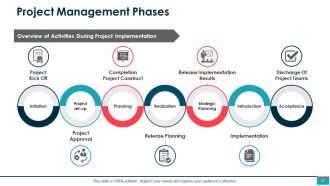
Project Management Phases
-
Project Management Icons Slide
-
Additional Slides
-

Coffee Time
-
Combo Chart
-
Clustered Column Line
-
Stacked Bar
-
Bar Chart
-

About Us
-
Our Team
-
Circular
-
Timeline
-

Thanks For Watching
FAQs for Project Management
You need scope definition, timeline with milestones, resource allocation, budget breakdown, and risk assessment. Communication plans are huge too - I've watched projects crash because key people got left out. Quality criteria and deliverables should be crystal clear from day one. Budget and timeline matter obviously, but scope definition is where everyone screws up. Seriously, nail down exactly what you're building first. Get everyone on the same page there before you stress about costs and deadlines. Oh, and maybe grab coffee before diving into the budget spreadsheets - that stuff's mind-numbing.
Honestly, the sprint thing is what sold me on Agile - you're shipping actual working stuff every few weeks instead of crossing your fingers for one big launch. Daily standups sound annoying but they're only 15 minutes and suddenly everyone knows what's happening. No more "wait, I thought you were handling that" moments. You'll catch problems way earlier too, which saves your sanity later. The retrospectives are clutch because your team can actually say "hey, this process sucks" and fix it. Just try the daily standup first - seriously, start there and you'll see what I mean about visibility.
Dude, get that project charter locked down first - like, really detailed with everyone's signature on it. Then set up a proper change process where any new stuff needs written approval. Can't tell you how many times I've watched projects crash because of those "quick favor" hallway chats. Write everything down (seriously, everything) and do regular check-ins about scope. When people want changes, show them what it'll actually cost - delays, budget hits, the whole mess. Makes them think twice. The goal is making changes feel deliberate instead of just letting things spiral out of control.
Look, if your team's not super techy, go with Asana or Monday.com - they're clean and won't make people want to throw their laptops. Trello works great for simple stuff but you'll hit its limits pretty quick. Jira's crazy powerful but honestly? It's a pain unless you live and breathe project management. Microsoft Project has literally everything but good luck figuring it out without a manual. My buddy's team loves Monday.com's visual setup. I'd grab the free trials and see what doesn't make your team groan.
Dude, communication literally makes or breaks projects - I can't stress this enough. Keep everyone in the loop about what's happening, what's changed, roadblocks, all of it. I've watched so many good projects crash just because someone important felt ignored or blindsided. Regular check-ins help you spot problems before they explode. Plus you can manage what people expect and get support when things go sideways (which they will). Here's the thing though - you gotta match your style to who you're talking to. Execs want the big picture summary, tech people need all the nitty-gritty details. Set up your communication rhythm early and actually stick to it.
Don't just do risk assessment once at the beginning - that's a rookie mistake I see all the time. Get your team together early for brainstorming sessions to spot potential problems. Weekly check-ins during status meetings work great since stuff changes constantly. Rank risks by how likely they are and how much damage they'd cause. High-priority ones need actual mitigation plans, not just wishful thinking. Make it routine instead of scrambling when things go sideways. Oh, and set up automatic triggers for risk reviews when you hit certain milestones or conditions shift.
First thing - figure out exactly what you need and when. People, money, tools, all of it. Buffer time is non-negotiable because trust me, stuff will break. Don't just assign warm bodies to tasks - actually match people's strengths to what needs doing. I learned that one the hard way! Track how busy everyone is so you're not accidentally killing your best performers. Priorities change constantly, so stay ready to shuffle things around. Weekly check-ins with team leads will save your butt - catch problems before they explode.
Honestly, tracking the right data completely changed how I approach projects. Instead of just guessing where things will go wrong, you can actually see patterns - like which tasks always blow past deadlines or where your team gets stuck. I used to wing resource planning too and yeah, total disaster. The cool thing is you can catch problems before they spiral into full chaos mode. Historical data helps you nail estimates way better for future projects. My advice? Don't overthink it at first. Just pick something simple like task completion rates and track it for a month. You'll be surprised what you discover.
Honestly, it comes down to three main things: good communication, being super clear about what you expect, and building actual trust. Schedule regular check-ins where people can bring up problems, not just boring status updates. Spell out deadlines and deliverables from day one since you can't just walk over and ask questions anymore. Also - and this might sound obvious but tons of teams skip it - do a proper kickoff where everyone meets each other. Remote teams who actually vibe together work so much better than random people staring at screens. Don't forget decent project management tools because nothing kills motivation like fighting with crappy software.
Set up a quick lessons learned template - just three sections: what worked, what sucked, and what to do differently. Right after you wrap the project, grab everyone for a short meeting while it's all still fresh. Seriously, if you wait even two weeks people's memories get fuzzy. Put everything in whatever shared folder your team actually checks (we all know that one neglected drive nobody opens). Then - and this is key - spend 15 minutes reviewing old lessons when you kick off new projects. Sounds boring but it'll save you from making the same dumb mistakes twice.
Look, budgeting is what stops your project from completely tanking financially. Get your numbers right upfront so stakeholders know what they're signing up for. Track spending weekly - don't wait around hoping everything works out. I learned this the hard way on a project that went 40% over budget because we weren't paying attention. Earned value management works great, but honestly? Even a basic spreadsheet comparing budget vs actual costs will save you. The whole point is catching problems early enough to actually fix them instead of scrambling at the end.
Honestly, the best thing I learned was breaking projects into tiny pieces first. Way easier to estimate "write the login function" than "build the whole app," you know? Always pad your estimates though - I usually add like 25% because there's always some random bug or requirement that pops up. Oh, and definitely track how long stuff actually takes vs what you thought. I use a basic spreadsheet for this and it's kinda eye-opening how wrong I used to be about certain types of tasks. Check in on progress regularly too so you can course-correct before everything goes sideways. After doing this for a few projects, you'll start seeing your blind spots.
Dude, org culture is probably the
-
great
-
project management
-
great
-
Project Management Powerpoint Presentation Slides with all 69 slides:
-
It's awesome template for because I'm finding computer template like this