


Project Team Engagement Activities Powerpoint Presentation Slides




Try Before you Buy Download Free Sample Product
 Impress Your
 Audience
 100%
100% Editable
 Save Hours
 of Time


Communication is considered a vital component for project success as it allows to discuss project progress and concerns to project stakeholders, team members, and leaders. Here is a professionally designed template on Project Team Engagement Activities that will be useful for project partners to achieve goals within the assigned timeframe and available resources through an effective communication plan. The deck covers details about lack of communication impacting overall project effectiveness, comparative assessment of project communication standards, statistics related to organizational communication, upcoming project details. It caters to information regarding essential parameters for effective communication, project communication strategies, target groups involved, and engagement in project communication. Key personnel involved in project communication are also showcased and their training schedule. Project communication channels internal or external and communication tools are presented. The deck covers the project communication plan for the target audience, stakeholder impact assessment, and calendar worksheet for communication. Various coordination activities, modes, and meetings for project management are presented. Moreover, the overall impact of effective project management is displayed along with cost assessment and performance dashboard to track project management activities. Get access to this 100 percent editable template now.
People who downloaded this PowerPoint presentation also viewed the following :
Content of this Powerpoint Presentation
Slide 1: This slide introduces Project Team Engagement Activities. State Your Company Name and begin.
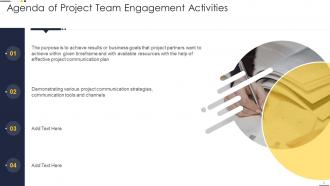
Slide 2: This slide states Agenda of the presentation.
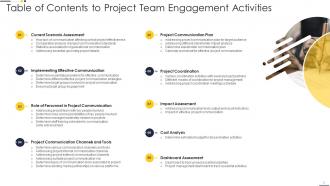
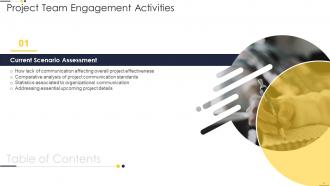
Slide 3: This slide presents Table of Content for the presentation.
Slide 4: This slide highlights title for topics that are to be covered next in the template.
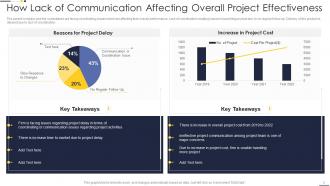
Slide 5: This slide displays How Lack of Communication Affecting Overall Project Effectiveness.
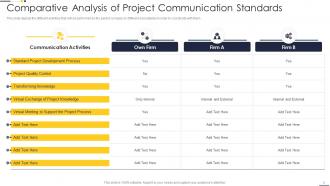
Slide 6: This slide represents Comparative Analysis of Project Communication Standards.
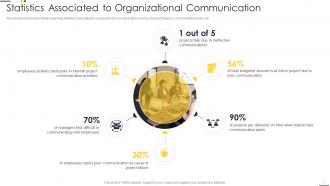
Slide 7: This slide shows Statistics Associated to Organizational Communication.
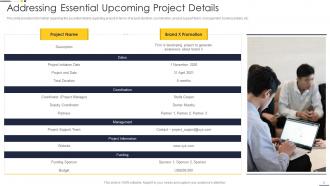
Slide 8: This slide presents essential details regarding project in terms of project duration, coordination, project support team, etc.
Slide 9: This slide highlights title for topics that are to be covered next in the template.
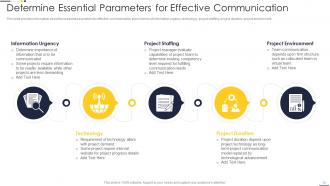
Slide 10: This slide displays essential parameters for effective communication plan in terms of information urgency, technology, project staffing, etc.
Slide 11: This slide represents Determine Different Effective Project Communication Strategies.
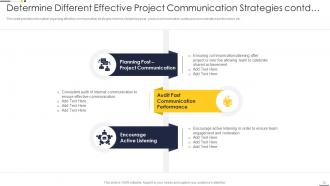
Slide 12: This slide shows effective communication strategies in terms of planning post - project communication.
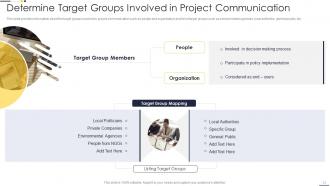
Slide 13: This slide presents target groups involved in project communication.
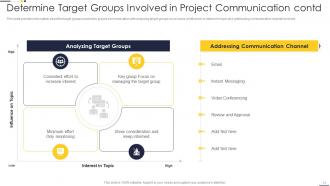
Slide 14: This slide shows Determine Target Groups Involved in Project Communication.
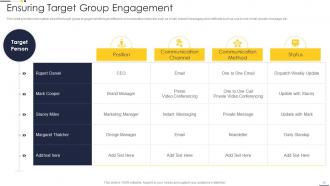
Slide 15: This slide displays target group engagement through different communication channels such as email, instant messaging, etc.
Slide 16: This slide highlights title for topics that are to be covered next in the template.
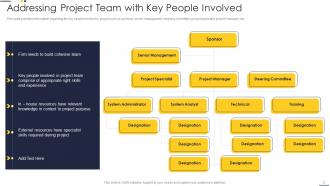
Slide 17: This slide shows key people involved in project such as sponsor, senior management, steering committee, etc.
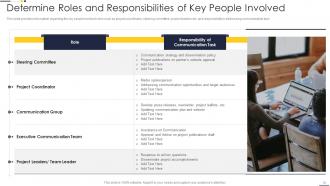
Slide 18: This slide presents Determine Roles and Responsibilities of Key People Involved.
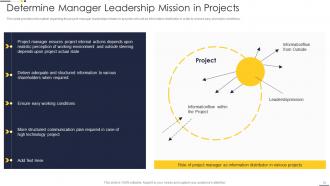
Slide 19: This slide shows project manager leadership mission in projects who act as information distributor in order to ensure easy workable conditions.
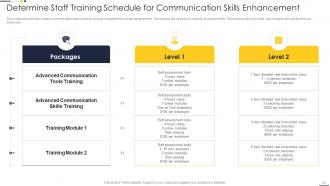
Slide 20: This slide displays Determine Staff Training Schedule for Communication Skills Enhancement.
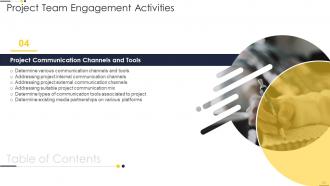
Slide 21: This slide highlights title for topics that are to be covered next in the template.
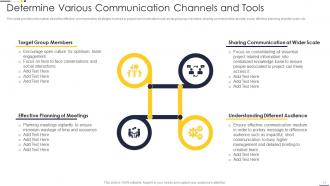
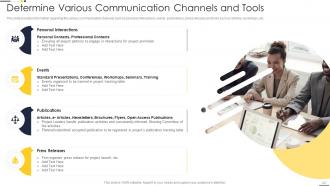
Slide 22: This slide shows various communication channels such as personal interactions, events, publications, etc.
Slide 23: This slide presents Determine Various Communication Channels and Tools.
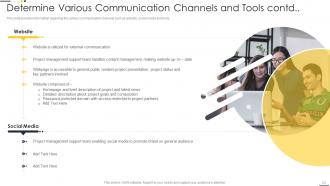
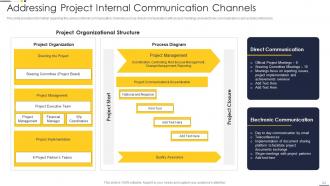
Slide 24: This slide shows various internal communication channels such as direct communication with project meetings and electronic communication such as teleconferences.
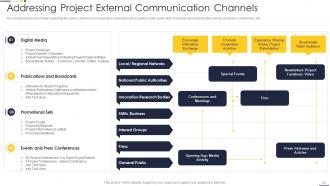
Slide 25: This slide displays various external communication channels such as digital media, publication broadcast, promotional sites, etc.
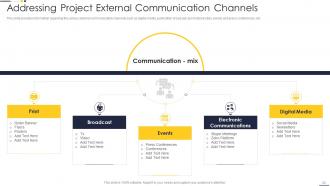
Slide 26: This slide represents Addressing Suitable Project Communication Mix.
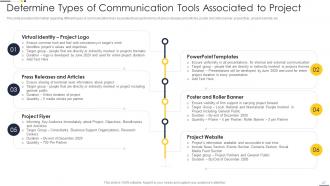
Slide 27: This slide shows Determine Types of Communication Tools Associated to Project.
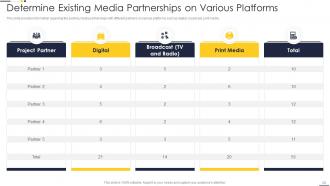
Slide 28: This slide presents Determine Existing Media Partnerships on Various Platforms.
Slide 29: This slide highlights title for topics that are to be covered next in the template.
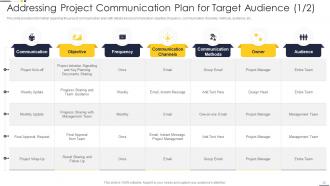
Slide 30: This slide displays Addressing Project Communication Plan for Target Audience.
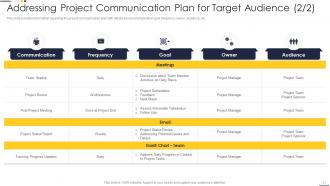
Slide 31: This slide represents project communication plan with details about communication goal, frequency, owner, audience, etc.
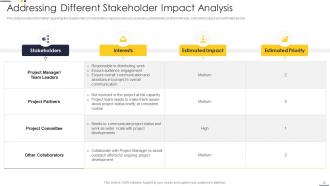
Slide 32: This slide shows stakeholder communication impact analysis by assessing stakeholders on their interests, estimated impact and estimated priority.
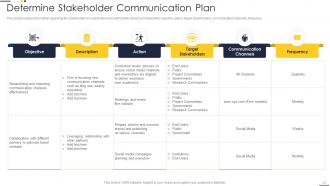
Slide 33: This slide presents stakeholder communication plan with details about communication objective, action, target stakeholders, etc.
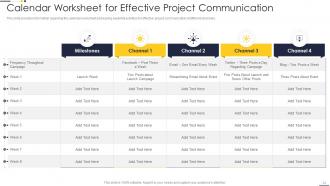
Slide 34: This slide shows Calendar Worksheet for Effective Project Communication.
Slide 35: This slide highlights title for topics that are to be covered next in the template.
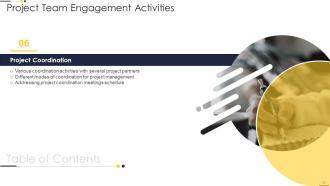
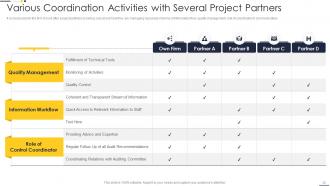
Slide 36: This slide represents Various Coordination Activities with Several Project Partners.
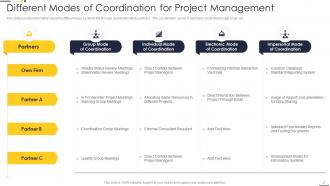
Slide 37: This slide shows Different Modes of Coordination for Project Management.
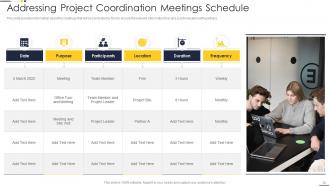
Slide 38: This slide presents Addressing Project Coordination Meetings Schedule.
Slide 39: This slide highlights title for topics that are to be covered next in the template.
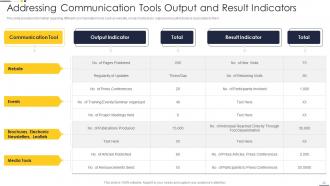
Slide 40: This slide displays Addressing Communication Tools Output and Result Indicators.
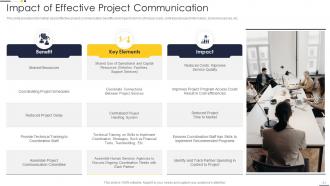
Slide 41: This slide represents effective project communication benefits and impact in terms of reduce costs, centralized project information, shared resources, etc.
Slide 42: This slide highlights title for topics that are to be covered next in the template.
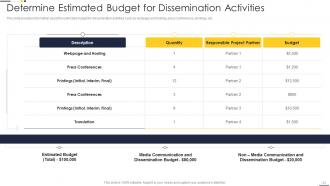
Slide 43: This slide presents Determine Estimated Budget for Dissemination Activities.
Slide 44: This slide highlights title for topics that are to be covered next in the template.
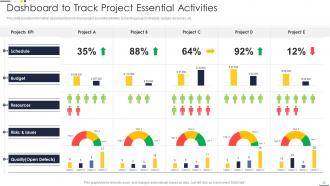
Slide 45: This slide displays dashboard to track project essential activities by tracking project schedule, budget, resources, etc.
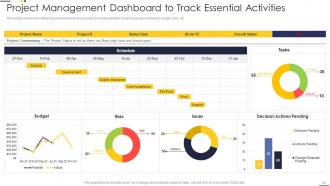
Slide 46: This slide represents Project Management Dashboard to Track Essential Activities.
Slide 47: This slide showcases Icons for Project Team Engagement Activities.
Slide 48: This slide is titled as Additional Slides for moving forward.
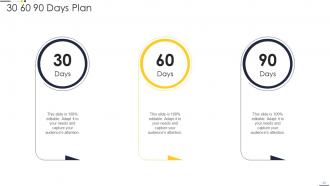
Slide 49: This slide provides 30 60 90 Days Plan with text boxes.
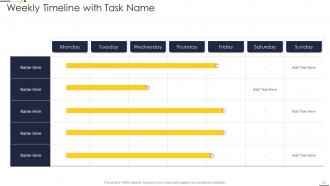
Slide 50: This slide displays Weekly Timeline with Task Name.
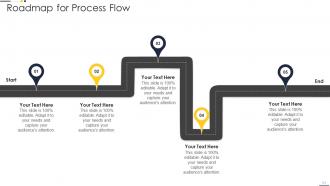
Slide 51: This slide shows Roadmap for Process Flow.
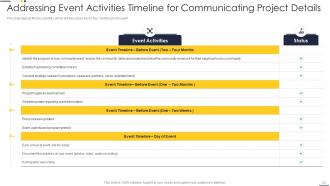
Slide 52: This slide presents Addressing Event Activities Timeline for Communicating Project Details.
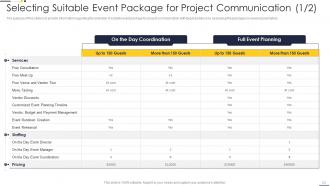
Slide 53: This slide represents Selecting Suitable Event Package for Project Communication.
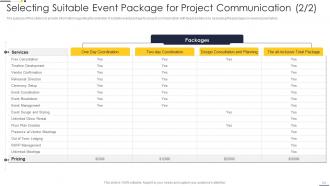
Slide 54: This is another slide continuing Selecting Suitable Event Package for Project Communication.
Slide 55: This is About Us slide to show company specifications etc.
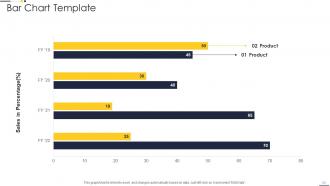
Slide 56: This slide represents Bar Chart Template with three products comparison.
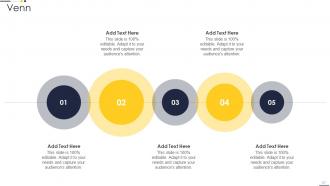
Slide 57: This slide shows Venn diagram with text boxes.
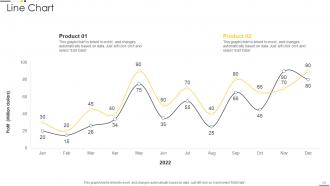
Slide 58: This slide presents Line Chart with two products comparison.
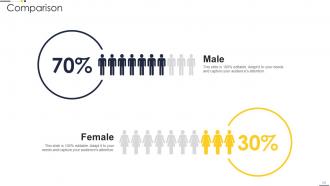
Slide 59: This is a Comparison slide to state comparison between commodities, entities etc.
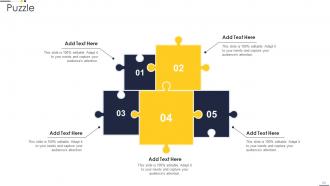
Slide 60: This slide displays Puzzle with related icons and text.
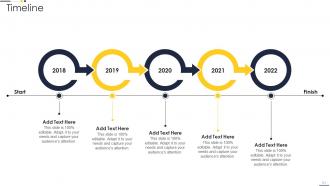
Slide 61: This is a Timeline slide. Show data related to time intervals here.
Slide 62: This is a Thank You slide with address, contact numbers and email address.
Project Team Engagement Activities Powerpoint Presentation Slides with all 67 slides:
Use our Project Team Engagement Activities Powerpoint Presentation Slides to effectively help you save your valuable time. They are readymade to fit into any presentation structure.






FAQs for Project Team Engagement Activities
Honestly? Skip the cheesy trust falls - nobody wants that awkwardness. What actually works is stuff that mirrors real work problems. Get people from different departments working together on small projects, or do collaborative problem-solving sessions using actual scenarios your team faces. Coffee chats work great too, or those lunch-and-learn things where people share what they know. Oh, and retrospectives are solid for celebrating wins as a group. I'd say try one low-key thing next week and see how your team responds. Some teams are just... different, you know?
Honestly, most icebreakers are awkward as hell, but there are ways to make virtual stuff less painful. Rotate who hosts meetings so people feel involved. Start with quick personal check-ins before jumping into work - like 2 minutes max. Virtual coffee chats actually work, or try online games during lunch if your team's into that. Breakout rooms are clutch for bigger meetings since people connect better in smaller groups. Don't force participation though - nobody wants mandatory fun. Pick one simple thing weekly and see what sticks with your crew's vibe.
Honestly, those little icebreaker games actually work. People can't do their best thinking when they're all stiff and formal around strangers. Two truths and a lie is pretty solid - nothing too cringey. Once everyone loosens up a bit, you'll notice way more people actually speak up in meetings instead of just sitting there. The whole psychological safety thing is real. When your team feels comfortable, they'll throw out ideas more freely and actually collaborate instead of just going through the motions. Even something as simple as sharing random fun facts during kickoff helps break down those weird barriers.
Honestly, just talk to your team regularly - that's way more useful than fancy metrics. Send quick pulse surveys asking what's working. Also track the obvious stuff like participation rates and whether people are actually sticking around. I do monthly check-ins instead of waiting for formal reviews (learned that the hard way). Watch meetings too - are people collaborating better or still butting heads? Engaged teams usually ship higher quality work, so that's another sign. Start with whatever feels natural for your group and tweak from there.
Honestly, the best cross-functional team activities get everyone's different skills involved while building actual trust. Problem-solving workshops work great - have each department tackle challenges together. Or try "knowledge swaps" where people teach each other what they actually do all day (you'd be surprised how little teams know about each other's work). Hackathons and design sprints are solid too since they force people to think beyond their usual stuff. Regular retrospectives catch friction early. Just make sure your activities actually need collaboration - don't just stick people in a room and hope for magic. Start small and low-pressure first.
Oh totally, cultural stuff makes a huge difference! First thing - survey your team about what they actually want. Some people love direct feedback, others need it way more gentle. Time zones are obvious but honestly, attitudes about hierarchy matter more than people think. Like, some team members won't speak up if their boss is leading the activity. Mix competitive stuff with collaborative things since not everyone's into winning/losing dynamics. Also humor is SO tricky - I've seen jokes completely bomb across cultures. Don't forget religious holidays when you're scheduling. Bottom line: rotate different types of activities so everyone gets something that clicks.
Honestly, Miro and Mural are lifesavers for brainstorming - everyone can jump in at once. Slack or Teams work great with those poll bots for quick check-ins. I'm kinda obsessed with Gather and Wonder because they let people actually wander around virtual spaces and bump into each other, which feels way more natural than scheduled meetings. Oh, and Loom's perfect for async video updates when you can't sync schedules. Don't go crazy though - pick one tool your team will actually stick with instead of bombarding them with a million new platforms.
Honestly, you don't need to spend a fortune on this stuff. Lunch and learns are clutch - people teaching each other random skills they have. Quick shout-outs during regular meetings work too, though some people find them cheesy. What I really love is rotating who runs meetings. Gives everyone a chance to lead and stops things from getting stale. Virtual coffee breaks are solid for remote teams, or just make a Slack channel for celebrating wins and random chat. The trick is picking maybe two things your team actually wants and sticking with them. Better than going all-out once then forgetting about it.
Honestly, monthly is a good starting point but it really depends on your team's vibe. High-pressure sprints? Maybe do bi-weekly check-ins or those quick pulse surveys. For longer projects, I'd do monthly team stuff plus quarterly deep dives - those actually catch problems before they explode. Don't stress about perfect timing though. Consistency matters more. Start monthly and see what works for your people. Oh, and set those calendar reminders right now or you'll blink and realize it's been three months with nothing. Trust me on that one.
Honestly? Remote team stuff is brutal. Meeting fatigue hits everyone hard, and people are spread across like 5 different projects so getting real engagement (not just nodding along) is tough. Time zones make everything worse if you're global. Here's the thing though - everyone works differently. Some people thrive in brainstorming chaos, others need quiet one-on-ones or just want to collaborate async. Don't assume what works. Mix it up constantly. Actually ask your team what they prefer instead of guessing. Competing priorities will always be there, but at least you can work with how people's brains function best.
Honestly, feedback is like your cheat sheet for figuring out what actually lands with your team. Try surveys or just casual chats after activities - you'll start noticing patterns pretty quick. Maybe they're into brainstorming sessions but roll their eyes at trust falls (can't blame them there). The trick is doing something with what they tell you instead of just collecting responses. People say they want more creative stuff and less forced fun? Switch it up. I've found that when teams see you're actually listening, engagement goes up naturally. Keep tweaking based on their input - it's way better than guessing what works.
Honestly, engaged teams make such a huge difference for project success. You'll get better quality work and fewer missed deadlines. When problems pop up, these teams actually solve them instead of just panicking. People communicate openly and take real ownership - they're not just checking boxes, you know? I've watched projects with amazing plans completely fall apart because the team didn't care. The engaged ones bounce back from setbacks way better too. Oh, and they come up with more creative solutions. Trust me, spend time on team engagement early on. It's way better than dealing with a mess later.
Make recognition part of what you're already doing - shout-outs during retros, peer nominations, celebrating wins in Slack. Pizza parties can feel super forced tbh. Some people love public praise, others want private feedback or conference tickets instead. Ask your team what they actually want! Get specific with it too - "great job" is useless, but "your documentation saved us three hours of debugging" actually means something. Oh and timing matters. Start small and see what sticks.
Hackathons are honestly pretty great for this - teams tackle real problems while building both tech skills and teamwork. Your coworkers could do lunch-and-learns where everyone shares their expertise. Escape rooms (virtual ones work too) actually make problem-solving fun, which is rare for team building activities. Group code reviews turn into learning sessions. You could try design thinking workshops or friendly competitions around improving processes. The key is matching whatever you pick to what your team's actually into. Oh, and game-based stuff usually gets better participation than the usual corporate nonsense.
Mix different activities so everyone gets something out of it. Junior people need skill workshops and mentorship - pair them up with someone experienced. Your senior folks want strategic talks and chances to lead others. But honestly? The best sessions I've seen are hackathons or case studies where different experience levels work together. You'll be surprised how well that dynamic works. Just don't put anyone on the spot about stuff they're "supposed" to know already - that kills the vibe fast.
-
Mesmerized with the fantastic collection! Super sleek, relevant infographics.
-
“Detailed and great to save your time.”